Lighthouse: Support configuring throttling/emulation settings across DT/CLI/Extension
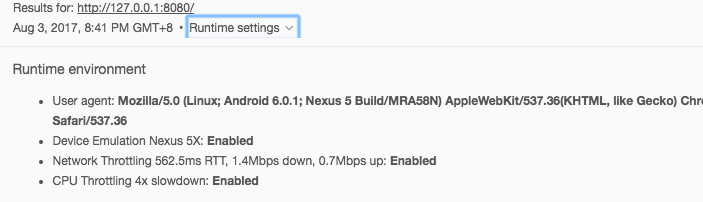
I want to point to how the options in the image above are configured in lighthouse.
 TongDaDa
All 31 comments
We need to add more options for customizing the cpu and throttling values.
If you're using the CLI, there are a few flags for disabling some of the settings, but that's it. If you're interested in where the device emulation numbers and default UA string come from, that's https://github.com/GoogleChrome/lighthouse/blob/63b4ac14d0a871ade0630db2885edd7848843243/lighthouse-core/lib/emulation.js.
 ebidel
on 3 Aug 2017
ebidel
on 3 Aug 2017
@ebidel thank , I'll see if
TongDaDa
on 3 Aug 2017
Concur with what is said above. I have a web application that will never see a mobile device, nor be served over a mobile network, so the audit tab does not pass my audit as a sufficient audit tab.
Looking forward to the option to change it.
 jookyone
on 10 Aug 2017
jookyone
on 10 Aug 2017
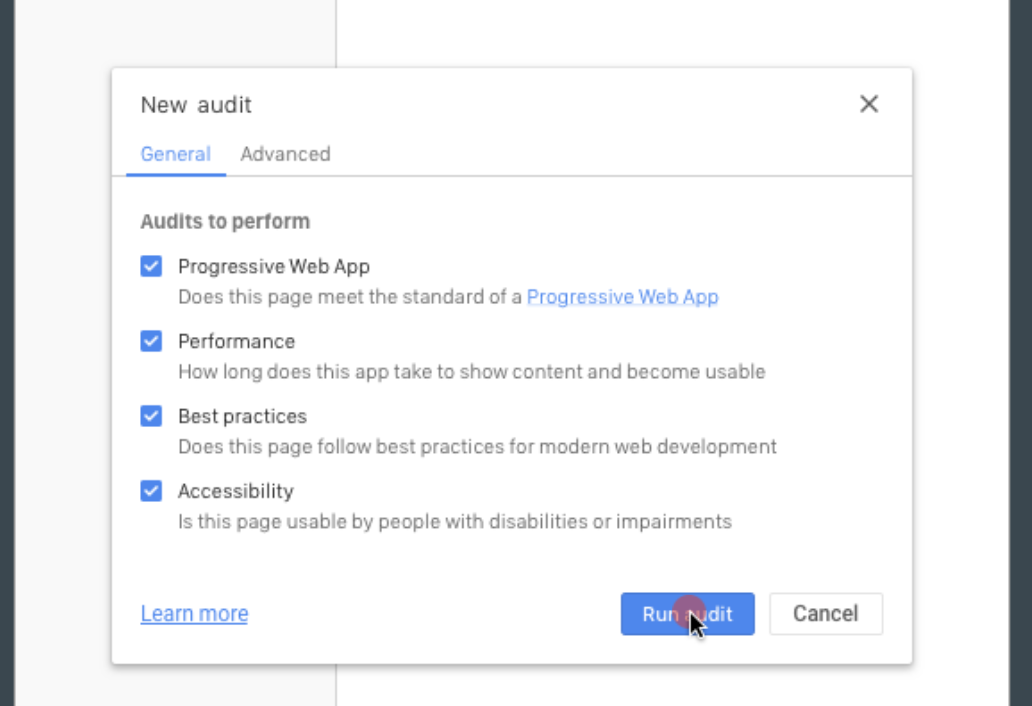
Advanced tab for config:
 paulirish
on 29 Sep 2017
paulirish
on 29 Sep 2017
This will be great for folks who want to monitor raw perf numbers only (among other things less affected by throttling), but scoring and how the HTML report displays results aren't set up for handling different throttling settings. Issues to figure out to do this right:
- Our scoring is all calibrated (to various degrees of precision) to numbers achievable on mobile devices. Scores will basically be useless, with high 90s and 100s for all but the worst sites
- Current network throttling has many issues, but it does add some baseline minimum numbers on some aspects of the run (unless a connection is actually slower than those numbers). Switching connections (office to home) or even position relative to a wifi AP will introduce variance in perf numbers
- Should the setting be sticky? For someone repeatedly testing a site with "desktop" in mind, absolutely; having to reset throttling settings on every run would be extremely annoying. However this also leaves us in the position of people forgetting what the current settings are and running with whatever was last set
I believe it was @patrickhulce who originally mentioned we could just use the big error message at the top of the report (#1512) whenever a non-throttled or non-emulated run is done. That should address the above, even giving a reminder in the sticky case, though @paulirish just brought up that WPT or anyone using better throttling (e.g. https://github.com/tylertreat/comcast) will also get this warning, which won't really be true for them (and generally be bad for users of WPT or other tools with LH integration who might not understand why they're seeing that)
 brendankenny
on 3 Oct 2017
brendankenny
on 3 Oct 2017
I thought we already talked about this a while back but can't remember for sure 😛
Weren't we going to use something like navigator.connection to show the warning or not? Not sure
 wardpeet
on 10 Oct 2017
wardpeet
on 10 Oct 2017
First up, we need to sort out the product plan here. to @vinamratasingal
paulirish
on 16 Oct 2017
A proposal for handling disabled emulation..
--disable-network-emulationwill change the report in two ways
- A warning icon badge is applied to the performance category score at the top. Some tooltip message on hover
- A message at the top of the report (#1512) is added: "Network throttling was disabled, so performance numbers are not representative of the Lighthouse baseline (a 3G mobile phone)."
- For the WebPagetest usecase, we add something like
--disable-network-emulation=providedwhich will bypass these report changes.
paulirish
on 17 Oct 2017
Took some time to think about this and here are the features we should support:
First, let's scope this down to just DevTools. Reasoning- it's our biggest entry point to Lighthouse, and we already have a configuration UI.
- [P0] Add support in the "Audits to Perform" UI that shows what configurations you have set, and port this over to the loading message (i.e. "Lighthouse will run for a user using the desktop version of your site on a fast connection")
- [P0] We should also add this in the report at the very top.
- [P0] Add an advanced config tab for mucking with the config settings, and an option to "remember my settings' (i.e. make them sticky)
- [P0] This has two main settings: mobile and desktop. If desktop, then throttling is turned off by default. If mobile, then throttling is ALWAYS turned on. The reason for this is based on my understanding, when a user is on a mobile connection there is some level of network variability/slowness that isn't really present for users on desktop. Therefore, in order to move folks to consider testing on more realistic connections, I think we should enable throttling by default.
- [P0] Have a top-level error if user is not using throttled connection.
- [P1] In the future, for mobile users, we might want to add additional throttling values- 2G, Fast 3G, Slow 3G, and 4G (let's align with whatever is in Chrome UX Report).
- [P0] Would need to add support for --disable-network-emulation=provided to bypass report changes.
- [P0] This has two main settings: mobile and desktop. If desktop, then throttling is turned off by default. If mobile, then throttling is ALWAYS turned on. The reason for this is based on my understanding, when a user is on a mobile connection there is some level of network variability/slowness that isn't really present for users on desktop. Therefore, in order to move folks to consider testing on more realistic connections, I think we should enable throttling by default.
- [P2] let's suggest throttling settings to users baed on their sites (if we have data on the average device/network profile).
 vinamratasingal-zz
on 27 Oct 2017
vinamratasingal-zz
on 27 Oct 2017
[P1] In the future, for mobile users, we might want to add additional throttling values- 2G, Fast 3G, Slow 3G, and 4G (let's align with whatever is in Chrome UX Report).
if we are scoping down to devtools why not reuse
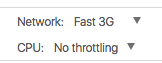
Perhaps we should create device presets that combine cpu & network together?
wardpeet
on 5 Nov 2017
This makes sense to me- however, I'm not sure what value CPU throttling provides besides mobile/desktop. Are there additional usecases that CPU throttling unlocks?
vinamratasingal-zz
on 6 Nov 2017
this is a bit far fetched but you could say an iphone 7 has 2x cpu, moto g 4 has 5x cpu, samsung s7 has 3x cpu
wardpeet
on 6 Nov 2017
There are a few conversations around preset alignment with DevTools and WebPageTest, so we'll need to align with them. (our network throttling preset is the exact same already). I also favor just including cpu throttling within it and not making that configurable. so:
Throttling
Fast 3G w/ 4x CPU slowdownNo throttling
And later perhaps we add a "Slow 3G w/ 6x CPU slowdown" preset, but I don't think it's a big priority.
And I'm thinking for device emulation we have:
Emulation
Mobile browser (Nexus 5X Chrome on Android)No emulation (Chrome Desktop)
IMO trying to offer more presets than this gets into messy territory.
paulirish
on 6 Nov 2017
+1 to Paul's suggestion.
We did some internal analysis and found rough buckets of desktop/mid-tier mobile/low-end mobile to be sufficient. Presenting anything more than that gets messy and suggests more precision than we're really offering.
 patrickhulce
on 6 Nov 2017
patrickhulce
on 6 Nov 2017
Sounds good! I don't mean we need more presets. I think we should "name" them as Fast 3g w 4x cpu slowdown is hard to point down what "phone" it is. What does that mean for a user? Is that throttling against a nexus 5x or more like an iPhone? So if we could say Fast 3g on an emulated nexus 5x that would be great but that's just an implementation detail.
wardpeet
on 6 Nov 2017
Is that throttling against a nexus 5x or more like an iPhone?
After the research we did on this, the conclusion was that the 4x slowdown is basically both nexus 5x and iphone. So attempting to be more precise isn't possible right now. :)
paulirish
on 6 Nov 2017
The alternative to my comment above is what @vinamratasingal suggested--a single dropdown:
Device profile
Mobile - Chrome on Android - Fast 3G Network w/ 4x CPU slowdownDesktop - Chrome Desktop - No throttling
The benefit to having two independent controls are the two use cases:
- desktop profile, but mobile device speed - I want to audit my desktop app, but its fast-ish on my machine, so I want it significantly slower to get baseline. (much like profiling)
- mobile profile, but no throttling - i want to iterate on accessibility/security/best practices/pwa stuff (and not perf right now) and get my results asap.
paulirish
on 6 Nov 2017
Ok thanks now I get the full picture. Sounds great @vinamratasingal
wardpeet
on 6 Nov 2017
As discussed in the Lighthouse team meeting, we have a product plan to move forward with the P0s. In the next few sprints, eng work for this feature will commence.
vinamratasingal-zz
on 7 Nov 2017
Currently blocked by https://chromium-review.googlesource.com/c/chromium/src/+/809912
paulirish
on 11 Dec 2017
In the meantime, is there a workaround for auditing sites from the CLI with the current user's data? I'm trying to audit a desktop site behind 2FA, so when I use the CLI it gets redirected to the login screen and audits that instead (which makes me realize how great it is to have Lighthouse in the Chrome DevTools).
I've tried some of the Chrome flags in addition to --disable-device-emulation --disable-storage-reset but I'd like it to pick up my cookies and login from my regular Chrome user.
 epeterson320
on 12 Dec 2017
epeterson320
on 12 Dec 2017
@epeterson320 You can launch Chrome with the remote debugging port set and pass that port to Lighthouse instead of having Lighthouse launch Chrome for you.
example on Mac
/Applications/Google\ Chrome.app/Contents/MacOS/Google\ Chrome --remote-debugging-port=9222
lighthouse --port=9222 --disable-storage-reset --disable-device-emulation <url>
this will use the default user profile in Chrome, alternatively you can launch Chrome with the specific --user-data-dir you want it to use
patrickhulce
on 12 Dec 2017
We're going with 2 dropdowns instead of checkboxes
Device Type:
- Desktop
- Mobile (Nexus 5X)
Throttling:
- On (Fast 3G/4x CPU slowdown)
- Off
also..
add PWA toplevel warning if emulation is offmaybe later- add 4 different loading text messages for different combinations
- make device type and throttling more prominent in report
patrickhulce
on 9 Jan 2018
I like the above approach.
If we're concerned about the length of labels (e.g for Fast 3G Network and 4x CPU slowdown..), we could include a more info link that documents what the throttling entails for that drop-down and just go with On/Off.
 addyosmani
on 9 Jan 2018
addyosmani
on 9 Jan 2018
after some iteration with paul, this is what we got right now.
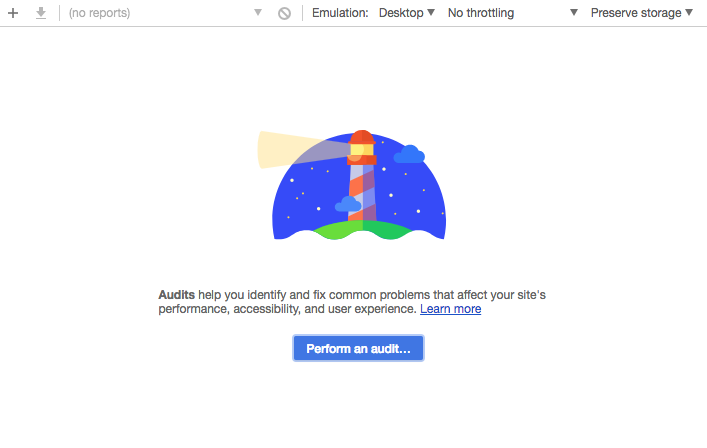
we moved the settings to the toolbar as all the variations we tried in the dialog felt forced/disruptive to the existing flow and the toolbar is where all existing throttling/emulation settings tend to live, also keeps the existing default flow pretty much identical while being pretty clear to users that these options exist now
patrickhulce
on 23 Feb 2018
This LGTM'es to me- thanks Paul/Patrick for taking care of this!
vinamratasingal-zz
on 23 Feb 2018
This has landed in ToT ✈️
patrickhulce
on 2 Mar 2018
Hi. I'm sorry for disturbing you, but we are eagerly waiting for this feature.
Could you please answer when it will be in live, at least for Lighthouse extension?
Thanks a lot.
 Alexadra
on 19 Mar 2018
Alexadra
on 19 Mar 2018
@Alexadra you can see it in Chrome Canary. it'll be in chrome stable in ~2 months.
paulirish
on 21 Mar 2018
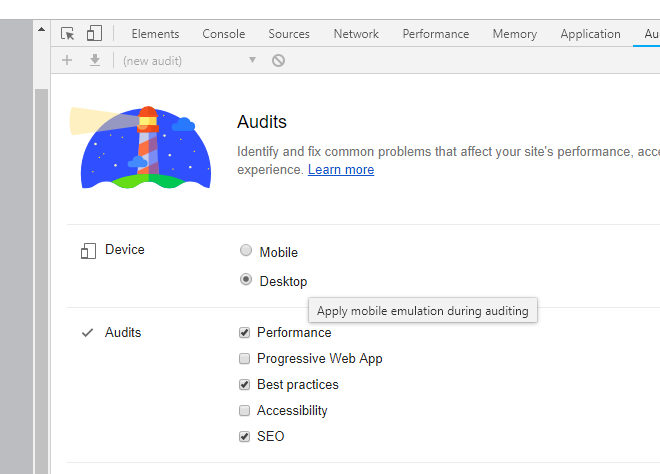
Hi folks, it's in my chrome, but not working - the desktop option also runs as mobile emulation, in the snip below I hover over the desktop button
 ognik777
on 20 Jan 2019
ognik777
on 20 Jan 2019
@ognik777 it's a bug in v71 see #6772
patrickhulce
on 20 Jan 2019
Related issues
 muuvmuuv
·
3Comments
muuvmuuv
·
3Comments
 sanprieto
·
3Comments
sanprieto
·
3Comments
 nl-igor
·
3Comments
nl-igor
·
3Comments
 johnfrancisli
·
3Comments
johnfrancisli
·
3Comments
 asistapl
·
3Comments
asistapl
·
3Comments
Most helpful comment
after some iteration with paul, this is what we got right now.
we moved the settings to the toolbar as all the variations we tried in the dialog felt forced/disruptive to the existing flow and the toolbar is where all existing throttling/emulation settings tend to live, also keeps the existing default flow pretty much identical while being pretty clear to users that these options exist now