Lighthouse: Lighthouse doesn't run in DevTools on Chromium Linux
EDIT: All chromium users with a non-matching git hash don't get the audits2 remote module. Unfortunately a diff bug than the chromeOS one.
I'm running a Asus Chromebook C302CA on the Beta Channel.
Chromium 60
When I go to my website and try to run the lighthouse audit on it, it just spins and never does anything other than switch to a mobile view.
 stramel
All 37 comments
@stramel got a URL for us?
 patrickhulce
on 30 Jun 2017
patrickhulce
on 30 Jun 2017
It was https://d-demo-ci.salesnext.com/login but it did work using the extension.
stramel
on 30 Jun 2017
Hm yeah seems to be working fine in Canary as well
patrickhulce
on 30 Jun 2017
@patrickhulce it was only with the audit through dev tools on my Chromebook. I didn't get any error messages either. I ended up having to close the tab to kill the audit.
stramel
on 30 Jun 2017
We're unable to reproduce with latest version, please re-comment if you're still experiencing this to re-open!
patrickhulce
on 29 Sep 2017
@patrickhulce I am still able to reproduce this.
Chromium Version 62.0.3202.89 (Official Build) Built on Ubuntu , running on Ubuntu 16.04 (64-bit)
Lighthouse 2.6.0
Works with the Chrome Extension doesn't work with the DevTools.
Can you please re-open?
stramel
on 18 Nov 2017
@stramel I'm able to audit that page in both Chrome Stable and Canary DevTools on both OS X and Ubuntu. Can you provide more information on steps you take and precisely what behavior you observe?
patrickhulce
on 20 Nov 2017
@patrickhulce I don't think my steps are that abnormal...
Steps to Reproduce w/ Extension
- Open Chromium 62
- Check Extension settings, Ensure Lighthouse is allowed to run in incognito
- Open an incognito tab
- Navigate to https://d-demo-ci.salesnext.com/login
- Click the lighthouse extension icon
- Click "Generate Report"
- Wait for successful finish
Works as Expected
Steps to Reproduce w/ Dev Tools
- Open Chromium 62
- Open an incognito tab
- Navigate to https://d-demo-ci.salesnext.com/login
- Open Dev Tools
- Click the "Audits" tab
- Click "Perform an audit..."
- Click "Run audit"
Expected: Same results as extension
Actual: The screen drops to emulating Nexus 5X. The modal where "Run audit" was click switches to a loading indicator, with the words loading. It stays in this state indefinitely.
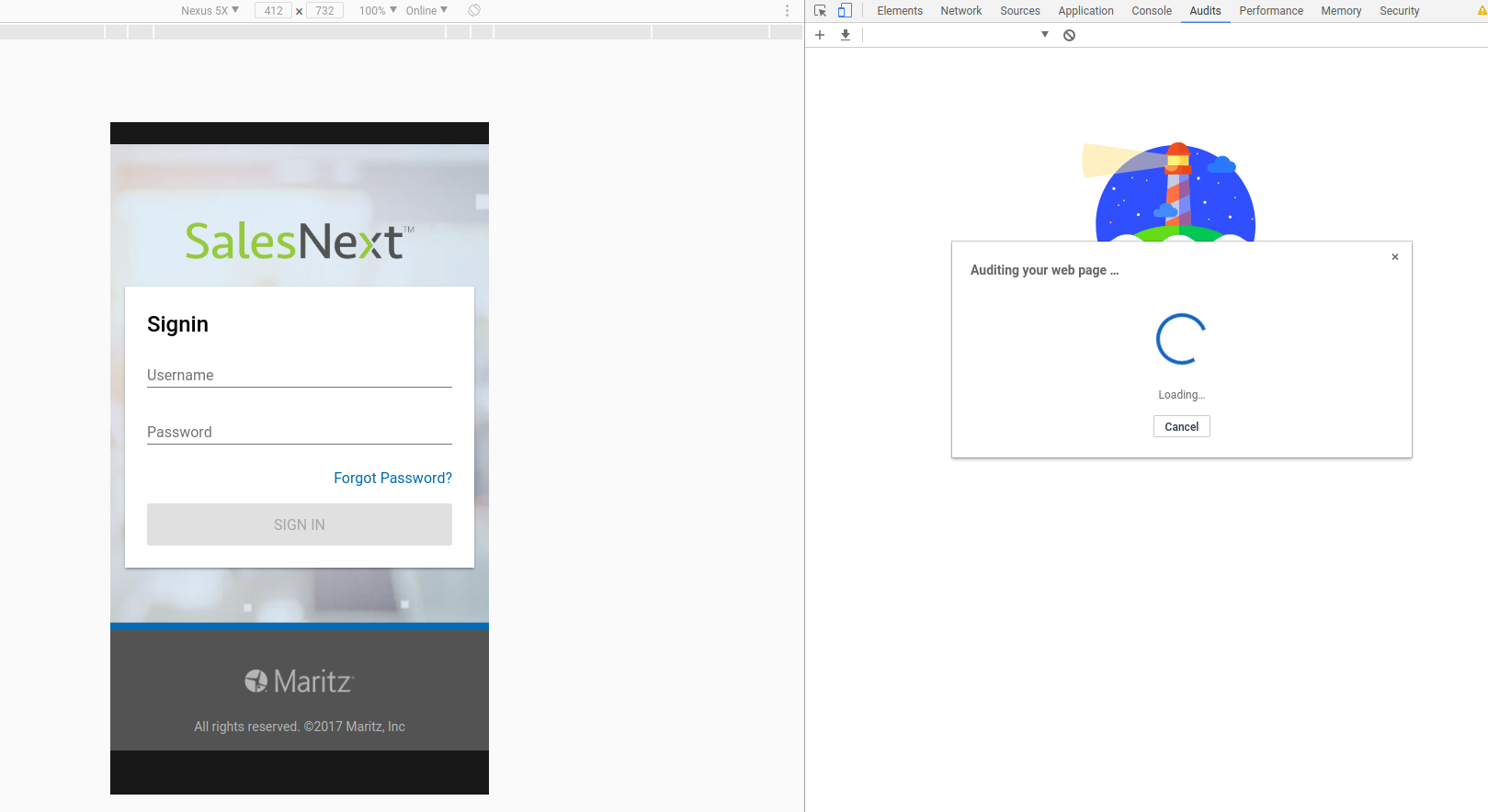
Clicking "cancel" changes the text to "Canceling" but never actually cancels anything.
Clicking the x in the upper-right corner of the dialog closes the dialog. However, click "Perform an audit" again, then try clicking "cancel" and it does nothing.
NOTE: I did change the URL to a more generic version which still has the same issue.
stramel
on 20 Nov 2017
Hm, strange. I cannot reproduce on this new URL either, but the behavior you're describing seems like DevTools has lost its connection to the tab and not actually started Lighthouse at all. "Loading" should almost immediately be replaced by "Loading page & waiting for onload..." in normal operation.
Are you able to successfully audit any page in DevTools?
patrickhulce
on 20 Nov 2017
@patrickhulce I am not able to successfully audit any page using the DevTools.
Tested usatoday.com and github.com
stramel
on 20 Nov 2017
@patrickhulce The issue is directly an issue with using Chromium not Chrome. I downloaded Google Chrome (stable) and ran the audit using DevTools, everything worked as expected.
stramel
on 20 Nov 2017
Ahhhh thanks for identifying @stramel! We'll have to explore this. Could you provide steps for how you're installing/building Chromium?
patrickhulce
on 20 Nov 2017
Mine comes with my OS, Gallium OS, which is specifically built for Chromebooks. It is listed as chromium-browser recommended under galliumos-desktop package.
stramel
on 20 Nov 2017
If this can help, the same issue (as explained and documented by @stramel ) happens running Lighthouse via Chromium 63 Developers Tools on Linux Mint (installed via apt).
On the same PC, Lighthouse on Google Chrome Version 63.0.3239.84 (Official Build) (64-bit) works as expected and completes the audits.
This is the "About Chromium" content:
Version 63.0.3239.84 (Official Build) Built on Ubuntu , running on LinuxMint 18.1 (64-bit)
 devsware
on 15 Dec 2017
devsware
on 15 Dec 2017
The same issue happens on Chromium 63 under Ubuntu installed from official apt repos:
Version 63.0.3239.84 (Official Build) Built on Ubuntu , running on Ubuntu 16.04 (64-bit)
 hhofstaetter
on 18 Dec 2017
hhofstaetter
on 18 Dec 2017
I'm guessing the remote module download fails due to an unmatched git hash.
see also #4132, which has an upstream bug at https://crbug.com/747349
 paulirish
on 2 Jan 2018
paulirish
on 2 Jan 2018
I can consistently reproduce the same exact issue described in https://github.com/GoogleChrome/lighthouse/issues/2627#issuecomment-345770177 in Debian 9.3 Stretch.
Installed from stretch/updates/main:
Version 64.0.3282.119 (Developer Build) built on Debian 9.3, running on Debian 9.3 (64-bit)
Version 62 from stretch/main doesn't work either:
Version 62.0.3202.89 (Developer Build) built on Debian 9.1, running on Debian 9.3 (64-bit)
 nzhuk98
on 10 Feb 2018
nzhuk98
on 10 Feb 2018
I confirm this issue too:
Version 64.0.3282.119 (Official Build) Built on Ubuntu , running on Ubuntu 14.04 (32-bit)
Lighthouse never finish the loading. Long live to Webpagetest :-)
 jasomdotnet
on 14 Feb 2018
jasomdotnet
on 14 Feb 2018
I have the same issue on
Version 64.0.3282.186 (Official Build) (64-bit)
On
Version 65.0.3325.106 (Official Build) beta (64-bit)
Lighthouse does finally start running tests. but after it finishes no report is being generated.
OS: Arch Linux
 N0ps32
on 9 Mar 2018
N0ps32
on 9 Mar 2018
Same on
Chromium: 64.0.3282.119 (Entwickler-Build) built on Debian 9.3, running on Debian 9.4 (64-Bit)
 Serkan-devel
on 21 Mar 2018
Serkan-devel
on 21 Mar 2018
Has the reason why it's happening already been found?
Serkan-devel
on 21 Mar 2018
@Serkan-devel Yes remote modules are not supported on all Chrome versions, see root cause crbug for discussion
patrickhulce
on 21 Mar 2018
the link isn't viewable on my end, even when logged in
Serkan-devel
on 21 Mar 2018
Ah, apologies didn't realize it's restricted.
Summary: remote devtools modules (such as audits/a11y/device frames/network "product" labels/etc) are not supported for some Chrome build processes, Chrome OS and Chromium Linux for example. Fix has landed in ToT for Chrome OS.
patrickhulce
on 21 Mar 2018
How far is it for the fix to to be ported from ChromiumOS to other Linux distros?
Serkan-devel
on 24 Apr 2018
Chromium also hang here after displaying "Lighthouse is warming up..."
on Version 66.0.3359.117 (Developer Build) built on Debian 9.4, running on Debian 9.4 (64-bit)
in console there is error:
[8627:8627:0516/201607.774326:ERROR:CONSOLE(1)] "Uncaught (in promise) SyntaxError: Invalid or unexpected token", source: chrome-devtools://devtools/bundled/audits2_worker.js?remoteBase=https://chrome-devtools-frontend.appspot.com/serve_file/@1634af79e3bf0d6f0178a5fdb8829b059ead4b26/ (1)
 mnalis
on 16 May 2018
mnalis
on 16 May 2018
For me it also hangs on "Lighthouse is warming up..." using stable build:
Version 66.0.3359.181 (Official Build) Built on Ubuntu , running on Ubuntu 17.10 (64-bit)
 stefanmaric
on 4 Jun 2018
stefanmaric
on 4 Jun 2018
Is there any progress
Serkan-devel
on 4 Jun 2018
There has been some progress, yes. Chrome OS is now bundled directly and should work in m69.
Chromium builds are still blocked, but there's a proposed approach that might work in most cases. Likely 1-2 releases out still.
patrickhulce
on 4 Jun 2018
I think it now works on 67.0.3396.87 (Entwickler-Build) built on Debian 9.4, running on Debian 9.4 (64-Bit)
Serkan-devel
on 26 Jul 2018
It's a good news for Debian users, but unfortunately it still freezes on Version 67.0.3396.99 (Official Build) Built on Ubuntu , running on LinuxMint 18.1 (64-bit)
devsware
on 26 Jul 2018
@devsware your version looks a little newer than mine. And isn't there a significant difference between debian and debian based distros, like ubuntu/mint?
Serkan-devel
on 26 Jul 2018
@Serkan-devel I agree that our systems are a bit different, even if Linux Mint is Ubuntu derived and Ubuntu is based on Debian.
Mine was just a quick test to check the status of Lighthouse on my system and I wanted to give a feedback about using it on Ubuntu (or Ubuntu derived) distro as soon as possible.
devsware
on 26 Jul 2018
Also works on Arch Linux now!
N0ps32
on 27 Jul 2018
Does Lighthouse's Chrome Launcher support Chromium by default, if Chrome or Chrome Canary are not installed?
Would I need to specify the Chromium path by the CHROME_PATH flag? (looking at https://www.npmjs.com/package/lighthouse)
 jasonworden
on 18 Dec 2018
jasonworden
on 18 Dec 2018
@jasonworden if it's on your path already and you're on linux, yes!
patrickhulce
on 19 Dec 2018
Looks like this is more or less fixed now that the remote module bug is fixed and released.
 brendankenny
on 1 May 2019
brendankenny
on 1 May 2019
Related issues
 mjara74
·
3Comments
mjara74
·
3Comments
 Simply007
·
3Comments
Simply007
·
3Comments
 radum
·
3Comments
radum
·
3Comments
 asistapl
·
3Comments
asistapl
·
3Comments
 etelai
·
3Comments
etelai
·
3Comments
Most helpful comment
Ah, apologies didn't realize it's restricted.
Summary: remote devtools modules (such as audits/a11y/device frames/network "product" labels/etc) are not supported for some Chrome build processes, Chrome OS and Chromium Linux for example. Fix has landed in ToT for Chrome OS.