Lighthouse-ci: Configurable server listen time for startServerCommand
My app is SSR, and I've tried to use "LHCI autorun" but Lighthouse fails to run the correct files (since it seems to run whatever is in a "./dist" or "./public" folder).
I'm trying the complex setup guide now, and ran into using a shell script. My current script looks something like this :
#!/bin/bash

# ... (build condition check)

# ... (server setup)

# Install Lighthouse CI
# If you're already using node to manage your project, add it to your package.json `devDependencies` instead to skip this step.
npm install -g @lhci/[email protected]

# Run a healthcheck to make sure everything looks good before we run collection.
lhci healthcheck --fatal

# Collect Lighthouse reports for our URL.
lhci collect --url=https://google.com --settings.chromeFlags=--no-sandbox \
    lhci upload target=temporary-public-storage \
    || echo "LHCI script failed!" \

# Assert that the reports look good, this command can be configured to ease your Lighthouse transition.
lhci assert --preset="lighthouse:recommended"
EXIT_CODE=$?

# ... (kill server)

exit $EXIT_CODE
However, on CircleCI when it runs the script, it seems to run the tests on a different port (rather than testing at my url "https://google.com").
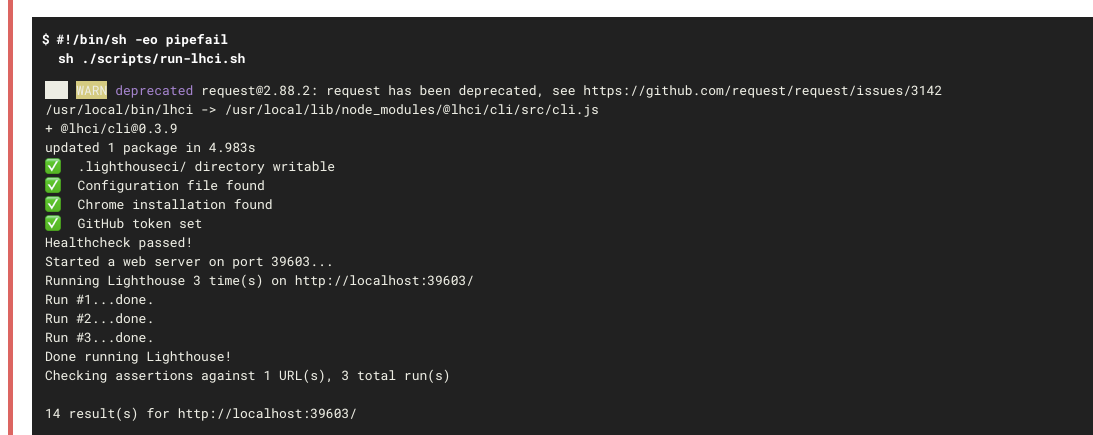
Please advise on how to proceed if I want to be testing staging envs, thanks!
 Tonyhliu
All 16 comments
Those logs do not seem to be coming from this script options, so it's a matter of applying configuration correctly.
Would you be able to provide your exact lighthouserc.json, script that runs LH, link to logs, etc? We have tests in place and dogfood working autorun examples in Circle CI, so I'm inclined to believe this is accidental misconfiguration we can't diagnose with more information.
Thanks!
 patrickhulce
on 17 Mar 2020
patrickhulce
on 17 Mar 2020
@patrickhulce This is my current lighthouserc.json:
{
"ci": {
"collect": {
"numberOfRuns": 3
},
"assert": {
"preset": "lighthouse:recommended",
"assertions": {
"offscreen-images": "off",
"uses-webp-images": "off"
}
},
"upload": {
"target": "temporary-public-storage"
}
}
}
Tonyhliu
on 17 Mar 2020
Thanks! Let's focus on the autorun issue because that should definitely be working.
When you were running lhci autorun did you have collect look like the below with url as an array? (Also try changing numberOfRuns to 1 to make sure the configuration is being picked up at all)
{
  "ci": {
    "collect": {
      "numberOfRuns": 1,
      "url": ["https://www.google.com"]
    },
    "assert": {
      "preset": "lighthouse:recommended",
      "assertions": {
        "offscreen-images": "off",
        "uses-webp-images": "off"
      }
    },
    "upload": {
      "target": "temporary-public-storage"
    }
  }
}
Just tested this, so this works and makes sense since we're providing a specific (hypothetical staging) URL to check.
But going back to my SSR app; if I wanted to test local env URLs, autorun would fail because it seems to look for HTML files in a ./dist or ./public folder. Any advise on how I can leverage LHCI autorun for SSR apps that are rendered via JS/JSX?
Tonyhliu
on 17 Mar 2020
if I wanted to test local env URLs, autorun would fail because it seems to look for HTML files in a ./dist or ./public folder
It only does that if you don't provide a URL. I'm a little confused why local and SSR is a sticking point. If you have an SSR app that requires a server you can just start your server and then run LHCI on that localhost URL or even tell LHCI to manage the lifecycle of your server with --collect.startServerCommand="<command to start your server>". See the docs. Unless maybe there's something else I'm missing?
patrickhulce
on 18 Mar 2020
Sorry for the confusion -I just wasn't sure if lhci autorun was compatible with a SSR app, especially since I've ran through multiple approaches, so thanks for the clarification.
Combing through the docs, I seem to be getting an error when I try to start my server then run LHCI on my localhost :
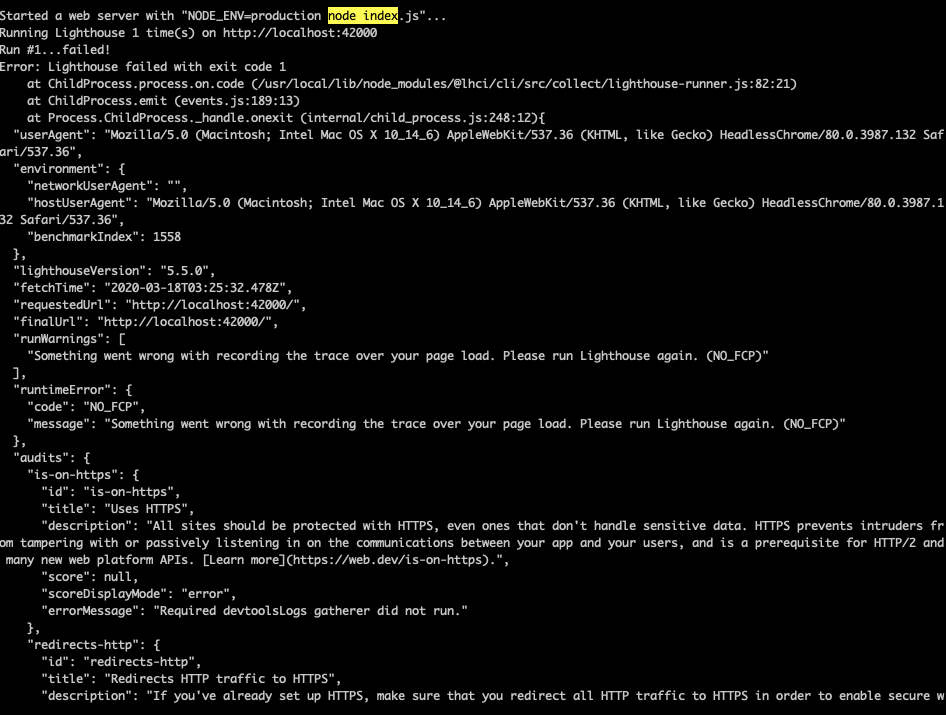
But for some reason, running lhci collect --start-server-command="npm start" && lhci upload --target=temporary-public-storage works as expected
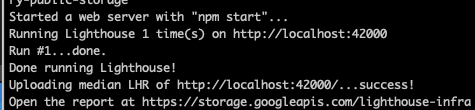
Any idea what this could be from?
Tonyhliu
on 18 Mar 2020
Looks like you're using a different start command between the two. Do you get the same result if you use npm start as your start command in autorun? NO_FCP means the server didn't return any content on the page.
autorun is simply running each separate LHCI command for you in the correct sequence, nothing fancy. If you use the exact same options in both cases you should see the exact same results.
patrickhulce
on 18 Mar 2020
My problem is now more so on Circle CI integration. I've gotten to the point where I can run it locally when I run lhci autorun --config=./lighthouserc.json. However, when CircleCI runs the same command lhci autorun --config=./lighthouserc.json, I get the following error :
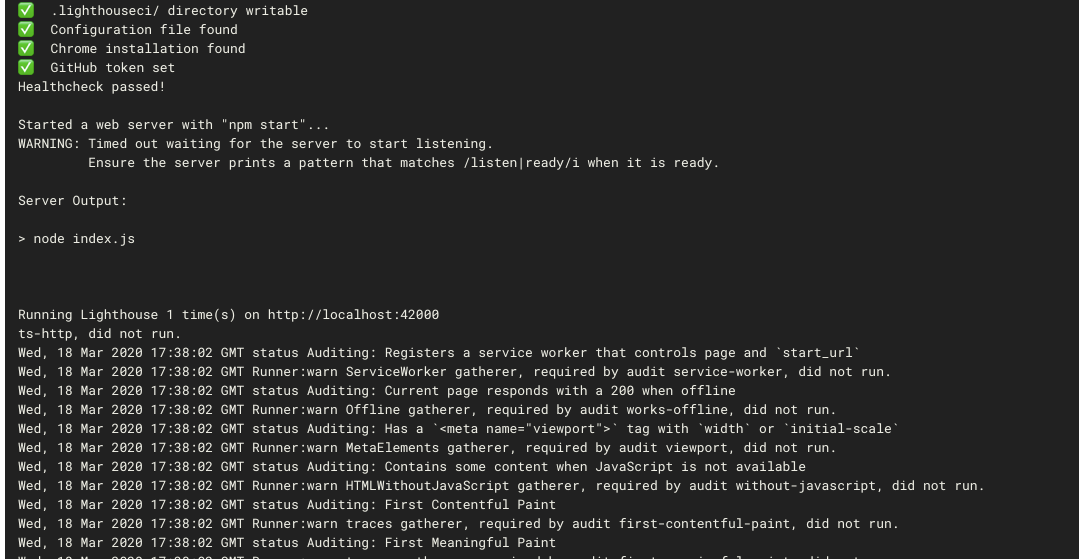
Current package.json script :
"serve:lhci": "npm start",
Current Lighthouserc.json :
{
  "ci": {
    "collect": {
      "numberOfRuns": 1,
      "settings": {
        "chromeFlags": "--no-sandbox"
      },
      "url": ["http://localhost:42000"]
    },
    "assert": {
      "preset": "lighthouse:recommended",
      "assertions": {
        "offscreen-images": "off",
        "uses-webp-images": "off"
      }
    },
    "upload": {
      "target": "temporary-public-storage"
    }
  }
}
I should also note that I'm console logging server listening on port 42000: when the server starts up
Tonyhliu
on 18 Mar 2020
Does the app do setup work before printing that message? Circle CI machines are probably significantly underpowered compared to your machine so the timeout may be legitimate.
If things are otherwise working, I wouldn't worry much about that warning. It's just informative and doesn't affect how LHCI runs.
If it's flakey because of all the setup though then perhaps we could introduce an option to increase the amount of time we wait for the server to startup.
patrickhulce
on 18 Mar 2020
The app makes a request to a service that sometimes takes a while, which causes it to timeout and the Lighthouse CI tests to fail on Circle.
Are we able to introduce the option to increase the time out? I will explore options on my end to see if I can shorten the server set up time.
Tonyhliu
on 18 Mar 2020
The app makes a request to a service that sometimes takes a while, which causes it to timeout and the Lighthouse CI tests to fail on Circle.
The app makes a request to a service before it starts up? Or it just makes a request to a service when the page is loaded?
The former needs a new feature in LHCI, the later is already configurable today with --collect.settings.maxWaitForFcp=X and --collect.settings.maxWaitForLoad=X where X is the timeout in milliseconds.
patrickhulce
on 18 Mar 2020
Currently it's making a request to a service _before_ it starts up, I'm exploring options to run it after though.
Tonyhliu
on 18 Mar 2020
@patrickhulce I think I am facing a similar issue but in my case, lhci does not error out.
The lighthouse report gets generated with some initial page text or loading state. My App(nextjs) runs in SSR, it calls a graphQL endpoint and gathers the data before sending it down to the browser.
The lighthouse report is ends up taking snapshots of the empty screen. It looks like this,
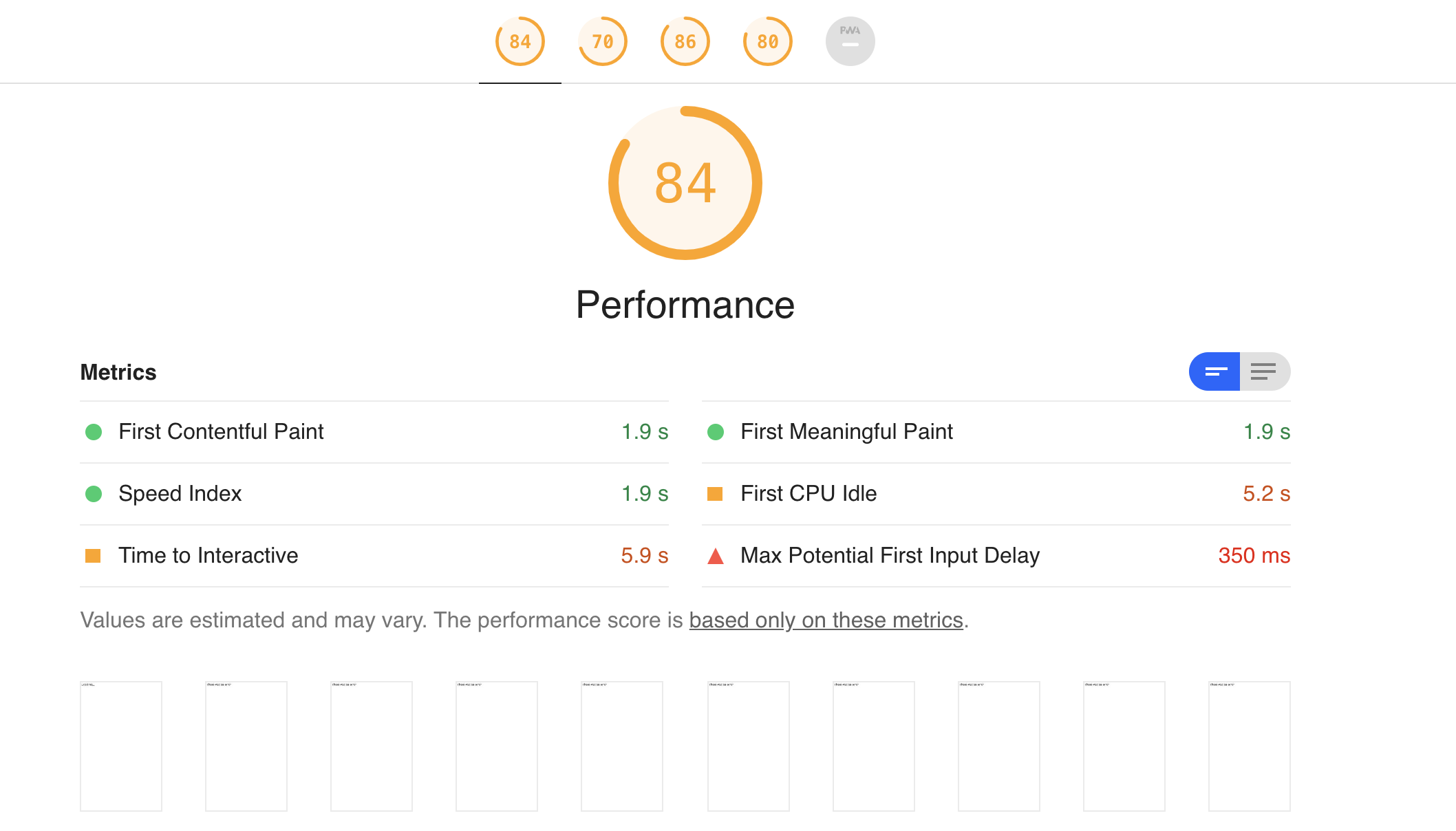
Please let me know if this is related to this issue or I can open up a new issue. Thanks for the help.
 nawazeverlane
on 18 Mar 2020
nawazeverlane
on 18 Mar 2020
That's unrelated @nawazeverlane but please don't open a new issue, that's not a bug in LHCI. That looks like your server is returning an error message.
If you expect the server to print a white screen with a line of text while it's loading the GraphQL payload, then it's a separate timeout configuration that's fixed by using a custom Lighthouse config.
lhci autorun --collect.settings.configPath=/path/to/config.js
module.exports = {
  extends: 'lighthouse:default',
  passes: [
    {passName: 'defaultPass', pauseAfterLoadMs: 123456}
  ],
};
Replace 123456 with however many milliseconds you expect this GraphQL query to take in the worst case scenario.
EDIT: Please verify your server is working properly before pursuing more LHCI debugging. i.e. try hitting it with curl, check the payload, check major resource responses, take a screenshot with puppeteer if necessary, etc. I know this part sucks but it's going to be much rougher trying to debug your basic server functions through Lighthouse.
patrickhulce
on 19 Mar 2020
Yeah, it was a server issue. The nextJS app is relying on two other servers
(one GraphQL & one API server) for its data--trying to figure out a way to get data and run LHCI for perf measurements.
nawazeverlane
on 19 Mar 2020
Thanks for your help @patrickhulce !
Tonyhliu
on 19 Mar 2020
Related issues
 mauriciabad
·
4Comments
mauriciabad
·
4Comments
 felixck12
·
4Comments
felixck12
·
4Comments
 lgummadi7
·
3Comments
lgummadi7
·
3Comments
 Hongbo-Miao
·
3Comments
Hongbo-Miao
·
3Comments
 thasmo
·
3Comments
thasmo
·
3Comments
Most helpful comment
Thanks! Let's focus on the autorun issue because that should definitely be working.
When you were running
lhci autorundid you havecollectlook like the below withurlas an array? (Also try changingnumberOfRunsto 1 to make sure the configuration is being picked up at all)