Lighthouse-ci: Dashboard legend doesn't show colour above 3 items
Hello team,
We use LHCI testing in our build steps. Our setup is that we have a mono repo deploying three different websites (using the same codebase). Our tests are run on each url, plus an additional time with a specific query string.
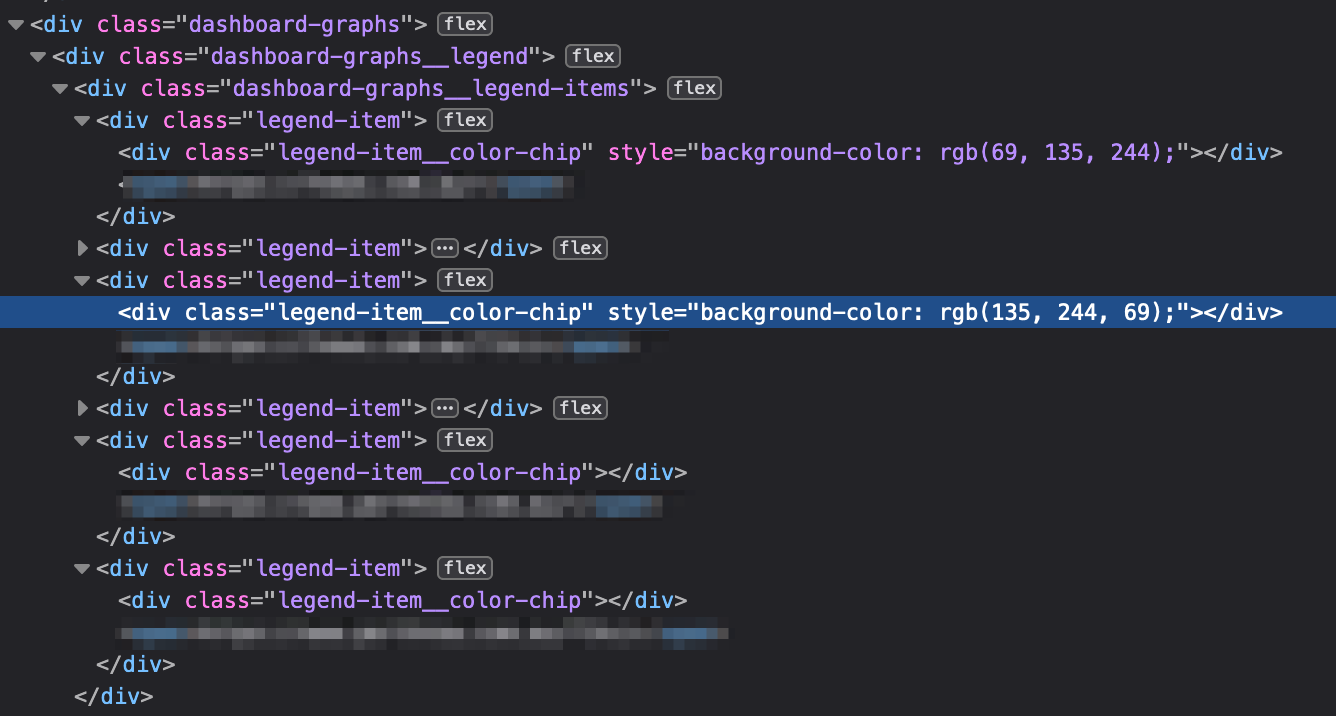
The legend will only show the colours for the first three items. The colours appear fine in the graph, I just don't know which is which.

The colour chips elements are in the code, but they don't have a background colour set
 antonjb
All 7 comments
Thanks for filing @antonjb! The multiple URL view is actually going to be going away completely soon and there will be a dropdown to select the URL. I'm curious if you have a strong use case for 6 URLs at once.
 patrickhulce
on 16 Jan 2020
patrickhulce
on 16 Jan 2020
Ah ok, if the ui is going away then this can be closed then. Thanks for letting me know.
I'm not sure if it's a strong use case. All three sites are deployed from the one codebase which means we can't run the check against the repo because the git hash doesn't change so LHCI would error if trying to run them independantly. I guess I could run LHCI on individual instances but that seems inefficient (three times the cost as we host it). Making a change in a component affects all three products the same.
The use of the query strings is because we have third party content (ads). To get an idea of how our changes effect performance vs how our changes and ads effect it we disable all third party content with the query string and compare.
If there's a better approach I'm happy for input.
antonjb
on 16 Jan 2020
I guess I could run LHCI on individual instances but that seems inefficient (three times the cost as we host it)
You should be able to just create separate projects for each on the same instance. You'd have to run lhci autorun 3 times with different configs to collect the different URLs but if you wanted to separate them, it shouldn't have to cost 3x.
Making a change in a component affects all three products the same.
This makes it sound like treating them separately isn't what's actually best though, so good call on unifying 👍
To get an idea of how our changes effect performance vs how our changes and ads effect it we disable all third party content with the query string and compare.
Great idea! We'd love to hear if there are any other features you feel are missing that would've made this type thing easier.
patrickhulce
on 16 Jan 2020
Good point about separate projects. I didn't think of that. It might be a better option because I wanted to add URLs for sub-pages that have video and or content. It'll make more sense per project rather than a big pile. We can focus down an issue because it still improves each project anyway.
One feature I have thought of is sharing a direct link to an individual test would be helpful
Not a feature but we are experiencing issues with images and Akamai image manager. Lighthouse Chrome identifies that they're sized correctly, so does LHCI run locally but not in our TeamCity instance. We aren't sure if that's the Docker setup or Akamai or LCHI. I haven't raised it as we are investigating Akamai first. It does mean we get a lot of false positives in the results.
antonjb
on 17 Jan 2020
One feature I have thought of is sharing a direct link to an individual test would be helpful
The URL for a specific build comparison should be a complete reference to all its options, so copy/pasting the link should be sharing a direct link. Or is this not what you mean?
Do keep us posted on the image issue! If you can identify repro steps let us know :)
patrickhulce
on 17 Jan 2020
The URL for a specific build comparison should be a complete reference to all its options, so copy/pasting the link should be sharing a direct link. Or is this not what you mean?
Yeah, so I can link to the project but then within that, if I click a specific error I can't share that with the relevant team/person. I'd have to say, go to this link and then click on the error called ...
antonjb
on 17 Jan 2020
Ah so a specific audit failure within that build comparison? Gotcha yeah great feature 👍 filed https://github.com/GoogleChrome/lighthouse-ci/issues/184
patrickhulce
on 17 Jan 2020
Related issues
 thasmo
·
3Comments
thasmo
·
3Comments
 JackMidd-Amido
·
4Comments
JackMidd-Amido
·
4Comments
 Hongbo-Miao
·
3Comments
Hongbo-Miao
·
3Comments
 PaulKujawa
·
4Comments
PaulKujawa
·
4Comments
 mathiasbynens
·
4Comments
mathiasbynens
·
4Comments