Lightgbm: I've tried everything I can to install LightGBM for R and I'm having no luck
What Im Working With: I installed Rtools 64 bit, Microsoft VS 2015 and 2017, I'm running R 3.4.1 and up to date Rstudio.
My computer is Windows 7.
I got lightgbm to work on my older computer by just running the install_github() method and it worked really well.
Now I cannot make any progress getting it to work and I'm frustrated.
I'll start off to say that I am not the most tech savvy when it comes to the nitty gritty basic computer functions, but I do greatly appreciate the work that you guys have done so far to improve the library and make it more accessible.
Method 1: install_github()
devtools::install_github("Microsoft/LightGBM", subdir = "R-package")
Downloading GitHub repo Microsoft/LightGBM@master
from URL https://api.github.com/repos/Microsoft/LightGBM/zipball/master
Installing lightgbm
"C:/PROGRA~1/R/R-34~1.1/bin/x64/R" --no-site-file --no-environ --no-save --no-restore --quiet CMD INSTALL
"C:/Users/XXXXXXX/AppData/Local/Temp/RtmpYZGn1I/devtools1b346ea40d/Microsoft-LightGBM-5543979/R-package" --library="C:/Program Files/R/R-3.4.1/library" --install-tests
- installing source package 'lightgbm' ...
** libs
installing via 'install.libs.R' to C:/Program Files/R/R-3.4.1/library/lightgbm
Warning: running command 'cmake -G "Visual Studio 15 2017 Win64" ..' had status 127
Warning: running command 'cmake -G "Visual Studio 14 2015 Win64" ..' had status 127
Warning: running command 'cmake -G "Visual Studio 12 2013 Win64" ..' had status 127
Warning: running command 'cmake ..' had status 127
Warning: running command 'cmake --build . --target _lightgbm --config Release' had status 127
Error in eval(ei, envir) : Cannot find lib_lightgbm.dll- removing 'C:/Program Files/R/R-3.4.1/library/lightgbm'
Installation failed: Command failed (1)
Warning message:
GitHub repo contains submodules, may not function as expected!
So, it cannot detect Visual Studio 2013, 2015, or 2017 64 bit, well that sucks.
So I guess I'll just try to manually install it.
Method 2:
I manually downloaded lib_lightgbm.dll before this step, and tried Laurae's lgbdl package.
lgb.dl(commit = "master",
- libdll = "C:\Program Files\R\R-3.4.1\lib_lightgbm.dll", # YOUR PRECOMPILED DLL
- repo = "https://github.com/Microsoft/LightGBM")
C:UsersXXXXXXXLightGBMR-package>c:
C:UsersXXXXXXXXLightGBMR-package>cd C:Users703093~1AppDataLocalTempRtmpYZGn1I
C:Users703093~1AppDataLocalTempRtmpYZGn1I>git clone --recursive https://github.com/Microsoft/LightGBM
Cloning into 'LightGBM'...
Submodule 'include/boost/compute' (https://github.com/boostorg/compute) registered for path 'compute'
Cloning into 'C:/Users/XXXXXXXX/AppData/Local/Temp/RtmpYZGn1I/LightGBM/compute'...
Submodule path 'compute': checked out '6de7f6448796f67958dde8de4569fb1ae649ee91'C:Users703093~1AppDataLocalTempRtmpYZGn1I>cd LightGBM
C:Users703093~1AppDataLocalTempRtmpYZGn1ILightGBM>git checkout master
Your branch is up-to-date with 'origin/master'.
Already on 'master'C:UsersXXXXXXAppDataLocalTempRtmpYZGn1ILightGBM>cp C:Program FilesRR-3.4.1lib_lightgbm.dll C:UsersXXXXXAppDataLocalTempRtmpYZGn1ILightGBM
'cp' is not recognized as an internal or external command,
operable program or batch file.
- installing source package 'lightgbm' ...
** libs
installing via 'install.libs.R' to C:/Program Files/R/R-3.4.1/library/lightgbm
Error in eval(ei, envir) : Cannot find lib_lightgbm.dll- removing 'C:/Program Files/R/R-3.4.1/library/lightgbm'
Warning in install.packages :
running command '"C:/PROGRA~1/R/R-34~1.1/bin/x64/R" CMD INSTALL -l "C:Program FilesRR-3.4.1library" "C:/Users/XXXXXX/AppData/Local/Temp/RtmpYZGn1I/LightGBM/R-package"' had status 1
Warning in install.packages :
installation of package ‘C:/Users/XXXX/AppData/Local/Temp/RtmpYZGn1I/LightGBM/R-package’ had non-zero exit status
[1] FALSE
Warning message:
running command 'C:UsersXXXXXAppDataLocalTempRtmpYZGn1Itemp.bat' had status 1
Dang, that doesn't work
Method 3: VS 2017 Command Prompt
I tried various zips and tar.gz's that I downloaded from the 'releases' page (https://github.com/Microsoft/LightGBM/releases) and tried to install from VS Command Prompt
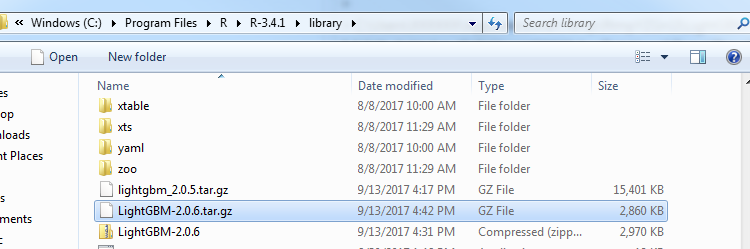

No luck.
Maybe there's something that I'm missing, but can someone give me some pointers on what to do here?
 BenjaminLott
All 18 comments
will it fail if you install python package from source?
 guolinke
on 13 Sep 2017
guolinke
on 13 Sep 2017
What is the command you used for method 2? libdll can't be "C:\\Program Files\\R\\R-3.4.1\\lib_lightgbm.dll" as it is where the LightGBM DLL should reside after installation.
In addition, if cp is not recognized, you need a bash with cp available in PATH environment variable. With a default Rtools installation, it should not happen because cp exists in C:/Rtools/bin, unless you deleted stuff in PATH.
 Laurae2
on 13 Sep 2017
Laurae2
on 13 Sep 2017
I am trying to install LightGBM on RHEL6 64 bit and am falling into similar issues. I also want to download the dependent packages for LightGBM but am unable to get the dependency tree resolved.
R version 3.2.5
I have tried the below methods:
- Installing using devtools::install_github(). Doesn't work gives me a warning message as below:
Warning message:
GitHub repo contains submodules, may not function as expected! - Installing from source (tar.gz) - Gives me below error:
Warning in untar2(tarfile, files, list, exdir, restore_times) :
skipping pax global extended headers
ERROR: cannot extract package from '/path/to/tar.gz'
Warning message:
In install.package
installation of package '/path/to/tar.gz' had non-zero exit status
Any suggestions are appreciated.
 sp-expl-R
on 14 Sep 2017
sp-expl-R
on 14 Sep 2017
will it fail if you install python package from source?
To my knowledge, it does not fail when I download the python package from source.

BenjaminLott
on 14 Sep 2017
I've just recently installed LightGBM for R (version 3.4.0 Patched) on Windows 10. This is what I did and it worked for me so here goes...
Prerequisites:
Install Git, CMake, Rtools (64bit), and Visual Studio (I also selected MS Build during the VS install options).
Add the following (or their equivalents on your system) to your PATH environment variable:
C:Program FilesRR-3.4.0patchedbinx64; C:Rtoolsbin; C:Rtoolsmingw_64bin
I don't think you need mingw_64 for this, but it's in mine anyway so I've included it for safety.
Then, the LightGBM installation:
- Click 'clone or download' on https://github.com/Microsoft/LightGBM and save as .zip
- Extract the .zip contents ('LightGBM-master') to C:LightGBM-master
- Run cmd as administrator and cd to C:LightGBM-masterR-package
- Run 'R CMD INSTALL --build . --no-multiarch' from the same cmd terminal.
Then running library(lightgbm) in R ought to load it up.
 charliekirkwood
on 14 Sep 2017
charliekirkwood
on 14 Sep 2017
Thank you Laurae and guolink for your replies and your work on this project, I actually figured out a way to get it to work. Turns out, there was a problem with my cmake path (ofcourse >:O)
This is the FULL process which should be reproducible (At least in Windows 7),
I'll try to include baby steps because it might help other people.
Step 1: Install cmake 64bit (https://cmake.org/download/)
Step 2: Install Visual Studio Developer Tools 2017 (or 2015??)
Step 3: Install Rtools 64bit
Step 4: Change PATH...
A. Start -> Control Panel -> System -> Advanced System Settings

B. System Properties window comes up, click on 'Advanced' tab, and then 'Environment Variables'
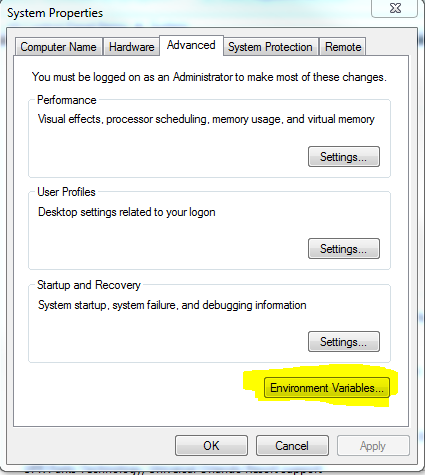
C. Environment Variables window comes up, scroll down on 'System Variables' and edit the 'Path' variable

D. Include the path in your computer to cmake and Rtools (I think mine for cmake was C:\Program Files\CMake\bin\cmake;)
Step 5: Install Laurae's lgbdl library, and load the library
devtools::install_github("Laurae2/lgbdl", force = TRUE)
Step 6: Then I followed Laurae's Code
lgb.dl(commit = "master",
       compiler = "vs",
       repo = "https://github.com/Microsoft/LightGBM")
and get this sweet sweet message

Thank you again guys for your help, I'm looking forward to using this awesome library :D
BenjaminLott
on 14 Sep 2017
Any suggestions for 64 bit Linux Users, either using DEVTOOLS or extracting from source.
sp-expl-R
on 14 Sep 2017
How can I install the lightgbm for R?Please give me some help
Installing using devtools::install_github(). Doesn't work gives me a warning message as below:
Warning message:
GitHub repo contains submodules, may not function as expected!
 Royhuiy
on 15 Oct 2017
Royhuiy
on 15 Oct 2017
How can I install the lightgbm for R?
The error as follow:
Error: package or namespace load failed for 'lightgbm' in inDL(x, as.logical(local), as.logical(now), ...):
无法载入共享目标对象‘C:/R/R-342/library/lightgbm/libs/x64/lib_lightgbm.dll’::
LoadLibrary failure: %1 不是有效的 Win32 应用程序。
Please help me.
Royhuiy
on 18 Oct 2017
error:
Error: package or namespace load failed for 'lightgbm' in inDL(x, as.logical(loc
al), as.logical(now), ...):
C:/R/R-342/library/lightgbm/libs/x64/lib_lightgbm.dll:
LoadLibrary failure: %1 Win32
how can I deal with it?
Royhuiy
on 18 Oct 2017
I followed exactly the same steps as mentioned by BenjaminLott to install lightgbm in R (3.4.0) and getting error with DESCRIPTION file.
Approach one:
lgb.dl(commit = "master", compiler = "vs", repo = "https://github.com/Microsoft/LightGBM")
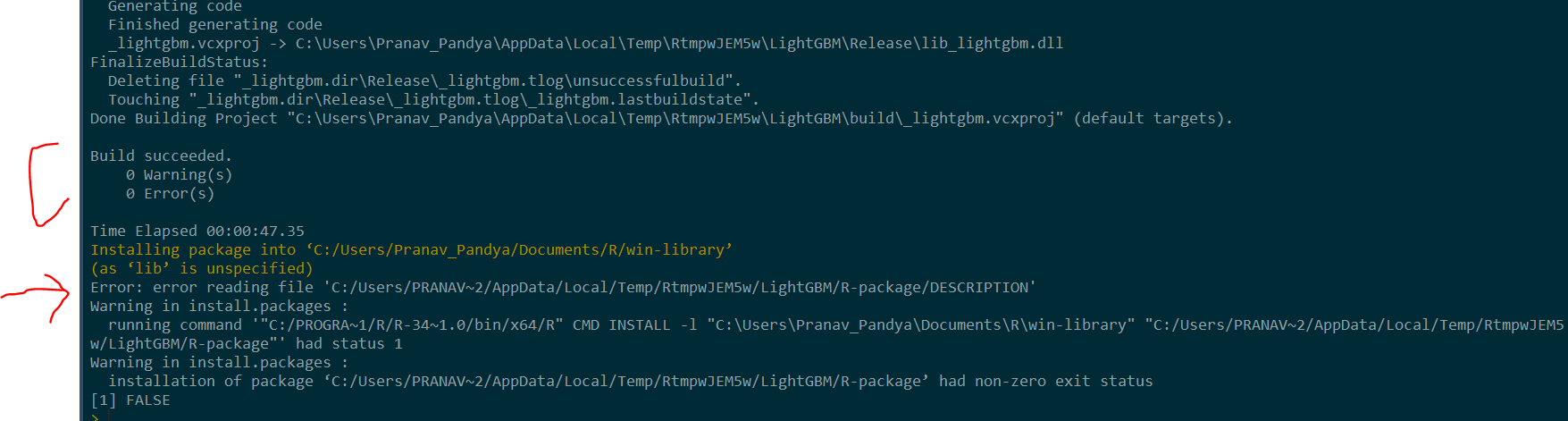
Approach two:
git clone --recursive https://github.com/Microsoft/LightGBM
cd LightGBM/R-package
Rscript build_package.R

R CMD INSTALL --build . --no-multiarch

Please help!
 pranavpandya84
on 18 Mar 2018
pranavpandya84
on 18 Mar 2018
@pranavpandya84 Duplicate: https://github.com/Microsoft/LightGBM/issues/1270
Laurae2
on 18 Mar 2018
Super! Thank you so much for the prompt response. I am able to install it successfully now. Thx.
pranavpandya84
on 18 Mar 2018
I'm trying to install lightGBM as specified by @BenjaminLott in R 3.4.3 and am getting the follwing error during step six
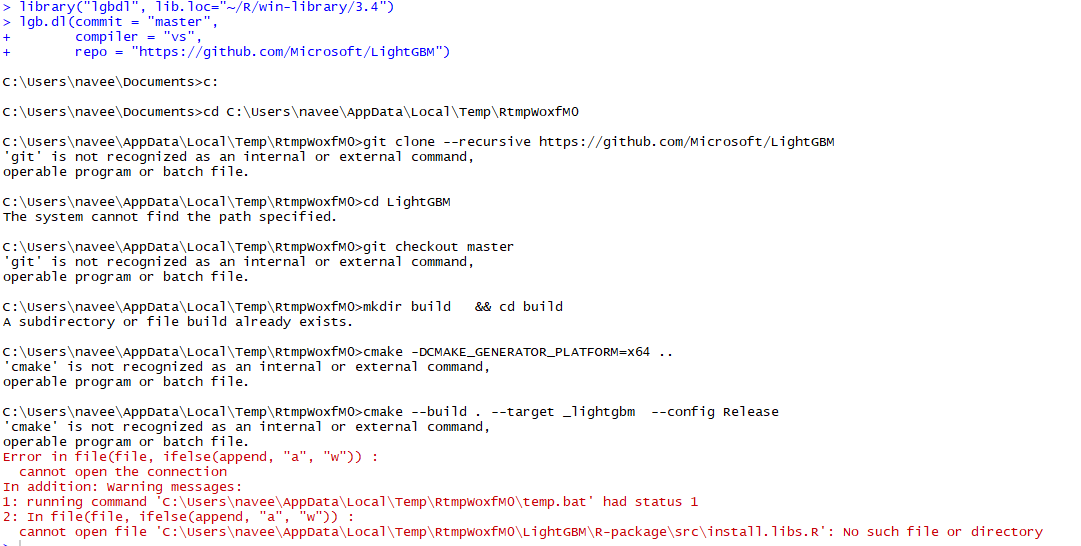
Can someone please help me.
 naveenraj96
on 23 Apr 2018
naveenraj96
on 23 Apr 2018
please install git
guolinke
on 24 Apr 2018
I have installed git. my git version is: git version 2.16.2.windows.1. I have also installed cmake version 3.11.1, visual studio 2017 (community) and Rtools 35. I have also installed lgbdl package and when I run the code in step 6 of @BenjaminLott I am getting the above error. Please help me.
naveenraj96
on 24 Apr 2018
@naveenraj96 Git is not available from command line as shown in the error message even though you installed it. Add Git to PATH so command line interfaces can access Git commands (open another issue if you can also).
Laurae2
on 24 Apr 2018
hey guys i just installed lightgbm package these are the steps to reproduce :
1 - git clone --recursive https://github.com/Microsoft/LightGBM
2 - cd LightGBM
3 - open R-package/src/install.lib and change use_precompile from FALSE to TRUE
4 - go to root directory of lightgbm and copy cmakelists and paste it to R-package/inst/bin
5 - cd lightGBM
6 - Rscript build_r.R
7 - cd r_lightgbm
8 - R CMD INSTALL --build . --no-multiarch
 mustaphaweather
on 7 Nov 2018
mustaphaweather
on 7 Nov 2018
Related issues
 hack-r
·
4Comments
hack-r
·
4Comments
 zanemarkson
·
3Comments
zanemarkson
·
3Comments
 jameslamb
·
3Comments
jameslamb
·
3Comments
jameslamb
·
3Comments
jameslamb
·
3Comments
 ClimbsRocks
·
3Comments
ClimbsRocks
·
3Comments
Most helpful comment
I've just recently installed LightGBM for R (version 3.4.0 Patched) on Windows 10. This is what I did and it worked for me so here goes...
Prerequisites:
Install Git, CMake, Rtools (64bit), and Visual Studio (I also selected MS Build during the VS install options).
Add the following (or their equivalents on your system) to your PATH environment variable:
C:Program FilesRR-3.4.0patchedbinx64; C:Rtoolsbin; C:Rtoolsmingw_64bin
I don't think you need mingw_64 for this, but it's in mine anyway so I've included it for safety.
Then, the LightGBM installation:
Then running library(lightgbm) in R ought to load it up.