Light-client: Make the Raiden account the default account when connecting to the dApp
User Story
As Chris I want to understand how the Raiden account works before using it the first time so that I can trust the dApp.
Acceptance criteria
- Toggle between Raiden account and Main Account on the General screen / Account screen
- The default account is the Raiden Account
- The toggle screen for the Main account details why someone would want to toggle on the Main account (as settings screen on the Raiden Account screen)
- User needs to know why they are not seeing their MetaMask account when connecting
User flow
A: Using the Raiden account
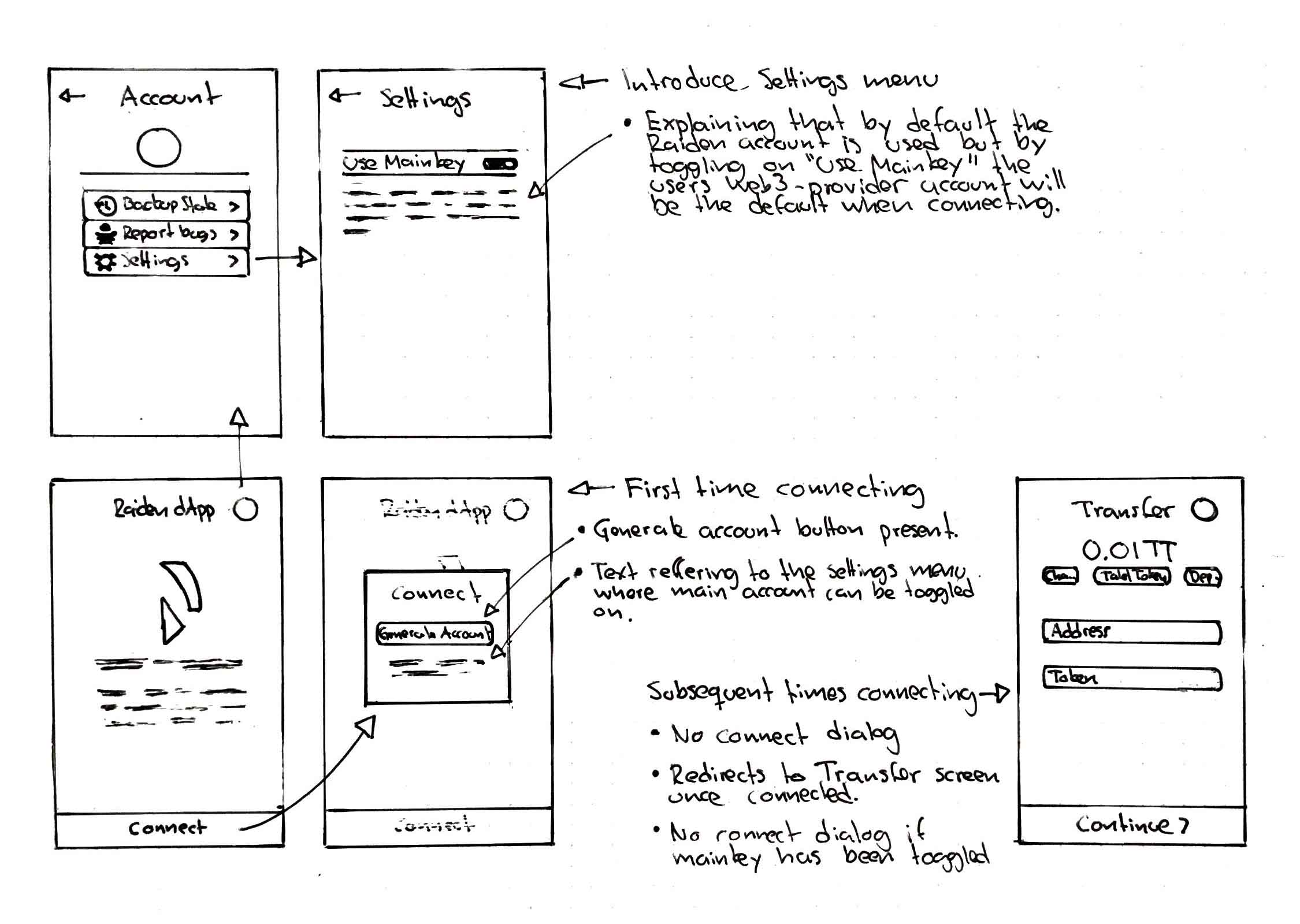
- User clicks on connect
- If he hasn't used a Raiden account before (for this URL and net), "Generate Account and key" with a brief explanation + referral to the settings screen for the main account
- If he has used a Raiden account before no pop-up
B: Using the Main account
- User clicks on the Identicon
- User clicks on Settings
- Brief explanation of main and raiden account
a. Main Account -> "You need to sign up to 7 messages manually for each transfer."
b. Raiden Account -> "Messages are signed automatically. You need to move back the tokens to your main account when leaving a token network." - User toggles to Main Account
- Main Account as default is getting stored locally
- User goes back to the connect screen
- User clicks on connect
- No pop-up
 christianbrb
All 13 comments
Split from #1108
christianbrb
on 7 Apr 2020
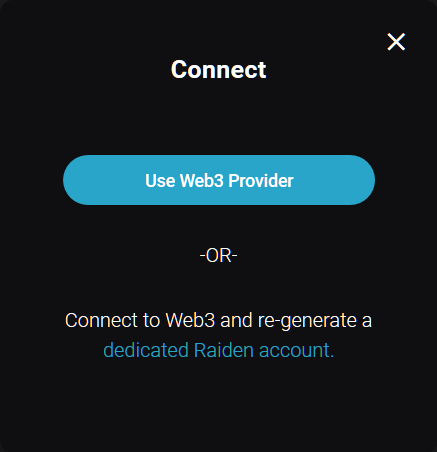
The user needs to know:
- He needs the Raiden Account address to receive transfers
- It is much more convenient (no pop-ups)
- The user needs to transfer tokens and ETH back manually to the main account
It should get explained here:
christianbrb
on 24 Apr 2020
In accordance with the user flow outlined in the issue description.
 taleldayekh
on 5 May 2020
taleldayekh
on 5 May 2020
Mockups for the updated connect button:
https://xd.adobe.com/view/28299435-4e57-487f-4745-55d76b62b496-5e18/
Mockups for the settings menu:
https://xd.adobe.com/view/4fb866db-3093-41e1-5887-4d97d8bc4526-3989/
taleldayekh
on 5 May 2020
@taleldayekh Looks great thanks :)
instead of

we should write You can use your web3 account directly ...
Maybe Settings above Report bugs
christianbrb
on 5 May 2020
Good point @christianbrb, we'll put settings on the top. I'll change the wording as well.
taleldayekh
on 5 May 2020
Mockup links have been updated.
taleldayekh
on 5 May 2020
What should happened if the user is already connected (e.g. via subkey) and then toggles to main account from the settings screen?
- Nothing, setting will apply once the user connects next time to the raiden network
- Dialog appears and tells the user that he will get disconnected and can reconnect then with the selected account
- No dialog, just disconnect immediately after toggling and go back to home screen where user can press connect again
 nephix
on 6 May 2020
nephix
on 6 May 2020
Would it make sense to only display the toggle setting when a user is disconnected?
A user would have to make that decision before connecting.
taleldayekh
on 6 May 2020
I thought about that, but then there would be an empty settings menu item..
We could hide it completely until there are more settings that should be displayed even while connected maybe?
nephix
on 6 May 2020
Out of the 3 suggestions above the one that seems more reasonable to me is the 2nd one.
 kelsos
on 6 May 2020
kelsos
on 6 May 2020
I would say we hide it completely until we have more settings. Why would you want to change the account once already connected?
taleldayekh
on 6 May 2020
Ok I'm just going to hide it then, it's also the simplest solution..
nephix
on 6 May 2020
Related issues
 andrevmatos
·
4Comments
taleldayekh
·
4Comments
andrevmatos
·
4Comments
taleldayekh
·
4Comments
 agatsoh
·
3Comments
agatsoh
·
3Comments
 MrCleanerPickerUpper
·
6Comments
MrCleanerPickerUpper
·
6Comments
 eorituz
·
4Comments
eorituz
·
4Comments
Most helpful comment
Mockup links have been updated.