libtorrent able to use 2 or more CPU Core instead of 1?
Please provide the following information
libtorrent version (or branch):
qbittorrent 4.1.0
platform/architecture:
windows 10 x64 1803
please describe what symptom you see, what you would expect to see instead and
how to reproduce it.
Sorry for my english
Hungary second biggest ISP gives for every subscriber 1000/200mbit FTTH internet
and I can not use the whole download speed because qbittorrent
can handle only 1CPU core at the same time...
I have Samsung 850 EVO 500GB SSD with an i5-2540M CPU in my notebook
if i download to SSD the CPU usage will go to 100% on the first CPU core but the download speed only 700-800mbit/s, the second CPU core and the 2 other threads going on 20% only
Qbittorrent or libtorrent can not use 2 or more CPU core at the same time to reach higher download speed with a slower CPU+SSD?
It will be much better if all CPU core with all CPU threads at 80% instead of CPU core1 100% CPU core2 20% CPU threads 20% too
could this be solved in the future or qbit/libtorrent will use only 1CPU core forever?
 djtj85
All 55 comments
which version of libtorrent are you using?
how many disk io threads are you using?
 arvidn
on 6 May 2018
arvidn
on 6 May 2018
qbittorrent 4.1.0 (libtorrent 1.1.7) on windows 10 x64 1803
where can i find disk io threads?
if i watch the task manager 13% CPU usage when
only seeding with 66mbit/sec (118 active seeds)

CPU Core1 100% if
downloading with 674mbit/sec but Core2 under 50% and CPU threads 3 and 4 under 50% too

I think this meaning libtorrent using only 1 CPU core and if able to use 2-3-4-6-8 core at same time then slower but 2c4t i5 CPU-s can be faster then 7-800mbit
What do you think?
I am lucky to have 1000/200mbit internet but not easy to use this speed for bittorrent download because only SSD is fast enough and my Sandy Bridge i5-2540M can reach only 7-800mbit at 100% CPU core usage
djtj85
on 6 May 2018
arvidn
on 6 May 2018
diskio threads = max number of connections on qbittorrent?
global 600
upload 600
i don't know where to find this aio threads in qbittorrent 4.1.0
djtj85
on 6 May 2018
neither do I. you may want to ask some qBT developer. @sledgehammer999 maybe?
arvidn
on 6 May 2018
@arvidn thanks for pointing me to the correct libtorrent setting.
@djtj85 unfortunately we don't expose that setting in the GUI. We might add it.
 sledgehammer999
on 6 May 2018
sledgehammer999
on 6 May 2018
Hmm, wait. The docs say that the default value for threads is 4. And we don't change that. So shouldn't @djtj85 see more that one core maxed out?
sledgehammer999
on 6 May 2018
The core that's maxed out is the one with the network thread on it. Libtorrent handles all network I/O on a single thread and changing that would be a major undertaking.
 ssiloti
on 6 May 2018
ssiloti
on 6 May 2018
if core 1 maxed out download speed reach the limit at 7-800mbit on my notebook
i have 2 PC too with i7-4790K CPU and Samsung 850Pro SSD, there i can use the full 1gbit speed (117megabytes/s) for download because that CPU have much better 1 core performance (4,4GHz 1core turbo and Devils Canyon core not Sandy Bridge mobile i5)
I think i5-2540M could reach the 900+mbit too but with 1 core its impossible :-(
If libtorrent/qbit can use 2 core or 2core/4threads at same time then slower CPU-s could reach much higher download speeds
what do you think?
I know in other countries the subscribers have only 50-100-200mbit internet
so they will never max out the CPU but in Hungary we have FTTH everywhere and ISP gives for each subscriber 1000/200mbit, the other ISP Hungarian Telekom 2000/500mbit oh my god :)
I downloaded today with qbit 4.1.0 291GB and uploaded 689GB so much better than utorrent 2.2.1
djtj85
on 6 May 2018
@ssiloti my experience is that the vast majority of the CPU usage is the SHA-1 hashing, which is done in the disk threads.
I've done 1 GiB/s when disabling hashing and disk-I/O on my macbook.
arvidn
on 6 May 2018
Only 1 in 4 disk I/O threads is used for hashing, so the default of 4 threads means there is only 1 hash thread. Setting the disk I/O thread count to 8 will create 2 hash threads which should allow full utilization of a dual core CPU.
ssiloti
on 6 May 2018
what can i do to reach 800+ mbit download speed with this i5-2540M CPU?
should I turn off "OS cache" or "smart read cache"? This will maybe help something?
the disk cache i set to 512MiB, protocol TCP only
@ssiloti your idea sounds good, maybe developers can upgrade the client
djtj85
on 6 May 2018
If you dare, you could try turning off hyperthreading on the CPU in the computer's bios.
Maxing out a CPU core then should be much harder for qBT to do...but it will mean you only have 2 CPU cores instead of the current 4 virtual CPU cores.
In my earlier tests...
Send upload piece suggestions cripples upload speed for some reason.
The other cache options have less effect and probably best left on.
For what it's worth, qBitTorrent sometimes reaches 70-73% CPU usage on my i5-650 3.2 Ghz CPU...but I'm doing LAN and virtual LAN tests with it, so those aren't comparable.
 Seeker2
on 7 May 2018
Seeker2
on 7 May 2018
The docs say that the default value for threads is 4.
Lets say we bumped this value to 8, will there be any downside? I mean for embedded systems like rpi, or dual-core CPU? Or I/O issues?
 Chocobo1
on 7 May 2018
Chocobo1
on 7 May 2018
Using more threads may be slightly slower on anything that doesn't need the extra threads.
I guess I/O issues could appear from multiple threads somehow deadlocking I/O resources by calling them at the same time.
Seeker2
on 7 May 2018
more threads will use slightly more resources. The main reason to use more threads is to allow more outstanding disk I/O, since those calls are blocking, more threads means a deeper queue of I/Os for the kernel to schedule. I would imagine this to be an advantage primarily when you have beefy disks with a large bandwidth-delay-product (either very high throughput or high latency).
In this case, I would definitely bet on 8 threads making a big difference for download rate, to spread the SHA-1 calculations over multiple threads.
arvidn
on 7 May 2018
2-4-6-8 core CPU-s (Intel i3+i5+i7 and AMD Ryzen 4-6-8 core with 8-12-16threads) will be able to handle it better if this value will be set from 4 to 8?
djtj85
on 7 May 2018
Yes, as I mentioned earlier, one main purpose of the threads is not to peg a core, but to block in a disk I/o call.
arvidn
on 7 May 2018
thank you
i hope @Chocobo1 will add this feature to next qbittorrent build and we will be able to try it
djtj85
on 7 May 2018
@djtj85 here's a qbt v4.1.0 build with aio_threads hardcoded to 8 instead of 4. Do you see improvement?
Link: https://builds.shiki.hu/temp/qbittorrent_4.1.0_x64_patched_aio_threads.7z
sledgehammer999
on 8 May 2018
I am sad
still only CORE1 at 100% usage and the CORE2 and T3+T4 only under 50%
as you can see i had 900+ mbit download but my mouse lagging because CORE1 at maximum

can try this anybody else who have 1gbit down speed and 2-4-6-8core CPU with win10 x64?
djtj85
on 8 May 2018
But at least you saw download speed impovement, right?
Previously you achieved 700-800mbps and now 900+ mbps, correct?
sledgehammer999
on 8 May 2018
previously i was able to reach 900+ mbit download but with bouncing near at 100% Core1 usage and its a little bit frustrating because mouse were lagging...
the new 8 aio_threads gives the same but constant 100% usage on Core 1 with same mouse lagging...
@Lash78 made a test too, i send the results (he have 1/1gbit Fiber Internet with much better 6 core 12 threads CPU)
first with 4 aio_threads
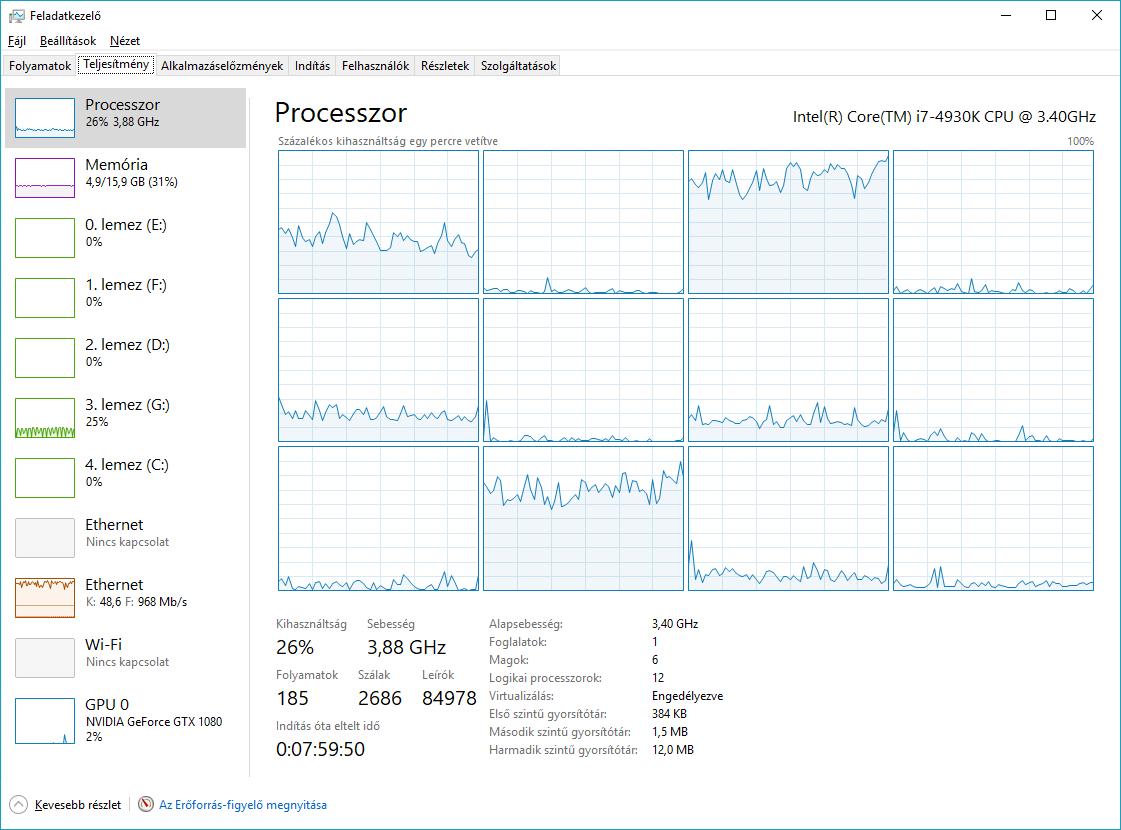
then with 8 aio_threads options

He said there was no difference
djtj85
on 8 May 2018
iirc, the disk threads that do SHA-1 hashing, also do disk I/O. I wonder if they get blocked by disk I/O jobs often enough to not let them peg a core doing SHA-1. it would be interesting to see what happens with aio_threads set to 32 or 64.
arvidn
on 8 May 2018
At this point the bottleneck is likely network or disk I/O. The fact that mouse movement is impacted suggests the system is being stressed by something other than hash computation. Moving the mouse cursor is a very high priority task, it is not something userspace computation should be able to impact. There is probably some lock contention going on in the kernel which would likely be caused by the network or disk drivers. Some popular consumer network interfaces have horrendously inefficient drivers which struggle to hit 1Gbps while pegging the CPU to 100%. What sort of CPU load do you see when running a network speed test?
I would normally say the disk is unlikely to be a problem here, but the performance monitor shows your disk at 100% active time which is suspicious for such a relatively low-throughput workload.
ssiloti
on 8 May 2018
I updated the LAN driver (Asus K53 notebook with Atheros 8151 PCI-e gbit LAN)
and I added 1 linux ISO (8GB file size to Samsung 850EVO 500GB SSD) nothing else ran in qbittorrent
the results at 800mbit download speed
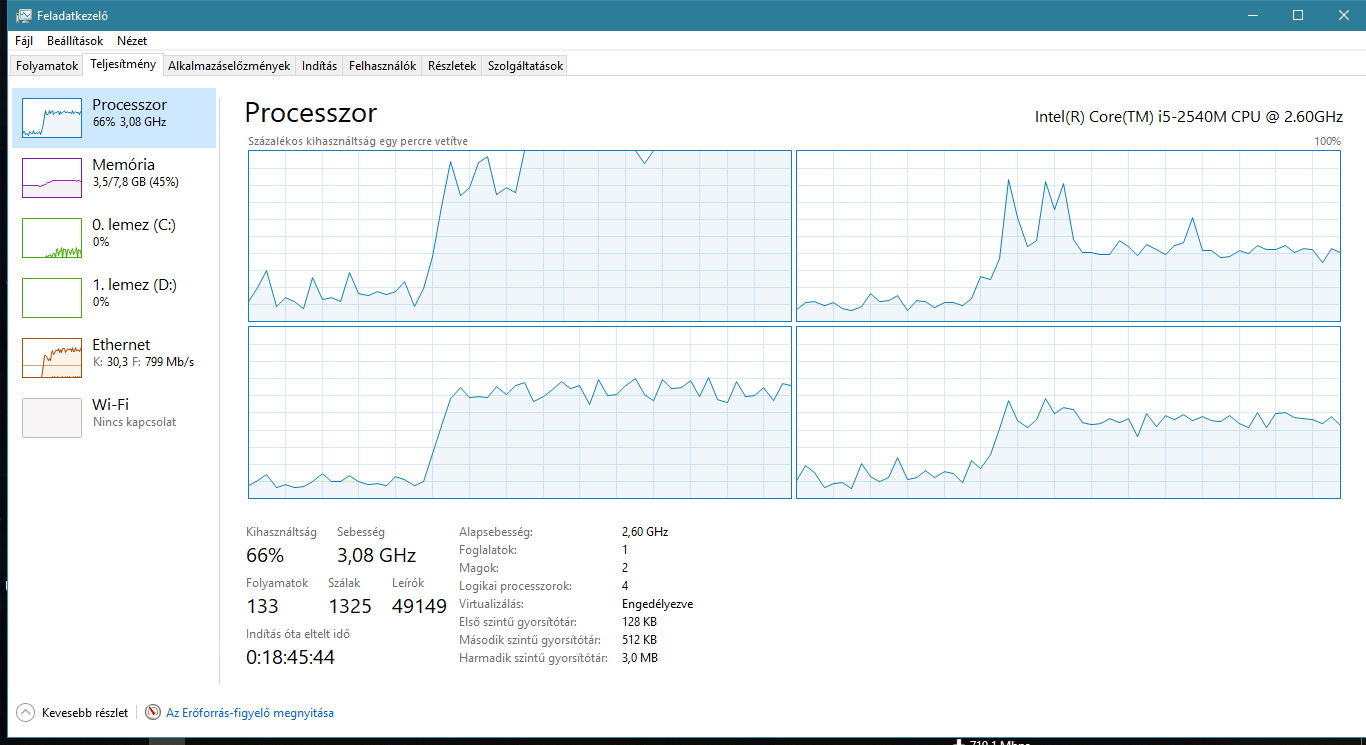
djtj85
on 8 May 2018
speedtest in google chrome (500mbit download all core and threads above 80%)

speedtest in Firefox latest (550mbit download all core above 80%)

speedtest with speedtest app (from market) (880mbit download speed only core 1 above 80% others under 20%)

qbittorrent 4.1.0 is much better than uTorrent 2.2.1 which i used before
with utorrent i've never been able to reach above 650mbit download speed (CPU core1 @ maximum)
with qbittorrent 4.1.0 i can reach 900+ mbit with 100% cpu core 1 usage
for me this is much much better, I just did not understand why not working all 2c4t why only Core1 at 100%
maybe you can find out how to improve libtorrent or qbittorrent for an older 2c4t or 2c2t CPU-s
if not possible then everything will remain so
i will set a 90MiB download limit and CPU core1 will not go above 95%
djtj85
on 8 May 2018
@djtj85 give me ~25 minutes and I'll post a build with aio_threads = 32.
sledgehammer999
on 8 May 2018
Build with 32 aio_threads: https://builds.shiki.hu/temp/qbittorrent_4.1.0_x64_patched_aio_threads_to_32.7z
sledgehammer999
on 8 May 2018
results with aio_threads = 32
CPU Core1 constant 100%, CPU Core2 much higher then with aio_threads 4 or 8
but now download speed dropped from 900+ mbites to 500-600mbites
i think i will use the original aio_threads 4
I can live with it together if CPU core 1 at 100% but at least I can download very fast
i will buy a new notebook with better CPU, i think this Sandy Bridge i5 does not want to work well
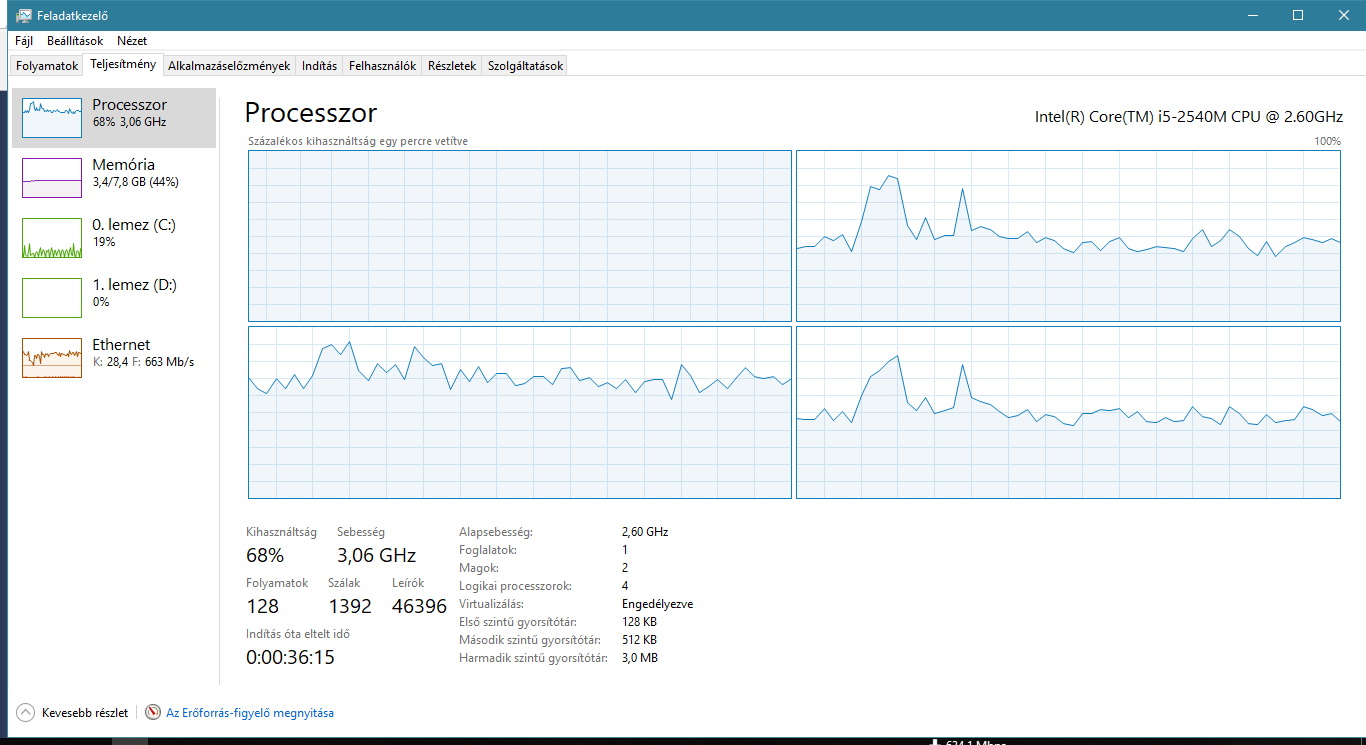
djtj85
on 9 May 2018
As a temporary workaround, it may be possible to lock qBitTorrent to a CPU core or cores (affinity) that's less heavily used and move other things off it.
Then qBT might be slightly faster while having less visible effects on everything else.
Seeker2
on 9 May 2018
If SHA1 hashing is the bottleneck, wouldn't it make sense to use the SHA intel extensions where available?
 the8472
on 12 May 2018
the8472
on 12 May 2018
yes it would
arvidn
on 12 May 2018
What code does libtorrent use for SHA? It's own or openssl functions?
sledgehammer999
on 12 May 2018
OpenSSL (if libtorrent is built to link against OpenSSL), otherwise there's a built-in "reference" implementation.
arvidn
on 12 May 2018
the tasks can not share between two CPU cores?
I mean this SHA1 hashing can not run the second CPU core, everything else the first CPU core?
djtj85
on 13 May 2018
I mean this SHA1 hashing can not run the second CPU core, everything else the first CPU core?
In your case I suspect that is exactly what is already happening, and SHA1 hashing is not the bottleneck. The speedtest results show that just downloading at ~900 Mbps and doing nothing with the data is using ~80% of one core. Downloading with bittorrent likely imposes even higher overhead due to multiple streams and uTP, such that the maxed out core is doing almost nothing other than servicing network I/O. One thing you can try is disabling uTP to see if that reduces the overhead any. Even then, it looks like that system is always going to struggle to saturate a 1Gbps link.
ssiloti
on 13 May 2018
Here is a build with disable_hash_checks set to true. And aio_threads to their default value.
Link: https://builds.shiki.hu/temp/qbittorrent_4.1.0_x64_patched_disable_hash_checks_to_true.7z
sledgehammer999
on 13 May 2018
@ssiloti i'm using qbittorrent always in "TCP only" mode
i have 1000/200mbit FTTB internet and its not need to use uTP
djtj85
on 13 May 2018
@sledgehammer999 I tried your build but the same
CPU Core1 constantly at maximum
Core2-3-4 close to 50% but under 50%
I returned back to original 4.1.0 qbit
It's working fine i will use a download speed limit and CPU Core1 will not operate at maximum
I can not do anything else
djtj85
on 16 May 2018
@djtj85
Did you try binding qBitTorrent to other processor cores to at least cut down on the lag on the system when it maxes out CPU Core1?
It's easier to do than disabling Hyperthreading, which might cause other problems.
Seeker2
on 17 May 2018
@sledgehammer999
Just so you know, I'm running the v4.1.0 build with the 32 aio threads and am seeing a MASSIVE improvement in performance.
I'm on Server 2016 w/ Ryzen 1700x and am writing/reading directly to my NAS via SMB multichannel (4 Gbps aggregate throughput between server and NAS).
Had issues with the writes getting choked when download speeds exceeded 500 Mbps or so, now I can download at 800+ Mbps sustained. None of my other settings changed other than the aio thread increase. Additionally, seeding speeds have significantly improved as well. I'm a 1Gpbs up and down fiber link.
 jonboy345
on 11 Jun 2018
jonboy345
on 11 Jun 2018
@arvidn Hi, I want to ask a basic question about this topic.
Which library or system call does libtorrent use to make a "multi-threading" environment?
Maybe it will cause libtorrent using "User Thread" in Windows OS, so it will not use multiple process/thread to handle the stuff.
 tjjh89017
on 13 Jun 2018
tjjh89017
on 13 Jun 2018
libtorrent uses real threads. in 1.1x and older it uses boost.asio's thread abstraction and in master it uses the standard library
arvidn
on 13 Jun 2018
According to Boost 1.67 asio implementation
It seems Boost.Asio using the overlapped I/O and select in Windows. It isn't a "TRUE thread" for OS because Windows doesn't know there are multiple threads. (I'm not sure if it is same in Linux)
The most important issue will be the implementation. (SHA1 checking and disk I/O are in the "same" thread)
SHA1 checking may block the scheduling in Boost.Asio, so there will only 1 SHA1 checking in OS.
Maybe some users say torrent checking in qBittorrent will be stuck sometimes because of this issue, too.
Please correct me if there is something wrong.
tjjh89017
on 13 Jun 2018
that's all correct. However, you seem to suggest that using asynchronous I/O is mutually exclusive with using threads, it isn't.
arvidn
on 13 Jun 2018
@djtj85 Could you upload a image that display qBitorrent in Task Manager Process Tab
Like this

My qBt always runs in a low CPU usage. But it still hangs while my script access to the qBt webUI to get torrent status.
Environment:
- Windows Server 2016 x64
- Dual E5-2620v2
- 2Tx4 HDD RAID0
tjjh89017
on 13 Jun 2018
@arvidn I knew it could use "Multi-Processing" and "Asynchronous I/O (Event-Driven)" simultaneously.
(I will use "Multi-Processing" rather than "Thread" or something else to represent which OS can schedule the jobs to multi-core)
I'm not sure the Thread Model that Windows used.
In Linux, if you use a thread (e.g. pthread or else), it will 1-to-1 map to a process, so kernel will know they can be scheduled to multi-core. As shown below. (EZIO is a libtorrent-based program, that doesn't fork or create threads)

But you can see the pic above. There is only one process in Windows Task Manager.
I thought that will be the Boost implementations in different platforms are different.
That may cause libtorrent is high performance in Linux but not in Windows.
So...
Is it possible to use multi-core in Windows?
@jonboy345 Thanks
tjjh89017
on 13 Jun 2018
@tjjh89017
Libtorrent uses the same threading model on all platforms. Windows does not show threads as separate line items in the process list. To see the number of threads a process has you need to go to the Details tab and enabled the Threads column.
ssiloti
on 13 Jun 2018
@ssiloti Yes, you are right!!!
Thanks for your reminder.
So if we increase the numbers of aio_threads, will it increase the performance too?
tjjh89017
on 13 Jun 2018
possibly, unless the bottleneck is on the network thread (which there is only one of)
arvidn
on 13 Jun 2018
@arvidn Thanks
Maybe I can have some tests and try to improve EZIO.
tjjh89017
on 13 Jun 2018
@tjjh89017 next week i will be at home and i will test my 1gbit FTTH internet
djtj85
on 14 Jun 2018
@sledgehammer999 FYI, I write some code to enable modifying "aio_threads" field in qBittorrent
qbittorrent/qBittorrent#9109
Take a look.
Thanks a lot.
tjjh89017
on 18 Jun 2018
This issue has been automatically marked as stale because it has not had recent activity. It will be closed if no further activity occurs. Thank you for your contributions.
![stale[bot] picture](https://avatars3.githubusercontent.com/in/1724?v=4&s=40) stale[bot]
on 29 Feb 2020
stale[bot]
on 29 Feb 2020
Related issues
ssiloti
·
24Comments
 silverqx
·
23Comments
silverqx
·
23Comments
 kevincox
·
155Comments
kevincox
·
155Comments
 xnoreq
·
84Comments
xnoreq
·
84Comments
 fastesol
·
17Comments
fastesol
·
17Comments