Libretime: no ssl available for output stream
Hi at all,
I want to integrate the player widget in my site, but my browser shows me mixed content because of the stream from http. I have a working setup for icecast with ssl, but I am not able to set right address. I can set port, but not protocoll.
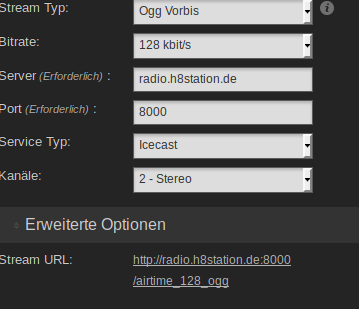
Where can I change this?
Thank you.
 drh8ball
All 16 comments
This is a unsolved problem currently but should be high on our priority. I suspect that the easiest way to fix it would be to look at the widget code itself.
 Robbt
on 6 Sep 2018
Robbt
on 6 Sep 2018
I've done this, the URL is set over php and js, but i dont know from where, I am trying in liquidsoap.cfg
drh8ball
on 6 Sep 2018
Changing settings in liquidsoap does not solve the problem, it is overwritten after saving settings.
Changing settings in /usr/share/airtime/php/airtime_mvc/public/js/airtime/preferences/streamsetting.js takes effect on liquidsoap.cfg only ....
drh8ball
on 6 Sep 2018
checkout the files in airtime_mvc/public/widgets - I'm not sure if that is where it actually is coming from but there is a js file.
Like much of this project unfortunately whomever wrote the code in the first place is no longer around and a lot of the knowledge we have is dependent upon us digging through the codebase to try to find answers.
Looking at the path in the url embeddablewidgets I did grep -ir 'embeddablewidgets' *
in the source directory and I found application/controllers/EmbeddablewidgetsController.php & airtime_mvc/application/views/scripts/embeddablewidgets/player.phtml
I'd check those out for a possible answer to your problem. I'd do more digging for you myself but I'm trying to get as much done while my daughter is taking a nap. Let us know if you find a good solution/hack. It is something I need to fix as well.
Robbt
on 6 Sep 2018
My hack is very very dirty, but it works.
I will search for a clean way, but I am no php coder.
In /usr/share/airtime/php/airtime_mvc/application/models/StreamSetting.php on line 81 i did this:
$url = "http://$host:$port/$mount"; --> $url = "https://$host:8443/$mount";
I think about making a new checkbox "alternate url" under settings output stream stream X.
If it is checked, there will be a textbox for the string, this must be written to database, from there we can use it directly in my file, without this dirty hack.
drh8ball
on 6 Sep 2018
I started work on this in https://github.com/radiorabe/libretime/commit/d0357a47d3489dfac2bdc0c9ac79a853d66f1e12 but didn't get around to really testing any of it.
 hairmare
on 15 Oct 2018
hairmare
on 15 Oct 2018
Hi all,
I have seen that you also have the problem that basic icecast does not have SSL support.
I have solved it on my servers by recompiling icecast with support for ssl.
In the future, if linux distributions do not fix this problem, you can think about creating a libretime repository, contain the packages needed to install this program from the terminal with something like: "sudo apt install libretime" and there will be a modified version of icecast with SSL support.
Since modifying icecast on the Libretime server also means fighting with Libretime, then I have chosen to use a second icecast server with SSL, and modify the Libretime configuration to use the custom server instead of the internal one.
In this way the operation of Libretime is not touched and we have the SSL support in output.
In the input still without SSL, but it is a much smaller problem
In the meantime I pass my notes (in Spanish ... sorry) to install SSL icecast in armbian (ubuntu 18.04)
....al parecer en Ubuntu el paquete icecast2, no está compilado con soporte ssl, así que tenemos que volver a compilarlo nosotros mismo.
Comparto aquí mis notas, por la posteridad y para mi futura referencia en el caso lo necesite.
Voy a asumir que ya tines instalado ispConfig en tu armbian (OrangePi Pc2 en mi caso), de que tienes IP fija y pública (123.123.123.100) de que tienes un subdominio asignado desde tu registar con un record A, por ejemplo así:
radio.example.org -> 123.123.123.100
1) Crea una web en ispConfig con SSL y Let's Encrypt al subdominio radio.example.org con IP 123.123.123.100.
No hace falta nada mas. Esta pagina web en realidad no se va a usar si fuera para los cerfiticados SSL.
2) Ahora vamos a desistalar si aúno no lo has hecho eventuales isntalaciones de icecast2
# apt remove --purge icecast2
3) vamos preparar el entorno de compilación para icecast:
# apt install git gcc build-essential libcurl4-openssl-dev libxslt1-dev libxml2-dev libogg-dev libvorbis-dev libflac-dev libtheora-dev libssl-dev libspeex-dev
4) ahora bajamo el último código fuente disponible de icecast
# git clone --recursive https://git.xiph.org/icecast-server.git  (tarda un poco a mostrar algo... espera)
# cd icecast-server
# ./autogen.sh
# ./configure --with-curl --with-openssl
# make -j4  (si tu placa tiene 8 núcleos, pon -j8 ... y si solo quieres usar 2 pon -j2)
# make install
5) ahora hay que crear un usuario para icecast
# adduser --disabled-password --gecos "" icecast
6) crear logs
# mkdir -p /var/log/icecast/
# touch /var/log/icecast/error.log
# touch /var/log/icecast/access.log
# chown -R icecast.icecast /var/log/icecast
# chown -R icecast.icecast /etc/icecast
7) ahora el certificado SSL ya creado en ispconfig para la pagina web radio.example.org
# mkdir /etc/icecast/ssl/
# touch /usr/local/bin/icecastLetEncrypt.sh
# chmod 755 /usr/local/bin/icecastLetEncrypt.sh
# mcedit /usr/local/bin/icecastLetEncrypt.sh
y escribe algo así:
#!/bin/bash
cat /etc/letsencrypt/live/radio.example.org/cert.pem \
/etc/letsencrypt/live/radio.example.org/privkey.pem \
> /usr/share/icecast/icecast.pem
chown icecast.icecast /etc/icecast/ssl/icecast.pem
chmod go-r /etc/icecast/ssl/icecast.pem
8) ahora la configuración de icecast:
<icecast>
    <!-- location and admin are two arbitrary strings that are e.g. visible
         on the server info page of the icecast web interface
         (server_version.xsl). -->
    <location>ESpaña</location>
    <admin>[email protected]</admin>

    <!-- IMPORTANT!
         Especially for inexperienced users:
         Start out by ONLY changing all passwords and restarting Icecast.
         For detailed setup instructions please refer to the documentation.
         It's also available here: http://icecast.org/docs/
    -->

    <limits>
        <clients>100</clients>
        <sources>2</sources>
        <queue-size>524288</queue-size>
        <client-timeout>30</client-timeout>
        <header-timeout>15</header-timeout>
        <source-timeout>10</source-timeout>
        <!-- If enabled, this will provide a burst of data when a client
             first connects, thereby significantly reducing the startup
             time for listeners that do substantial buffering. However,
             it also significantly increases latency between the source
             client and listening client.  For low-latency setups, you
             might want to disable this. -->
        <burst-on-connect>1</burst-on-connect>
        <!-- same as burst-on-connect, but this allows for being more
             specific on how much to burst. Most people won't need to
             change from the default 64k. Applies to all mountpoints  -->
        <burst-size>65535</burst-size>
    </limits>

    <authentication>
        <!-- Sources log in with username 'source' -->
        <source-password>MySecretPasswd</source-password>
        <!-- Relays log in with username 'relay' -->
        <relay-password>MySecretPasswd</relay-password>

        <!-- Admin logs in with the username given below -->
        <admin-user>admin</admin-user>
        <admin-password>MySecretPasswd</admin-password>
    </authentication>

    <!-- set the mountpoint for a shoutcast source to use, the default if not
         specified is    /stream but you can change it here if an alternative is
         wanted or an extension is required
    <shoutcast-mount>/live.nsv</shoutcast-mount>
    -->

    <!-- Uncomment this if you want directory listings -->
    <!--
    <directory>
        <yp-url-timeout>15</yp-url-timeout>
        <yp-url>http://dir.xiph.org/cgi-bin/yp-cgi</yp-url>
    </directory>
    -->

    <!-- This is the hostname other people will use to connect to your server.
         It affects mainly the urls generated by Icecast for playlists and yp
         listings. You MUST configure it properly for YP listings to work!
    -->
    <hostname>radio.example.org</hostname>

    <!-- You may have multiple <listener> elements -->
    <listen-socket>
        <port>8000</port>
        <!-- <bind-address>127.0.0.1</bind-address> -->
        <!-- <shoutcast-mount>/stream</shoutcast-mount> -->
    </listen-socket>
    <!--
    <listen-socket>
        <port>8080</port>
    </listen-socket>
    -->

    <listen-socket>
        <port>8443</port>
        <ssl>1</ssl>
    </listen-socket>


    <!-- Global header settings
         Headers defined here will be returned for every HTTP request to Icecast.

         The ACAO header makes Icecast public content/API by default
         This will make streams easier embeddable (some HTML5 functionality needs it).
         Also it allows direct access to e.g. /status-json.xsl from other sites.
         If you don't want this, comment out the following line or read up on CORS.
    -->
    <http-headers>
        <header name="Access-Control-Allow-Origin" value="*" />
    </http-headers>


    <!-- Relaying
         You don't need this if you only have one server.
         Please refer to the config for a detailed explanation.
    -->
    <!--<master-server>127.0.0.1</master-server>-->
    <!--<master-server-port>8001</master-server-port>-->
    <!--<master-update-interval>120</master-update-interval>-->
    <!--<master-password>hackme</master-password>-->

    <!-- setting this makes all relays on-demand unless overridden, this is
         useful for master relays which do not have <relay> definitions here.
         The default is 0 -->
    <!--<relays-on-demand>1</relays-on-demand>-->

    <!--
    <relay>
        <server>127.0.0.1</server>
        <port>8080</port>
        <mount>/example.ogg</mount>
        <local-mount>/different.ogg</local-mount>
        <on-demand>0</on-demand>

        <relay-shoutcast-metadata>0</relay-shoutcast-metadata>
    </relay>
    -->


    <!-- Mountpoints
         Only define <mount> sections if you want to use advanced options,
         like alternative usernames or passwords
    -->

    <!-- Default settings for all mounts that don't have a specific <mount type="normal">.
    -->
    <!--
    <mount type="default">
        <public>0</public>
        <intro>/server-wide-intro.ogg</intro>
        <max-listener-duration>3600</max-listener-duration>
        <authentication type="url">
                <option name="mount_add" value="http://auth.example.org/stream_start.php"/>
        </authentication>
        <http-headers>
                <header name="foo" value="bar" />
        </http-headers>
    </mount>
    -->

    <!-- Normal mounts -->

    <mount type="normal">
        <mount-name>/stream2.mp3</mount-name>

        <username>Tester</username>
        <password>MySecretPasswd</password>

        <max-listeners>100</max-listeners>
        <!--dump-file>/tmp/dump-example1.ogg</dump-file-->
        <burst-size>65536</burst-size>
        <!--fallback-mount>/example2.ogg</fallback-mount>
        <fallback-override>1</fallback-override>
        <fallback-when-full>1</fallback-when-full>
        <intro>/example_intro.ogg</intro-->
        <hidden>1</hidden>
        <public>1</public>
        <!--authentication type="htpasswd">
                <option name="filename" value="myauth"/>
                <option name="allow_duplicate_users" value="0"/>
        </authentication-->
        <http-headers>
                <header name="Access-Control-Allow-Origin" value="*" />
        </http-headers>
        <!--on-connect>/home/icecast/bin/stream-start</on-connect>
        <on-disconnect>/home/icecast/bin/stream-stop</on-disconnect-->
    </mount>


    <!--
    <mount type="normal">
        <mount-name>/example-complex.ogg</mount-name>

        <username>othersource</username>
        <password>hackmemore</password>

        <max-listeners>100</max-listeners>
        <dump-file>/tmp/dump-example1.ogg</dump-file>
        <burst-size>65536</burst-size>
        <fallback-mount>/example2.ogg</fallback-mount>
        <fallback-override>1</fallback-override>
        <fallback-when-full>1</fallback-when-full>
        <intro>/example_intro.ogg</intro>
        <hidden>1</hidden>
        <public>1</public>
        <authentication type="htpasswd">
                <option name="filename" value="myauth"/>
                <option name="allow_duplicate_users" value="0"/>
        </authentication>
        <http-headers>
                <header name="Access-Control-Allow-Origin" value="http://webplayer.example.org" />
                <header name="baz" value="quux" />
        </http-headers>
        <on-connect>/home/icecast/bin/stream-start</on-connect>
        <on-disconnect>/home/icecast/bin/stream-stop</on-disconnect>
    </mount>
    -->

    <!--
    <mount type="normal">
        <mount-name>/auth_example.ogg</mount-name>
        <authentication type="url">
            <option name="mount_add"       value="http://myauthserver.net/notify_mount.php"/>
            <option name="mount_remove"    value="http://myauthserver.net/notify_mount.php"/>
            <option name="listener_add"    value="http://myauthserver.net/notify_listener.php"/>
            <option name="listener_remove" value="http://myauthserver.net/notify_listener.php"/>
            <option name="headers"         value="x-pragma,x-token"/>
            <option name="header_prefix"   value="ClientHeader."/>
        </authentication>
    </mount>
    -->

    <fileserve>1</fileserve>

    <paths>
        <!-- basedir is only used if chroot is enabled -->
        <basedir>/usr/share/icecast</basedir>

        <!-- Note that if <chroot> is turned on below, these paths must both
             be relative to the new root, not the original root -->
        <logdir>/var/log/icecast</logdir>
        <webroot>/usr/share/icecast/web</webroot>
        <adminroot>/usr/share/icecast/admin</adminroot>
        <!-- <pidfile>/usr/share/icecast/icecast.pid</pidfile> -->

        <!-- Aliases: treat requests for 'source' path as being for 'dest' path
             May be made specific to a port or bound address using the "port"
             and "bind-address" attributes.
          -->
        <!--
        <alias source="/foo" destination="/bar"/>
        -->
        <!-- Aliases: can also be used for simple redirections as well,
             this example will redirect all requests for http://server:port/ to
             the status page
        -->
        <alias source="/" destination="/status.xsl"/>
        <!-- The certificate file needs to contain both public and private part.
             Both should be PEM encoded.
   -->
        <ssl-certificate>/etc/icecast/ssl/icecast.pem</ssl-certificate>
    </paths>

    <logging>
        <accesslog>access.log</accesslog>
        <errorlog>error.log</errorlog>
        <!-- <playlistlog>playlist.log</playlistlog> -->
        <loglevel>3</loglevel> <!-- 4 Debug, 3 Info, 2 Warn, 1 Error -->
        <logsize>10000</logsize> <!-- Max size of a logfile -->
        <!-- If logarchive is enabled (1), then when logsize is reached
             the logfile will be moved to [error|access|playlist].log.DATESTAMP,
             otherwise it will be moved to [error|access|playlist].log.old.
             Default is non-archive mode (i.e. overwrite)
        -->
        <!-- <logarchive>1</logarchive> -->
    </logging>

    <security>
        <chroot>0</chroot>
        <!--
        <changeowner>
            <user>nobody</user>
            <group>nogroup</group>
        </changeowner>
        -->
    </security>
</icecast>
9) ahora probamos si funciona con
# sudo -H -u icecast /usr/local/bin/icecast -b -c /etc/icecast/icecast.xml
si hay errores hay que corregirlos.
El motivo del error aparece en la pantalla.
En normalidad son problemas de permisos o de que no encuentra un archivo o una carpeta.
10) creación de un servicio systemd
# mcedit /etc/systemd/system/icecast.service
y pega dentro al fichero:
[Unit]
Description=icecast service
After=multi-user.target[Service]
Type=forking
Restart=on-failure
User=icecast
ExecStart=/usr/local/bin/icecast -b -c /etc/icecast/icecast.xml
WorkingDirectory=/home/icecast
StandardOutput=syslog
StandardError=syslog[Install]
WantedBy=multi-user.target
11) mata a icecast si es eventualmente activo. Para mirar el PID, puedes dar este comando:
# ps -A | grep icecast
y te sale ago así:
PID TTY TIME CMD
22780 pts/0 00:00:04 icecast
Para matar icecast dale un
# kill -9 22780
(el pid no será lo mismo)
y luego
systemctl daemon-reload
systemctl enable icecast.service
systemctl start icecast.service
ahora tienes icecast activo y con SSL
vete a la pagina https://radio.example.org:8443 y verás que se abre icecast con soporte para SSL
Notas:
Esta configuración de icecast.xml, permite 2 trasmisiones simultáneas a la vez. Una en el punto de montaje:
https://radio.example.org:8443/stream (source/MySecretPasswd)
y el otro en
https://radio.example.org:8443/stream2.mp3 (Tester/MySecretPasswd)
la trasmisión de Source (cool mic desde android o ffmpeg desde linux u otra app que soporte icecast) hay que ponerle:
servidor: radio.example.org
Mount: stream
puerto: 8000
usuario: source
contraseña: MySecretePasswd
servidor: radio.example.org
Mount: stream2.mp3
puerto: 8000
usuario: Tester
contraseña: MySecretePasswd
 maxlinux2000
on 18 Jan 2020
maxlinux2000
on 18 Jan 2020
@maxlinux2000 kudos to you, good man! i can confirm, this solution really works :)
@libretime_team By the way, since Chrome 80 it's mixed content on your fancy https encrypted sites serious issue and potentionally show-stopper. Every http mixed request is automatically upgraded to https, and without SSL support Icecast will remain silent with a lot of console errors :(
 JohnnyEn
on 7 Mar 2020
JohnnyEn
on 7 Mar 2020
I believe that the solution to get rid of problems with SSL is to use the combination of Docker + Traefik.
If the Libretime team could create a dockerfile and a docker-compose for this magnificent products, it would give us a standardized installation and debug system.
If all the facilities are the same, it will be much easier to debug and fix the bugs.
I also assure you that installing libretime is not a simple thing on everyone's cover. You have to have enough experience, and a lot of free time to solve the problems.
However, with docker + traefik it is almost trivial to install a service.
All services work in http and traefik which is a reverse proxy, it deals with adding the ssl certificate. Therefore internally everything works with http, but on the internet it works with https.
This greatly simplifies session deploy.
Do you need an icecast?
docker run majorcadevs/icecast
I encourage you (developpers) to pass the project to docker so that it can spread much more in the world.
maxlinux2000
on 7 Mar 2020
Docker: https://github.com/ned-kelly/docker-multicontainer-libretime or https://github.com/kessibi/libretime-docker
I'm not sure if either uses traefik, but they should handle SSL at the reverse proxy level
 paddatrapper
on 9 Mar 2020
paddatrapper
on 9 Mar 2020
TNX!!!!! It's working!
But now I need to use with Traefik 1.7. Do you have try it?
maxlinux2000
on 9 Mar 2020
I have never used Traefik, sorry
paddatrapper
on 10 Mar 2020
I will try to use. For the moment I deployed this
https://radio.iesus.win
For the moment it's only the installer, and I haven't try the connection
with db and icecast. But look good.
It's running in a little orangePi with traefik
I will send you my docker- compose file when finished
El mar., 10 mar. 2020 8:18, Kyle Robbertze notifications@github.com
escribió:
I have never used Traefik, sorry
—
You are receiving this because you were mentioned.
Reply to this email directly, view it on GitHub
https://github.com/LibreTime/libretime/issues/513?email_source=notifications&email_token=ABLLVUPQUMUHJRNQ2LSJK53RGXSTRA5CNFSM4FTUPOJ2YY3PNVWWK3TUL52HS4DFVREXG43VMVBW63LNMVXHJKTDN5WW2ZLOORPWSZGOEOKJGWA#issuecomment-596939608,
or unsubscribe
https://github.com/notifications/unsubscribe-auth/ABLLVUI6OONBVQALAJ44333RGXSTRANCNFSM4FTUPOJQ
.
maxlinux2000
on 10 Mar 2020
Is there anyway to do this without requiring docker ? We should support SSL for output if possible. I honestly just haven't taken the time to dig into this yet.
Robbt
on 17 Mar 2020
You can add a stanza to the Apache config to proxy some endpoint (e.g. /live_stream) to localhost:8000 and handle SSL there. The advantage is that you only need 1 domain and 1 certificate, but it means that the endpoint cannot be used in LibreTime. Another way is to create a subdomain and a second vhost which proxies to icecast (e.g. stream.example.com). This requires a subdomain/second domain and 2 SSL certificates, but means that LT isn't restricted from using any endpoints.
paddatrapper
on 17 Mar 2020
My hack is very very dirty, but it works.
I will search for a clean way, but I am no php coder.
In /usr/share/airtime/php/airtime_mvc/application/models/StreamSetting.php on line 81 i did this:
$url = "http://$host:$port/$mount"; --> $url = "https://$host:8443/$mount";I think about making a new checkbox "alternate url" under settings output stream stream X.
If it is checked, there will be a textbox for the string, this must be written to database, from there we can use it directly in my file, without this dirty hack.
I like this hack, it's simple. Just change a few static values in the config.
Still, it might be overwritten automatically when updating at some point in the future...
For a little more satisfaction one might also want to adjust:
/usr/share/airtime/php/airtime_mvc/application/views/scripts/dashboard/stream-player.phtml
Replace http:// with https:// to make the Player (up top right) in the Admin dashboard work.
 H0ST4L3X
on 28 Jun 2020
H0ST4L3X
on 28 Jun 2020
Related issues
 frecuencialibre
·
9Comments
frecuencialibre
·
9Comments
 peppinoita
·
15Comments
paddatrapper
·
14Comments
Robbt
·
4Comments
peppinoita
·
15Comments
paddatrapper
·
14Comments
Robbt
·
4Comments
 zklosko
·
11Comments
zklosko
·
11Comments