Library: v0.16 cannot be run on Safari/iOS Safari
I'm unable to run the latest release on Safari as it does not support BigInt.

My Safari is v13.0.5, macOS Catalina 10.15.3.
iOS 13.3.1
 wyred
wyred
All 24 comments
Yep, I forget that UMD builds would suffer this, I'm already working in a solution.
 odahcam
on 5 Mar 2020
odahcam
on 5 Mar 2020
Just to record a huge thanks for this library. I've used it in a demo that also uses a small library I've (inexpertly) written to interpret GS1 AIs and their values (https://github.com/gs1/interpretGS1scan). The demo works on my venerable Samsung S6 but, as reported in this issue, not on iOS devices.
Thanks again
Phil
 philarcher
on 9 Mar 2020
philarcher
on 9 Mar 2020
Just curious, is there any update on this?
 skyrex-mark
on 10 Mar 2020
skyrex-mark
on 10 Mar 2020
Nope, I couldn't find any viable way to "fix" this yet. If you don't need PDF 417 decoding, just use previous version: v0.15.2 which works on Safari.
If you need PDF 417 and Safari support, help me 😅.
Options are:
- Create a class that manages both BigInt and JSBI with fallback to Number to support any browser with the option of using JSBI where BigInt is needed in browsers like Safari.
- Create a class that manages both BigInt and Number so we could fallback in browsers that doesn't have BigInt available yet.
I've already coded part of the second, but while afraid to mess up with the Java similarities, so stopped to think a little more about it.
odahcam
on 11 Mar 2020
Could we use this polyfill https://www.npmjs.com/package/big-integer? (It would use native BigInt if the browser has it ,otherwise, use the polyfill)
skyrex-mark
on 12 Mar 2020
Hi,
I tried using the Polyfill as suggested by @skyrex-mark but, sadly, without success. My version of the multi-camera demo at https://gs1.github.io/interpretGS1scan/camera.html uses version 0.15 which has greatly increased the number of devices on which it works now. I am sorry that I don't have the skill to offer a workaround for the big integer problem. The interpretation function may or may not be useful to others...
philarcher
on 16 Mar 2020
Please note that a polyfill should be loaded before the library and even with it, it can't really polyfill BigInt since BigInt provides functionality beyond logic, but some syntactic. So, that's the challenge here, we need to wrap BigInt written on code in some code that allows polyfills or workarounds to work.
odahcam
on 17 Mar 2020
Does not work on Chrome in iOS either for me. Has anyone had success with any browser on iOS (ipad or iphone)?
 chintanp
on 3 Apr 2020
chintanp
on 3 Apr 2020
Does not work on Chrome in iOS either for me. Has anyone had success with any browser on iOS (ipad or iphone)?
The BigInt library works for me but you need to make sure the polyfill is fully loaded before the zxing library.
skyrex-mark
on 3 Apr 2020
@skyrex-mark can you share an example of how you added the BigInt library? I tried adding the BigInt npm package as a script tag (<script src="https://peterolson.github.io/BigInteger.js/BigInteger.min.js"></script>) in the head section, though I did not see any change in behavior on iOS+Chrome.
chintanp
on 4 Apr 2020
Workaround if you using webpack:
- Install polyfill
yarn add big-integer - Create file
big-int-fix.js:
import bigInt from 'big-integer'
/* global BigInt */
if (typeof (BigInt) === 'undefined') {
  window.BigInt = bigInt
}
- Import before
@zxing/library
import '../utils/big-int-fix'
import {BrowserMultiFormatReader } from '@zxing/library'
 nikolawan
on 7 Apr 2020
nikolawan
on 7 Apr 2020
@nikolawan does this really works?
odahcam
on 9 Apr 2020
For anyone curious about the issue, this is only a Safari issue:
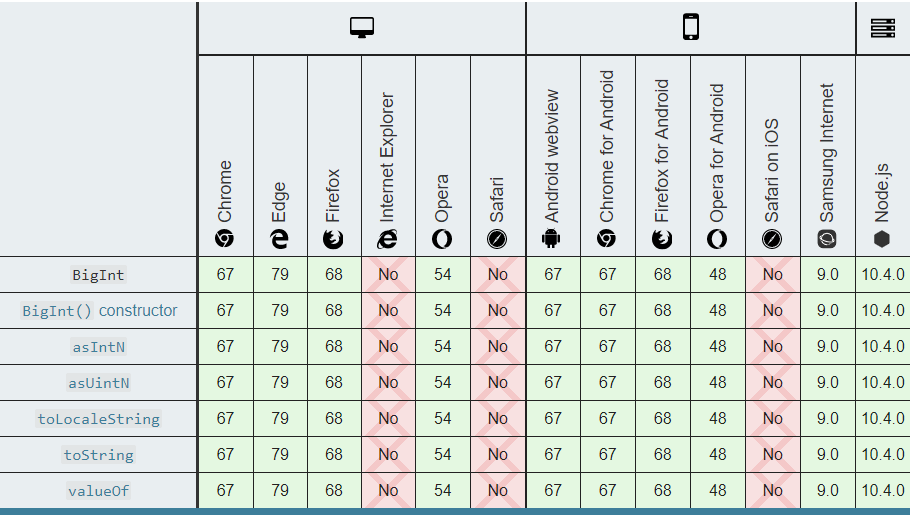
Source: https://developer.mozilla.org/en-US/docs/Web/JavaScript/Reference/Global_Objects/BigInt
Bad day for Apple, again.
odahcam
on 9 Apr 2020
@nikolawan does this really works?
Hi, using that workaround solved my problem (but didn't need PDF 417).
Thanks a lot for this library!
 sirfabio80
on 9 Apr 2020
sirfabio80
on 9 Apr 2020
For all of you that doesn't need PDF417 I would suggest you to use the previous version, v0.15.2, which is basically the same, but with less code and doesn't need a workaround or polyfill.
odahcam
on 9 Apr 2020
It should be fixed on v0.16.3. Cheers.
odahcam
on 16 Apr 2020
Even if it is fixed it doesn't mean PDF417 will work, it still depends on the BigInt type that is not supported on Safari, but it may work fine with Number. The fix here just means that the library can now once again be used in Safari, but if you try to use PDF417 that shouldn't work.
odahcam
on 16 Apr 2020
@odahcam Thanks for the update. Works on iOS + Safari for me. It did not work for iOS + Chrome. Is this consistent with the expectations? As a check, the provided demo also did not work on iOS Chrome.
chintanp
on 21 Apr 2020
Kind of, at this point I don't really know what to expect from Apple. I just didn't tested it on iOS at all, only macOS, which is the only Apple hardware I have. I know I could use an emulator, but I was tired and decided macOS was enough. So, for Chrome it could be a lot of possibilities that go beyond just BigInt problem we had here, it really doesn't makes much sense working on Safari and not on Chrome. If you have any logs or console errors I could take a look.
odahcam
on 21 Apr 2020
I am testing it on my iPad and Chrome, when I run the demo, I see on the console the message "ZXing code reader initialized" and then the following error:
"Can't enumerate devices, method not supported".
chintanp
on 21 Apr 2020
What's iOS and Chrome versions? Just to clear it out, it has nothing to do with this BigInt issue.
odahcam
on 21 Apr 2020
@odahcam Yes, this could be a camera access issue. iOS version: 12.0.1 and Chrome version: 80.0.3987.95
chintanp
on 21 Apr 2020
I'm not sure, but I remember iOS 12 being a bit unstable about supporting other browsers and getUserMedia. You can always test if the device does support it on Chrome so we can have an idea of what's happening. You can use this piece of code as an example for testing: https://github.com/zxing-js/library/blob/915a9384862f6ae8e81c19ded1071572528bf378/src/browser/BrowserCodeReader.ts#L337
Maybe navigator.mediaDevices ins't available, but just navigator.getUserMedia.
odahcam
on 22 Apr 2020
@odahcam Yes, this could be a camera access issue. iOS version: 12.0.1 and Chrome version: 80.0.3987.95
This is an known issue for years and it is unlikely that apple will fix that in the near term. https://stackoverflow.com/questions/51501642/chrome-and-firefox-are-not-able-to-access-iphone-camera
skyrex-mark
on 24 Apr 2020
Related issues
 lenny76
·
10Comments
lenny76
·
10Comments
 kenlyon
·
6Comments
kenlyon
·
6Comments
 boruchsiper
·
7Comments
boruchsiper
·
7Comments
 michael-pearson
·
6Comments
michael-pearson
·
6Comments
 Hopingocean
·
3Comments
Hopingocean
·
3Comments
Most helpful comment
Yep, I forget that UMD builds would suffer this, I'm already working in a solution.