Library: Default camera is different in different browsers
When i try to get default camera to work for scanning( by using undefined in deviceId place) in https server, it was opening front camera in chrome where as back camera in Firefox. And also Is there any way to make sure the default one to be back camera by default?
 sethusuryateja
All 6 comments
You gotta select the camera if you wanna control it. There's no such thing as default camera and each browser controls it as their want, so each one can and will give us different cameras.
When I want back camera, I always use the listVideoInputDevices method and select the back camera (now cames the shitty part) using regex to match the back camera name.
If you're not confortable with regex, you can try the 'mediaDevices' API and try to select the rear (environment facing) camera using media constraints
 odahcam
on 26 Jan 2020
odahcam
on 26 Jan 2020

Thanks for clarification, but i am still not clear. Sorry if I'm wrong, but according to documentation, if we give device ID as undefined, isn't it supposed to select environment facing camera by default? So how could enviroment facing camera's be different in different browsers?
sethusuryateja
on 26 Jan 2020
It will prefer the environment camera, which means we use media device constraints to ask for that camera, as you can see in the source code:
_(we also have this one)_
Unfortunatelly, as you noticed, browsers behave strangely and there's nothing I can do about it for now. I wish some experienced folk find this and tell me I'm wrong, my own projects using this lib would be benefit, hehe.
In short that's what I know: if you want some specific camera, you gotta find it and deliver it to the library yourself (you can still use the library functions for that).
odahcam
on 26 Jan 2020
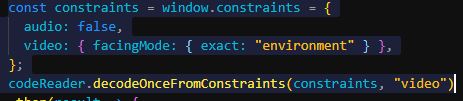
Using this instead of decodeFromInputvideoDevice seems to launch back camera by default.
sethusuryateja
on 30 Jan 2020
Stale issue message
![github-actions[bot] picture](https://avatars.githubusercontent.com/in/15368?v=4&s=40) github-actions[bot]
on 30 Mar 2020
github-actions[bot]
on 30 Mar 2020
I choose not to use facingMode: { exact: 'environment' } because it throws error when environment cameras are not available and it is bad, for example, for non-mobile devices.
odahcam
on 6 Apr 2020
Related issues
 ismailjamiljauhari
·
6Comments
ismailjamiljauhari
·
6Comments
 josephernest
·
8Comments
josephernest
·
8Comments
 sabasayer
·
3Comments
sabasayer
·
3Comments
 Hopingocean
·
3Comments
Hopingocean
·
3Comments
 arthurmmedeiros
·
3Comments
arthurmmedeiros
·
3Comments
Most helpful comment
It will prefer the environment camera, which means we use media device constraints to ask for that camera, as you can see in the source code:
https://github.com/zxing-js/library/blob/9599156b311508e63cb1c0933c34c89a2e2b97e1/src/browser/BrowserCodeReader.ts#L235-L250
_(we also have this one)_
Unfortunatelly, as you noticed, browsers behave strangely and there's nothing I can do about it for now. I wish some experienced folk find this and tell me I'm wrong, my own projects using this lib would be benefit, hehe.
In short that's what I know: if you want some specific camera, you gotta find it and deliver it to the library yourself (you can still use the library functions for that).