Libertinus: How should we handle the binary artifacts in Git history?
As the new maintainer I am making the executive decision to stop adding generated binary artifacts to the Git repository (see #331). To me the benefits of being able to use tooling designed for the purpose of managing sources far far outweigh the expediency of having matching artifacts¹ & sources side by side at the expense of not being able to efficiently use tooling).
What to do with the repository history to date is a much trickier problem. As of 6.12 the Git object store for the repository is 333 MB. That's hundreds of megabytes of baggage you are forced to download and shuffle around to do anything meaningful with the source (sure you _can_ get a sparse checkout with modern Git versions, but who knows how to do that!).
One option would be –given that this won't keep growing in the same way now— to cut our losses, say the 333 MB of heft is just our baseline and suck it up and keep it.
Another option would be to keep a copy of the current main branch and tags around on Github untouched as a legacy source, but add a new branch that is rebased using filter-branch to remove all the artifacts. Future releases could be tagged against this branch, and it could be set as the default branch. This would mean most people cloning the repo would only get the lightweight development branch while people pulling
--allbranches would git a surprise payload.The final main option I see is to do the same rebase as in option 2, but drop the current branch entirely. This would mean re-tagging all the releases.
I really don't like option 3, there is too much history: links across the Internet, checksums for existing releases, cross-linked issues, links to commit SHA's, etc.
Option 1 is the least friction, but I'm not too happy with permanently dooming the repository to dragging around the artifacts.
I propose experimenting with option 2 and at least seeing what it would look like. How big would the git object store be for a branch with all the artifacts filtered out? How far back are the releases fully reproducible? Can we script something to package all the existing Git artifacts and attach them to their respective tags? Would there really be any data loss this? It looks like at least all the 6.x releases since 2016 have the artifacts attached to the releases already, so this is only relevant to older tags.
¹ Going forward I'll be porting the SFD build process to use fontship. One side effect of this is that automatically generated build artifacts will be available for every commit to Github (not just releases) so going forward the equivalent of being able to get font artifacts at arbitrary non-release commits will still be possible anyway.
 alerque
All 24 comments
I’d be happy going with option 3, but number 2 sounds like a good compromise. People are going to have to update links to this project due to the change of maintainer anyway (don’t trust GitHub to maintain any redirect forever!), so it seems like it’s the right time to make the repo leaner (y)
 fitojb
on 6 Jul 2020
fitojb
on 6 Jul 2020
As of 6.12 the Git object store for the repository is 333 MB.
Are you sure?
$ du -h --apparent-size .git
186M    .git/objects/pack
42K .git/objects/info
186M    .git/objects
(this is a freshly cloned repo, you might want o run git gc to get the same numbers from an existing clone).
 khaledhosny
on 6 Jul 2020
khaledhosny
on 6 Jul 2020
Have you considered git LFS?
 moyogo
on 6 Jul 2020
moyogo
on 6 Jul 2020
Have you considered git LFS?
Sorry I meant this for https://github.com/alerque/libertinus/pull/331.
moyogo
on 6 Jul 2020
Are you sure?
Nope. The number was fished out a little too fast from my local repository which hasn't been garbage collected this week: git gc --aggressive --prune=now brings it down to 257 MB. I don't know why that varries so much from your results, but even the repo I cloned out on Sunday post-migration is bigger.
The point still stands, 186 MB is too big too. This is too many over-the-wire and on-disk bytes being spent for no gain. I was reminded of how heafty the git clone is just the other day when re-cloning while shuffling around things to migrate this to my account. I've been reminded of this dozens of times every time I update a system or publish system package updates and it builds font packages for Arch Linux and it takes forever to rebuild "otf-libertinus-git" because the chroot build has to fetch a monster source repo.
alerque
on 6 Jul 2020
Sure, I’m not discrediting your main point, it is just that 333 MB seems too off to me.
khaledhosny
on 6 Jul 2020
What happens if I just rungit clone? I don’t think cleaning a new main branch would prevent git clone from getting the problematic branches.
What about a new repository for future work and the current repository for archival purpose only?
moyogo
on 6 Jul 2020
Some old Libertinus binaries can be found mirrored in TexLive (mainly the releases, with a couple git versions mixed in):
- Sep 2018 - Jun 2020: https://git.texlive.info/texlive/log/Master/texmf-dist/fonts/opentype/public/libertinus-fonts
- Jun 2018 - Sep 2019: https://git.texlive.info/texlive/log/Master/texmf-dist/fonts/opentype/public/libertinus-otf
- Jan 2016 - Sep 2018: https://git.texlive.info/texlive/log/Master/texmf-dist/fonts/opentype/public/libertinus
Most Linux distributions (Fedora, Debian, etc.) tend to pull Libertinus from TexLive rather than straight from GitHub. Broken weblinks and git hashes, are not so easy to solve. My thoughts are:
- Linux distributions are unaffected.
- If the user wants the latest version of Libertinus, or a historical released version, he'll probably just google it.
- If the user needs to resolve a git hash (for example, he's reading through old issues or PRs), he can browse
to find it.
So, I'm on the fence, but I'm slightly in favor of options 2/3 over option 1.
 daddesio
on 10 Jul 2020
daddesio
on 10 Jul 2020
@moyogo That is a good point to bring up since by default Git will fetch commits for all branches when cloning. You can git clone --single-branch to avoid this, so keeping the old main branch around as an archive would include a heavy clone cost by default for people that were not paying attention but those that cared could get a lightweight clone that includes history.
That being said, your idea of archiving a different copy of the repository. I think I'd do it the other way around though for several reasons. Keeping people's participation in issues, releases, and even links pointing to the current canonical location is important, but of course setting up a second repository to archive the commits with binary artifacts intact is something we can do.
Thanks also for the thoughts on this @daddesio. I think combined with one or other of the archive methods above that you're probably right, even if some Git hash is required it won't be that hard to track down.
I'll play with git filter-branch in a bit and see how the repo looks without artifacts. The auto-building stuff is nearly ready to go, so deciding this is the last step before tagging a new release to mark the change in repository/management/build tooling and start moving on towards actual font development.
alerque
on 13 Aug 2020
Just some notes to self on how to actually do the filtering:
$ git filter-repo --force --invert-paths --path-glob "*.otf" --path-glob "*.woff2" --path-glob "*.woff" --tag-rename v:alif-
$ git gc --aggressive --prune=now
$ git log --diff-filter=D --summary | grep delete
My neat and tidy ideas №1, №2, and №3 don't quite stand up to the reality. I've been mucking around in sandbox repos trying different approaches on for size and all of them have pros and cons not mentioned here and edge cases. One interesting one is that even deleting the legacy branch (№3) wouldn't help regular cloners because Git by default also downloads all remote tags and hence gets the same content anyway — unless one also deleted all the releases and tags which I am unwilling to do. I don't want to make a clean break from history, I just wanted to lighten the clone weight a bit.
I'll be moving ahead with something №2.5-ish: namely adding a filtered branch without the built font artifacts but with otherwise all the same history. This will give those who care a way to clone --single-branch and actually get a lightweight checkout with history. Since it won't make any difference if it is deleted or not I'll keep the current main branch around for legacy reference purposes with a notice in the README in case anybody lands on its HEAD. Since the filtered branch can reuse all the other blobs it won't add overall weight to people doing a full checkout.
alerque
on 18 Aug 2020
So how do we compile the otfs?
 jonorthwash
on 20 Aug 2020
jonorthwash
on 20 Aug 2020
@jonorthwash Run fontship make from the root directory of the repository. This is documented in CONTRIBUTING.md but perhaps I should add that to the README too. (edit: done)
Unless you are on Arch Linux (where yay -S fontship will install it) the easiest way on most systems at this point is probably Docker. Just adding an alias and using it should be enough, it will pull the images on first run:
$ alias fontship='docker run -it --volume "$(pwd):/data" --user "$(id -u):$(id -g)" theleagueof/fontship:latest'
$ fontship make
Of course you can compile and install from source to your system as well, see Fontship.
Also of note, if what you want is a font build from some specific commit in the repository (other than releases which have packages attached to the tags) you can download the artifacts from any commit (since Fonship was introduced) from the Actions tab of this repository under the Fontship workflow.
alerque
on 20 Aug 2020
@alerque shouldn't the Docker command be mentioned in CONTRIBUTING.md?
Also of note, if what you want is a font build from some specific commit in the repository (other than releases which have packages attached to the tags) you can download the artifacts from any commit (since Fonship was introduced) from the Actions tab of this repository under the Fontship workflow.
^ This sounds like it should be mentioned in README.md#building — WDYT?
 waldyrious
on 20 Aug 2020
waldyrious
on 20 Aug 2020
Thanks for the suggestions @waldyrious. I added a mention of the artifacts to the README and suggestions about installation both there and in CONTRIBUTING. Given how many times I've tweaks to or added hints about the simplest Docker usage I'd rather not document the exact alias in this project and leave that to the fontship documentation. Also, as I expect Homebrew and other package managers to eventually be an easy way to install Fontship I don't want to promote Docker as the only way to do this. Frankly in my opinion it's not the best way, it's just the easiest rigt now for people on non GNU systems or without experience compiling software.
alerque
on 20 Aug 2020
Sounds great @alerque. Thanks for the the quick reaction, too! :)
waldyrious
on 20 Aug 2020
(other than releases which have packages attached to the tags)
I was having trouble finding the releases. GitHub moved where they put the link to releases, so it looked like the feature wasn't enabled for the repo / like there were none.
you can download the artifacts from _any_ commit (since Fonship was introduced) from the Actions tab of this repository under the Fontship workflow.
I haven't been able to figure this out—I get as far as the workflow and then there's just what looks like a list of resolved issues with various options. Are there instructions for this somewhere too?
jonorthwash
on 21 Aug 2020
Hey @jonorthwash sorry you're having trouble, and thanks for the feedback. I'll work on getting it documented where peole can finde it.
I was having trouble finding the releases. GitHub moved where they put the link to releases, so it looked like the feature wasn't enabled for the repo / like there were none.
Granted Github moving all the cheese at the same time this project moved it's cheese does add to confusion. But given that the Releases link is in the same location on all Github repos I guess people will get used to the new normal soon enough. Also we have in linked in the README just in case.
you can download the artifacts from _any_ commit (since Fonship was introduced) from the Actions tab of this repository under the Fontship workflow.
I haven't been able to figure this out—I get as far as the workflow and then there's just what looks like a list of resolved issues with various options. Are there instructions for this somewhere too?
Okay one thing I just learned is that artifact downloads are only available to logged in users. Now I'm concerned about who they are available too .... can you confim this series is the same for you.
The "list of resolved issues" you mention is the commit log, each of those is a commit to the repository, and clicking on each is where you would find the generated files to match. For me it's like this:
Actions → Fontship → a commit:

On the next page there is a ZIP download:
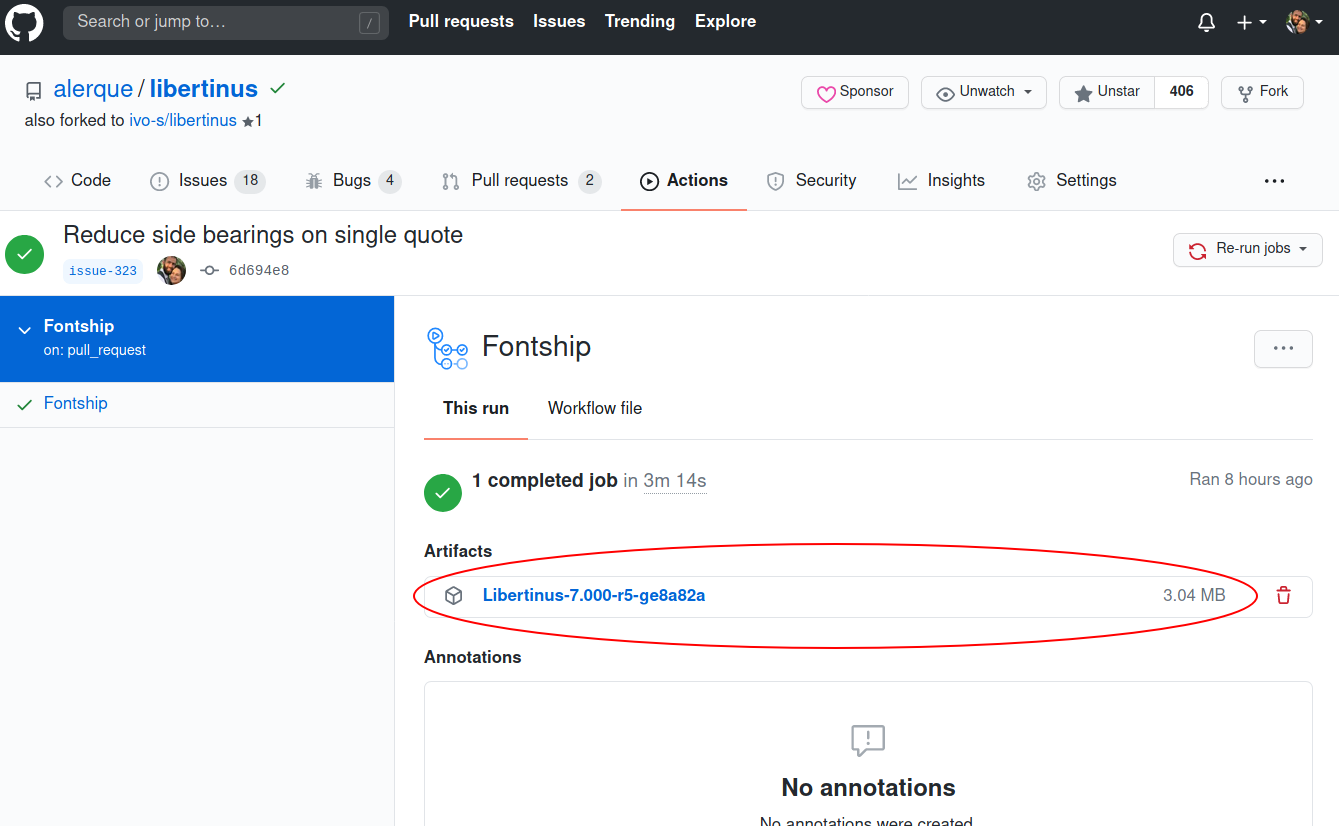
That file is visible to anyone, but I can't download it without logging in. I'm hopping any logged in user can reach it not just project devs, and I'll look into how to make it public.
alerque
on 21 Aug 2020
I was having trouble finding the releases. GitHub moved where they put the link to releases, so it looked like the feature wasn't enabled for the repo / like there were none.
Granted Github moving all the cheese at the same time this project moved it's cheese does add to confusion. But given that the Releases link is in the same location on all Github repos I guess people will get used to the new normal soon enough.
Yep, this is just an awkward time I guess :)
Also we have in linked in the README just in case.
Thanks!
That file is visible to anyone, but I can't download it without logging in. I'm hopping any logged in user can reach it not just project devs, and I'll look into how to make it public.
I'm able to download it without any trouble. Thanks for the explanation (and graphic!).
What wasn't obvious to me was where on each commit to click. There's at least 5 clickable places in each row: the commit name (which there are multiple rows matching in many cases), the PR number or commit hash (which brings you back to the PR or commit—this is what I was expecting to be matched to the artifacts), the committer's username, the branch, and a "…" menu with more irrelevant options.
So in the end all my confusion is because of GitHub's UI :-P
jonorthwash
on 21 Aug 2020
Yes the UI is a mess, and getting messier. Just for grins, finding artifacts on PRs is getting harder too. And the tab there is not called "Actions" its called "Checks".
For PRs I'll be working on a much more OBVIOUS workflow including making Fontship comment on PRs after it runs with visuals for any relevant diffs it can parse (similar to what I've been posting for the last couple PRs I've posted like #349, #353, etc.). But that will be some time coming yet...when it does posting direct artifact links inline in the PR might be possible.
alerque
on 21 Aug 2020
For PRs I'll be working on a much more OBVIOUS workflow including making Fontship comment on PRs after it runs with visuals for any relevant diffs it can parse (similar to what I've been posting for the last couple PRs I've posted like #349, #353, etc.)
That would be amazing! And an overlapping comparison, like what the Tiff typeface diff tool does, would be the cherry on top! 😃
I recently came across a way to do this with imagemagick, using the code from this commit, which is what was used to make the visual diff images in the that project's README:
waldyrious
on 21 Aug 2020
@waldyrious ImageMagic isn't a good choice for this because its shaping is terrible, we really want something that doesn't just spew a sequence of glyphs but also does full shaping / kerning / language and script features / OpenType features the way a really environment would. I plan to use SILE for this, and yes I already have visual diffs of old/new overlays like that, but it's currently in PDF form. I don't have it ready to embed in PR comments yet. The real tricky part is knowing what to test. It's not easy to map from a source change to sensible output strings should be tested, especially not from SFD. We're going to need some custom tooling.
Thanks for the tiff link, that's one I didn't know about!
alerque
on 21 Aug 2020
ImageMagic isn't a good choice for this because its shaping is terrible, we really want something that doesn't just spew a sequence of glyphs but also does full shaping / kerning / language and script features / OpenType features the way a really environment would.
FWIW, ImageMagic supports all of this when built with Raqm support.
khaledhosny
on 22 Aug 2020
@khaledhosny Today I learned ... thanks! That tip will come in handy. If not for the above discussed application, for other projects.
alerque
on 23 Aug 2020
Related issues
 MarcusHKST
·
3Comments
MarcusHKST
·
3Comments
 cssobral2013
·
7Comments
cssobral2013
·
7Comments
 CampanIgnis
·
3Comments
khaledhosny
·
3Comments
CampanIgnis
·
3Comments
khaledhosny
·
3Comments
 iandoug
·
8Comments
iandoug
·
8Comments
Most helpful comment
FWIW, ImageMagic supports all of this when built with Raqm support.