Libertem: Allow several attempts to specify a remote cluster
How to reproduce: Connect to a remote cluster in the GUI with the wrong URL (cluster not running in this case).
What should happen:
- Error message
- Try again
What happens:
- Error message on the console, not in the GUI
- Input box still visible, but "connect" button faded out
- Not possible to try again
Edit: Reloading the browser window works as a work-around.
 uellue
All 17 comments
What are the prerequisite to solve this issue ?
 twentyse7en
on 29 Feb 2020
twentyse7en
on 29 Feb 2020
What are the prerequisite to solve this issue ?
In this case, a prerequisite to fixing the bug is building the client from source, as there most likely need to be changes in the TypeScript client code. You may need to know the basics of some libraries used in the client, for example react and possibly redux. You may need to understand the very basics of backend and front end web dev, for debugging and understanding what happens when the user clicks the connect button etc.
Were you able to reproduce the bug?
 sk1p
on 29 Feb 2020
sk1p
on 29 Feb 2020
Were you able to reproduce the bug?
Yeah, I did reproduce.
I'm not familiar with web dev. But I would love to solve this bug, I think knowing web dev would be helpful for GSOC project.
twentyse7en
on 1 Mar 2020
We have a small section on debugging the web GUI in our documentation, which has some pointers to indispensable debugging tools (browser's devtools, react and redux plugins for these, ...), which should help you trace what is going on.
As a hint on how to start with this, I would suggest to try to understand what exactly, on client and server, step by step, is happening in the "happy case", that is, in case the user presses the "Connect" button and either connects to an existing dask cluster or successfully creates a local cluster (the two cases are in general very similar). Let me know if you get stuck or need help to understand any specific part!
sk1p
on 1 Mar 2020
Thanks :+1:
twentyse7en
on 1 Mar 2020
I tried to figure out how "happy case" works. The client makes a connection request and server returns status ok. Then it makes action connected. I didn't understand how "browser" button showed after that.
Also in the "bad case" server returns 500: Internal Server Error.
twentyse7en
on 27 Mar 2020
I tried to figure out how "happy case" works. The client makes a connection request and server returns status
ok.
:+1: - as evidenced by the request in the "network" tab of the browser's devtools. Where in the code does this request happen? How do we go from "user presses button" to "network request is made"? This may require some "detective work", but one possible approach is to have a look at the "initiator" column of the network tab. I'm not sure it is visible by default, but you can enable it by right clicking on the header:
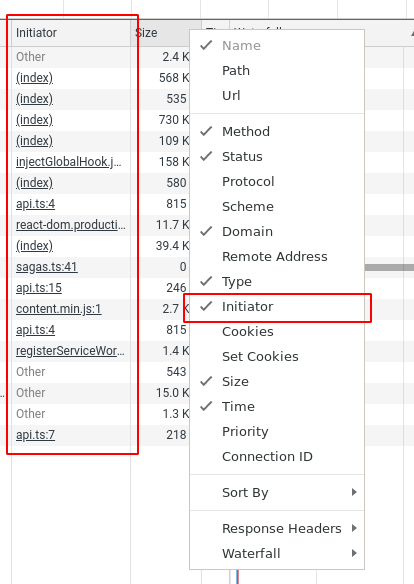
Then it makes action
connected.
Where in the code is that action created?
I didn't understand how "browser" button showed after that.
The browse button is rendered as part of the DatasetList component, which is conditionally shown by the ChannelStatus component. If you have a look at App.tsx, you can see this relationship, and in ChannelStatus.tsx you can see the condition.
Also in the "bad case" server returns
500: Internal Server Error.
Indeed. Which is not handled in the client, which then makes the UI unusable.
sk1p
on 28 Mar 2020
when the button is clicked, action "connect" is dispatched.Then it makes a request to the server for cluster connection. Here it receives the response from the server.
>
Where in the code is that action created?
In the "happy case" when the status of the received response is "ok".
twentyse7en
on 30 Mar 2020
Nice! Looks like you found out where the request is done - that's also where the error handling should be done. Also have a look at the connectToCluster function itself - maybe part of the error handling should also live there. Quite possibly instead of a 500 response, the server should also respond with a better error message... but the client should also not crash if it gets a 500 when connecting.
Do you want to give it a try, or do you need further discussion?
sk1p
on 30 Mar 2020
I will give a try first
twentyse7en
on 30 Mar 2020
I tried out to figure out what's happening on the server. But it felt complicated to me. How can I send a different message when the cluster connection isn't successful.
twentyse7en
on 1 Apr 2020
I tried out to figure out what's happening on the server. But it felt complicated to me.
It may look complicated at a first glance, but most of the code is not really relevant for fixing this issue. Try to go through it, line by line, and keep track at which point the cluster connection is established. Understanding everything after that is not needed for this issue. Also, keep in mind that this issue only deals with the non-local cluster.
How can I send a different message when the cluster connection isn't successful.
First, you have to find out what happens if the connection is not successful. Is an exception thrown, or does some function return another value in case of an error? Then, you can add a message for the error case and send that if the error condition is met.
sk1p
on 1 Apr 2020
I tried to go through line by line. This is the function responsible for making cluster connection. A partial function is created first.I didn't understand these statements :
executor = AsyncAdapter(wrapped=sync_executor)
await self.state.executor_state.set_executor(executor, request_data)
twentyse7en
on 1 Apr 2020
For just testing, I put this in a try block. Then there was no error, but now the server is sending response as the cluster connected.
I would like to send a different response when cluster is not connected. Then client could show some error message to user and reset the button.
twentyse7en
on 1 Apr 2020
A partial function is created first
Yeah, this is used here because sync_to_async only takes a function, not a function and arguments.
I didn't understand these statements :
executor = AsyncAdapter(wrapped=sync_executor)
await self.state.executor_state.set_executor(executor, request_data)
For understanding them, you need a bit of context how the web API works. The Web API is completely asynchronous - which means that handling of multiple requests can be done concurrently (maybe best described as "interleaved" with another?). In detail, every time you read await, you can imagine that the awaited operation is started, and another request/response that is currently in flight has the chance to continue running. Once the awaited operation is done, execution can continue here.
That also means if you need to do something that will take a long time, you need to put it into a thread. Now, because our DaskJobExecutor is synchronous, it would not directly work inside the Web API: it would block the main loop for however long it takes to connect, or execute a job, or basically do anything. So we wrap it into its own thread, using this AsyncAdapter.
But! This is not really important for understanding what's going on here - these lines are only executed once the connection to the cluster is successful.
I would like to send a different response when cluster is not connected. Then client could show some error message to user and reset the button.
Sounds like a good plan! Now, with exceptions, you always have to think about where you should catch the exception, and where you should allow it to "bubble up" (let me know if this is unclear, I can describe it in more detail).
If you put your exception handling into the executor, you would have to know in the executor how to handle this problem, which is not the case here: you can only send your message from the ConnectHandler! So that's where the error handling needs to happen.
sk1p
on 1 Apr 2020
Thx for the details! I was able to handle the exception and send a response. Is this ok and what are the other changes to make on the server side.
twentyse7en
on 2 Apr 2020
Fixed by #699
sk1p
on 12 Apr 2020
Related issues
uellue
·
11Comments
uellue
·
7Comments
uellue
·
9Comments
sk1p
·
10Comments
sk1p
·
7Comments