With reference to #5, we should test which execution order and chunking allows for fastest processing of the data and design the file format accordingly to allow loading the data in continuous blocks. In Test for ideal chunking size and processing order.docx I've summarized discussions with @sk1p to specify the issue more precisely together with a way to test for it. What do you think?
 uellue
All 23 comments
A quick summary from some preliminary tests with numpy!
Conclusion: The data should be chunked in tiles of 32 kPixel or 64 kPixel and stacks of at least 8 frames, better 16 or 32. Algorithms 2 and 5 generally perform the best, more or less equally well.
- Tested for pixels and masks of type uint32/int32. Running it with unit16/double is on the TODO list.
- L3 cache has the biggest influence. On my system that's 3 MB. Processing tiles that require more than the L3 cache for mask and data incurs significant penalties with about 70 % of optimal performance for very large tiles.
- When things fit in the L2, the benchmark gets a moderate benefit.
- Using numpy in the chosen way gives very significant overheads for tiles of 16 kPixel or smaller that eat any benefits that the L1 cache could bring. The processing itself is fastest for tiles of 8 kPixel or 16 kPixel.
- As expected, 2 is doing better than 1 for moderately large tiles, that means 1 is killed by overheads in practice. 6 is killed by large frames. 4 generally sucks.
- TODO: put the benchmark on github as soon as it is cleaned up a bit.
uellue
on 26 Jan 2018
A "sneak peek" from @sk1p with results of a corresponding C benchmark (1 process). I'm currently running this on my laptop where I ran the numpy tests to get comparable results.
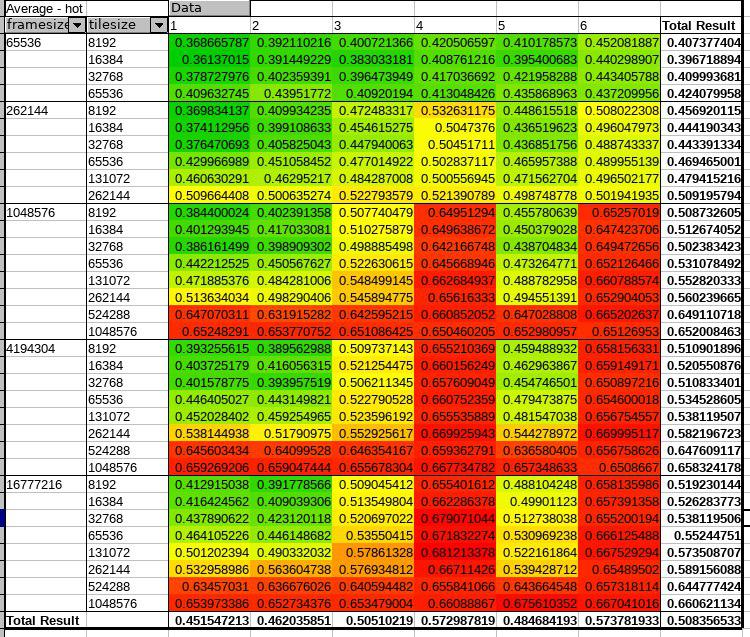
We are also working on running several processes in parallel. It seems that hyperthreading gives a nice boost in throughput when things fit into the L1 (8 kPixel tilesize on my system). Under these conditions, the correct algorithm and tilesize are roughly 4x _edit: 2.5x, that was an outlier_ faster than a naive implementation.
Takeaway:
- C/C++ compiled with optimizations for the target architecture is strongly recommended for the heavy lifting. Numpy is factors slower, at least the stock version.
- Grouping and ordering the operations to optimize cache use makes a huge difference, in particular when all logical processors are used. Memory bandwidth hamstrings the "naive" implementations.
- With GPUs the memory transfer will likely have an even bigger impact
- The underlying file format should probably store and compress the data as stacks and bundles of tiles, not just a linear list of frames. That way the data can be compressed and decompressed in the caches and stays "hot", and we get linear access patterns when the algorithm works its way through a file.
uellue
on 30 Jan 2018
To add some explanation: both tilesize and framesize are number of pixels, with each pixel being an int (4 bytes). The numbers shown above in the pivot table are averages over all other parameters (number of masks, stackheight, ...)
The two red columns for methods 4 and 6 start where the whole frame no longer fits my L3 cache (the frame is 4MB, my L3 cache only 3MB), and the methods don't use tiling efficiently.
The red rows for all other methods start at tile sizes where frame plus mask (=2*tilesize) no longer fit the L3 cache.
 sk1p
on 30 Jan 2018
sk1p
on 30 Jan 2018
Interesting. I'm wondering how this would translate into the lazy loading HyperSpy implementation. Since it is using dask to do the processing. Would it be possible to optimize the processing by selecting the appropriate chunking?
 magnunor
on 30 Jan 2018
magnunor
on 30 Jan 2018
@magnunor I guess not completely, except if you can declare one array as constant and dask is really smart about its access pattern - that would be awesome though!
sk1p
on 30 Jan 2018
Should be fairly easy to test: generate HDF5-files with different chunking. And then run the same type of processing on all of them.
It is something which has been on my to-do list a long time. I don't think I'll have the time to do the tests themselves, but I might have time to write a minimal example on how to do it.
magnunor
on 30 Jan 2018
I wrote some minimal scripts for generating EMD style HDF5-files (so they can easily be opened in HyperSpy), with different chunking. However, after having made it, I'm not really certain if we can separate the data being loaded into memory from the CPU runtime itself...
To generate the data (note that this will create many 2+ GB files):
import h5py
import numpy as np

def create_emd_file(filename, chunks):
    f = h5py.File(filename, mode="w")
    f.attrs.create('version_major', 0)
    f.attrs.create('version_minor', 2)

    f.create_group('experimental/science_data')
    group = f['experimental/science_data']
    group.attrs.create('emd_group_type', 1)

    data = np.random.random((128, 128, 128, 128))
    group.create_dataset(name='data', data=data, chunks=chunks)
    group.create_dataset(name='dim1', data=range(128))
    group['dim1'].attrs.create('name', b'dim1')
    group['dim1'].attrs.create('units', b'units1')
    group.create_dataset(name='dim2', data=range(128))
    group['dim2'].attrs.create('name', b'dim2')
    group['dim2'].attrs.create('units', b'units2')
    group.create_dataset(name='dim3', data=range(128))
    group['dim3'].attrs.create('name', b'dim3')
    group['dim3'].attrs.create('units', b'units3')
    group.create_dataset(name='dim4', data=range(128))
    group['dim4'].attrs.create('name', b'dim4')
    group['dim4'].attrs.create('units', b'units4')
    f.close()

create_emd_file("test_chunks_01_01_128_128.emd", (1, 1, 128, 128))
create_emd_file("test_chunks_02_02_128_128.emd", (2, 2, 128, 128))
create_emd_file("test_chunks_04_04_128_128.emd", (4, 4, 128, 128))
create_emd_file("test_chunks_12_12_128_128.emd", (12, 12, 128, 128))
create_emd_file("test_chunks_24_24_128_128.emd", (24, 24, 128, 128))
create_emd_file("test_chunks_48_48_128_128.emd", (48, 48, 128, 128))
To run some simple, not very rigorous, lazy processing:
import glob
import time
import hyperspy.api as hs

emd_filename_list = glob.glob("*.emd")
emd_filename_list.sort()

for emd_filename in emd_filename_list:
    s = hs.load(emd_filename, lazy=True).transpose(signal_axes=(2, 3))
    t0 = time.time()
    s.sum()
    print(emd_filename)
    print(time.time() - t0)
Gives me:
test_chunks_01_01_128_128.emd
22.295766592025757
test_chunks_02_02_128_128.emd
8.882082462310791
test_chunks_04_04_128_128.emd
4.036624908447266
test_chunks_12_12_128_128.emd
2.34709095954895
test_chunks_24_24_128_128.emd
2.5581858158111572
test_chunks_48_48_128_128.emd
2.570340156555176
Hm, interesting! _Quite_ some overhead, apparently. Now, where is that coming from? I know from our tests that numpy _python_ does create overheads when you work on smaller blocks with numpy, but not _that_ bad. What are our candidates?
- Dask
- Python interface for HDF5
- HDF5 libraries
Maybe profiling https://docs.python.org/3/library/profile.html#module-cProfile could be insightful?
uellue
on 31 Jan 2018
Looking at the bigger picture, I'm seeing a conflict of interest between C/C++ implementations and Python brewing up. For lightweight, streamlined C processing it is good to work on chunks that fit in the caches -- at least L3 -- since the overheads from fine-grained inner loops are small and the gains from parallel, optimized code that works in the L1/L2 caches are huge. For Python, however, the overheads can be simply enormous, apparently. Since we can't fix all the stupid things that other people do with parallelism in Python* and people want to use such stupid code with our files, we can't punish them with small default block sizes optimized for C. Weighing our options, I'd tend to use blocks in the range of 1-8 MB. The L3 on high-end processors is in the region of 12 MB, that means in C we are not doing THAT bad when running on a proper workstation. Then we process these big blocks in smaller portions, and in the end it's not hurting us much. Python, however, is at least workable.
'* When doing multiprocessing with Python, one quickly ends up with asinine things like forking the entire Python process over and over again, or serializing+deserializing the entire input or output data between workers and passing it through IPC. To make things fast, one has to make sure that worker processes are long-lived, and manually allocate shared memory with the multiprocessing module and make sure that workers only receive pointers/descriptors for their work packages and exchange bulk data through shared memory or by reading their own data from file. However, that negates the advantages of Python. If you manually allocate memory and do pointer arithmetic, you are not far from using C anyway.
Takeaway message: Use C/C++ for number crunching and Python ONLY for high-level glue code! And don't even try multiprocessing with Python. To do it right, you invest more work than doing it in C/C++ with OpenMP and the likes.
uellue
on 31 Jan 2018
Note that the timing numbers above also includes reading the data from the hard drive, which also include things like decompression (and other HDF5-overheads).
My thoughts on this is where the development effort is best spent. For example, the lazy loading (dask) implementation in HyperSpy has had very little optimization, so there are probably _very_ low hanging optimizations which can be done by someone with Python development experience. This is something I'd like to do myself, but I can't really justify the time in my currents project, as the code runs fast enough for my needs. Optimizing this in HyperSpy would automatically benefit a large number of people currently using the lazy loading for processing these types of datasets.
magnunor
on 31 Jan 2018
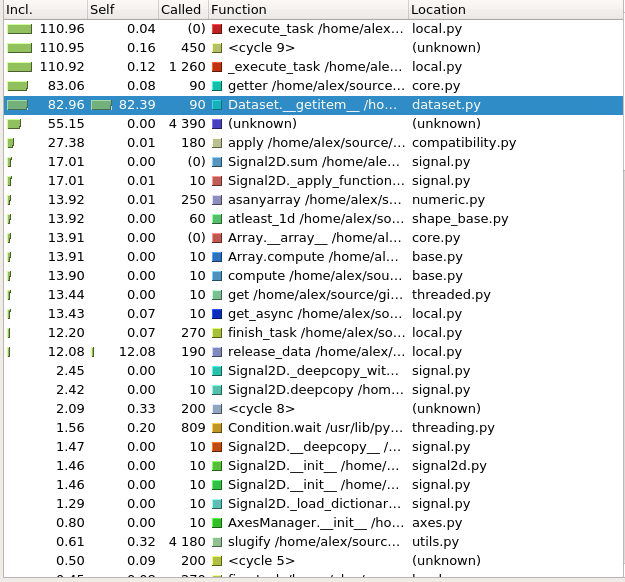
The overhead of HDF5 is quite significant indeed. I did some initial profiling of the 48_48_128_128 case, and most of the time is spent in Dataset.__getitem__ of h5py - though I don't think compression is the culprit, as it has to be explicitly enabled for each HDF5 dataset, right?
Attached it a screenshot of a kcachegrind view of the profile. The profile itself was recorded with yappi for multi threading support.
sk1p
on 1 Feb 2018
@sk1p, compression is not enabled by default in h5py. So those datasets (should) all be uncompressed. What would be interesting to know is how the compression effects the file reading time, vs file size, and how/if the chunking also effects this.
group.create_dataset(name='data', data=data, chunks=chunks, compression='gzip', compression_opts=4)
which could also include the other in-built compressions: 'szip' and 'lzf'. This might have been done elsewhere, but I haven't seen it yet.
(I'm guessing this got a little offtopic...)
magnunor
on 1 Feb 2018
@magnunor yeah, we definitely want to experiment with compression, too. I'd also like to know if blosc is of any use for this case, especially if it's used as a hdf filter, and how it compares with the built-in compression methods. The idea of blosc is to decode in blocks that are small enough to fit into CPU caches, and "increase" memory bandwidth that way, but I don't know if we will see any advantages if used as a hdf filter with relatively large blocks.
Regarding your comment about optimizing lazy loading in hyperspy: I think that's worth pursuing and I'd like to give it a shot. I'll ask in the hyperspy gitter later if anyone is willing to give me a high level introduction to the lazy/dask code.
sk1p
on 5 Feb 2018
I could imagine that blosc brings the biggest gains on high-end systems like http://www.fz-juelich.de/ias/jsc/EN/Expertise/Supercomputers/JURECA/Configuration/Configuration_node.html where we have to keep 2*12 cores plus 4 NVidia cards fed with data.
uellue
on 5 Feb 2018
Maybe an interesting comparison laptop vs. Jureca. A typical laptop has more than 2x the memory bandwidth per core, and the throughput per core is much lower. For our algorithm, Jureca has maybe 1/4 of the effective memory bandwidth compared to a laptop. And that's just for the CPUs, not even taking GPUs into account!
https://ark.intel.com/de/products/81018/Intel-Core-i3-4030U-Processor-3M-Cache-1_90-GHz
https://ark.intel.com/de/products/81908/Intel-Xeon-Processor-E5-2680-v3-30M-Cache-2_50-GHz
uellue
on 5 Feb 2018
A strategy to use on Jureca would be to start one independent process per CPU (each stays within one NUMA domain and we avoid cache synchronization), load and decompress a chunk that fits together with the full mask set into the shared L3 cache and then spawn lightweight threads that eat through that chunk with small tiles where the mask tile set fits into the L1 or L2 on each core. That way we minimize transfers with the main memory. The main job of the main memory is to cache the contents of the compressed source file.
uellue
on 5 Feb 2018
Probably we can find an implementation where people did the work for us already: #14
See for example:
uellue
on 7 Feb 2018
I had a look at the effects of the different chunking parameters, profiling using the dask built-in Profiler, ResourceProfiler, and CacheProfiler.
The first case is test_chunks_01_01_*:
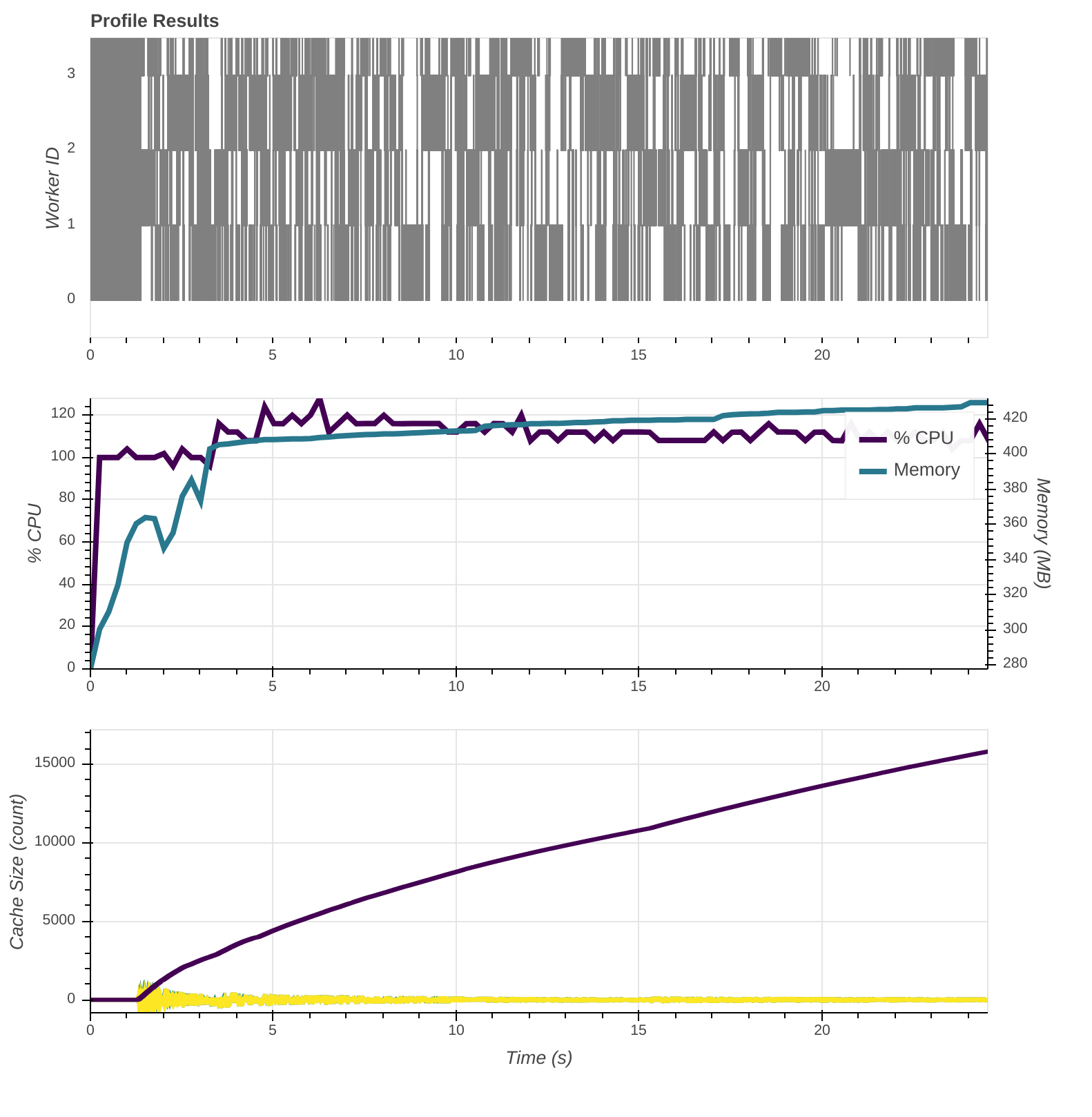
Doesn't look _too_ bad, right? Except for it taking forever. If you zoom in, you get this:
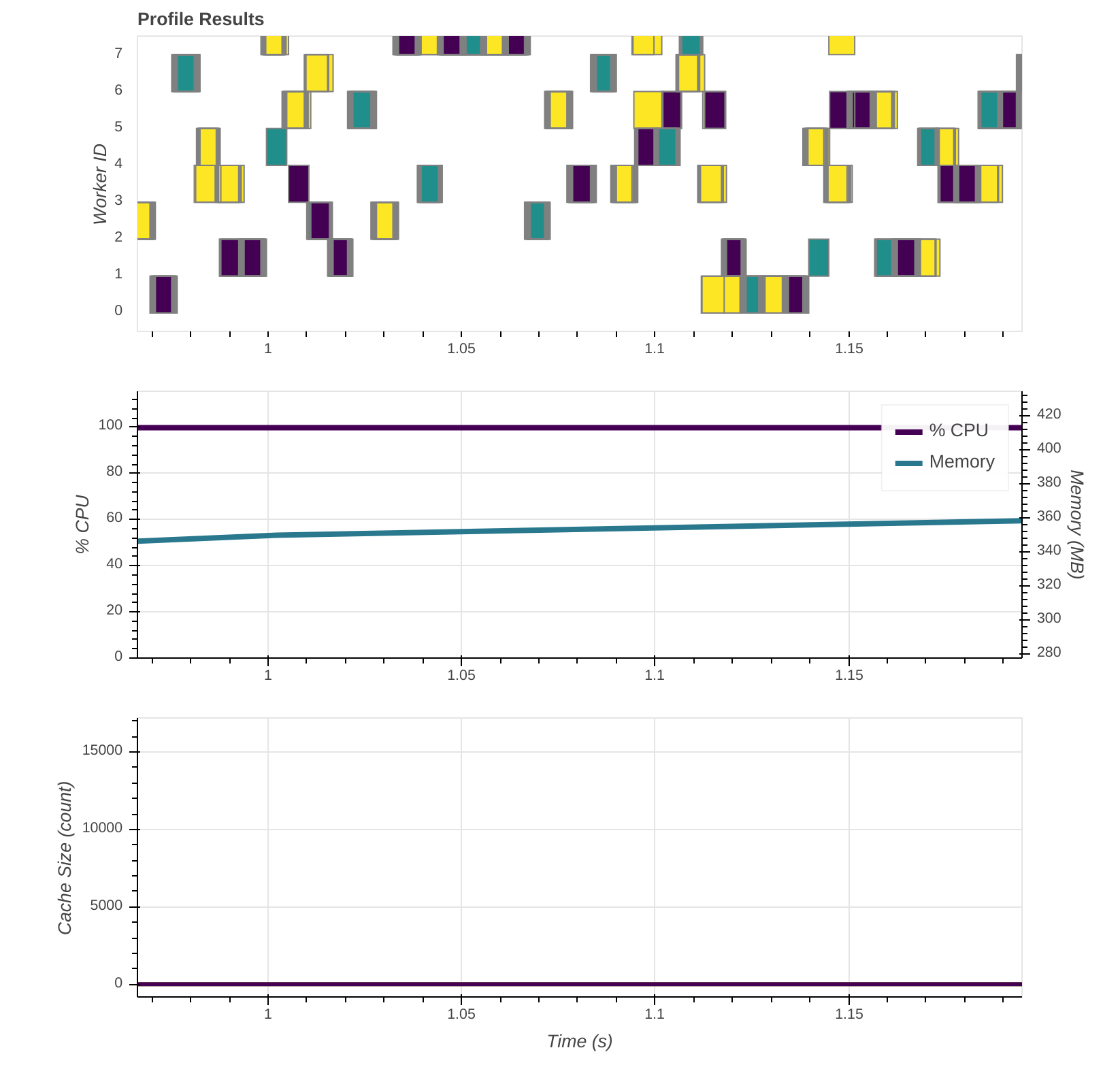
As I understand it, _a lot_ of very small tasks are created, and time is dominated by the overhead of managing them/communication. The following is a screenshot of a small part of the graph created:

It was not directly created from the computation of the benchmark, but should be very similar - and yes, the thick black line at the bottom is a bunch of edges! The access pattern to the chunks in the file then depends on the dask scheduler, and I don't know if they try to create a linear access pattern on the data.
In contrast, these are the profiles for test_chunks_48_48_*:
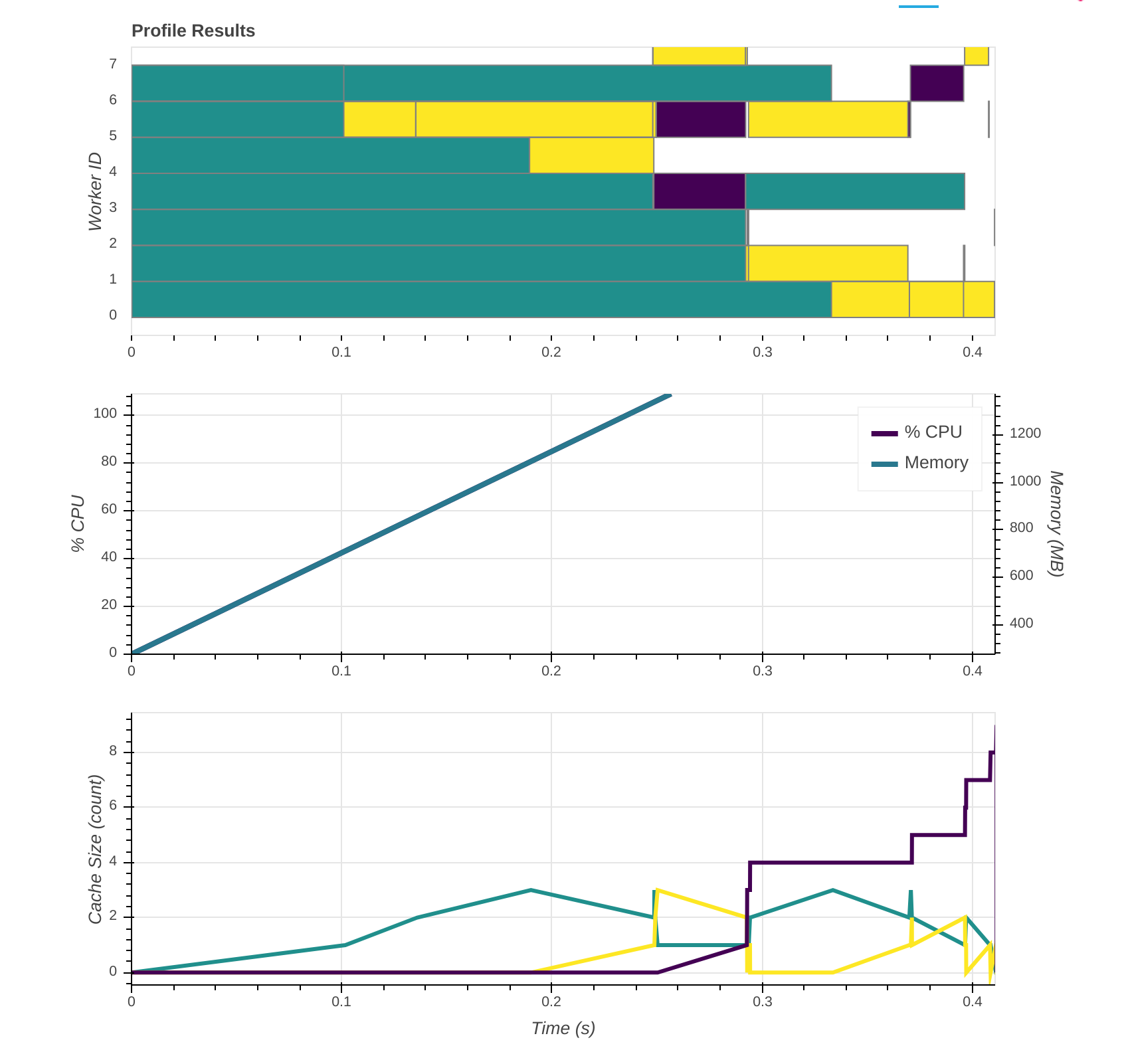
This looks better! Even though we get little benefit from multi-threading, if any.
Now my question would be: what are the effects on processing larger files? If the input was (1024, 1024, 128, 128) or larger, we would get a large number of chunks, too, and pay basically the same (avoidable) overhead.
An idea would be to have a fixed amount of tasks, each working on a "stream" of hdf5 chunks. I guess this can be arranged by having small-ish hdf5 chunks (~1MB), but mapping them to larger dask chunks? That would also fit the rule of thumb for dask chunking: "A task should take longer than 100ms."
sk1p
on 7 Feb 2018
A nice presentation with lots of details and information about the issues we are working on: http://www.pytables.org/docs/LargeDataAnalysis.pdf
uellue
on 7 Feb 2018
@sk1p Do you have an overview of PyTables vs dask? My feeling is that PyTables+Numexpr is made for distributing and blocking trivial "number crunching" tasks efficiently on out-of-core data sets, while dask works at a higher abstraction level with complicated dependencies and heterogeneous sub-tasks. That means one would use dask to coordinate a complicated analysis workflow while PyTables+Numexpr does the heavy lifting on each sub-task.
uellue
on 7 Feb 2018
I committed the benchmark scripts, based on the one by @magnunor, into git. There is also an eager version, and a h5py+numpy version, to compare "plain" hyperspy vs lazy hyperspy vs numpy.
Now we can also compare the impact of chunking without taking lazy processing into account. For example, using emd_sum_np:
test_chunks_01_01_128_128.emd
init 0.5138914585113525
0.6539206504821777
3131.878460314532 MB/s (overall)
14625.521801387647 MB/s (without init)

test_chunks_48_48_128_128.emd
init 0.3355224132537842
0.48197388648986816
4249.192865852603 MB/s (overall)
13984.154305491793 MB/s (without init)
(The emd_sum_hs version performs comparably)
To establish a baseline for what performance can be attained, and to account for hdf5 overhead, I also wrote benchmarks for working on binary files (both in Python using np.tofile / np.fromfile and in C reading raw doubles). The Python version has comparable performance to the lazy hyperspy version (~4700MB/s), whereas the C version is quite a bit faster (~6300MB/s).
Comparing the binary version with the hdf5 version, I'd say hdf5 does perform quite well, if you apply large enough chunks. I also want to write a C version that reads hdf5 as another comparison point (hdf5 vs raw binary).
sk1p
on 7 Feb 2018
@uellue I haven't looked into pytables in depth yet
sk1p
on 7 Feb 2018
I'm closing this since it works well for matrix-matrix multiplication. For other algorithms we can open dedicated issues.
uellue
on 5 Oct 2018
Related issues
uellue
·
11Comments
uellue
·
7Comments
sk1p
·
3Comments
uellue
·
7Comments
uellue
·
5Comments
Most helpful comment
I wrote some minimal scripts for generating EMD style HDF5-files (so they can easily be opened in HyperSpy), with different chunking. However, after having made it, I'm not really certain if we can separate the data being loaded into memory from the CPU runtime itself...
To generate the data (note that this will create many 2+ GB files):
To run some simple, not very rigorous, lazy processing:
Gives me: