Libelektra: web-ui: support new namespaces
Steps to Reproduce the Problem
Have some default keys and start up Web-UI:
kdb setmeta /sw/example/highlevel/#0/current/mydouble default 0
kdb ls /
#> /sw/example/highlevel/#0/current/mydouble
kdb run-elektrad
kdb run-web
Expected Result
That Web-UI starts up without issues.
Actual Result
An error is displayed:
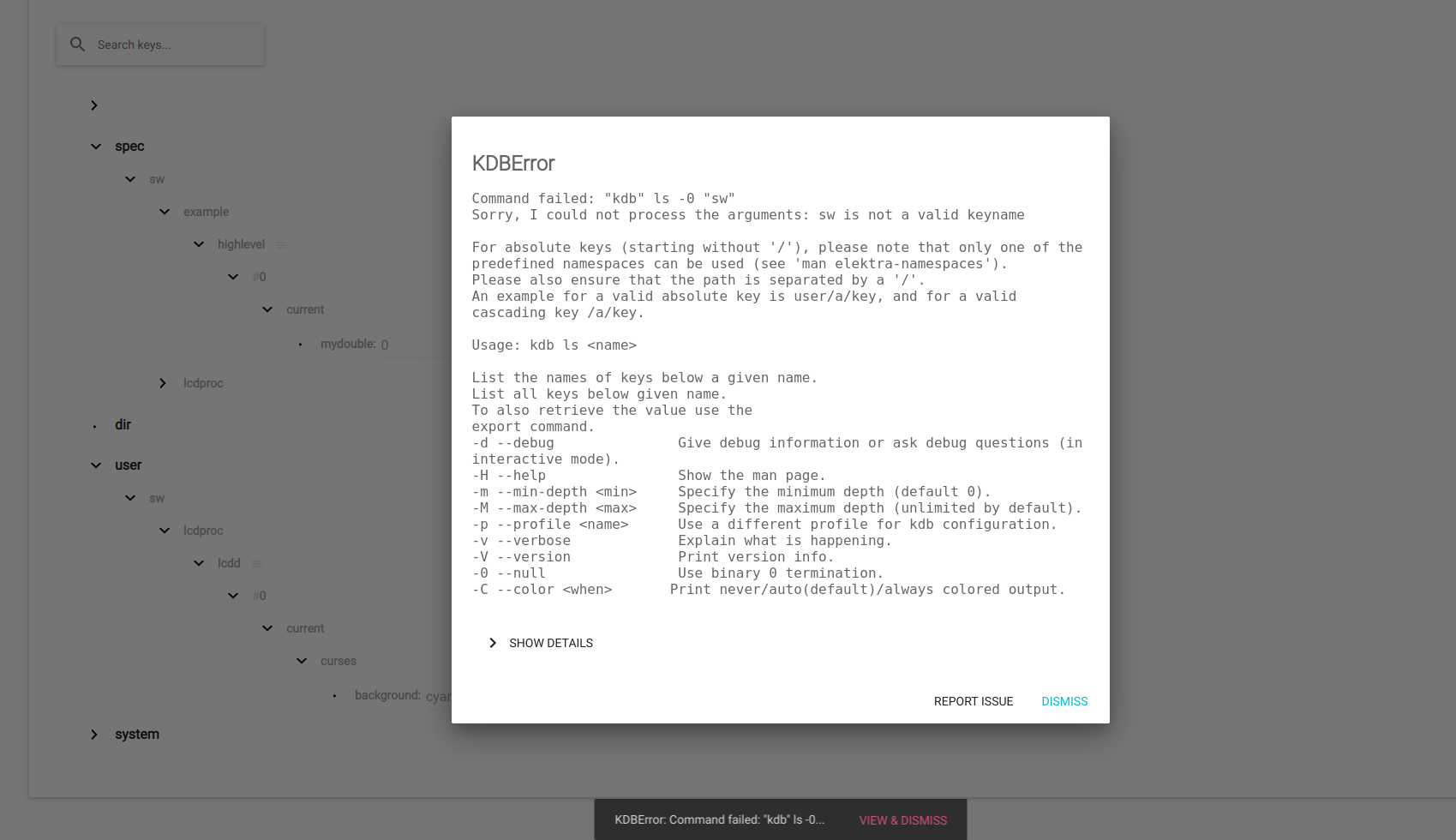
KDBError

Command failed: "kdb" ls -0 "sw"
Sorry, I could not process the arguments: sw is not a valid keyname

For absolute keys (starting without '/'), please note that only one of the
System Information
- Elektra Version: master
Further Log Files and Output
 markus2330
All 15 comments
@markus2330 Could you please assign me to this issue for the course CM and unassign me from the issue #2476 as discussed in this the thread of issue #2476?
 goJoWe16
on 20 Mar 2019
goJoWe16
on 20 Mar 2019
Done!
markus2330
on 20 Mar 2019
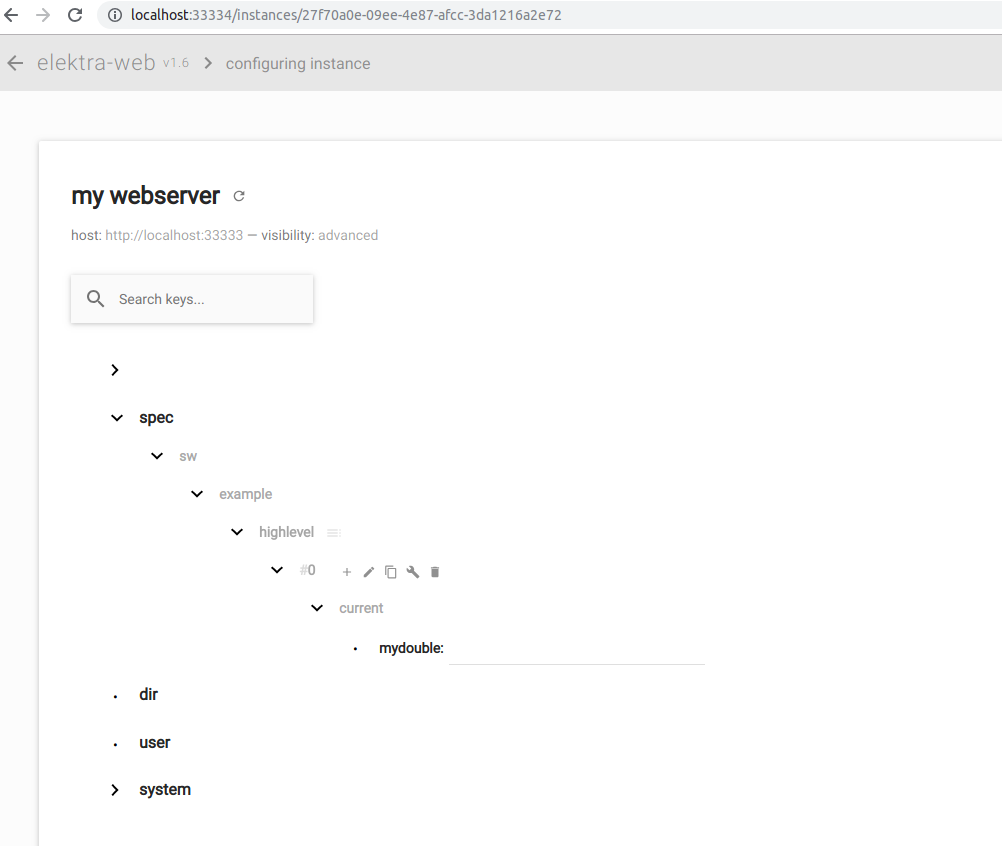
@markus2330 I am not able to reproduce this issue with the current version of elektra. The web-ui starts up without any issues on my system (using one instance):
goJoWe16
on 27 Mar 2019
I just see that this issue has overlap with #2408, which already assigned to someone else. I clarified which part should be fixed in which issue.
With #2456 this issue most likely fixes itself. So here actually only a verification step is needed after #2456 was fixed (which hopefully will happen today).
But #2410 will not fix itself, as it needs changes in how kdb is executed and is also very much related to this issue. Can you take this over? (I assigned you there.)
markus2330
on 27 Mar 2019
Yes I can take over issue #2410 and will also verify if the fix of issue #2408 fixes this issue.
Unfortunately, I will only be able to fix issue #2410 until the next deadline in the CM course next week.
goJoWe16
on 27 Mar 2019
Yes I can take over issue #2410 and will also verify if the fix of issue #2408 fixes this issue.
Thank you!
Unfortunately, I will only be able to fix issue #2410 until the next deadline in the CM course next week.
It would be better if you can fix two issues till then. Until now no PR was accepted.
markus2330
on 27 Mar 2019
Is okay by me, I will try my best!
goJoWe16
on 27 Mar 2019
Thank you!
markus2330
on 27 Mar 2019
This issue cannot be reproduced with the description given in this issue, but it can be reproduced following the following steps (based on the descirption of issue #2410):
sudo kdb mount `pwd`/LCDd-spec.ini spec/sw/lcdproc/lcdd/#0/current ni
sudo kdb spec-mount /sw/lcdproc/lcdd/#0/current
kdb set '/sw/lcdproc/lcdd/#0/current/curses/background' green
This leads to the same KDB error as initially stated in this issue.
@markus2330 I will try to fix the initial issue for the course CM, i hope that is okay.
goJoWe16
on 3 Apr 2019
Yes, it is okay!
Sorry for the incomplete description of how to reproduce the issue.
markus2330
on 3 Apr 2019
I'll keep it open for now as the workaround might be removed later.
markus2330
on 4 Apr 2019
New tasks:
- Support new namespaces as introduced in #3102
- remove workaround
markus2330
on 19 Nov 2019
I mark this issue stale as it did not have any activity for one year. I'll close it in two weeks if no further activity occurs. If you want it to be alive again, ping the issue by writing a message here or create a new issue with the remainder of this issue.
Thank you for your contributions :sparkling_heart:
![stale[bot] picture](https://avatars.githubusercontent.com/in/1724?v=4&s=40) stale[bot]
on 18 Nov 2020
stale[bot]
on 18 Nov 2020
Since the keyname overhaul, we need to check the web-ui in general.
 mpranj
on 24 Nov 2020
mpranj
on 24 Nov 2020
Yes :sparkling_heart:, I opened #3570 for the various topics we should retest.
markus2330
on 25 Nov 2020
Related issues
mpranj
·
3Comments
 sanssecours
·
3Comments
mpranj
·
4Comments
mpranj
·
3Comments
sanssecours
·
3Comments
sanssecours
·
3Comments
mpranj
·
4Comments
mpranj
·
3Comments
sanssecours
·
3Comments