Lf: Support for navigating history of jumps
Hi, there is one crucial functionality not present at the moment in lf that I even think I must be missing something. It's going back in history of jumps, example use case:
I'm configuring some program in my home directory but I need to quickly jump to /etc to edit some config file but then come back immediately. In general when you are very deep in some directory and you accidentally bookmark away, you have to travel all the way back.
Bind like map <c-j> back would solve this, I believe ranger has it.
Thanks.
 aidam38
All 10 comments
@aidam38 There is the automatic ' mark for the last visited directory. I think you can use it to for your usecase. However, there is no general mechanism to jump back more than once (i.e. jumplist).
 gokcehan
on 12 Aug 2019
gokcehan
on 12 Aug 2019
As an fzf user, I think it would have been awesome if we could search all already visited directories in the current Lf session. Such functionality could be easily built around fzf if only Lf would provide e.g an environmental variable that will be available in all child shells or a command that will print these and that could be used with lf -remote.
This enhancement would help @aidam38 as well because it'll be possible to select a directory from the history stack via it's position.
 doronbehar
on 20 Aug 2019
doronbehar
on 20 Aug 2019
Is it possible map mark ' to shortcut? If I add map <a-h> mark-load ' to config it still asks me to select mark after using this shortcut.
 hajdamak
on 10 Oct 2019
hajdamak
on 10 Oct 2019
@hajdamak Assuming your mark-load command is still mapped to ' as default, you can try the following:
map <a-h> :push ''
@gokcehan Yeap, this works fine. Thanks.
This covers most important use case. Although having full history would be very handy.
hajdamak
on 10 Oct 2019
Wish there was a simple way to jump through directory history stack backwards and forwards, irrelevant of fzf, _e.g._ map H history-stack-backward and map L history-stack-forward
 rafi
on 22 Feb 2020
rafi
on 22 Feb 2020
For what's worth, I managed to get a close (enough) behavior with the following in lfrc:
$pwd > ~/.dir-stack-lf
cmd on-cd &{{
SKIP=`cat ~/.do_skip`
if [ $SKIP -ne 1 ]; then
pwd >> ~/.dir-stack-lf
fi
echo 0 > ~/.do_skip
}}
cmd go-back ${{
last_dir="`tail -2 ~/.dir-stack-lf|head -1|sed 's;/;\\/;g'`"
lf -remote "send $id cd \"$last_dir\""
egrep -vE "^$last_dir$" ~/.dir-stack-lf > /tmp/lf-last-dirs
mv /tmp/lf-last-dirs ~/.dir-stack-lf
echo 1 > ~/.do_skip
}}
map H go-back
This is highly improvable though and I wouldn't mind having less dotfiles in it.
 mvrozanti
on 18 Jul 2020
mvrozanti
on 18 Jul 2020
Neat idea @mvrozanti. I didn't know about the on-cd command; super useful. Took your idea and tweaked it in a few of ways:
- Keep one jump list file per client (means that if you have multiple
lfinstances running they don't clobber each other). - Preserve jump list file across invocations of
lf(use ofuniqimposes an upper bound on the size of the list file). - Using
sedinstead ofhead+tailbecause it should be faster.
Probably also "highly improvable though", just like yours 😂. Thanks for sharing.
map <f-6> jump-in
map <c-o> jump-out

${{
  JUMP_LIST=~/.config/lf/jump-list.$id
  JUMP_INDEX=~/.config/lf/jump-index.$id
  JUMPING=~/.config/lf/jumping.$id
  $pwd >> $JUMP_LIST
  uniq $JUMP_LIST $JUMP_LIST.uniq
  mv $JUMP_LIST.uniq $JUMP_LIST
  cat $JUMP_LIST | wc -l | sed -e 's/ //g' > $JUMP_INDEX
  rm -f $JUMPING
}}

cmd jump-in ${{
  JUMP_LIST=~/.config/lf/jump-list.$id
  JUMP_INDEX=~/.config/lf/jump-index.$id
  INDEX=$(expr `cat $JUMP_INDEX` + 1)
  MAX=$(cat $JUMP_LIST | wc -l)
  if [ $INDEX -le $MAX ]; then
    echo $INDEX > $JUMP_INDEX
    touch ~/.config/lf/jumping.$id

    # https://stackoverflow.com/a/6022431/2103996
    TARGET=$(sed "${INDEX}q;d" $JUMP_LIST)
    lf -remote "send $id cd \"$TARGET\""
  fi
}}

cmd jump-out ${{
  JUMP_LIST=~/.config/lf/jump-list.$id
  JUMP_INDEX=~/.config/lf/jump-index.$id
  INDEX=$(expr `cat $JUMP_INDEX` - 1)
  if [ $INDEX -gt 0 ]; then
    echo $INDEX > $JUMP_INDEX
    touch ~/.config/lf/jumping.$id

    # https://stackoverflow.com/a/6022431/2103996
    TARGET=$(sed "${INDEX}q;d" $JUMP_LIST)
    lf -remote "send $id cd \"$TARGET\""
  fi
}}

cmd on-cd &{{
  JUMP_LIST=~/.config/lf/jump-list.$id
  JUMP_INDEX=~/.config/lf/jump-index.$id
  JUMPING=~/.config/lf/jumping.$id
  if [ -e $JUMPING ]; then
    # If jumping, just move.
    rm $JUMPING
  else
    # Otherwise, truncate jump list at current index and record new directory.
    head -n $(cat $JUMP_INDEX) $JUMP_LIST > $JUMP_LIST.new
    pwd >> $JUMP_LIST.new
    mv $JUMP_LIST.new $JUMP_LIST
    INDEX=$(expr `cat $JUMP_LIST | wc -l`)
    echo $INDEX > $JUMP_INDEX
  fi
}}
 wincent
on 18 Jul 2020
wincent
on 18 Jul 2020
That default mapping is horrible
That being said, I'm copying all the rest to my lfrc. Thanks dude
Minor edit:
$pwd >> $JUMP_LIST
should be
pwd >> $JUMP_LIST
I also wanted this, but found that having not just history, but a ranked by frequency and recency list is more useful.
Something like this can be done with z. Imo, it is a better way of doing it, since it also accounts for your cd's in interactive shell.
If you want just recency - that also possible via z -t. But note that database is the same across all lf instances. In that case - yes, separate simple jump lists as presented above are better.
But if you like me - here is how you can integrate z into lf.
Since z is designed to be sourced in shell rc file to work - we will need two simple helper scripts.
First one - z-add, as name suggests - is used to add directory into z database.
#!/usr/bin/env bash

source /usr/share/z/z.sh

# --add is undocumented for some reason, but it works
_z --add "$1"
Second - z-list - to list (ranked) directories from database
#!/usr/bin/env bash

source /usr/share/z/z.sh

_z -l 2>&1
Assuming those two somewhere in your $PATH - in lfrc add
cmd on-cd &{{
    z-add "$PWD"
}}
on-cd

# and fzf integration
cmd fzf_z ${{
    sel="$(z-list | sed "s|$HOME|~|g" | fzf +s --nth=2.. --tac | sed "s|~|$HOME|g;s|^[0-9,.]* *||")"
    [ -d "$sel" ] && lf -remote "send $id cd \"$sel\""
}}

map <c-g> fzf_z
Now when you'll press ctrl+g you'll be presented with ranked list of all visited directories:
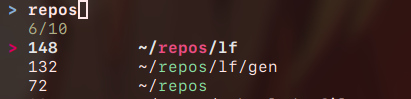
If you want ranking by recency only - change -l to -t in z-add.
EDIT
TIL: there is no need for z-add / z-list shenanigans, zoxide exists, and you could just use zoxide add "$PWD" in on-cd, and zoxide query -l instead of z-list in fzf_z:
cmd fzf_z ${{
    sel="$(zoxide query -l | fzf +s)"
    [ -d "$sel" ] && lf -remote "send $id cd \"$sel\""
}}
 MahouShoujoMivutilde
on 14 Oct 2020
MahouShoujoMivutilde
on 14 Oct 2020
Related issues
 itmitica
·
6Comments
itmitica
·
6Comments
 pr4th4m
·
7Comments
gokcehan
·
7Comments
pr4th4m
·
7Comments
gokcehan
·
7Comments
 niksfirefly
·
9Comments
doronbehar
·
3Comments
niksfirefly
·
9Comments
doronbehar
·
3Comments
Most helpful comment
Neat idea @mvrozanti. I didn't know about the
on-cdcommand; super useful. Took your idea and tweaked it in a few of ways:lfinstances running they don't clobber each other).lf(use ofuniqimposes an upper bound on the size of the list file).sedinstead ofhead+tailbecause it should be faster.Probably also "highly improvable though", just like yours 😂. Thanks for sharing.