Lexikjwtauthenticationbundle: Another Unable to find the controller for path "/login_check". The route is wrongly configured
So obviously, there is a lot of issues already with this error message. Only a few has been addressed.
I feel I have been through all the issues now, and I have attempted many different configurations to see if I could get a working result, with no luck.
Error message
Unable to find the controller for path "/login_check". The route is wrongly configured
security:
    encoders:
        App\Entity\User:
            algorithm: bcrypt
    role_hierarchy:
        ROLE_READER: ROLE_USER
        ROLE_ADMIN: ROLE_READER
    providers:
        entity_provider:
            entity:
                class: App\Entity\User
                property: username
    firewalls:
        # Removed main entirely as suggested in a different issue, with no luck. Also attempted to move dev
        dev:
            pattern: ^/(_(profiler|wdt)|css|images|js)/
            security: false
        login:
            pattern:  ^/login
            stateless: true
            anonymous: true
            json_login:
                check_path: /login_check
                # Attempted with specific username_path and password_path config as well as without
                username_path: username
                password_path: password
                success_handler: lexik_jwt_authentication.handler.authentication_success
                failure_handler: lexik_jwt_authentication.handler.authentication_failure
        register:
            pattern:  ^/register
            stateless: true
            anonymous: true
        api:
            pattern:   ^/v1
            stateless: true
            anonymous: true
            provider: entity_provider
            guard:
                authenticators:
                    - lexik_jwt_authentication.jwt_token_authenticator
    access_control:
        - { path: ^/login, roles: IS_AUTHENTICATED_ANONYMOUSLY }
        - { path: ^/v1, roles: IS_AUTHENTICATED_FULLY }
        - { path: ^/register, roles: IS_AUTHENTICATED_ANONYMOUSLY }
Creating users with /register works fine. However, all users created through register returns the error message regarding a missing controller. However, that only occures if the username/password credentials is correct, if I type in a wrong password, it returns bad credentials as expected.
 michaelrachlitz
All 15 comments
Could you provide your routes.yaml ? Also what version of symfony are you using? Do you have a github project that reproduces this problem? Is this during the dev environment?
 kemicofa
on 8 Feb 2019
kemicofa
on 8 Feb 2019
@kemicofa
register:
  path: /register
  controller: App\Controller\AuthController::register
  methods: POST

api:
  path: /v1
  controller: App\Controller\AuthController::api

login:
  path: /login
  controller: App\Controller\AuthController::login
Done several new attempts though. At this moment, I am manually validating logins and I removed the /login_check. Manually creating tokens also.
Using Symfony 4.
Environment: Dev as well as prod.
michaelrachlitz
on 11 Feb 2019
I have the exact problem when trying to invoke request in Postman with wrong Body type (x-www-form-urlencoded vs raw)...does something like this from command line also producing the error ?
curl -X POST -H "Content-Type: application/json" http://yourhost:yourport/api/login_check -d '{"username":"admin","password":"xxxxxxx"}'
 kapcus
on 11 Feb 2019
kapcus
on 11 Feb 2019
Same here, with Symfony 3.4
 nzurita
on 26 Feb 2019
nzurita
on 26 Feb 2019
You are probably not sending a valid JSON request. The Content-Type header must beapplication/json (not obvious using postman)
 chalasr
on 28 Feb 2019
chalasr
on 28 Feb 2019
Closing due to the lack of feedback.
chalasr
on 20 Apr 2019
@cbourgois thanks god, you saved me
 spmsupun
on 25 Jul 2019
spmsupun
on 25 Jul 2019
Yep! The error changed in the new versions of Symfony.
It's not an Error 400 Bad Request anymore but 404 when the request is empty.
Be carrefull, some MOOC are not updated...
I have spent 1h on that ahah!
 Monrocq
on 16 Oct 2019
Monrocq
on 16 Oct 2019
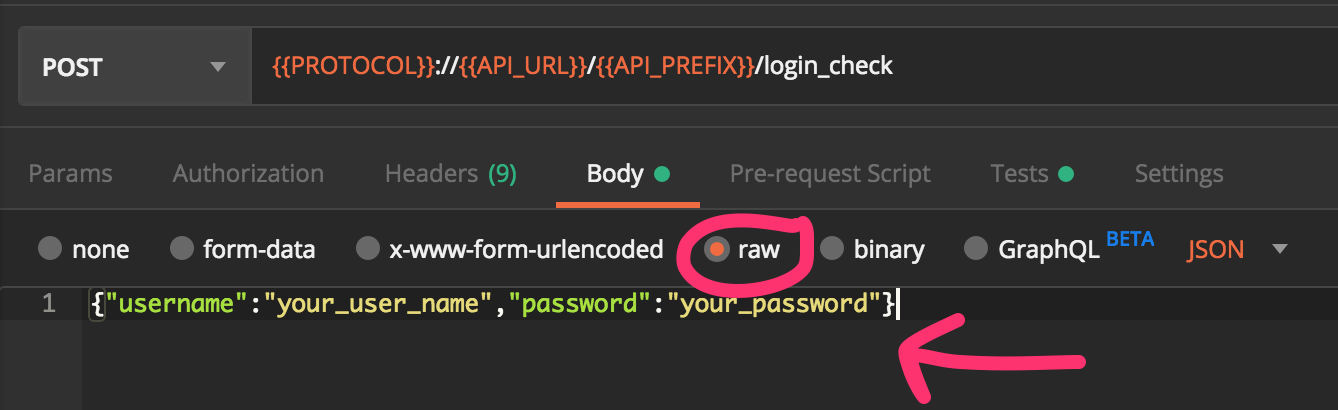
In addition to configure the header as @chalasr says, send your credentials in JSON:
 alfupe
on 21 Dec 2019
alfupe
on 21 Dec 2019
I just removed main part of the configuration, and that workes for me
` firewalls:
dev:
pattern: ^/(_(profiler|wdt)|css|images|js)/
security: false
main:
anonymous: lazy
provider: app_user_provider
    login:
        pattern:  ^/login
        stateless: true
        anonymous: true
        json_login:
            check_path: /login_check
            success_handler: lexik_jwt_authentication.handler.authentication_success
            failure_handler: lexik_jwt_authentication.handler.authentication_failure

    register:
        pattern:  ^/register
        stateless: true
        anonymous: true

    api:
        pattern:  ^/api
        stateless: true
        anonymous: false
        provider: app_user_provider
        guard:
            authenticators:
                - lexik_jwt_authentication.jwt_token_authenticator
        # activate different ways to authenticate
        # https://symfony.com/doc/current/security.html#firewalls-authentication

        # https://symfony.com/doc/current/security/impersonating_user.html`
 goranajvaz123
on 10 Apr 2020
goranajvaz123
on 10 Apr 2020
It worked for me using:
curl -k -X POST -H "Content-Type: application/json" -d "{\"username\":\"user", \"password\":\"user\"}" https://127.0.0.1:8000/api/login_check
 shamil8
on 8 Jun 2020
shamil8
on 8 Jun 2020
I had the same error and I try to use the solutions given in this issue but no result. To resolve this I return an empty array, at the beginning the function did nothing, for the getRoles function of my Entity (I do not take into account the role management in my project) and I send a JSON type for my informations (username and password) - before I used the TEXT type and finally it's works :)
public function getRoles()
    {
        return [];
    }
 SekmSet
on 25 Aug 2020
SekmSet
on 25 Aug 2020
Try to change order of your firewalls, example :
1 - dev
2 - login
3 - api
4 - main
 EvKoh
on 20 Sep 2020
EvKoh
on 20 Sep 2020
Try to change order of your firewalls, example :
1 - dev
2 - login
3 - api
4 - main
You are a life saver. Why does it have to be so hard. Seriously, this needs to be documented. Wasted hours and hours on something that should not have taken some minutes!!!
 bamjad
on 19 Oct 2020
bamjad
on 19 Oct 2020
@bamjad Pull requests are more than welcome to document such common troubles.
chalasr
on 19 Oct 2020
Related issues
 christophe-mailfert
·
5Comments
christophe-mailfert
·
5Comments
 astronati
·
5Comments
astronati
·
5Comments
 ghost
·
5Comments
ghost
·
5Comments
 kamran-jabbar
·
4Comments
kamran-jabbar
·
4Comments
 Walkoss
·
5Comments
Walkoss
·
5Comments
Most helpful comment
You are probably not sending a valid JSON request. The
Content-Typeheader must beapplication/json(not obvious using postman)