Lens: Prometheus doesn't install on arm64 cluster
Describe the bug
I do not have Prometheus installed on my arm64 microk8s cluster. I clicked the install button in Lens settings and it attempted to deploy, but the pod was unable to start - crashloopbackoff.
To Reproduce
Steps to reproduce the behavior:
- Connect to an arm64 cluster
- Click around to ensure Lens is connected/working other than Prometheus
- Go to settings for the cluster
- Click on install prometheus
- Click back to dashboard and see errors as pod fails to initialize
Expected behavior
I expected prometheus to install and come up, lighting up the dashboard in Lens.
Environment (please complete the following information):
- Lens Version: 3.4.0
- OS: Windows 10 (client); Ubuntu 18.04 (k8s nodes); Microk8s 1.18.2
- Installation method (e.g. snap or AppImage in Linux): Win10 installer
 rockfordlhotka
All 16 comments
Hi @rockfordlhotka
New version runs Prometheus , but u need now change deploy in kube-state-metrics
and change image for carlosedp/kube-state-metrics:v1.9.6
that image have support for arch amd64, arm, arm64
coreos/kube-state-metrics have only amd64 and not support for others arch.
I run in raspberry pi 4 arm64 kernel


 BlackMix
on 16 Jun 2020
BlackMix
on 16 Jun 2020
This should be "fixed" in 3.5.0 already via https://github.com/lensapp/lens/pull/400. With "fixed" I mean that kube state metrics should now be left in "Pending" state as it cannot find proper node as itäs using only amd64 selector
 jnummelin
on 16 Jun 2020
jnummelin
on 16 Jun 2020
@jnummelin with new version I got warning message, that not good idea, better add one image with amd64, arm, arm64 builds and so everyone can use Lens, Carlos image is fine have recent build from metrics and 100k+ downloads
BlackMix
on 16 Jun 2020
@BlackMix if I understand correctly, you are saying that I can't have Lens install Prometheus.
I need to find the deployment file (which is where?), edit it, and install Prometheus by hand?
rockfordlhotka
on 16 Jun 2020
@rockfordlhotka nop, u install normal in Lens and stop kube-state-metrics deploy with scale 0, so u edit deploy with new image: carlosedp/kube-state-metrics:v1.9.6
after edit image back scale for 1
edit: Prometheus in last version work fine, only kube-state-metrics not work in arm64, so need use other image.
BlackMix
on 16 Jun 2020
Oh, ok. I need to do some learning 😄
rockfordlhotka
on 16 Jun 2020
I think now this fix it #484
I tested and run without errors.
node arm64

BlackMix
on 17 Jun 2020
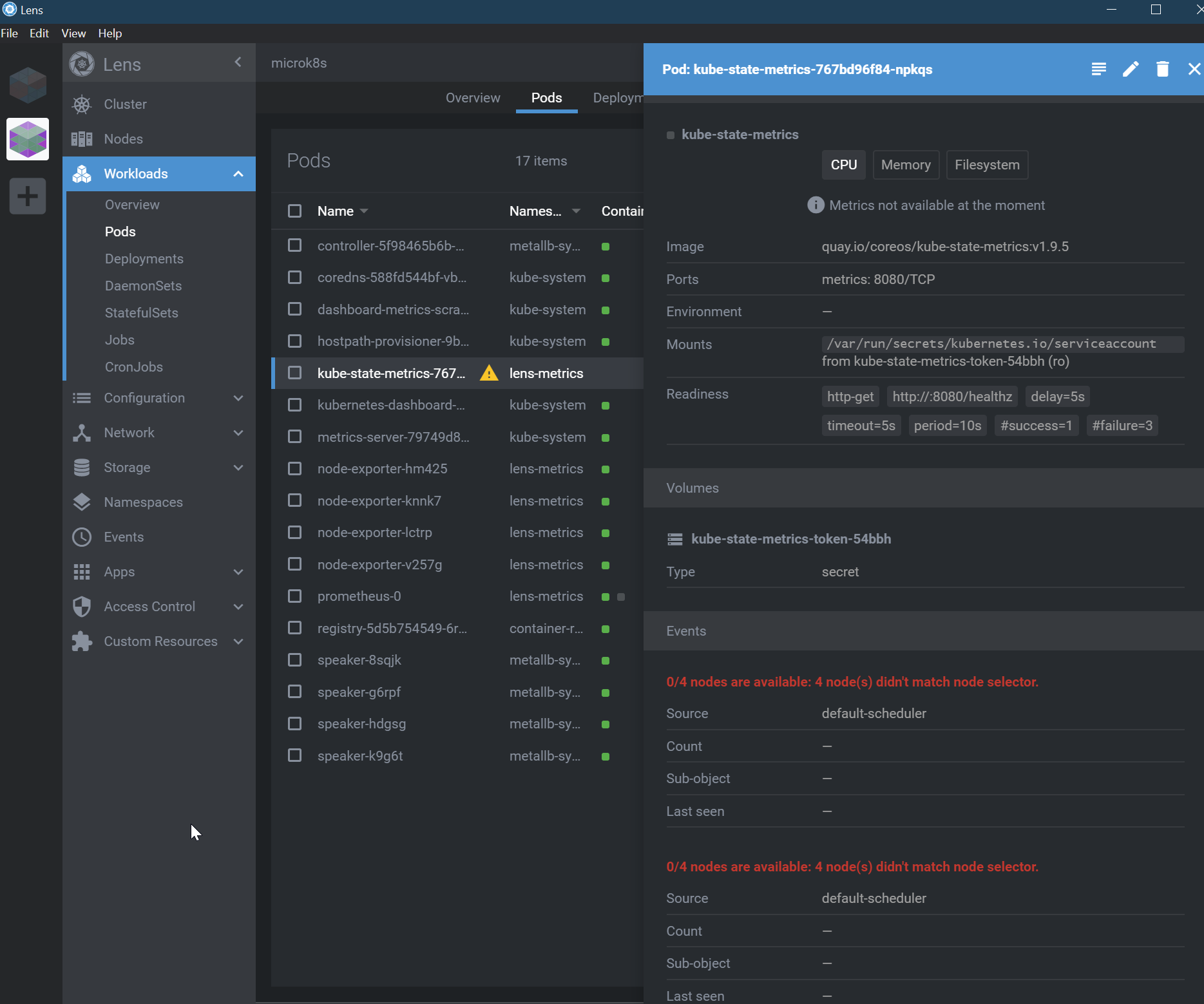
I finally got enough time to try this again - latest version of microk8s on arm64 and latest version of Lens. It does make a good effort, but kube-state-metrics doesn't start on any of the nodes because they don't match the node selector. I'm afraid I am not sure what that means?
rockfordlhotka
on 23 Jul 2020
Is the problem because there's no selector for arm64?
affinity:
nodeAffinity:
requiredDuringSchedulingIgnoredDuringExecution:
nodeSelectorTerms:
- matchExpressions:
- key: kubernetes.io/os
operator: In
values:
- linux
- key: kubernetes.io/arch
operator: In
values:
- amd64
- matchExpressions:
- key: beta.kubernetes.io/os
operator: In
values:
- linux
- key: beta.kubernetes.io/arch
operator: In
values:
- amd64
Yes, this is one of the problems. But when I tried to add the value in the matchExpressions statements, then it failed to start the pod with a CrashLoopBackOff problem.
The good news are that until now kube-state-metrics didn't have support (image) for arm64, but it seems that they started to work on this 11 days ago. You can follow the issue and PR in their official Github project:
Issue: https://github.com/kubernetes/kube-state-metrics/issues/1037
PR: https://github.com/kubernetes/kube-state-metrics/pull/1190
 cristiangauma
on 10 Aug 2020
cristiangauma
on 10 Aug 2020
My current workaround is to repurpose a 2007 era laptop that was gathering dust as a k8s node, so I have one amd64 node that can run this particular container.
rockfordlhotka
on 11 Aug 2020
Is there any news about the issue?
 luis-garza
on 20 Oct 2020
luis-garza
on 20 Oct 2020
I make it work in my local Raspberry Pi cluster under the arm64/v7 architecture.
For that, I had to edit these nodeAffinity annotations for the kube-state-metrics deployment in the lens- metrics namespace. Otherwise, the pods won't be scheduled to run since it is unable to find any matching expression.
     affinity:
        nodeAffinity:
          requiredDuringSchedulingIgnoredDuringExecution:
            nodeSelectorTerms:
              - matchExpressions:
                  - key: kubernetes.io/os
                    operator: In
                    values:
                      - linux
                  - key: kubernetes.io/arch
                    operator: In
                    values:
                      - arm64
              - matchExpressions:
                  - key: beta.kubernetes.io/os
                    operator: In
                    values:
                      - linux
                  - key: beta.kubernetes.io/arch
                    operator: In
                    values:
                      - arm64
Also, I had to update the Deployment image, to point to the specific image for ARM. (To know which images tags use, check here). I updated the deployment image in order to use k8s.gcr.io/kube-state-metrics/kube-state-metrics-arm64:2.0.0-alpha.1.
Using the provided Quay repository doesn't work since the image was build for the amd64 architecture.
I would recommend using Moby BuildKit to build multi-architecture images (at least for the most popular architectures), or updating the Registry to use the above listed images.
 fmdlc
on 24 Oct 2020
fmdlc
on 24 Oct 2020
I have tested the above using the latest alpha release - k8s.gcr.io/kube-state-metrics/kube-state-metrics:v2.0.0-alpha.3
This all appears to work correctly, looking at the image build I would suggest replacing that as the default as it supports - (arch: amd64, arm, arm64, ppc64le and s390x)
I also note they have stated they will stop producing the quay image soon. By switching the image you probably dont need the node selectors.
The only issue i do see is the pod counter says i have 0 out of 440. A, i dont know where the 440 is configured and b i have lots of pods running :) - but CPU & Memory look good which is the main thing.
Tested on a Raspberry PI Arm - Microk8s cluster
Thanks
 pixie79
on 2 Dec 2020
pixie79
on 2 Dec 2020
@pixie79 could you share your manifest, mate? I'd love to test it on my Nvidia Jetson Nano node. My previous attempts failed quite miserably :)
 organicnz
on 5 Dec 2020
organicnz
on 5 Dec 2020
I can confirm that it works with k8s.gcr.io/kube-state-metrics/kube-state-metrics:v2.0.0-beta,
The quay.io only supports amd64, we should switch to the gcr.io image by default.
 Vaskozl
on 14 Dec 2020
Vaskozl
on 14 Dec 2020
Related issues
 magusd
·
4Comments
magusd
·
4Comments
 diemus
·
3Comments
diemus
·
3Comments
 fjudith
·
4Comments
fjudith
·
4Comments
 headcr4sh
·
5Comments
headcr4sh
·
5Comments
 spyro2000
·
3Comments
spyro2000
·
3Comments
Most helpful comment
I make it work in my local
Raspberry Picluster under thearm64/v7architecture.For that, I had to edit these
nodeAffinityannotations for thekube-state-metricsdeployment in thelens- metricsnamespace. Otherwise, the pods won't be scheduled to run since it is unable to find any matching expression.Also, I had to update the
Deploymentimage, to point to the specific image for ARM. (To know which images tags use, check here). I updated thedeploymentimage in order to usek8s.gcr.io/kube-state-metrics/kube-state-metrics-arm64:2.0.0-alpha.1.Using the provided Quay repository doesn't work since the image was build for the
amd64 architecture.I would recommend using Moby BuildKit to build multi-architecture images (at least for the most popular architectures), or updating the Registry to use the above listed images.