Lens: Unable to connect to remote clusters in 2.6.x
Describe the bug
Cannot connect to any of my Rancher Kubernetes clusters since the 2.6.x updates. I am presented with the following result on all my Rancher clusters:
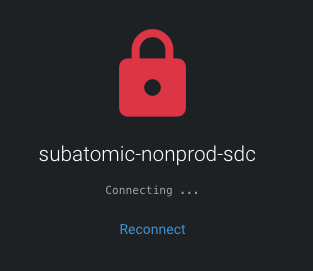
Looking at the logs, Lens appears to be trying to go through 127.0.0.1 to connect to my clusters. I have no proxy configured as seen here:
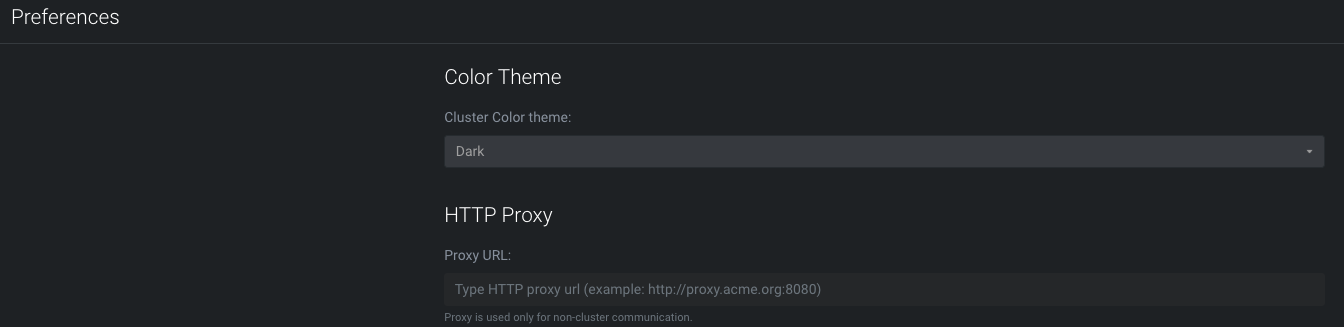
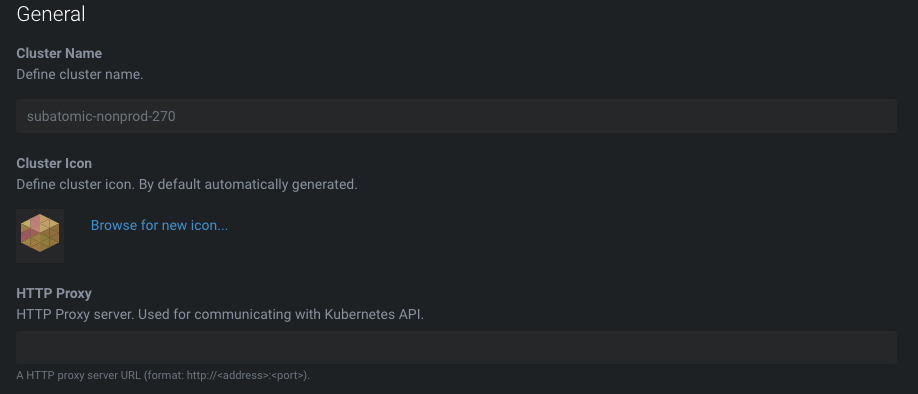
Note that all my local Minikube clusters are still connectable.
To Reproduce
Steps to reproduce the behaviour:
- Open Lens
- Click on cluster icon
- See error image appear as above
Expected behavior
Lens dashboard should appear for the cluster once connected.
Environment:
- Lens Version: 2.6.2
- OS: OSX
- Installation method: From the dmg file download for OSX
Logs:
info: initializing server for 127.0.0.1:49152 on port 49156
error: Failed to connect to cluster subatomic-nonprod-270: {
  "name": "StatusCodeError",
  "statusCode": 404,
  "message": "404 - \"default backend - 404\"",
  "error": "default backend - 404",
  "options": {
    "json": true,
    "timeout": 10000,
    "headers": {
      "host": "bb6abba0-feb0-4953-8415-ec6fea9c15dd.localhost:49152"
    },
    "uri": "http://127.0.0.1:49152/api-kube/version",
    "simple": true,
    "resolveWithFullResponse": false,
    "transform2xxOnly": false
  },
  "response": {
    "statusCode": 404,
    "body": "default backend - 404",
    "headers": {
      "content-length": "21",
      "content-type": "text/plain; charset=utf-8",
      "date": "Fri, 22 Nov 2019 08:42:57 GMT",
      "server": "nginx/1.15.6",
      "strict-transport-security": "max-age=15724800; includeSubDomains",
      "connection": "close"
    },
    "request": {
      "uri": {
        "protocol": "http:",
        "slashes": true,
        "auth": null,
        "host": "127.0.0.1:49152",
        "port": "49152",
        "hostname": "127.0.0.1",
        "hash": null,
        "search": null,
        "query": null,
        "pathname": "/api-kube/version",
        "path": "/api-kube/version",
        "href": "http://127.0.0.1:49152/api-kube/version"
      },
      "method": "GET",
      "headers": {
        "host": "bb6abba0-feb0-4953-8415-ec6fea9c15dd.localhost:49152",
        "accept": "application/json"
      }
    }
  }
}
error: [object Object]
error: Failed to connect to cluster subatomic-nonprod-270: {
  "name": "StatusCodeError",
  "statusCode": 404,
  "message": "404 - \"default backend - 404\"",
  "error": "default backend - 404",
  "options": {
    "json": true,
    "timeout": 10000,
    "headers": {
      "host": "bb6abba0-feb0-4953-8415-ec6fea9c15dd.localhost:49152"
    },
    "uri": "http://127.0.0.1:49152/api-kube/version",
    "simple": true,
    "resolveWithFullResponse": false,
    "transform2xxOnly": false
  },
  "response": {
    "statusCode": 404,
    "body": "default backend - 404",
    "headers": {
      "content-length": "21",
      "content-type": "text/plain; charset=utf-8",
      "date": "Fri, 22 Nov 2019 08:42:59 GMT",
      "server": "nginx/1.15.6",
      "strict-transport-security": "max-age=15724800; includeSubDomains",
      "connection": "close"
    },
    "request": {
      "uri": {
        "protocol": "http:",
        "slashes": true,
        "auth": null,
        "host": "127.0.0.1:49152",
        "port": "49152",
        "hostname": "127.0.0.1",
        "hash": null,
        "search": null,
        "query": null,
        "pathname": "/api-kube/version",
        "path": "/api-kube/version",
        "href": "http://127.0.0.1:49152/api-kube/version"
      },
      "method": "GET",
      "headers": {
        "host": "bb6abba0-feb0-4953-8415-ec6fea9c15dd.localhost:49152",
        "accept": "application/json"
      }
    }
  }
}
error: [object Object]
error: server http://127.0.0.1:49152/bb6abba0-feb0-4953-8415-ec6fea9c15dd exited with code null
error: proxy subatomic-nonprod-270 exited with code null
Kubeconfig:
apiVersion: v1
kind: Config
clusters:
- name: "subatomic-nonprod-sdc"
  cluster:
    server: "https://rancher.caas.absa.co.za/k8s/clusters/c-pnclq"
    certificate-authority-data: "cert is here"

users:
- name: "u-fwengx4xqg"
  user:
    token: "token is here"

contexts:
- name: "subatomic-nonprod-sdc"
  context:
    user: "u-fwengx4xqg"
    cluster: "subatomic-nonprod-sdc"

current-context: "subatomic-nonprod-sdc"
 kbristow
All 13 comments
(beautified the jsons in error log)
 kke
on 22 Nov 2019
kke
on 22 Nov 2019
Same issue but when connecting on 2.6.1
 andrejonathan
on 24 Nov 2019
andrejonathan
on 24 Nov 2019
I have the same issue as well with 2.6.3
 raswinraaj
on 28 Nov 2019
raswinraaj
on 28 Nov 2019
@andrejonathan @raswinraaj are you also using Rancher?
 jakolehm
on 28 Nov 2019
jakolehm
on 28 Nov 2019
@andrejonathan @raswinraaj are you also using Rancher?
I am seeing the same with Rancher and Lens 2.6 on Windows 10
@jakolehm
 nielsvz
on 28 Nov 2019
nielsvz
on 28 Nov 2019
@nielsvz is Rancher installed using "HA" installation guide (= runs on top of RKE)?
jakolehm
on 28 Nov 2019
@jakolehm Just with regards to the original issue, the Rancher I am trying to connect to is an HA install using RKE.
kbristow
on 28 Nov 2019
I managed to setup test Rancher to play with and got the issue re-produced.
So the problem boils down to kubectl proxy not working with Rancher managed clusters at all! In 2.6.0 Lens moved to use kubectl proxy functionality to handle all the authentication to the cluster API. So basically all the requests from UI are proxied through this auth handler so the UI does not need to know anything about cluster auth mechanisms.
So I got my Rancher managed DO cluster with kube config:
apiVersion: v1
clusters:
- cluster:
    server: https://mydomain.org/k8s/clusters/c-s2w4y
  name: rancher-do-test
contexts:
- context:
    cluster: rancher-do-test
    user: rancher-do-test
  name: rancher-do-test
current-context: rancher-do-test
kind: Config
preferences: {}
users:
- name: rancher-do-test
  user:
    token: <token>
I start proxy manually:
$ kubectl proxy -v 9
I1128 13:27:11.845064   10709 loader.go:375] Config loaded from file:  kubeconfig_rancher
Starting to serve on 127.0.0.1:8001
But all request to the proxy just hit the default backend (as there's ingress with TLS in front of my Rancher manager)
$ curl -s -o /dev/null -w "%{http_code}" localhost:8001/api/v1/pods?limit=500
404
Some Rancher issues instruct to use the cluster path as part of the proxied request, but it still fails:
$ curl -s -o /dev/null -w "%{http_code}" localhost:8001/k8s/clusters/c-j2q4x/api/v1/pods?limit=500
404
Since the requests through kubectl proxy seems to be always directed to the default backend of the ingress controller (nginx ingress in my case) I'm actually not sure whether this is really a Rancher issue or kubectl proxy issue. Or maybe the way Rancher sets up the ingress&TLS. Need to dig deeper how Rancher sets up everything and how to possibly fix things.
https://media.giphy.com/media/PSRhz4Qj4m82Q/giphy.gif
 jnummelin
on 28 Nov 2019
jnummelin
on 28 Nov 2019
Fix is already done, we just need to make sure that it does not break other (non-rancher) clusters.
jakolehm
on 28 Nov 2019
Fix is already done, we just need to make sure that it does not break other (non-rancher) clusters.
Well, I'd call this more like a workaround. 😺 IMO the actual bug is in kubectl proxy functionality which sets the Host header wrongly when proxying. We're anyway able to make Lens work soon with Rancher managed clusters.
jnummelin
on 28 Nov 2019
Thanks guys!
kbristow
on 28 Nov 2019
Hi.
I am not using rancher.
However the issue got resolved after I updated and restarted lens a couple
of times.
On Thu, Nov 28, 2019, 2:08 PM Jari Kolehmainen notifications@github.com
wrote:
@andrejonathan https://github.com/andrejonathan @raswinraaj
https://github.com/raswinraaj are you also using Rancher?—
You are receiving this because you were mentioned.
Reply to this email directly, view it on GitHub
https://github.com/kontena/lens/issues/91?email_source=notifications&email_token=AL77WLSGLE6E7DUJ26TSHHDQV57RTA5CNFSM4JQNTMZKYY3PNVWWK3TUL52HS4DFVREXG43VMVBW63LNMVXHJKTDN5WW2ZLOORPWSZGOEFL27JI#issuecomment-559394725,
or unsubscribe
https://github.com/notifications/unsubscribe-auth/AL77WLT7WBK5AMFOKQMJ5CTQV57RTANCNFSM4JQNTMZA
.
raswinraaj
on 29 Nov 2019
Fix will be included in v2.6.5.
jakolehm
on 29 Nov 2019
Related issues
 diemus
·
3Comments
diemus
·
3Comments
 mhobotpplnet
·
4Comments
mhobotpplnet
·
4Comments
 PhanSon95
·
4Comments
PhanSon95
·
4Comments
 snowmoonsoftware
·
4Comments
snowmoonsoftware
·
4Comments
 leemorton
·
3Comments
leemorton
·
3Comments