Leela-chess: Make it easier to build lc0 for windows
It took me >24 hours to build all dependencies. Make it easier.
Or at least write steps that I did.
 mooskagh
All 25 comments
Is it possible to bundle them into a nuget package?
 Akababa
on 19 Apr 2018
Akababa
on 19 Apr 2018
This is the first time I hear about nuget.
But as it seems that noone did that for tensorflow so far, I'd expect that to be non-trivial.
If someone is willing to try that, that would be nice.
I'll try not to forget to post manual building steps today, in case someone wants to try or optimize that process.
mooskagh
on 19 Apr 2018
I have some degree of hope as someone got it working for C# here: https://github.com/migueldeicaza/TensorFlowSharp/
You're using C API or C++ API?
Akababa
on 19 Apr 2018
C++
mooskagh
on 19 Apr 2018
Ok, building tensorflow + LCzero in twenty easy steps:
Download cmake from here and unpack somewhere, for example into
C:\dev\cmake-3.11.0-win64-x64.
_Note: cmake from cygwin didn't work for me, as it doesn't know how to generate visual studio projects_Download and install Microsoft Visual Studio 2015 from here
_Note: during installation, install Visual C++, and you can uncheck other languages_
_Note: if you install Visual Studio 2017 instead, CUDA v9.0 will fail to install (v9.1 will install fine though)_
_Note: make sure to install the last update of Visual Studio 2015. In the initial version there was some bug in compiler which caused it to compute convlayer incorrectly. I cannot find anymore where I saw that information, but the VS service packs claimed to fix the problem. Also I did not install service packs explicitly, and my compiler version was correct, maybe VS installer does that automatically._Download CUDA 9.0 from here and install.
_Note: it is important to install CUDA after Visual Studio_
_Note: Tensorflow doesn't officially support CUDA v9.1 (although there are reports in internet that itworks), so download v9.0_Download Microsoft Build Tools 2015 from here and install.
_Note: I'm not sure that is needed, but initially cmake complained that it needs MS build tools, and I installed few things here and there and it seemed to help_Download cuDNN for CUDA __v9.0__ from here (you have to register and fill a survey), and unpack somewhere, for example into
C:\dev\cuDNNClone tensorflow git repository somewhere, for example into
C:\dev\tenforflow:
git clone https://github.com/tensorflow/tensorflow.git C:\dev\tensorflow
Make a
builddirectory neartensorflow, e.g.C:\dev\build, and go into that directoryFrom that directory, run:
"C:\dev\cmake-3.11.0-win64-x64\bin\cmake.exe" ..\tensorflow\tensorflow\contrib\cmake ^
-DCMAKE_BUILD_TYPE=Release ^
-Dtensorflow_ENABLE_GPU=ON ^
-Dtensorflow_BUILD_PYTHON_BINDINGS=OFF ^
-Dtensorflow_ENABLE_GRPC_SUPPORT=OFF ^
-Dtensorflow_BUILD_PYTHON_TESTS=OFF ^
-Dtensorflow_WIN_CPU_SIMD_OPTIONS=/arch:AVX ^
-Dtensorflow_BUILD_SHARED_LIB=ON ^
-DCUDA_TOOLKIT_ROOT_DIR="C:/Program Files/NVIDIA GPU Computing Toolkit/CUDA/v9.0" ^
-DCUDNN_HOME="C:/dev/cuDNN/cuda" ^
-G"Visual Studio 14 2015 Win64"
- From file
tf_stream_executor.vcxproj(inbuilddirectory) delete the following line:
<ClCompile Include="C:\dev\tensorflow\tensorflow\stream_executor\cuda\cudnn_version_test.cc" />
That file contains gunit.h dependency which it cannot find.
_Note: that was a problem as of April 6, 2018. I think they fix it soon_
10: From file tf_tutorials_example_trainer.vcxproj delete the following line:
<Object Include="C:\dev\build\tf_stream_executor.dir\$(Configuration)\cudnn_version_test.obj" />
- Run (from
builddirectory):
"C:\Program Files (x86)\MSBuild\14.0\Bin\MSBuild.exe" ^
/m:1 ^
/p:CL_MPCount=1 ^
/p:Configuration=Release ^
/p:Platform=x64 ^
/p:PreferredToolArchitecture=x64 tf_tutorials_example_trainer.vcxproj ^
/filelogger
_Note: /m:1 means "build in 1 thread". The default is 8, and it is much faster, but people say it fails with running out of memory in the middle with 8 threads_
_Note: Building tf_tutorials_example_trainer.vcxproj only took 3 hours for me, and it seems to be enough. On the other hand, trying to build ALL_BUILD.vcxproj failed after 14 hours of building_
Clone
leela-chessrepository.Create empty Visual Studio C++ console project, and add all
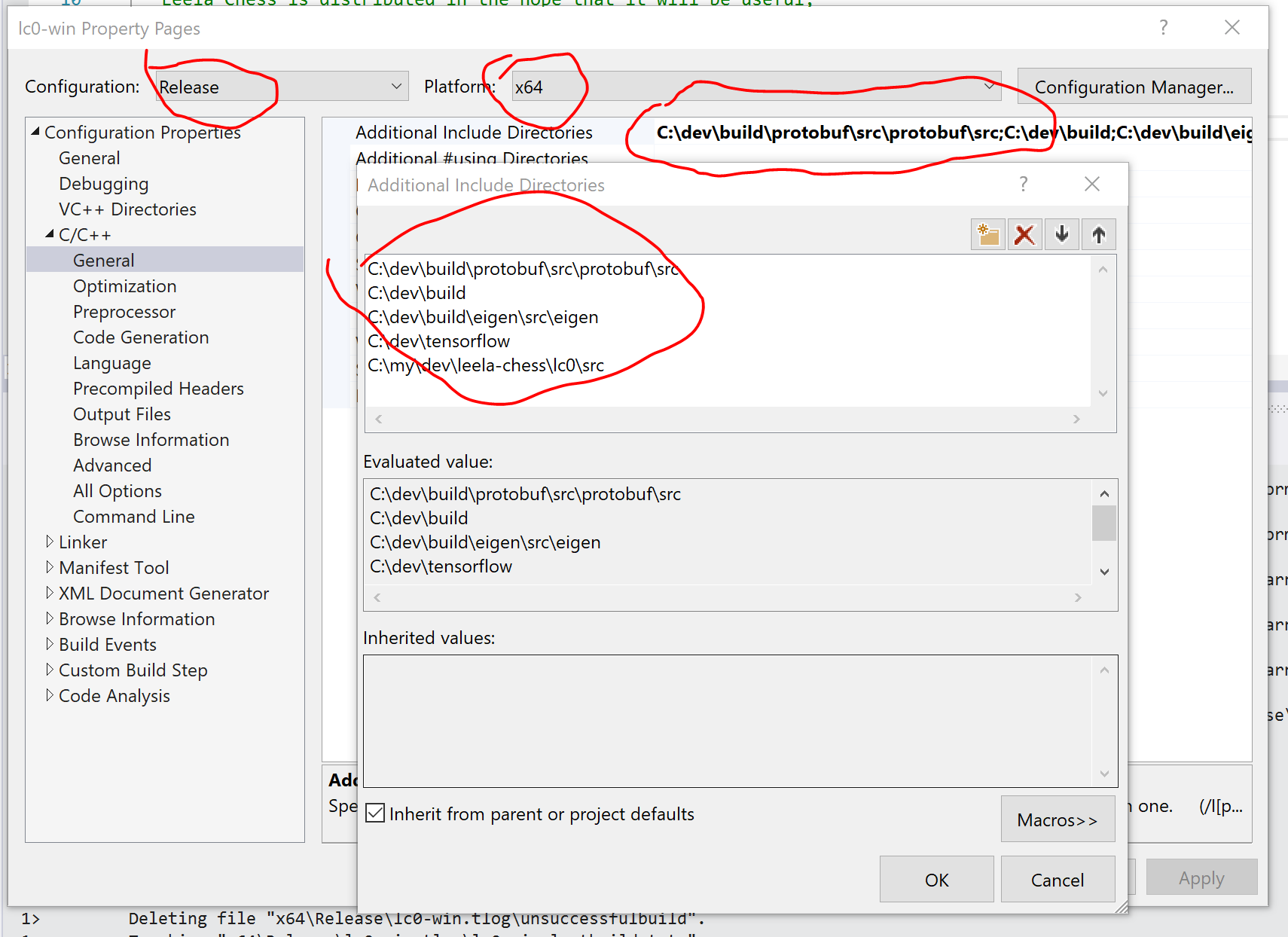
*.ccfiles except all*_test.ccfiles to the project. Make sure that destination platform is set tox64and configuration toRelease.In C++ additional include directory configuration of project properties (right click on project name->properties), add the following directories:
C:\dev\build\protobuf\src\protobuf\src
C:\dev\build
C:\dev\build\eigen\src\eigen
C:\dev\tensorflow
C:\my\dev\leela-chess\lc0\src
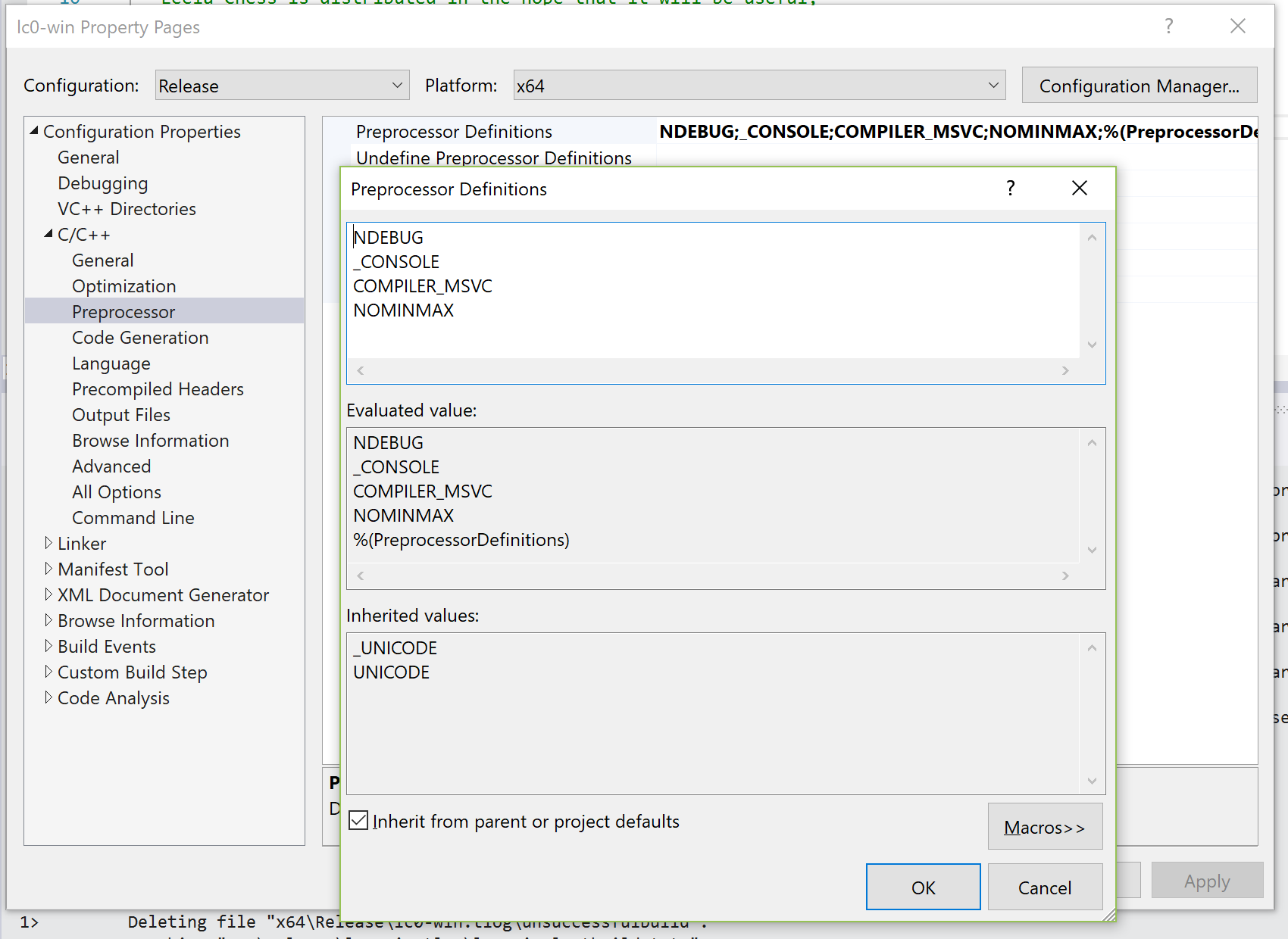
- In C++ preprocessor definitions, add the following:
_CONSOLE
COMPILER_MSVC
NOMINMAX
- In list of dependent libraries, add the following:
libprotobuf.lib
/WHOLEARCHIVE:tf_cc.lib
/WHOLEARCHIVE:tf_cc_framework.lib
/WHOLEARCHIVE:tf_cc_ops.lib
/WHOLEARCHIVE:tf_core_cpu.lib
/WHOLEARCHIVE:tf_core_direct_session.lib
/WHOLEARCHIVE:tf_core_framework.lib
/WHOLEARCHIVE:tf_core_kernels.lib
/WHOLEARCHIVE:tf_core_lib.lib
/WHOLEARCHIVE:tf_core_ops.lib
/WHOLEARCHIVE:tf_stream_executor.lib
cublas.lib
cublas_device.lib
cuda.lib
cudadevrt.lib
cudart.lib
cudart_static.lib
cufft.lib
cufftw.lib
curand.lib
cusolver.lib
cusparse.lib
nppc.lib
nppial.lib
nppicc.lib
nppicom.lib
nppidei.lib
nppif.lib
nppig.lib
nppim.lib
nppist.lib
nppisu.lib
nppitc.lib
npps.lib
nvblas.lib
nvcuvid.lib
nvgraph.lib
nvml.lib
nvrtc.lib
OpenCL.lib
cudnn.lib
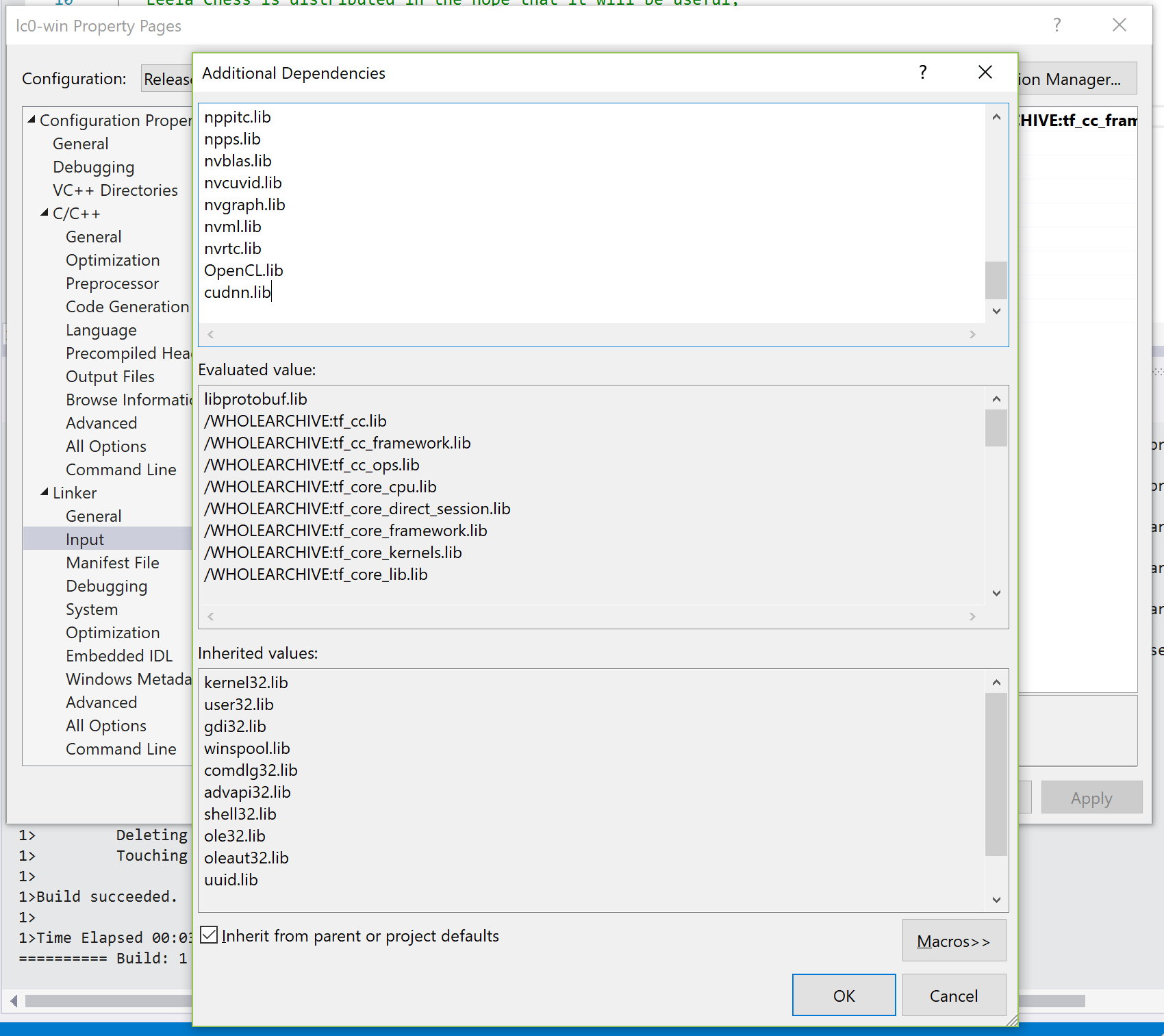
_Note: It's important to add /WHOLEARCHIVE: before some libraries. Otherwise it will compile/link, but won't work_
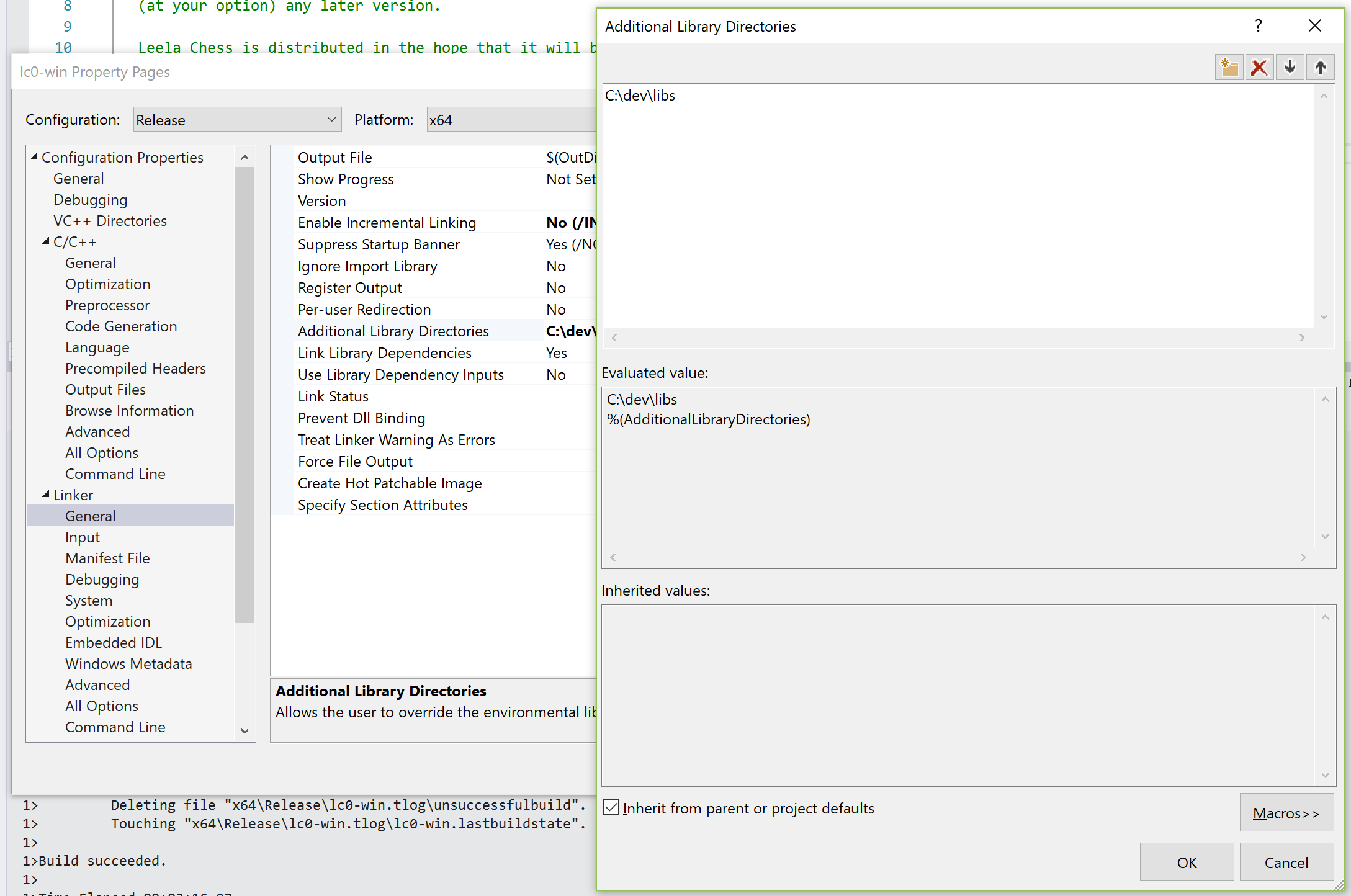
Find those files inside
C:\dev\build,C:\dev\cuDNN\andC:/Program Files/NVIDIA GPU Computing Toolkit/CUDA/v9.0and copy into some location, for exampleC:\dev\libsList that
C:\dev\libsdirectory in "Additional library dependencies" setting:
Build the project. (Ctrl+Shift+B)
_Note: Takes ~15 minutes to link for me. Patience._You can find the built binary in
x86/Releasedirectory of the project, that's it! Enjoy.
mooskagh
on 19 Apr 2018
Wow! I'd be lying if I said I wasn't a little intimidated now. I'll try it with VS2017 and see what happens.
PS. Your link to 2015 build tools is broken
Akababa
on 19 Apr 2018
Fixed the link, thanks.
mooskagh
on 19 Apr 2018
Also, after all of that, it turned out that tensorflow was compiled without AVX instructions support. I'm not sure at which step I should have done something differently to have AVX support.
mooskagh
on 19 Apr 2018
It might have something to do with these? I got this when I ran the first cmake.
-- Performing Test COMPILER_OPT_ARCH_NATIVE_SUPPORTED
-- Performing Test COMPILER_OPT_ARCH_NATIVE_SUPPORTED - Failed
So I have learned in the last two hours that CUDA 9.1 really does not like the latest VS 2017 toolchain... to anyone else with this problem, just open "C:\Program Files\NVIDIA GPU Computing Toolkit\CUDA\v9.1\include\crt\host_config.h" and change #if _MSC_VER < 1600 || _MSC_VER > 1914 on line 133. Also need to change set(tensorflow_CUDA_VERSION "9.1" CACHE STRING "CUDA version to build against") on line 45 of the "C:\devtensorflowtensorflow\contrib\cmake\CMakeLists.txt".
I still can't get Visual Studio to compile the CUDA samples but tensorflow cmake seems to be compiling (for now).
EDIT: Got errors with using the newest MSVC compiler (v141), use 140 instead by passing -T v140 to cmake
Akababa
on 20 Apr 2018
I'm getting a bunch of link errors to some "xla" namespace.. any ideas?
1>cuda_gpu_executor.obj : error LNK2001: unresolved external symbol "public: static void __cdecl xla::internal_statusor::Helper::Crash(class tensorflow::Status const &)" (?Crash@Helper@internal_statusor@xla@@SAXAEBVStatus@tensorflow@@@Z)
Akababa
on 21 Apr 2018
Those symbols are located here /tensorflow/compiler/xla/ but in my build directory I can find no projects which touch anything from those.. Could you search through build/*.vcxproj for xla substring?
mooskagh
on 21 Apr 2018
Unfortunately no :( I've been trying for two days now but I'm still terrible at getting things to build. Would you be so kind as to put all your compiled .libs in an archive and upload them somewhere? (assuming such a thing is legal)
Akababa
on 22 Apr 2018
There are a few recent suspicious commits which may cause that: https://github.com/tensorflow/tensorflow/commits/master/tensorflow/stream_executor/cuda/cuda_gpu_executor.cc
I believe that if you sync to some earlier tensorflow commit (around April 7), that may help.
I've copied all .libs that I have into http://crem.xyz/files/tf-libs.7z
But if your tensorflow build didn't finish, it's also possible that you won't have .h files (it generates a lot of them during build).
mooskagh
on 22 Apr 2018
The funny thing is it appears to build fine up to the final link for tf_tutorials_example_trainer, and the same goes for lc0.exe, (even when using your libs). There are thousands of link errors and they all come from the /WHOLEARCHIVE libs so I don't think it can be a missing header problem.
I'll try the April 7 suggestion, thanks!
Akababa
on 22 Apr 2018
Anybody with a working VS Solution?
 ed-apostol
on 17 May 2018
ed-apostol
on 17 May 2018
For CUDA build, there is working meson project. (That builds VS solution).
I'll write build instruction soon but in short:
- Install python3
- Install meson (
pip3 install --upgrade meson) - Edit build_cuda.cmd to have all correct paths.
- Run build_cuda.cmd (It generates project, pauses, then builds it)
For tensorflow build the process is much more involved.
mooskagh
on 18 May 2018
For cuda build I get the following errors, something is missing?
Code:
 int main(int argc, char **argv) { return 0; }
Compiler stdout:
 testfile.cpp
LINK : fatal error LNK1181: cannot open input file 'dl.lib'

also, gtest.lib, gtest_main.lib

Dependency GTest found: NO
 MallePietje
on 19 May 2018
MallePietje
on 19 May 2018
Missing gtest is fine, but can you copy the entire output of build-cuda.sh?
It should not require dl.lib.
On Sat, May 19, 2018 at 3:29 PM MallePietje notifications@github.com
wrote:
For cuda build I get the following errors, something is missing?
Code:
int main(int argc, char **argv) { return 0; }
Compiler stdout:
testfile.cpp
LINK : fatal error LNK1181: cannot open input file 'dl.lib'also, gtest.lib, gtest_main.lib
Dependency GTest found: NO
—
You are receiving this because you authored the thread.
Reply to this email directly, view it on GitHub
https://github.com/glinscott/leela-chess/issues/334#issuecomment-390405015,
or mute the thread
https://github.com/notifications/unsubscribe-auth/AKvpl2D8Xi2DRQnXOe87SKxLJCUeorFBks5t0B4dgaJpZM4TWMxE
.
mooskagh
on 19 May 2018
Build started at 2018-05-19T18:36:18.838590
Main binary: c:\program files (x86)\python36-32\python.exe
Python system: Windows
The Meson build system
Version: 0.46.1
Source dir: C:\Users\Frisoleela-chess\lc0
Build dir: C:\Users\Frisoleela-chess\lc0build
Build type: native build
Project name: lc0
Sanity testing C++ compiler: cl
Is cross compiler: False.
Sanity check compiler command line: cl C:\Users\Frisoleela-chess\lc0build\meson-private\sanitycheckcpp.cc /FeC:\Users\Frisoleela-chess\lc0build\meson-private\sanitycheckcpp.exe
Sanity check compile stdout:
sanitycheckcpp.cc
Microsoft (R) Incremental Linker Version 14.00.24215.1
Copyright (C) Microsoft Corporation. All rights reserved.
/out:C:\Users\Frisoleela-chess\lc0build\meson-private\sanitycheckcpp.exe
sanitycheckcpp.obj
Sanity check compile stderr:
Microsoft (R) C/C++ Optimizing Compiler Version 19.00.24215.1 for x64
Copyright (C) Microsoft Corporation. All rights reserved.
Running test binary command: C:\Users\Frisoleela-chess\lc0build\meson-private\sanitycheckcpp.exe
Native C++ compiler: cl (msvc 19.00.24215.1)
Build machine cpu family: x86_64
Build machine cpu: x86_64
Running compile:
Working directory: C:\Users\FrisoAppData\Local\Temp\tmpr5b1gsr4
Command line: cl C:\Users\FrisoAppData\Local\Temp\tmpr5b1gsr4\testfile.cpp /nologo /showIncludes /FeC:\Users\FrisoAppData\Local\Temp\tmpr5b1gsr4\output.exe /MDd /Od dl.lib
Code:
int main(int argc, char **argv) { return 0; }
Compiler stdout:
testfile.cpp
LINK : fatal error LNK1181: cannot open input file 'dl.lib'
Compiler stderr:
Library dl found: NO
Library libtensorflow_cc found: NO
Library libprotobuf found: NO
Library cublas found: YES
Library cudnn found: YES
Library cudart found: YES
Program /usr/local/cuda-9.2/bin/nvcc found: NO
Program /usr/local/cuda-9.1/bin/nvcc found: NO
Program nvcc found: YES (C:\Program Files\NVIDIA GPU Computing Toolkit\CUDA\v9.0\bin\nvcc.EXE)
Running compile:
Working directory: C:\Users\FrisoAppData\Local\Temp\tmp0_e5ls0v
Command line: cl C:\Users\FrisoAppData\Local\Temp\tmp0_e5ls0v\testfile.cpp /nologo /showIncludes /FeC:\Users\FrisoAppData\Local\Temp\tmp0_e5ls0v\output.exe /MDd /Od gtest.lib
Code:
int main(int argc, char **argv) { return 0; }
Compiler stdout:
testfile.cpp
LINK : fatal error LNK1181: cannot open input file 'gtest.lib'
Compiler stderr:
Running compile:
Working directory: C:\Users\FrisoAppData\Local\Temp\tmp3wctgly8
Command line: cl C:\Users\FrisoAppData\Local\Temp\tmp3wctgly8\testfile.cpp /nologo /showIncludes /FeC:\Users\FrisoAppData\Local\Temp\tmp3wctgly8\output.exe /MDd /Od gtest_main.lib
Code:
int main(int argc, char **argv) { return 0; }
Compiler stdout:
testfile.cpp
LINK : fatal error LNK1181: cannot open input file 'gtest_main.lib'
Compiler stderr:
Dependency GTest found: NO
Build targets in project: 1
Generating vcxproj lc0.
MallePietje
on 19 May 2018
So seems that it found gtest lib on your computer, but wasn't able to build
it. But that's fine, it won't build test.
It still generated vs project for the main engine:
Build targets in project: 1
Generating vcxproj lc0.
If you press enter to continue (or manually load solution in build/
directory), it should work.
On Sat, May 19, 2018 at 6:47 PM MallePietje notifications@github.com
wrote:
Build started at 2018-05-19T18:36:18.838590
Main binary: c:\program files (x86)\python36-32\python.exe
Python system: Windows
The Meson build system
Version: 0.46.1
Source dir: C:\Users\Frisoleela-chess\lc0
Build dir: C:\Users\Frisoleela-chess\lc0build
Build type: native build
Project name: lc0
Sanity testing C++ compiler: cl
Is cross compiler: False.
Sanity check compiler command line: cl
C:\Users\Frisoleela-chess\lc0build\meson-private\sanitycheckcpp.cc
/FeC:\Users\Frisoleela-chess\lc0build\meson-private\sanitycheckcpp.exe
Sanity check compile stdout:
sanitycheckcpp.cc
Microsoft (R) Incremental Linker Version 14.00.24215.1
Copyright (C) Microsoft Corporation. All rights reserved./out:C:\Users\Frisoleela-chess\lc0build\meson-private\sanitycheckcpp.exe
sanitycheckcpp.obj
Sanity check compile stderr:
Microsoft (R) C/C++ Optimizing Compiler Version 19.00.24215.1 for x64Copyright (C) Microsoft Corporation. All rights reserved.
Running test binary command:
C:\Users\Frisoleela-chess\lc0build\meson-private\sanitycheckcpp.exe
Native C++ compiler: cl (msvc 19.00.24215.1)
Build machine cpu family: x86_64
Build machine cpu: x86_64
Running compile:
Working directory: C:\Users\FrisoAppData\Local\Temp\tmpr5b1gsr4
Command line: cl
C:\Users\FrisoAppData\Local\Temp\tmpr5b1gsr4\testfile.cpp /nologo
/showIncludes /FeC:\Users\FrisoAppData\Local\Temp\tmpr5b1gsr4\output.exe
/MDd /Od dl.libCode:
int main(int argc, char **argv) { return 0; }
Compiler stdout:
testfile.cpp
LINK : fatal error LNK1181: cannot open input file 'dl.lib'Compiler stderr:
Library dl found: NO
Library libtensorflow_cc found: NO
Library libprotobuf found: NO
Library cublas found: YES
Library cudnn found: YES
Library cudart found: YES
Program /usr/local/cuda-9.2/bin/nvcc found: NO
Program /usr/local/cuda-9.1/bin/nvcc found: NO
Program nvcc found: YES (C:\Program Files\NVIDIA GPU Computing
Toolkit\CUDA\v9.0\bin\nvcc.EXE)
Running compile:
Working directory: C:\Users\FrisoAppData\Local\Temp\tmp0_e5ls0v
Command line: cl
C:\Users\FrisoAppData\Local\Temp\tmp0_e5ls0v\testfile.cpp /nologo
/showIncludes /FeC:\Users\FrisoAppData\Local\Temp\tmp0_e5ls0v\output.exe
/MDd /Od gtest.libCode:
int main(int argc, char **argv) { return 0; }
Compiler stdout:
testfile.cpp
LINK : fatal error LNK1181: cannot open input file 'gtest.lib'Compiler stderr:
Running compile:
Working directory: C:\Users\FrisoAppData\Local\Temp\tmp3wctgly8
Command line: cl
C:\Users\FrisoAppData\Local\Temp\tmp3wctgly8\testfile.cpp /nologo
/showIncludes /FeC:\Users\FrisoAppData\Local\Temp\tmp3wctgly8\output.exe
/MDd /Od gtest_main.libCode:
int main(int argc, char **argv) { return 0; }
Compiler stdout:
testfile.cpp
LINK : fatal error LNK1181: cannot open input file 'gtest_main.lib'Compiler stderr:
Dependency GTest found: NO
Build targets in project: 1
Generating vcxproj lc0.—
You are receiving this because you authored the thread.
Reply to this email directly, view it on GitHub
https://github.com/glinscott/leela-chess/issues/334#issuecomment-390417406,
or mute the thread
https://github.com/notifications/unsubscribe-auth/AKvpl4DtrComXYUMzTHm_Xf_YGjQb0YFks5t0EyvgaJpZM4TWMxE
.
mooskagh
on 19 May 2018
The build is not good, from msbuild.log:
1 error detected in the compilation of "C:/Users/Friso/AppData/Local/Temp/tmpxft_00001088_00000000-10_network_cudnn.cpp1.ii".
network_cudnn.cu
The command exited with code 1.
Done executing task "CustomBuild" -- FAILED.
Done building target "CustomBuild" in project "[email protected]" -- FAILED.
Done Building Project "C:\Users\Frisoleela-chess\lc0build\[email protected]" (default targets) -- FAILED.
Build FAILED.
"C:\Users\Frisoleela-chess\lc0build\[email protected]" (default target) (1) ->
(CustomBuild target) ->
../src/neural/network_cudnn.cu(417): error : identifier "CUDNN_ACTIVATION_IDENTITY" is undefined [C:\Users\Frisoleela-chess\lc0build\[email protected]]
0 Warning(s)
1 Error(s)
Time Elapsed 00:00:01.52
MallePietje
on 19 May 2018
Documentation says "CUDNN_ACTIVATION_IDENTITY (new for 7.1)", so maybe you
have cuDNN older than 7.1?
On Sat, May 19, 2018 at 7:23 PM MallePietje notifications@github.com
wrote:
The build id not good, from msbuild.log:
1 error detected in the compilation of
"C:/Users/Friso/AppData/Local/Temp/tmpxft_00001088_00000000-10_network_cudnn.cpp1.ii".
network_cudnn.cu
The command exited with code 1.
Done executing task "CustomBuild" -- FAILED.
Done building target "CustomBuild" in project "[email protected]" -- FAILED.
Done Building Project "C:\Users\Frisoleela-chess\lc0build\
[email protected]" (default targets) -- FAILED.Build FAILED.
"C:\Users\Frisoleela-chess\lc0build\[email protected]" (default target)
(1) ->
(CustomBuild target) ->
../src/neural/network_cudnn.cu(417): error : identifier
"CUDNN_ACTIVATION_IDENTITY" is undefined
[C:\Users\Frisoleela-chess\lc0build\[email protected]]0 Warning(s)
1 Error(s)Time Elapsed 00:00:01.52
—
You are receiving this because you authored the thread.
Reply to this email directly, view it on GitHub
https://github.com/glinscott/leela-chess/issues/334#issuecomment-390419874,
or mute the thread
https://github.com/notifications/unsubscribe-auth/AKvpl9G14Ne-mNd9v4l0kEkF_o-Yk3yFks5t0FUWgaJpZM4TWMxE
.
mooskagh
on 19 May 2018
Ah, sorry. I thought I had the most recent, but was 7.05. Thanks for your help.
MallePietje
on 19 May 2018
Kind of easy now. :)
Build instructions are there: https://github.com/glinscott/leela-chess/tree/next/lc0#windows
Feel free to reopen if build is not easy enough.
mooskagh
on 21 May 2018
Related issues
 AscendChina
·
7Comments
AscendChina
·
7Comments
 ThomasCabaret
·
5Comments
ThomasCabaret
·
5Comments
 jkiliani
·
13Comments
jkiliani
·
13Comments
 ashinpan
·
17Comments
ashinpan
·
17Comments
 Ttl
·
8Comments
Ttl
·
8Comments
Most helpful comment
Ok, building tensorflow + LCzero in twenty easy steps:
Download cmake from here and unpack somewhere, for example into
C:\dev\cmake-3.11.0-win64-x64._Note: cmake from cygwin didn't work for me, as it doesn't know how to generate visual studio projects_
Download and install Microsoft Visual Studio 2015 from here
_Note: during installation, install Visual C++, and you can uncheck other languages_
_Note: if you install Visual Studio 2017 instead, CUDA v9.0 will fail to install (v9.1 will install fine though)_
_Note: make sure to install the last update of Visual Studio 2015. In the initial version there was some bug in compiler which caused it to compute convlayer incorrectly. I cannot find anymore where I saw that information, but the VS service packs claimed to fix the problem. Also I did not install service packs explicitly, and my compiler version was correct, maybe VS installer does that automatically._
Download CUDA 9.0 from here and install.
_Note: it is important to install CUDA after Visual Studio_
_Note: Tensorflow doesn't officially support CUDA v9.1 (although there are reports in internet that itworks), so download v9.0_
Download Microsoft Build Tools 2015 from here and install.
_Note: I'm not sure that is needed, but initially cmake complained that it needs MS build tools, and I installed few things here and there and it seemed to help_
Download cuDNN for CUDA __v9.0__ from here (you have to register and fill a survey), and unpack somewhere, for example into
C:\dev\cuDNNClone tensorflow git repository somewhere, for example into
C:\dev\tenforflow:Make a
builddirectory neartensorflow, e.g.C:\dev\build, and go into that directoryFrom that directory, run:
tf_stream_executor.vcxproj(inbuilddirectory) delete the following line:That file contains gunit.h dependency which it cannot find.
_Note: that was a problem as of April 6, 2018. I think they fix it soon_
10: From file
tf_tutorials_example_trainer.vcxprojdelete the following line:builddirectory):_Note: /m:1 means "build in 1 thread". The default is 8, and it is much faster, but people say it fails with running out of memory in the middle with 8 threads_
_Note: Building
tf_tutorials_example_trainer.vcxprojonly took 3 hours for me, and it seems to be enough. On the other hand, trying to buildALL_BUILD.vcxprojfailed after 14 hours of building_Clone
leela-chessrepository.Create empty Visual Studio C++ console project, and add all
*.ccfiles except all*_test.ccfiles to the project. Make sure that destination platform is set tox64and configuration toRelease.In C++ additional include directory configuration of project properties (right click on project name->properties), add the following directories:
_Note: It's important to add /WHOLEARCHIVE: before some libraries. Otherwise it will compile/link, but won't work_
Find those files inside
C:\dev\build,C:\dev\cuDNN\andC:/Program Files/NVIDIA GPU Computing Toolkit/CUDA/v9.0and copy into some location, for exampleC:\dev\libsList that

C:\dev\libsdirectory in "Additional library dependencies" setting:Build the project. (Ctrl+Shift+B)
_Note: Takes ~15 minutes to link for me. Patience._
You can find the built binary in
x86/Releasedirectory of the project, that's it! Enjoy.