Ledger-live-desktop: Ledger Live, won't show after I open it
Ledger Live Version and Operating System
- tested on latest Ledger Live
- Windows 10
After I open the app as I normaly would, it just won't apper on any of my screens. I tried reinstalling the app, unplugging all screens except one, update whatever I could but nothing helped.
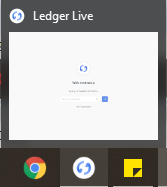
So after I open the app, nothing will pop up as I said, but if I start clicking furiusly on it, then i can see its outline blink in the corner of my screen...
Attached image shows, that Ledger Live is running
 MaTthyU
All 4 comments
That's a strange issue.
Could you try clicking on the window, and immediately after (without doing anything else in between) pressing Windows key + Up arrow on your keyboard?
This is a keyboard shortcut in Windows 10 which will maximize the window and hopefully bring it up. I suspect it may be outside of the screen bounds, which is why you cannot see it anywhere. Let me know if the window shows up on your screen after that.
 pbondoer
on 2 Sep 2019
pbondoer
on 2 Sep 2019
Yeah, I know right?
I have tried many times, believe me. I am not sure if I am able to fully describe what's happening so i decided to capture it. Hope it helps.
MaTthyU
on 2 Sep 2019
Tried many things, finally got it resolved.
So if you encountered this problem, this is what worked for me.
Uninstall LL, force delete all files associated with LL, reinstall GPU driver.
Only force delete did not worked. I don't know why would GPU cause problems like this, anyways, time to close this issue.
My thank You, belongs to anyone who thought about solution.
MaTthyU
on 6 Sep 2019
I had the exact same problem tonight. If that can help someone, I managed to fix it by:
- clicking the Ledger Live icon in the taskbar (to open the app somewhere on the screen even though it's not visible)
- pressing ALT+space to bring the Move, Size, Minimise, Maximize menu on the current window
- click Maximise, the LL window then appeared full screen
- drag the window somewhere to force the minimised version to be visible on the screen
(I tried plugging a second monitor and using windows key+arrow to move the hidden window around but that didn't work)
 yannickvidal
on 4 Jan 2021
yannickvidal
on 4 Jan 2021
Related issues
 BurnyBoi
·
4Comments
BurnyBoi
·
4Comments
 kravens
·
3Comments
kravens
·
3Comments
 juan-cortes
·
4Comments
juan-cortes
·
4Comments
 noman-land
·
4Comments
noman-land
·
4Comments
 Urgo
·
3Comments
Urgo
·
3Comments
Most helpful comment
Tried many things, finally got it resolved.
So if you encountered this problem, this is what worked for me.
Uninstall LL, force delete all files associated with LL, reinstall GPU driver.
Only force delete did not worked. I don't know why would GPU cause problems like this, anyways, time to close this issue.
My thank You, belongs to anyone who thought about solution.