Learn-to-send-email-via-google-script-html-no-server: Issue receiving email
Hi,
Firstly I have to say what a great script this is.
I have been using it on my website for a while without an issue. I am now developing my wife's website and have an issue I hope you can help with.
The issue is when I send a message through her form the message she receives in gmail comes through as read.
Please could you suggest where I may have gone wrong?
Cheers.
 harbourart
All 5 comments
@harbourart thanks for the feedback. That's quite strange. We've never seen this before. 🤷♂️
This could be a good question for StackOverflow where there are quite a few Google Developer Experts (GDEs)
who can help --> https://stackoverflow.com/questions/tagged/google-apps-script
 nelsonic
on 29 Oct 2020
nelsonic
on 29 Oct 2020
Thanks for the reply. I will follow the link
harbourart
on 29 Oct 2020
@harbourart Just a guess but have you checked if there is any Filters on her Gmail account that apply the rule "mark as read"?
Gmail settings -> "Filters and Blocked Adresses"
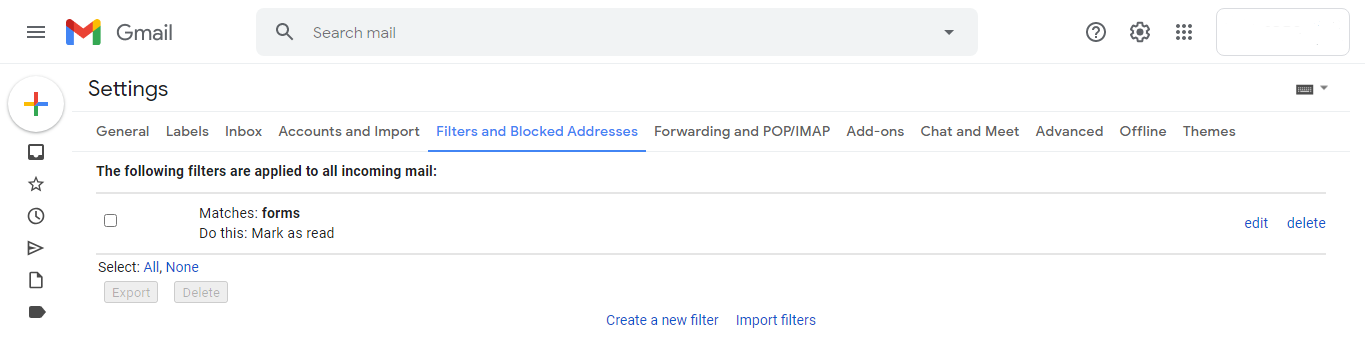
See if there is a filter with "Do this: Mark as read" and change it or delete it.
There is another scenario where you are forwarding a copy of incoming mail to another address and have the option "mark ... Mail's copy as read" selected
Gmail settings -> "Forwarding and POP/IMAP"

If the option "mark ... Mail's copy as read" is selected and you want to keep forwarding the incoming mail, change it to "keep ... Mail's copy in the Inbox".
 cristianofromagio
on 30 Oct 2020
cristianofromagio
on 30 Oct 2020
Thanks @cristianofromagio
Good shout I didn't think about that, I will investigate.
harbourart
on 30 Oct 2020
Hope the tips helped, and you were able to track it down! Feel free to let us/others know if you did figure it out too :)
 mckennapsean
on 27 Jan 2021
mckennapsean
on 27 Jan 2021
Related issues
mckennapsean
·
4Comments
 sidbatra
·
4Comments
sidbatra
·
4Comments
 eleosa
·
4Comments
mckennapsean
·
3Comments
eleosa
·
4Comments
mckennapsean
·
3Comments
 joshiadvait8
·
3Comments
joshiadvait8
·
3Comments
Most helpful comment
@harbourart Just a guess but have you checked if there is any Filters on her Gmail account that apply the rule "mark as read"?
Gmail settings -> "Filters and Blocked Adresses"

See if there is a filter with "Do this: Mark as read" and change it or delete it.
There is another scenario where you are forwarding a copy of incoming mail to another address and have the option "mark ... Mail's copy as read" selected
Gmail settings -> "Forwarding and POP/IMAP"

If the option "mark ... Mail's copy as read" is selected and you want to keep forwarding the incoming mail, change it to "keep ... Mail's copy in the Inbox".