Learn-to-send-email-via-google-script-html-no-server: NOT WORKS (Prevent the page changing)(Step 10)(Success)(Bootstrap + Jquery)
I have followed the instructions to the letter, and have returned my steps again and again without finding the error ... Although the console throws the file properly loaded Js, once I press the send button I get the data to the mail and everything buuuut the web page changes and I appear "success".
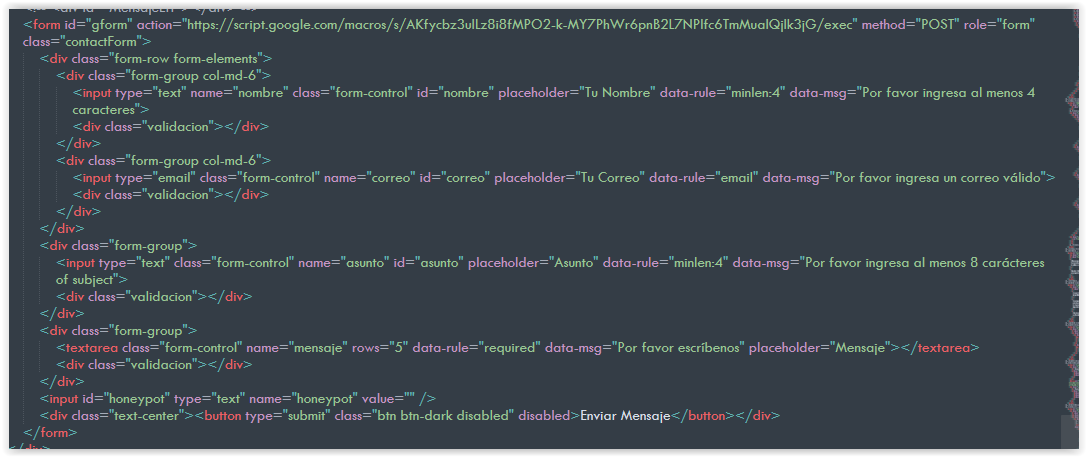
My form contains the ID "gform" and the div that contains the elements has the class "form-elements". Likewise, the Script is loaded at the end of the body. I really do not know what I'm doing wrong):
It will be because I use bootstrap? or why did I charge the Jquery at the beginning? What do I do wrong?


 JintaYadomi
All 6 comments
Should have class=gform. I'd recommend using the JS console debugger to see what code is hit, if any, when you first load the page (does it find the form?) or when you hit submit (does it trigger the callback?).
 mckennapsean
on 23 Jun 2019
mckennapsean
on 23 Jun 2019
I do not know how to do that, but I'm desperate ... So here's my project:
www.propiedadesarica.tk.zip
JintaYadomi
on 23 Jun 2019
It should work now. Changed 2 lines in form-summission-handler.js and some lines in index.js.
In js file there was some wrong catching of elements, and in index I think that problem was making unclosed div and also wrong catching of elements.
Anyway, any changes are marked by .
Btw, I probably also send you a couple of emails while testing.
Cheers :)
 Vojnuk
on 24 Jun 2019
Vojnuk
on 24 Jun 2019
- Changes marked by
<!--FIX-->
Vojnuk
on 24 Jun 2019
It should work now. Changed 2 lines in form-summission-handler.js and some lines in index.js.
In js file there was some wrong catching of elements, and in index I think that problem was making unclosed div and also wrong catching of elements.
Anyway, any changes are marked by .
Btw, I probably also send you a couple of emails while testing.Cheers :)
jaja ! Yes friend! I noticed a couple of them, I thought someone had visited the site or that my girlfriend had pressed while I left the room xDD was funny ... I also thought that someone here reviewed it ... Thank you very much for your time! I will take a look!
JintaYadomi
on 24 Jun 2019
Well, it works excellent! Thank you so much!
In case someone else happens to me, I hope the following and the above is useful:
I took a look and noticed the following changes:
• The "form-elements" was within the
Related issues
 onurusluca
·
4Comments
JintaYadomi
·
3Comments
onurusluca
·
4Comments
JintaYadomi
·
3Comments
 sidbatra
·
4Comments
sidbatra
·
4Comments
 jchesner
·
3Comments
mckennapsean
·
3Comments
jchesner
·
3Comments
mckennapsean
·
3Comments
Most helpful comment
<!--FIX-->