Learn-to-send-email-via-google-script-html-no-server: Not posting to spreadsheet
TL;DR the form I created will send to my email, but won't post in the spreadsheet
Hi! So I've followed the first portion of the tutorial. When I did it with the provided files it worked perfectly, but when I went to implement it on my end I was able to get the form to send an email to me, but not post it in the spreadsheet. I've looked at your FAQ and have made sure that I'm using the correct version and that it has the "Anyone, even anonymous" permissions.
Did I create the spreadsheet incorrectly? I just went to google drive, created a spreadsheet, inserted the names of the rows, opened script editor, and pasted the code.
A note that may be irrelevant: I am using Bootstrap 3 for this project
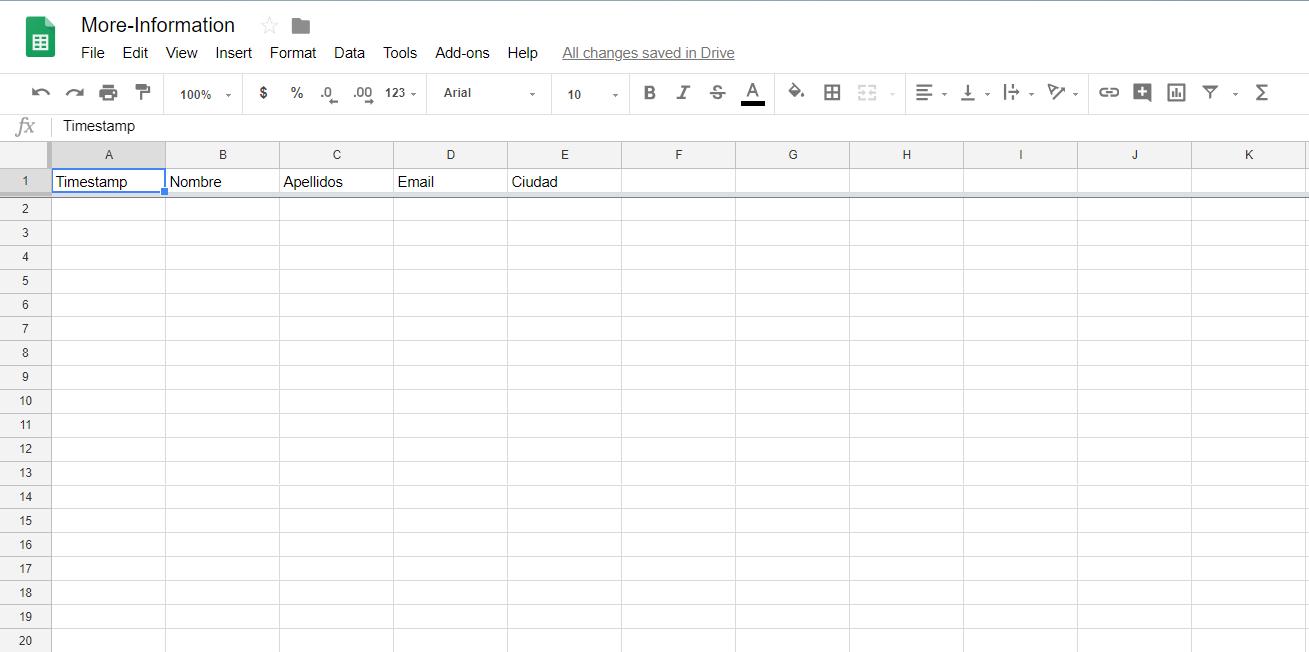
This is the spreadsheet that I've created.
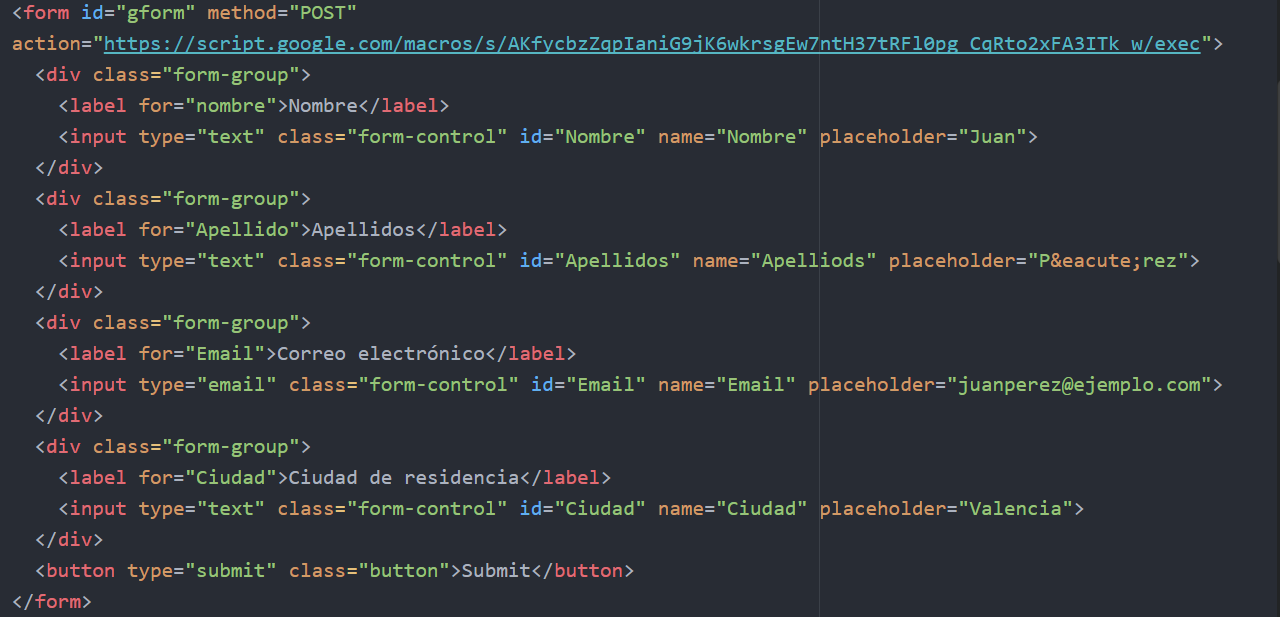
This is the code for the form that I'm trying to implement.
And this is the email I receive once I submit the form.

 clward1
All 16 comments
I'm having the same problem, Everything works fine except the success message page doesn't load for me and the data isn't added to the connected sheet. Trying to figure it out as I type this
 yalomeri
on 2 Jul 2018
yalomeri
on 2 Jul 2018
I was able to get this working on a brand new spreadsheet using our code - so I think it is working. If you are getting emails, that means there is just an error writing to the spreadsheet, which means we are close!
The spreadsheet component is dependent on you specifying a "sheet" on the form as a data attribute, or changing the default used in the Google Script. Our default is to use a sheet name of "responses", so your sheet's/tab's name must match or nothing will work.
Also, the column headers are case sensitive, so they must all match _exactly_ what you have put in the form, so that all IDs match and case _is_ important here, so make sure the IDs match the case of the header row or it won't write anything. We will be working on making this robust & even write the header row for you, hopefully soon. #75
 mckennapsean
on 3 Jul 2018
mckennapsean
on 3 Jul 2018
Replacing the original record_data function with this snippet fixed the issue for me. Found it in a .zip file in an email from a coworker that left a couple months ago, so I can't really guarantee anything.
/**
 * record_data inserts the data received from the html form submission
 * e is the data received from the POST
 */
function record_data(e) {
  Logger.log(JSON.stringify(e)); // log the POST data in case we need to debug it
  try {
    var doc     = SpreadsheetApp.getActiveSpreadsheet();
    var sheet   = doc.getSheetByName(e.parameters.formGoogleSheetName); // select the 'responses' sheet by default
    var headers = sheet.getRange(1, 1, 1, sheet.getLastColumn()).getValues()[0];
    var nextRow = sheet.getLastRow()+1; // get next row
    var row     = [ new Date() ]; // first element in the row should always be a timestamp
    // loop through the header columns
    for (var i = 1; i < headers.length; i++) { // start at 1 to avoid Timestamp column
      if(headers[i].length > 0) {
        row.push(e.parameter[headers[i]]); // add data to row
      }
    }
    // more efficient to set values as [][] array than individually
    sheet.getRange(nextRow, 1, 1, row.length).setValues([row]);
  }
  catch(error) {
    Logger.log(e);
  }
  finally {
    return;
  }

}
 junkdeck
on 3 Jul 2018
junkdeck
on 3 Jul 2018
Looks like the only change is when getting the form values we don't loop through them and make it a comma separated list? That could help if the data doesn't have a header that matches an ID from your form possibly.
mckennapsean
on 3 Jul 2018
If only! Sadly, if the header's don't match the IDs the entered values are just undefined.
Anyway, there's probably something wrong with my setup, but for the time being, this works just fine.
junkdeck
on 3 Jul 2018
A few clarifications, I am in fact getting the success message upon submit. And I have also changed my sheet name to match the google script (ie 'responses') rather than the other way around. I was really hoping that was the issue, but it did not fix it.
Also, I was able to get the example to work on another document (I essentially just typed up your example code). So I'm not entirely sure what I've done wrong in terms of implementing it on this specific code. Do you guys need any other information that could help you trouble shoot this with me?
clward1
on 3 Jul 2018
Oh lord. I'm dumb. Pack it up ladies and gentlemen, I made a typo. In my source code I spelled "Apellidos" incorrectly which apparently stopped the entire row from inserting into the spreadsheet. Thank you everyone for the help!
clward1
on 3 Jul 2018
I have a question that may be irrelevant/impossible to implement. But is there a way to email the users directly using this?
I would like to be able to send a "confirmation" email of sorts that contains a PDF for users to look through. If this is impossible or even too far off topic, then I understand. But any help in regards to this issue would be much appreciated.
clward1
on 3 Jul 2018
glad to hear that your issue is resolved! I was wondering if a typo could be there problem. I'll be sure to make that more robust on my current branch.
as far as emails go, yes it should be possible. it may be simpler to set up a workflow service to send an email in response to the ones you are getting since they have a gui for doing that I think.
the issue is if the user puts someone else's email then you could be spamming people with your emails. but there is no reason you can't do that. but not sure on attaching a PDF from GS.
mckennapsean
on 3 Jul 2018
Yeah I went back and double-checked my form names vs. cell names too... Complete discrepancy, so that's probably why it didn't work!
junkdeck
on 4 Jul 2018
yup the names of the spreadsheet -have- to follow the form exactly currently. it's case sensitive too.
mckennapsean
on 4 Jul 2018
for those still getting issues with the spreadsheet not updating, I opened a PR that is more fault tolerant and will add header names for you. #248
mckennapsean
on 5 Jul 2018
I'm still only getting the emails, but the order of the form elements is out of place. I have first name first, then email, then message and then the last name lol. I tried to write an if statement to change the html attribute to change from hidden to visible once the submit button is clicked to show success page instead of the ugly form values, but unfortunately it didn't work. The spreadsheet is also another problem that's not working for me even after changing sheet name and header names to match the the form id's and names. I even used the code you posted from your coworkers zip file and that still didn't work.
yalomeri
on 5 Jul 2018
@yalomeri - it sounds like you do not have the JS file loading correctly for your form. it is needed to A) preserve form order in the email and B) not show the json results on a new page. check your dev console if you are loading it as there may be errors.
as for the spreadsheet, see the PR for updated code to try. otherwise the columns of your spreadsheet must match the form 100% with the first being a timestamp, and it's case sensitive. a single spelling error breaks it right now. see my PR for a fix.
and yes the sheet name must be the same as specified by the form or Google script.
mckennapsean
on 5 Jul 2018
sorry @mckennapsean It was a fault of my own in my own local js file that was causing problems. It now prints to the sheet and I get an email as well, just need to figure out why the success message isn't showing up after clicking submit
yalomeri
on 5 Jul 2018
glad to hear you got it working, @yalomeri !
we got that PR I posted merged, so the issue of the spreadsheet not updating should be resolved. please file if you have additional issues.
@clward1 - to your question of the email, feel free to reopen/comment/post a new issue if you have difficulty. I know a variety of users have asked about sending the form data to the email that is submitted, and this is possible (but just could be a bit spam-y, so we don't do that by default here).
mckennapsean
on 7 Jul 2018
Related issues
 austinjupiter
·
3Comments
mckennapsean
·
3Comments
austinjupiter
·
3Comments
mckennapsean
·
3Comments
 shaily99
·
4Comments
shaily99
·
4Comments
 vlknlvnt
·
4Comments
vlknlvnt
·
4Comments
 joshiadvait8
·
3Comments
joshiadvait8
·
3Comments
Most helpful comment
Oh lord. I'm dumb. Pack it up ladies and gentlemen, I made a typo. In my source code I spelled "Apellidos" incorrectly which apparently stopped the entire row from inserting into the spreadsheet. Thank you everyone for the help!