Learn-to-send-email-via-google-script-html-no-server: Insecurity!
The spreadsheet with a list of all the emails of the demo form users is shared publicly when making a copy. This is a serious breach of privacy and security.
 eequals
All 5 comments
@eequals _thank you_ for opening this issue.
are you referring to the "example" form with "test data" in it?
We wrote this tutorial a few _years_ ago and it has taken on a life of it's own ...
_Most_ people are _savvy_ enough to use "test data" while they are trying out the form:
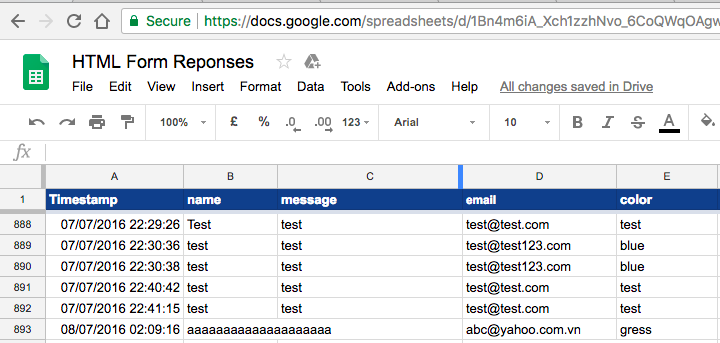
In the interest of _privacy_ for the people who are _less_ privacy-aware,
I have deleted the 10k rows that had any user-data in them:
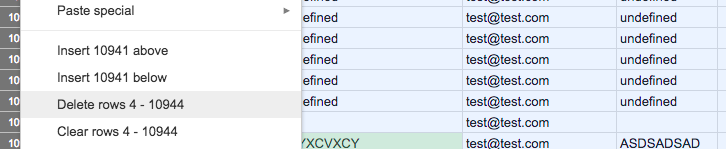
So the spreadsheet is "clean" again.
Also, for future reference this is not a "security" issue.
It's a _feature_ of a tutorial to let people _see_ that the data they have submitted has
been added to the spreadsheet exactly as they sent it.
 nelsonic
on 9 Mar 2018
nelsonic
on 9 Mar 2018
Dear nelsonic,
Many thanks for a very prompt reply and for swiftly deleting the 10k rows. The difficulty is that the form needs a real email if the test is to work properly so that an email be received by the tester, and many people appear to have used ordinary email addresses rather than disposable ones. If the test only sent your own email address back to you personally and to no-one else, it would, I agree, be a valid feature of the test. But unfortunately as soon as you follow the first instruction, which is to copy the spreadsheet, all the emails are copied to you (and whether or not you tried the form yourself). I cannot possibly agree that this is a feature and not a serious lapse of security. People choose to use a contact form rather than publish an email address precisely to reduce being spammed. As it is, this is a spammer's assistant.
A solution might be to have only dummy data in a spreadsheet for users to copy and to email the tester just their own line of data that would have appeared in the spreadsheet. I haven't got sufficient understanding of the system to know how easy this might be.
Many thanks,
eequals
eequals
on 9 Mar 2018
For the email to validate successfully, it only needs to look like an email, e.g., [email protected] (or minimally I think just [email protected])
Over the past year or so I've had the main spreadsheet, I've gotten numerous requests to delete data people have sent. And I always did so promptly.
When I deploy updates to the repo, I disable the emailing on the form so I don't get constantly spammed. Similarly I could disable this on the demo here.
We have a test page too with many more form types, but this does come autofilled with valid info. We could keep that data live for testing purposes and add a warning to the page.
Lastly, we could have a third spreadsheet that is used for copy purposes only that is not wired up to anything. When I deploy, this is all manual, so I wouldn't go that route unless I find a simple way to automate this.
 mckennapsean
on 9 Mar 2018
mckennapsean
on 9 Mar 2018
this is strictly a deployment issue. I changed how I will "deploy" Google Script changes to also disable saving the data to the spreadsheet. I will leave some dummy data in there but not any user data. please let me know if that helps address your concern @eequals
for those interested, this is how I deploy changes to the repo: I paste the google-apps-script file in, disable saving & email, then save as a version. then I revert that so saving & email works. I "deploy" the version where everything was disabled, so that the demo works but nothing is saved. however, when someone copies the form, they get all the most recent code.
mckennapsean
on 21 Jun 2018
Yes, that will solve the privacy concern if the demo no longer saves data. Thank you. Having a demo to try makes us want to put in real data on the (wrong) assumption that if we do we will see the whole functionality and it will send us a test email, for which a functional address is clearly necessary. That's why I and others have put in real data and been concerned that it is on public view.
Best wishes,
Mark (eequals)
On Thursday, 21 June 2018, 08:00:00 BST, Sean McKenna <[email protected]> wrote:
this is strictly a deployment issue. I changed how I will "deploy" Google Script changes to also disable saving the data to the spreadsheet. I will leave some dummy data in there but not any user data. please let me know if that helps address your concern @eequals
for those interested, this is how I deploy changes to the repo: I paste the google-apps-script file in, disable saving & email, then save as a version. then I revert that so saving & email works. I "deploy" the version where everything was disabled, so that the demo works but nothing is saved. however, when someone copies the form, they get all the most recent code.
—
You are receiving this because you were mentioned.
Reply to this email directly, view it on GitHub, or mute the thread.
eequals
on 23 Jun 2018
Related issues
 ThomasSalty
·
4Comments
ThomasSalty
·
4Comments
 ryanlao
·
3Comments
ryanlao
·
3Comments
 vlknlvnt
·
4Comments
vlknlvnt
·
4Comments
 sidbatra
·
4Comments
sidbatra
·
4Comments
 Herbert2122
·
4Comments
Herbert2122
·
4Comments
Most helpful comment
For the email to validate successfully, it only needs to look like an email, e.g.,
[email protected](or minimally I think just[email protected])Over the past year or so I've had the main spreadsheet, I've gotten numerous requests to delete data people have sent. And I always did so promptly.
When I deploy updates to the repo, I disable the emailing on the form so I don't get constantly spammed. Similarly I could disable this on the demo here.
We have a test page too with many more form types, but this does come autofilled with valid info. We could keep that data live for testing purposes and add a warning to the page.
Lastly, we could have a third spreadsheet that is used for copy purposes only that is not wired up to anything. When I deploy, this is all manual, so I wouldn't go that route unless I find a simple way to automate this.