Leakcanary: LeakCanary can't dump heap on Android R devices when targetSdkVersion <= 28
Description
When running an app which targets SDK 28 (or probably anything lower), LeakCanary fails to dump the heap when executing on Android R device (currently tested against most recently available DP2 version)
Steps to Reproduce
- install app from https://github.com/CDRussell/LeakCanaryHeapDumpProblem
- run app on Android R device, and rotate the screen a few times to deliberately trigger a leak detection
- note in
logcatthatLeakCanaryfails due to write permissions issues
Expected behavior: [What you expect to happen]
LeakCanary shouldn't have permissions issues.
Version Information
- LeakCanary version: 2.2
- Android OS version: Android R (dp2)
- Gradle version:
gradle-6.1.1/com.android.tools.build:gradle:4.0.0-beta04
Additional Information
- Note, only happens if targetSdk is 28 or lower. targetSdk 29 works fine
- If i manually grant the
WRITE_EXTERNAL_STORAGEpermission at runtime, it works again
Stack Trace
2020-04-22 21:16:26.648 6894-6936/com.duckduckgo.myapplication D/LeakCanary: Check for retained objects found 2 objects, dumping the heap
2020-04-22 21:16:27.722 6894-6936/com.duckduckgo.myapplication D/LeakCanary: Could not dump heap
    java.lang.RuntimeException: Couldn't dump heap; open("/storage/emulated/0/Download/leakcanary-com.duckduckgo.myapplication/2020-04-22_21-16-26_695.hprof") failed: Operation not permitted
        at dalvik.system.VMDebug.dumpHprofData(Native Method)
        at dalvik.system.VMDebug.dumpHprofData(VMDebug.java:384)
        at dalvik.system.VMDebug.dumpHprofData(VMDebug.java:361)
        at android.os.Debug.dumpHprofData(Debug.java:2016)
        at leakcanary.internal.AndroidHeapDumper.dumpHeap(AndroidHeapDumper.kt:68)
        at leakcanary.internal.HeapDumpTrigger.dumpHeap(HeapDumpTrigger.kt:156)
        at leakcanary.internal.HeapDumpTrigger.checkRetainedObjects(HeapDumpTrigger.kt:146)
        at leakcanary.internal.HeapDumpTrigger.access$checkRetainedObjects(HeapDumpTrigger.kt:28)
        at leakcanary.internal.HeapDumpTrigger$scheduleRetainedObjectCheck$3.run(HeapDumpTrigger.kt:293)
        at android.os.Handler.handleCallback(Handler.java:907)
        at android.os.Handler.dispatchMessage(Handler.java:99)
        at android.os.Looper.loop(Looper.java:216)
        at android.os.HandlerThread.run(HandlerThread.java:67)
2020-04-22 21:16:27.723 6894-6936/com.duckduckgo.myapplication D/LeakCanary: Failed to dump heap, will retry in 5000 ms
 CDRussell
All 26 comments
Looks like behavioral changes to Scoped Storage might be the culprit and there's different behavior depending on whether the app targets 29 vs lower levels
CDRussell
on 22 Apr 2020
We should always use MediaStore on R+, it has new constants for Downloads directory.
https://commonsware.com/blog/2019/12/21/scoped-storage-stories-storing-mediastore.html
 consp1racy
on 24 Apr 2020
consp1racy
on 24 Apr 2020
I just created an emulator running R and I can't reproduce the issue, both with the provided sample as well as with LeakCanary's sample
Logcat shows the expected log:
WRITE_EXTERNAL_STORAGE permission not granted, ignoring
This means the permission is missing and LeakCanary won't try to use the sdcard. In the example you provided, it looked like that check passed and LeakCanary had decided it could use the sdcard, and then that didn't work.
Now, another weird thing: @CDRussell you pasted a link to https://developer.android.com/preview/behavior-changes-11 but I couldn't find any reference to scoped storage there. A quick googling brought up this page: https://developer.android.com/preview/privacy/storage
Maybe a change of behavior between dp2 and dp3? Can you still make this crash happen?
 pyricau
on 4 May 2020
pyricau
on 4 May 2020
To be very clear, I do agree that we need to migrate to Scoped Storage on R+ so that apps that target API 11 can keep using LeakCanary (contributions welcome!). However this issue is about apps that target API <=28 on Android R.
pyricau
on 4 May 2020
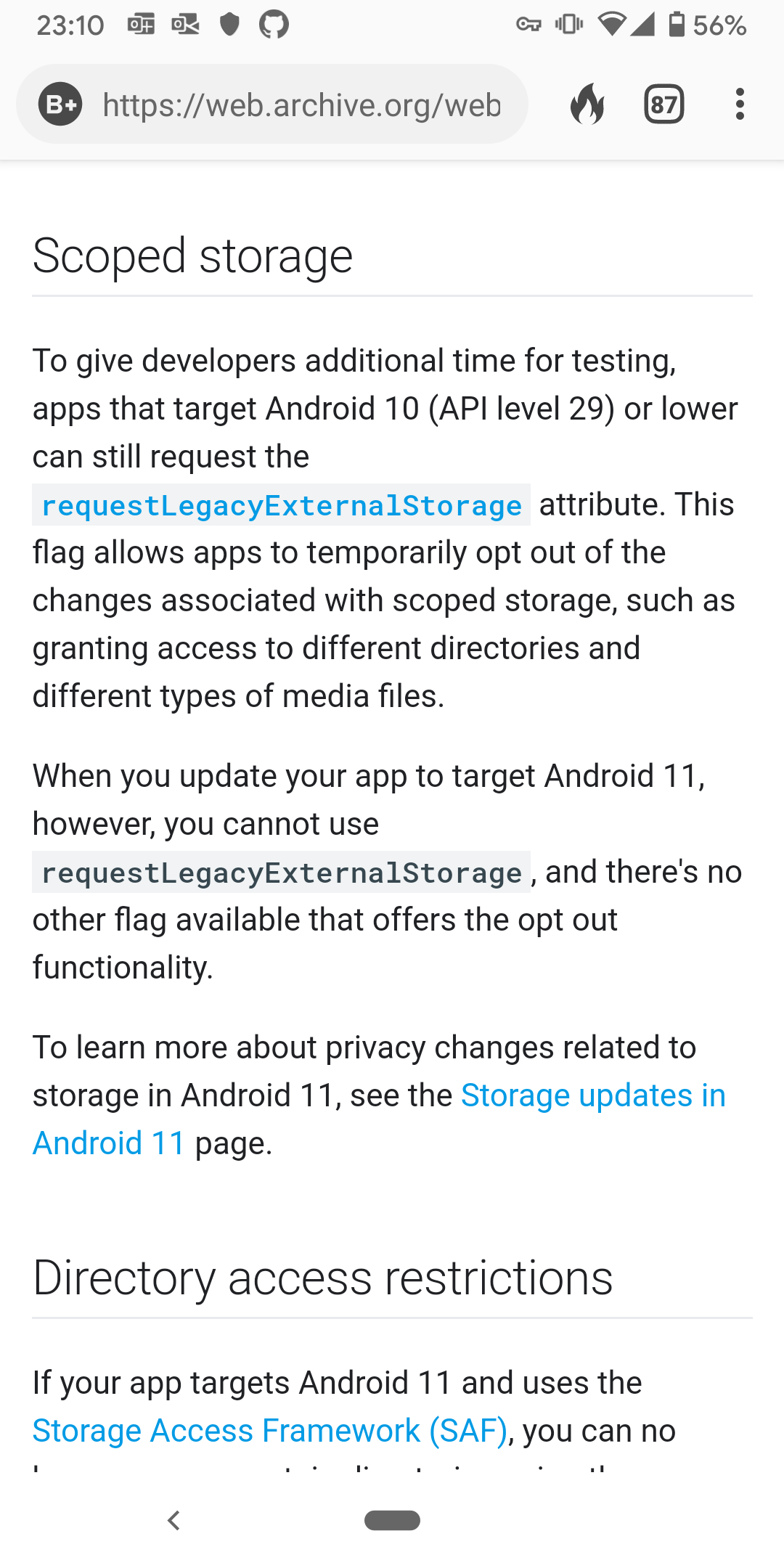
Looks like they've updated the docs! Here's a screen grab from the old docs page. You're right that it's probably a DP2-specific issue. I'll test it out with DP3 when I can and report back.
CDRussell
on 5 May 2020
Tried again and I'm still seeing the same issue (same stack trace as reported) on latest version of R on my device.
Is it possible the behavior is different on an emulator vs real device for this? 😕
Device Details
Pixel 2
Build Number: RPP3.200320.017 (most up-to-date available)
CDRussell
on 5 May 2020
Ok!
When you wrote:
note in logcat that LeakCanary fails due to write permissions issues
Can you share what exactly does LeakCanary write? Is that the stacktrace you already shared?
The thing I find surprising is that if I follow your instructions, then the app doesn't have the runtime permission. LeakCanary checks that it has the permission, and if it doesn't have it it logs that it doesn't (which is fine!) and the stores the heap dump in the app storage instead. So I would expect that on a fresh install it goes to app storage and works fine.
pyricau
on 5 May 2020
Yeah, that's pretty much what was shared earlier, but I'll attach the full output here that happens from app launch.
@pyricau, what's the easiest way to debug and step through LeakCanary to try get you more information? It never tries to dump when I have the debugger attached.
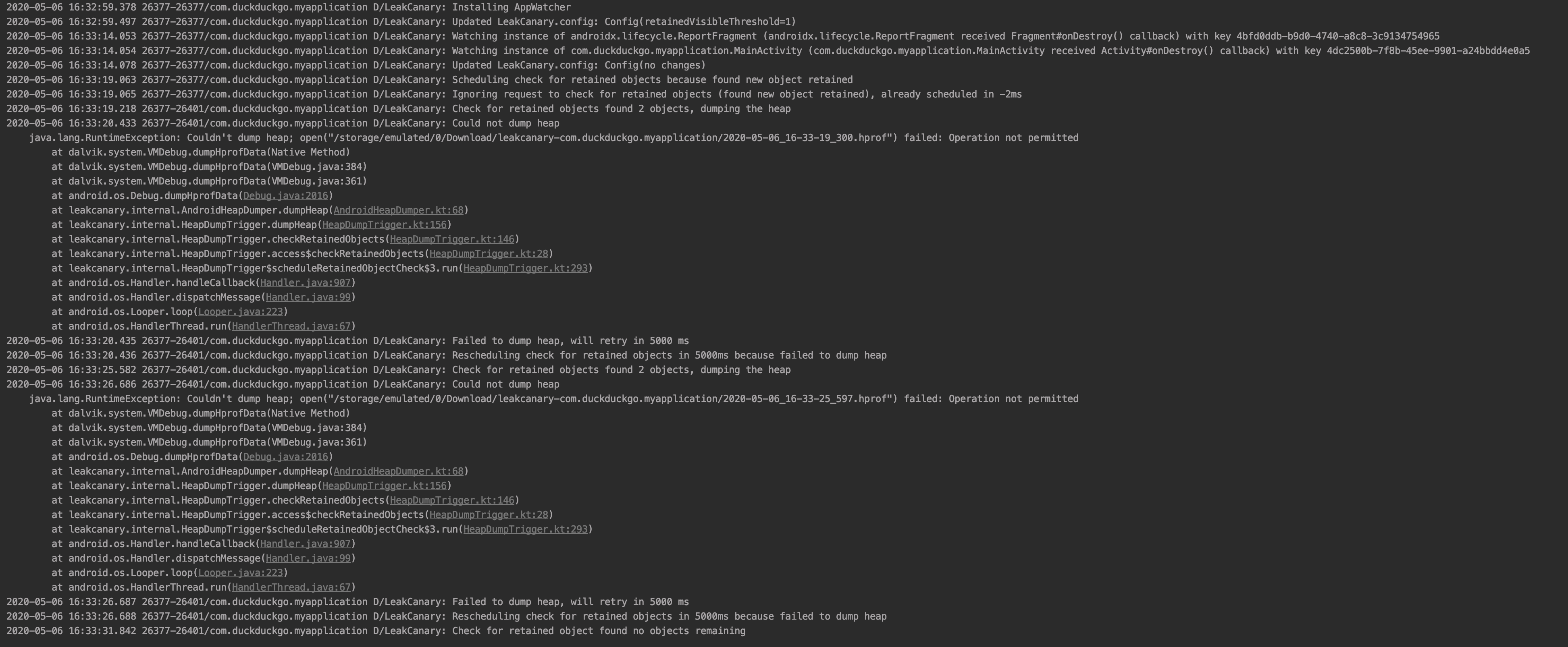
CDRussell
on 6 May 2020
(Come to think of it, what's the point in using public storage anyway? Sharing from LeakCanary got some upgrades over the years...)
consp1racy
on 6 May 2020
It never tries to dump when I have the debugger attached.
Try LeakCanary.config.dumpHeapWhenDebugging = true
@consp1racy The main advantage is that if you uninstall / reinstall the hprof file is still there. In LeakCanary 1 the heap analysis was stored as a file so it survived reinstalled, but in 2 it's stored in SQLite so it disappears anyway.. Also it doesn't count towards the app size, though not sure how exactly that matters. Also sometimes the app partition is reaching its max size. Maybe those are problems of the past? We could change LeakCanary to never store on the sdcard, maybe.
pyricau
on 6 May 2020
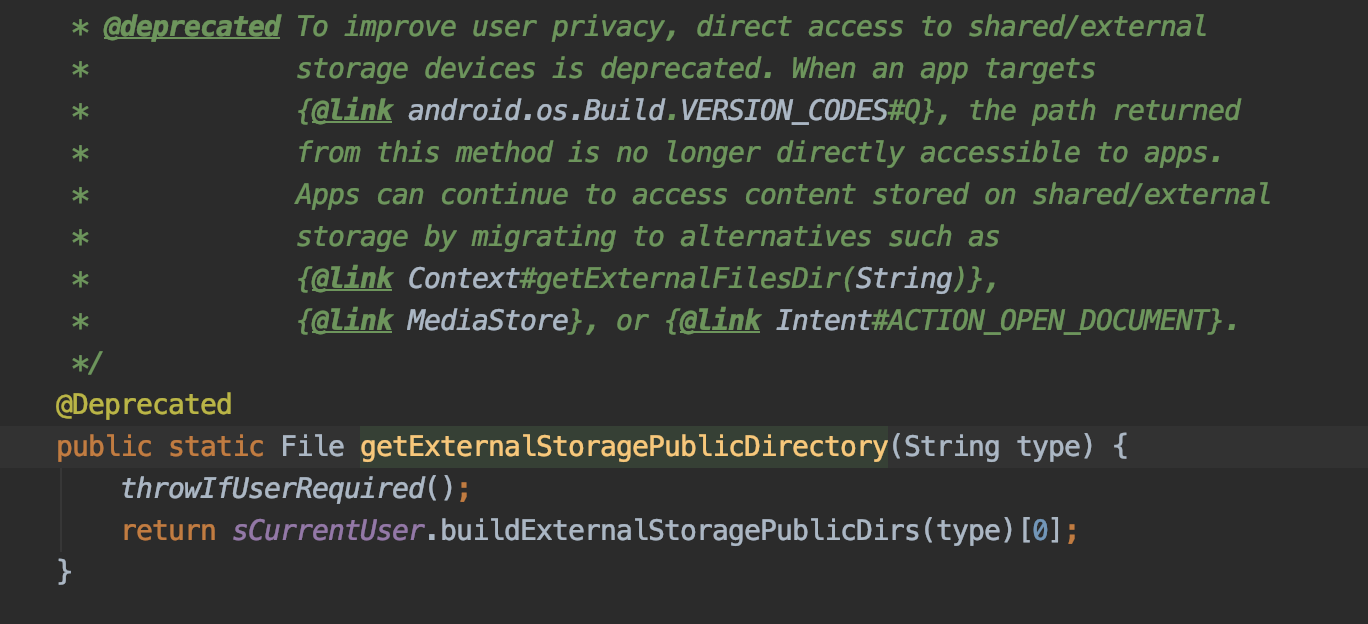
The problem is somewhere in amongst the files created by that method. ☝️. According to those docs, there shouldn't be a problem targeting 28, but 🤷♂️.
private fun externalStorageDirectory(): File {
    val downloadsDirectory = Environment.getExternalStoragePublicDirectory(DIRECTORY_DOWNLOADS)
    return File(downloadsDirectory, "leakcanary-" + context.packageName)
  }
downloadsDirectory.canWrite() == true. when you create that new sub-directory, the result of that is that canWrite() == true. but when you create the File for the hprof, it says that canWrite == false. in other words, it says
/storage/emulated/0/Downloadis writable/storage/emulated/0/Download/leakcanary-com.duckduckgo.myapplicationis writable/storage/emulated/0/Download/leakcanary-com.duckduckgo.myapplication/2020-05-06_21-24-29_136.hprofis not writable
CDRussell
on 6 May 2020
Wow. That seems like a bug worth reporting to AOSP, right?
Are you able to repro on an R emulator or just your pixel 2?
Thanks for the investigation btw that's amazing.
pyricau
on 7 May 2020
Actually, just one thing: https://developer.android.com/reference/java/io/File#canWrite()
true if and only if the file system actually contains a file denoted by this abstract pathname and the application is allowed to write to the file; false otherwise.
So, given that, it would make sense that File.canWrite() returns false given that the file wasn't created yet.. Maybe that's not the issue at hand here?
pyricau
on 7 May 2020
Good point! so canWrite() isn't really useful at all in this investigation.
However, I now know why me and you were seeing different results. And you might hate me a little... 😅
So turns out that on my Pixel 2, /storage/emulated/0/Download/leakcanary-com.duckduckgo.myapplication already existed in the file directory. Probably from running it on targetSDK=29 when verifying which SDK caused the issue. All my efforts to uninstall and reinstall the app to ensure a clean state was useless given the file was in the public download dir and survived uninstall.
So the code would have failed to create this directory, but since it already existed, the code then thought it succeeded, and so figured it would be able to succeed in writing the hprof. However, at this moment it doesn't actually have write abilities at all.
To summarize, I think this was a real issue in DP2, and is now fixed in DP3. And it's only because I had that /storage/emulated/0/Download/leakcanary-com.duckduckgo.myapplication hanging around from a previous run that I was still in a weird state.
CDRussell
on 7 May 2020
If you really want to reproduce my scenario
- Set targetSdkVersion=29
- Run the app; cause a heap dump once
- Notice it creates a dir in the public storage directory
/storage/emulated/0/Download/leakcanary-com.duckduckgo.myapplication(this is different behavior from older target versions) - Set targetSdkVersion=28
- Run the app; cause a heap dump
- Observe the hprof failing to write because of permissions issues
CDRussell
on 7 May 2020
Interesting! I wonder, is this a potential bug that should still be reported to AOSP? targetSdkVersion can be reverted in app upgrades (e.g. a roll forward if that target upgrade went bad).
I'm also a bit confused: I thought this would become forbidden with target 29. How comes it "works" when targeting 29 but then not 28? This is all really confusing to me. I probably missed something.
pyricau
on 8 May 2020
I'm confused too! 😕
is this a potential bug that should still be reported to AOSP? targetSdkVersion can be reverted in app upgrades (e.g. a roll forward if that target upgrade went bad).
Good question. I'm not sure if the exact problem above of being left in an odd state is strictly Android's fault. LeakCanary looks for the presence of that directory and assumes because it exists that it can write to it. That's a very reasonable assumption to make since nothing else should be creating it. But perhaps there could be more resiliency added to not just checking for that directory existing but further checks to verify LC can write to it?
CDRussell
on 11 May 2020
LeakCanary looks for the presence of that directory and assumes because it exists that it can write to it
This is the code:
    var storageDirectory = externalStorageDirectory()
    if (!directoryWritableAfterMkdirs(storageDirectory)) {
      // use internal directory
    } else {
      // use external storage
    }


  private fun externalStorageDirectory(): File {
    val downloadsDirectory = Environment.getExternalStoragePublicDirectory(DIRECTORY_DOWNLOADS)
    return File(downloadsDirectory, "leakcanary-" + context.packageName)
  }

  private fun directoryWritableAfterMkdirs(directory: File): Boolean {
    val success = directory.mkdirs()
    return (success || directory.exists()) && directory.canWrite()
  }
As you can see, LeakCanary tries to create it then checks the directory is writable
pyricau
on 11 May 2020
Oh yeah! So it looks like if you created a directory when targetSDK = 29 and downgrade to 28, that dir shows as writable incorrectly? As in, canWrite() == true but it'll throw an exception if you try to write to it. If that's indeed the case, you're right, that's got to be an Android bug.
I'll try find time to make a standalone project showing that exact scenario (that doesn't involve LeakCanary), though it probably won't be too soon. If anyone else is watching and has the time, please feel free to grab it before i can.
CDRussell
on 13 May 2020
I'm still confused! How were you able to create the directory when targeting SDK 29? First, you'd need to have the write permission for that folder, and then downgrade to 28 and then remove the permission? But also, I thought when targeting 29 even with the permission you're not supposed to be able to write there, you have to use the special storage?
Is the bug maybe more simply that the app once had the permission then lost it?
pyricau
on 13 May 2020
FWIW, I've looked a little bit at what using Scoped Storage in Leak Canary would require, and there would be quite a bit to refactor in my opinion because it currently use File everywhere and Scope Storage only allows us to get file descriptors.
(just my 2 cents that if this bug is fixable by any other way I think migrating to scoped storage seems quite a bit involved)
 bishiboosh
on 23 May 2020
bishiboosh
on 23 May 2020
That being said we can probably store the heap dump in app's cache directory, process it there and only then publish it. That should make it a bit easier.
consp1racy
on 24 May 2020
I'm going to close this issue as it sounds like this has been fixed in the latest android candidate release? Let me know if not.
pyricau
on 5 Jun 2020
D/LeakCanary: Could not dump heap
    java.lang.RuntimeException: Couldn't dump heap; open
Android 11 (preview)
leakcanary 2.3
Why closed? Already resolved?
 yourshinsuke
on 11 Jun 2020
yourshinsuke
on 11 Jun 2020
@yourshinsuke are you using the latest version of the Android 11 emulator image?
pyricau
on 11 Jun 2020
I'm going to close this issue as it sounds like this has been fixed in the latest android candidate release? Let me know if not.
Apologies for being non-responsive recently; been swamped. Closing sounds good to me and if I notice the same issue again on the latest Android 11 beta, I'll comment again about it.
CDRussell
on 11 Jun 2020
Related issues
 nobeh
·
5Comments
nobeh
·
5Comments
 smallgirl
·
3Comments
smallgirl
·
3Comments
 ltym2016
·
4Comments
ltym2016
·
4Comments
 peter1492
·
6Comments
peter1492
·
6Comments
 msfjarvis
·
6Comments
msfjarvis
·
6Comments