Leaflet: Map breaks when created dynamically in combination with disabled worldCopyJump
I've come across a strange issue when creating the map container in JS, appending it to a wrapper and setting the map size at a later time. This only occurs when worldCopyJump is disabled, however.
https://jsfiddle.net/2w6apqxy/
The map tiles are partially broken and the map center is at an incorrect position. When appending the container before L.map() (https://jsfiddle.net/2w6apqxy/1/) or after L.tileLayer() (https://jsfiddle.net/2w6apqxy/2/), the issue isn't present. When enabling worldCopyJump, the issue isn't present either, regardless of when the container is appended to the wrap.
Is this a bug related to how the map dimensions are determined when worldCopyJump is disabled vs. enabled, or is this expected behavior?
 tgelz
tgelz
All 6 comments
Hi!
Thanks for a thorough report. I can reproduce this, and from what you're saying, it clearly sounds like a bug.
I investigated for a short while, but didn't find why this is happening, so some further investigation is going to be necessary.
 perliedman
on 22 May 2018
perliedman
on 22 May 2018
Hi,
Hum looks like a funny edge case indeed.
What happens is that the map._sizeChanged remains at true from L.map initialization.
Since center and zoom options are defined in L.map, the map calls setView method, which will use map.getSize (in _resetView).
But a little bit later the map initialization (re)sets the flag map._sizeChanged = true.
https://github.com/Leaflet/Leaflet/blob/ba6f97fff8647e724e4dfe66d2ed7da11f908989/src/map/Map.js#L145-L154
Therefore on next map.getSize() call, it will re-read the map viewport size.
https://github.com/Leaflet/Leaflet/blob/ba6f97fff8647e724e4dfe66d2ed7da11f908989/src/map/Map.js#L852-L853
This interferes with how invalidateSize works, which needs to read the old size first. But since the _sizeChanged flag is still true, the first ("old") reading already uses the new size.
This makes the view reset fail.
https://github.com/Leaflet/Leaflet/blob/ba6f97fff8647e724e4dfe66d2ed7da11f908989/src/map/Map.js#L533-L540
This situation occurs when the map view is set at initialization, then viewport size changes before next call to map.getSize() (in OP's case when appending the map container => width already changes, then adding a Tile Layer, explicitly calling map.invalidateSize(), etc.).
It does not occur if specifying the option worldCopyJump, because the Map.Drag handler adds an init hook that is called _after_ the map._sizeChanged = true flag, and if the option is true, it calls map.getSize() already, therefore before the map viewport size changes.
Therefore the fix seems to be to perform the private variables initialization _before_ setting the map view: https://jsfiddle.net/2w6apqxy/3/
L.Map.include({
  initialize: function(id, options) { // (HTMLElement or String, Object)
    options = L.Util.setOptions(this, options);

    ////////////////////////////////////////////
    // Initialize private variables first,
    // so that we avoid inconsistent state.
    ////////////////////////////////////////////
    this._handlers = [];
    this._layers = {};
    this._zoomBoundLayers = {};
    this._sizeChanged = true;
    ////////////////////////////////////////////

    this._initContainer(id);
    this._initLayout();

    // hack for https://github.com/Leaflet/Leaflet/issues/1980
    this._onResize = L.Util.bind(this._onResize, this);

    this._initEvents();

    if (options.maxBounds) {
      this.setMaxBounds(options.maxBounds);
    }

    if (options.zoom !== undefined) {
      this._zoom = this._limitZoom(options.zoom);
    }

    if (options.center && options.zoom !== undefined) {
      this.setView(L.latLng(options.center), options.zoom, {
        reset: true
      });
    }

    ////////////////////////////////////////////
    // Instead of initializing private variables
    // in the middle of the process…
    ////////////////////////////////////////////
    /*this._handlers = [];
    this._layers = {};
    this._zoomBoundLayers = {};
    this._sizeChanged = true;*/
    ////////////////////////////////////////////

    this.callInitHooks();

    // don't animate on browsers without hardware-accelerated transitions or old Android/Opera
    this._zoomAnimated = L.DomUtil.TRANSITION && L.Browser.any3d && !L.Browser.mobileOpera &&
      this.options.zoomAnimation;

    // zoom transitions run with the same duration for all layers, so if one of transitionend events
    // happens after starting zoom animation (propagating to the map pane), we know that it ended globally
    if (this._zoomAnimated) {
      this._createAnimProxy();
      L.DomEvent.on(this._proxy, L.DomUtil.TRANSITION_END, this._catchTransitionEnd, this);
    }

    this._addLayers(this.options.layers);
  },
});
 ghybs
on 22 May 2018
ghybs
on 22 May 2018
@ghybs your solution seems reasonable 👍
 cherniavskii
on 22 May 2018
cherniavskii
on 22 May 2018
@ghybs thanks for the explanation. Your solution works in my implementation as well 👍
tgelz
on 22 May 2018
emm, I did the same thing : move the this._handlers = []; things ahead , but the tiles still break..
There's some thing wrong with map-pane, tiles break down and render out of map container.. Don't know what happened. weird.
Acutally the leaflet-map-pane div including leaflet-tile-container has height bigger than leaflet-container "mapDiv"
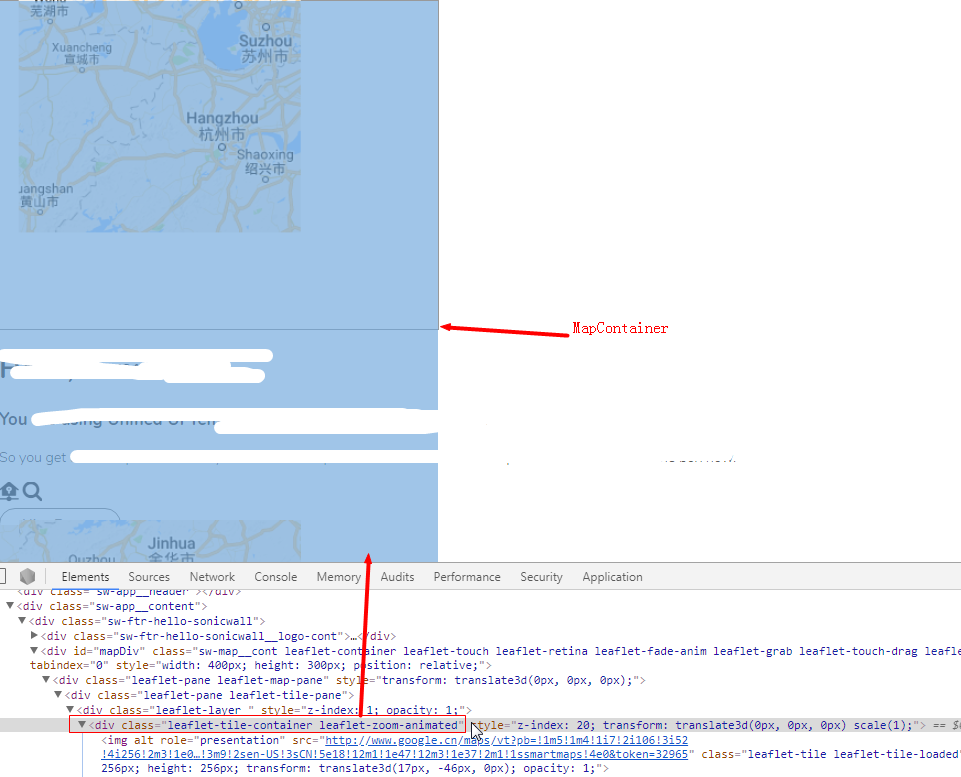
I was using leaflet in typescript + vue, encountered this issue.
Any suggestion ?
 alex2wong
on 22 Aug 2018
alex2wong
on 22 Aug 2018
Hi @alex2wong,
Your screenshot and description look like a totally different issue from what OP described.
I suspect your case to be similar to:
https://stackoverflow.com/questions/38835758/leaflet-drawing-tiles-disjointly/38836996#38836996
ghybs
on 22 Aug 2018
Related issues
 viswaug
·
4Comments
viswaug
·
4Comments
 timwis
·
3Comments
timwis
·
3Comments
 pgeyman
·
3Comments
pgeyman
·
3Comments
 JonnyBGod
·
4Comments
JonnyBGod
·
4Comments
 ssured
·
3Comments
ssured
·
3Comments