Leaflet: Blurring due to fractional CSS transform
Continuing from https://github.com/Leaflet/Leaflet/issues/6068.
How to Reproduce
Open http://leafletjs.com/examples/quick-start/ on a non-retina screen. Pan the map slowly, and note the tiles sometimes crisper, sometimes blurrier due to interpolation. To further see the effect, click on the map to get the "You clicked the map at..." popup, which is also blurry depending on the current translation.
- Leaflet version I'm using: (current)
- Browser (with version) I'm using: Chrome Version 64.0.3282.186
- OS/Platform (with version) I'm using: OSX High Sierra 10.13.3 (17D47)
Screenshots
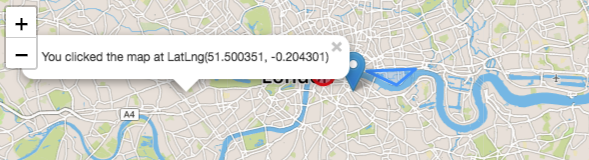

This can also lead to subtle seam artifacts, depending on how you've panned:

 brianreavis
All 8 comments
I have same issue.
Especially it happen when position is float type number with no retina monitor.
 Jinkwon
on 10 Apr 2018
Jinkwon
on 10 Apr 2018
I also encountered this while integrating Leaflet, and was able to fix it by checking if on non-retina screen (window.devicePixelRatio <= 1.5) and patching this function in Draggable (which is used by Map.Drag, which is then used by Map): https://github.com/Leaflet/Leaflet/blob/master/src/dom/Draggable.js#L181
Why does this function not round this._newPos, given this is what Leaflet already does in many other cases? Would you accept a PR to fix?
I don't believe this issue is actually continuing from #6068, while both cause blurriness associating the two may be misleading. Also, is this the same issue raised by #6232 and #3297?
 mbullington
on 10 Jul 2018
mbullington
on 10 Jul 2018
Hi @mbullington,
Thank you for your look into this!
Please would you be able to publish a patch of your fixed version, so that other users (like @EugenRakhimov) can test it in their configuration and report if it works in their case?
A simple way would be to setup e.g. a Plunker (https://leafletjs.com/edit) with:
L.Draggable.include({
  _updatePosition: yourModifiedFunction
})
before instantiating the map.
You can also send a PR of course.
 ghybs
on 11 Jul 2018
ghybs
on 11 Jul 2018
Thanks @ghybs!
I implemented the fix here using the tool you suggested here: https://plnkr.co/edit/wmVxVPD6S7trPlaRDBF3?p=preview If the fix works, I'll be more than happy to send a PR.
This test case can be contrasted with https://leafletjs.com/examples/quick-start/ , where the issue persists. I'm using a normal 1080p display connected to a mid-2012 MacBook Pro.
@brianreavis @EugenRakhimov Could you please test the above link on your devices and see if it fixes the issue?
mbullington
on 11 Jul 2018
@mbullington Looks fine to me.
 EugenRakhimov
on 11 Jul 2018
EugenRakhimov
on 11 Jul 2018
We're also seeing this behaviour. However not only on Pan, but always.
Here is a screenshot comparing on the same screen:
- The map in QGis
- The WMS tile opened in new tab
- The map in leaflet
Notice how number 3 is more blurry than the others (click image for full size).

The screenshots are in Edge, but we're seeing the same result in Chrome, Firefox and IE as well.
Unfortunately the tile is from a paid service, so it can't be accessed from outside.
My DevicePixelRation is 1.
 MikaelEdebro
on 11 Jan 2019
MikaelEdebro
on 11 Jan 2019
It's been awhile since I've looked at this, but for what it's worth, the _updatePosition approach didn't cover all cases for me. My fix: https://github.com/naturalatlas/Leaflet/commit/eb0802b8e074489f2358fd5d46827d3c1164dbec (plus https://github.com/naturalatlas/Leaflet/commit/016a112d59c8ce080709aa519d492c6fd0bf92aa to fix a small omission).
An approach like this obviously adjusts some of the core guts of Leaflet, so one of the maintainers is going to have to dig into it and decide if this is an acceptable approach. I wouldn't hold my breath on that though, as Leaflet's more-or-less in coasting mode.
brianreavis
on 11 Jan 2019
I have the same problem, map became blurry after move:
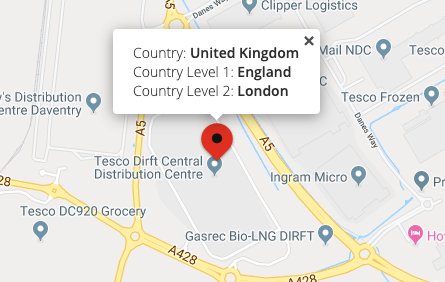
and after I move the map a bit:
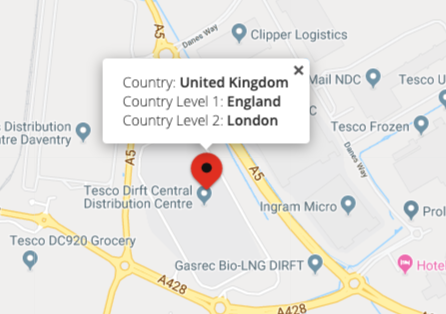
Maybe you should apply https://github.com/naturalatlas/Leaflet/commit/eb0802b8e074489f2358fd5d46827d3c1164dbec solution but round transform by new parameter?
MacOS: 10.14.5
Chrome: 76.0.3809.132
Desktop, scale 1
 vstyle
on 12 Sep 2019
vstyle
on 12 Sep 2019
Related issues
 pgeyman
·
3Comments
pgeyman
·
3Comments
 viswaug
·
4Comments
viswaug
·
4Comments
 walterfn2
·
4Comments
walterfn2
·
4Comments
 timwis
·
3Comments
timwis
·
3Comments
 onethread
·
3Comments
onethread
·
3Comments
Most helpful comment
Thanks @ghybs!
I implemented the fix here using the tool you suggested here: https://plnkr.co/edit/wmVxVPD6S7trPlaRDBF3?p=preview If the fix works, I'll be more than happy to send a PR.
This test case can be contrasted with https://leafletjs.com/examples/quick-start/ , where the issue persists. I'm using a normal 1080p display connected to a mid-2012 MacBook Pro.
@brianreavis @EugenRakhimov Could you please test the above link on your devices and see if it fixes the issue?