Leaflet: Printing leaflet from chrome: Unexplained patch of map shows on secondpage
How to reproduce
- Leaflet version I'm using: 1.2.0
- Browser (with version) I'm using: Chrome 62.0.3202.89
What behaviour I'm expecting and which behaviour I'm seeing
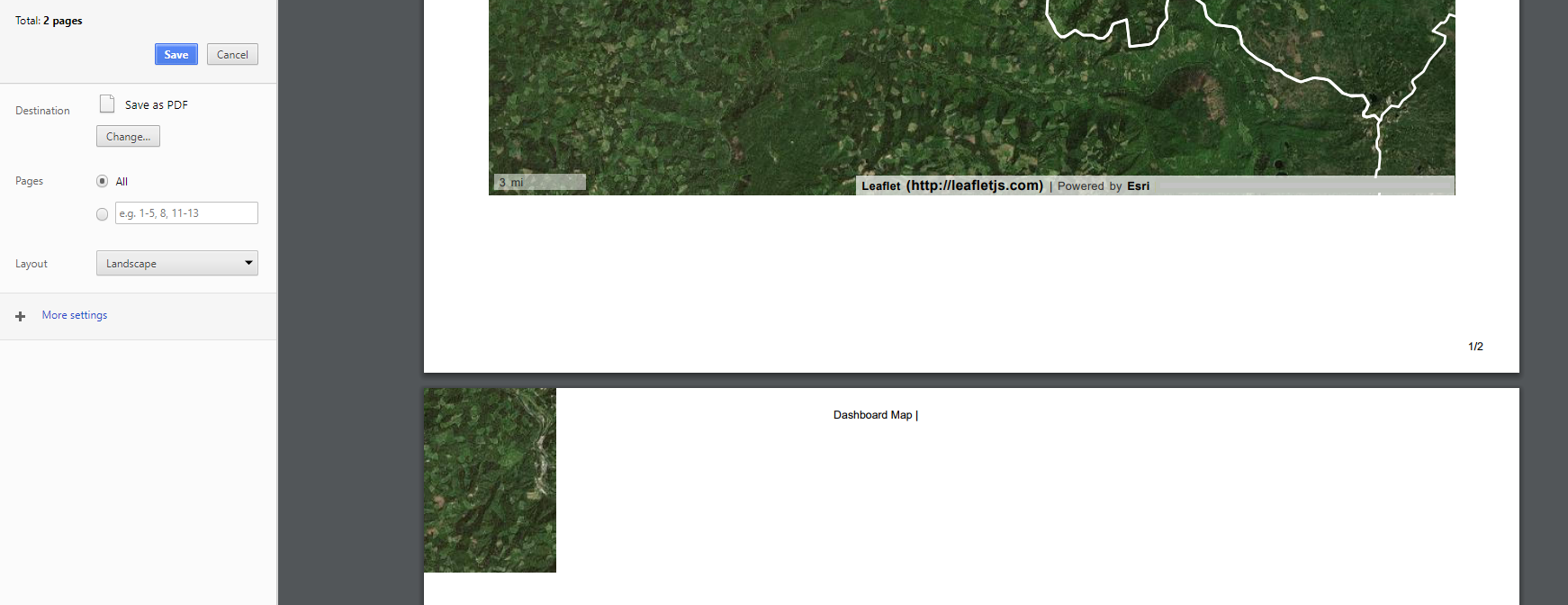
When I print my page in chrome print media query style rules hide all the unnecessary elements on the page and just the leaflet map is printed. In the print preview something unexpected happens: a patch of the map which is usually hidden, but is loaded in the page shows up at the top of the second page of the print job. Back on the webpage I can see that this is one of the bottom-left tiles loaded by leaflet by turning of the 'position:relative' rule on the map div in developer tools.
I am not sure how to stop this unexpected/undesired patch of map from printing on the second page of the print job. I have tried applying a css rule 'overflow: hidden !important' with no success. Does anybody have any suggestions about how to get the map to print properly?
Minimal example reproducing the issue
Here is a screenshot of the issue:
- [x] this example is as simple as possible
- [x] this example does not rely on any third party code
 sethpkendall
All 11 comments
Hi @sethpkendall,
could you provide link to example reproducing this issue? You can use this playground to create one.
I set up a map instance and printing looks good to me:

 cherniavskii
on 10 Nov 2017
cherniavskii
on 10 Nov 2017
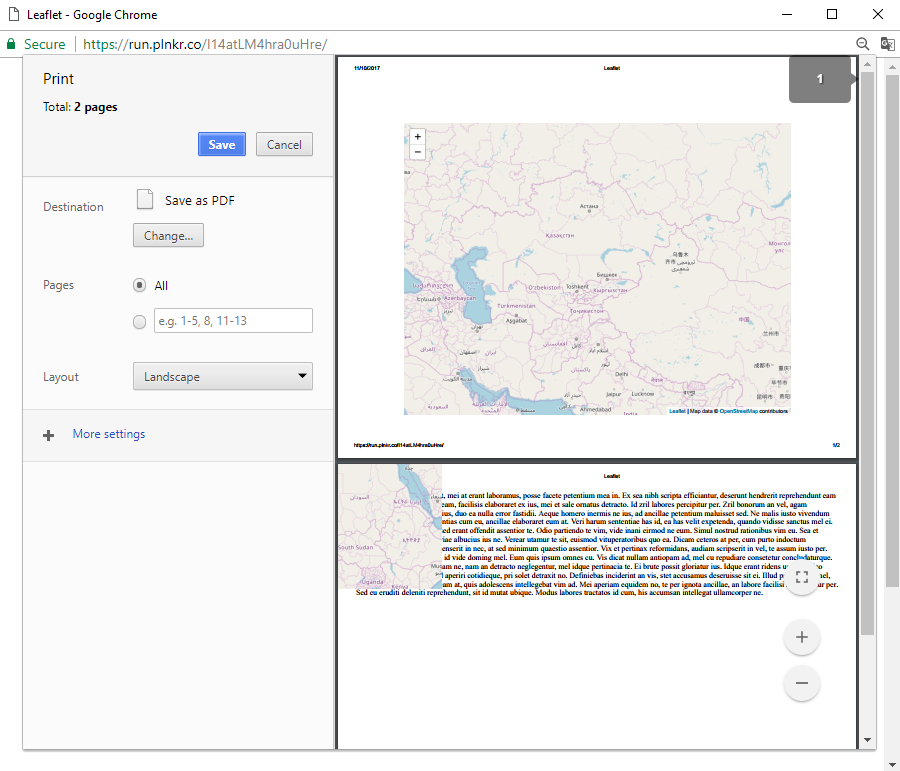
Ok I have added a paragraph of lorem ipsum text and a little styling to mimic the setup that I am using and in which I am encountering the issue: https://plnkr.co/edit/IBnjyibDKg87DEXjstWL?p=preview
Note that the issue is not always present. I have found that the case correlated to the appearance of the problem is when the map has been zoomed in and panned to the northeast by clicking at the top right and dragging to the bottom left corner. In this screen shot you can see that the tiles that are erroneously visible in the print preview are a continuation of the visible map. They are some of the extra tiles loaded in preparation for panning the map.
sethpkendall
on 10 Nov 2017
I confirm, issue is present also in 0.6.0 Leaflet version.
cherniavskii
on 10 Nov 2017
Looks really weird. That tile outside of leaflet container is visible only on the second page, and if it's visible - there's never more than one tile on that page.
I slightly modified your example https://plnkr.co/edit/2jeaApwcTcAB8D5R7ckl?p=preview
cherniavskii
on 10 Nov 2017
I also confirm this issue. It's reproduced only in Chrome, Firefox is not affected.
 vitalif
on 18 Feb 2018
vitalif
on 18 Feb 2018
In my case the issue reproduces when:
- the map fills the entire page, or at least its bottom-left corner. print dpi in HTML is always 72dpi, so an A4 page is always ~595x841px
- most of the bottom-left tile is offscreen, like translate3d(-173px,773px,0) or so. it is important that its X coordinate must be negative
- it's not the last page printed
It seems it's a Chrome bug - my guess is it thinks that this tile "does not fit" and part of it should be printed on the next page. I tried to do various CSS tricks with that tile but it ignores everything :)
vitalif
on 19 Feb 2018
@vitalif @sethpkendall I'm having the same problem. Any updates/fixes?
 schlesingermatthias
on 14 Mar 2018
schlesingermatthias
on 14 Mar 2018
@schlesingermatthias I am also still awaiting a fix. No news.
sethpkendall
on 14 Mar 2018
I suspect this bug should be filed for Chrome
vitalif
on 15 Mar 2018
OK, it has been filed as a bug in Chrome as well:
https://bugs.chromium.org/p/chromium/issues/detail?id=822250
sethpkendall
on 15 Mar 2018
Hi!
I am having problem with loading leaflet map properly on chrome it does show upp in firefox and IE without any problem but this problem only occure in chrome!
thnx for helping:)
 zhen1991
on 20 Mar 2018
zhen1991
on 20 Mar 2018
Related issues
 JonnyBGod
·
4Comments
JonnyBGod
·
4Comments
 prbaron
·
3Comments
prbaron
·
3Comments
 arminghm
·
3Comments
arminghm
·
3Comments
 piehei
·
3Comments
piehei
·
3Comments
 jblarsen
·
3Comments
jblarsen
·
3Comments
Most helpful comment
OK, it has been filed as a bug in Chrome as well:
https://bugs.chromium.org/p/chromium/issues/detail?id=822250