Ldaprecord-laravel: [Bug] Too many redirects on Fortify
Environment (please complete the following information):
- LDAP Server Type:ActiveDirectory
- PHP Version: 7.4.8
- Laravel Framework 8.8.0
- directorytree/ldaprecord-laravel : v1.7.3
- laravel/jetstream : v1.3.1
Describe the bug:
I have successfully implemented this package in a new Laravel Fortify installation.
But after login, I hit too many redirects. I can see that:-
sync_attributesis working fromuserstable- logging is confirmed, based on
ldap_loggingoutput
I can go to /user/profile and it showed me logged in. The only routes having issue is the default /dashboard.
When i refreshed the page, it keeps on redirecting to /login/ to /dashboard in loop.
 rognales
All 18 comments
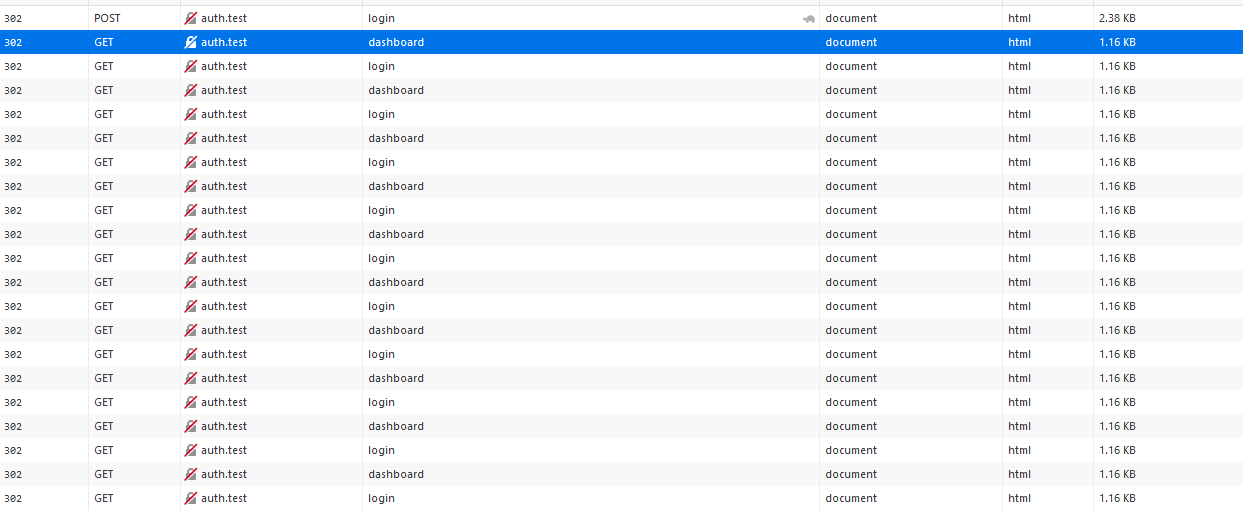
Devtools snaphost
I did logging something at /dashboard routes Closures, it seems it only got called once.
Same goes to Laravel\Fortify\Contracts\LoginResponse@toResponse(), only got called once.
rognales
on 5 Oct 2020
This middleware is causing the loop Authenticate.php
rognales
on 5 Oct 2020
Here's the log triggered by Illuminate\Auth\Middleware\Authenticate.php
````php
[2020-10-05 06:33:01] local.INFO: handle ["2020-10-05T06:33:01+00:00"]
[2020-10-05 06:33:01] local.INFO: authenticate ["2020-10-05T06:33:01+00:00",["sanctum"]]
[2020-10-05 06:33:01] local.INFO: unauthenticated ["2020-10-05T06:33:01+00:00",["sanctum"]]
[2020-10-05 06:33:01] local.INFO: handle ["2020-10-05T06:33:01+00:00"]
[2020-10-05 06:33:01] local.INFO: authenticate ["2020-10-05T06:33:01+00:00",["sanctum"]]
[2020-10-05 06:33:01] local.INFO: unauthenticated ["2020-10-05T06:33:01+00:00",["sanctum"]]
[2020-10-05 06:33:01] local.INFO: handle ["2020-10-05T06:33:01+00:00"]
[2020-10-05 06:33:01] local.INFO: authenticate ["2020-10-05T06:33:01+00:00",["sanctum"]]
[2020-10-05 06:33:01] local.INFO: unauthenticated ["2020-10-05T06:33:01+00:00",["sanctum"]]
[2020-10-05 06:33:01] local.INFO: handle ["2020-10-05T06:33:01+00:00"]
[2020-10-05 06:33:01] local.INFO: authenticate ["2020-10-05T06:33:01+00:00",["sanctum"]]
[2020-10-05 06:33:01] local.INFO: unauthenticated ["2020-10-05T06:33:01+00:00",["sanctum"]]
[2020-10-05 06:33:01] local.INFO: handle ["2020-10-05T06:33:01+00:00"]
[2020-10-05 06:33:01] local.INFO: authenticate ["2020-10-05T06:33:01+00:00",["sanctum"]]
[2020-10-05 06:33:01] local.INFO: unauthenticated ["2020-10-05T06:33:01+00:00",["sanctum"]]
`````
rognales
on 5 Oct 2020
Hi @rognales,
This sounds like a routing issue. Can you post your routes/web.php file?
 stevebauman
on 5 Oct 2020
stevebauman
on 5 Oct 2020
Here's my routes web.php, which is the default inertia stack of Jetstream
````php
Route::get('/', function () {
return view('welcome');
});
Route::middleware(['auth:sanctum'])->get('/dashboard', function () {
Log::info('web.php', [now()->toIso8601String()]);
return Inertia\Inertia::render('Dashboard');
})->name('dashboard');
````
rognales
on 5 Oct 2020
Hmm, the default should be (note the verified middleware):
Route::middleware(['auth:sanctum', 'verified'])->get('/dashboard', function () {
    return Inertia\Inertia::render('Dashboard');
})->name('dashboard');
Can you post your config/auth.php file?
stevebauman
on 5 Oct 2020
I did playaround with the files. But yeah, the issue persist with or without verified middleware.
auth.php
````php
'defaults' => [
'guard' => env('AUTH_GUARD', 'ldap'),
'passwords' => 'users',
],
'guards' => [
    'ldap' => [
        'driver' => 'session',
        'provider' => 'ldap',
    ],

    'web' => [
        'driver' => 'session',
        'provider' => 'users',
    ],

    'api' => [
        'driver' => 'token',
        'provider' => 'users',
        'hash' => false,
    ],
],

'providers' => [
    'users' => [
        'driver' => 'eloquent',
        'model' => App\Models\User::class,
    ],

    'ldap' => [
        'driver' => 'ldap',
        'model' => LdapRecord\Models\ActiveDirectory\User::class,
        // 'model' => App\Models\Ldap\User::class,
        'rules' => [],
        'database' => [
            'model' => App\Models\User::class,
            'sync_passwords' => true,
            'sync_attributes' => [
                'name' => 'ppdisplayname',
                'email' => 'mail',
                'uid' => 'uid',
                'staff_id' => 'uid',
                'icno' => 'ppnewic',
                'unit' => 'pporgunitdesc',
            ],
        ],
    ],
],
````
rognales
on 5 Oct 2020
Hmm, just for a quick test, try setting the default guard to web, and updating the web guard to use your ldap provider.
Let me know how it goes!
stevebauman
on 5 Oct 2020
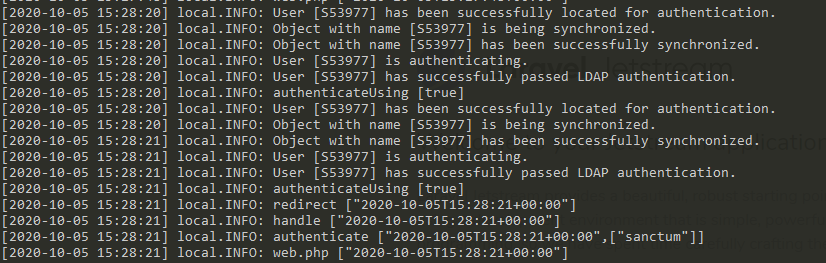
That's weird. It works now, without changing as per your comment
rognales
on 5 Oct 2020
Hmm strange! Not sure. Sounds like the issue was either middleware, session handling, or the auth guard.
Glad you're up and running!
stevebauman
on 5 Oct 2020
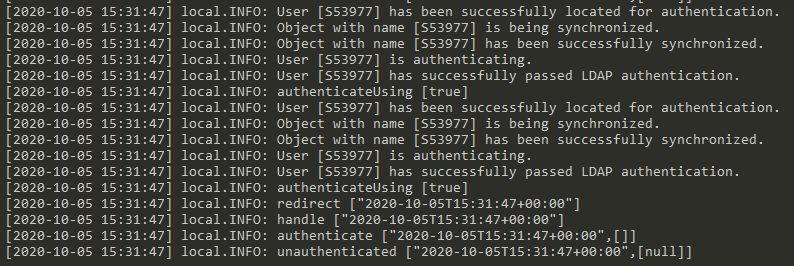
I did issue php artisan migrate:fresh and now the issue is back.
No changes on the code base other than DB refresh.
rognales
on 5 Oct 2020
I would dive into the authentication middleware that is causing the issue like you mentioned. Source dive it inside of your vendor/ folder and start dumping-and-dying (dd()) to see why it's not validating the session properly.
stevebauman
on 5 Oct 2020
Will do. Thx for your time.
rognales
on 5 Oct 2020
I downloaded a clone of your repository and found the issue. Laravel Sanctum uses the web guard by default in its middleware. Paste this inside of your config/auth.php and you're good to go:
<?php

return [

    /*
    |--------------------------------------------------------------------------
    | Authentication Defaults
    |--------------------------------------------------------------------------
    |
    | This option controls the default authentication "guard" and password
    | reset options for your application. You may change these defaults
    | as required, but they're a perfect start for most applications.
    |
    */

    'defaults' => [
        'guard' => 'web',
        'passwords' => 'users',
    ],

    /*
    |--------------------------------------------------------------------------
    | Authentication Guards
    |--------------------------------------------------------------------------
    |
    | Next, you may define every authentication guard for your application.
    | Of course, a great default configuration has been defined for you
    | here which uses session storage and the Eloquent user provider.
    |
    | All authentication drivers have a user provider. This defines how the
    | users are actually retrieved out of your database or other storage
    | mechanisms used by this application to persist your user's data.
    |
    | Supported: "session", "token"
    |
    */

    'guards' => [
        'web' => [
            'driver' => 'session',
            'provider' => 'ldap',
        ],

        'api' => [
            'driver' => 'token',
            'provider' => 'users',
            'hash' => false,
        ],
    ],

    /*
    |--------------------------------------------------------------------------
    | User Providers
    |--------------------------------------------------------------------------
    |
    | All authentication drivers have a user provider. This defines how the
    | users are actually retrieved out of your database or other storage
    | mechanisms used by this application to persist your user's data.
    |
    | If you have multiple user tables or models you may configure multiple
    | sources which represent each model / table. These sources may then
    | be assigned to any extra authentication guards you have defined.
    |
    | Supported: "database", "eloquent"
    |
    */

    'providers' => [
        'users' => [
            'driver' => 'eloquent',
            'model' => App\Models\User::class,
        ],

        'ldap' => [
            'driver' => 'ldap',
            // 'model' => LdapRecord\Models\ActiveDirectory\User::class,
            'model' => App\Models\Ldap\User::class,
            'rules' => [],
            'database' => [
                'model' => App\Models\User::class,
                'sync_passwords' => true,
                'sync_attributes' => [
                    'name' => 'ppdisplayname',
                    'email' => 'mail',
                    'uid' => 'uid',
                    'staff_id' => 'uid',
                    'icno' => 'ppnewic',
                    'unit' => 'pporgunitdesc',
                ],
            ],
        ],

        // 'users' => [
        //     'driver' => 'database',
        //     'table' => 'users',
        // ],
    ],

    /*
    |--------------------------------------------------------------------------
    | Resetting Passwords
    |--------------------------------------------------------------------------
    |
    | You may specify multiple password reset configurations if you have more
    | than one user table or model in the application and you want to have
    | separate password reset settings based on the specific user types.
    |
    | The expire time is the number of minutes that the reset token should be
    | considered valid. This security feature keeps tokens short-lived so
    | they have less time to be guessed. You may change this as needed.
    |
    */

    'passwords' => [
        'users' => [
            'provider' => 'users',
            'table' => 'password_resets',
            'expire' => 60,
            'throttle' => 60,
        ],
    ],

    /*
    |--------------------------------------------------------------------------
    | Password Confirmation Timeout
    |--------------------------------------------------------------------------
    |
    | Here you may define the amount of seconds before a password confirmation
    | times out and the user is prompted to re-enter their password via the
    | confirmation screen. By default, the timeout lasts for three hours.
    |
    */

    'password_timeout' => 10800,

];
So instead of creating another guard, we need to target the web guard since Sanctum is hard-coded by that?
Can I still change the behavior (change web and ldap provider) as before?
rognales
on 5 Oct 2020
You must configure the sanctum guard, as show in its source code here:
https://github.com/laravel/sanctum/blob/a38ffd5f419dbaaefc4cb81c1bdde12a02c4854e/src/Guard.php#L54
Example:
// config/sanctum.php

'guard' => env('AUTH_GUARD', 'ldap'),
Thanks man. Yes, it's working as intended now.
rognales
on 6 Oct 2020
Excellent -- no problem. Happy to help! 👍
stevebauman
on 6 Oct 2020
Related issues
 satyakresna
·
7Comments
satyakresna
·
7Comments
 AlexH269
·
4Comments
AlexH269
·
4Comments
 brinkonaut
·
6Comments
brinkonaut
·
6Comments
 abiffe
·
3Comments
abiffe
·
3Comments
 murrant
·
5Comments
murrant
·
5Comments