Ldaprecord-laravel: Trying to get property 'ldap' of non-object
Hey there, i want to authenticate users with OpenLDAP and sync them to my database.
The login and sync work, but when i try to fetch the authenticated user, it is always null.
Could i get help maybe?
The full source code is on a private Gitlab Instance, i would give access to the repo, it someone could help me. But please ask, because i am syncing the whole .env file too.
Regards Lala


 Lulalaby
All 19 comments
Lulalaby
on 30 May 2020
Hi @Lulalaby, I'll help you get this working 👍
I don't think I'll need access to the repository (especially if it contains sensitive information), but I'll just need you to post a couple things here so I can assist you.
First, can you ensure you can connect to your configured LDAP server by running the following command:
php artisan ldap:test
This will tell you if connectivity is successful.
If successful, can you post your LoginController.php code and your config/auth.php file?
 stevebauman
on 30 May 2020
stevebauman
on 30 May 2020
Yes, I will do in a few.
The connection works and the authentication too.
Otherwise I wouldn't have seen this error :D
Lulalaby
on 30 May 2020

Lulalaby
on 30 May 2020
LDAPVerifyAuth.php
<?php

namespace App\Http\Controllers;

use Illuminate\Support\Facades\Auth;
use Illuminate\Http\Request;
use Illuminate\Support\Facades\DB;
use LdapRecord\Container;
use LdapRecord\Models\OpenLDAP\User;
use Illuminate\Foundation\Auth\AuthenticatesUsers;
use LdapRecord\Laravel\Auth\ListensForLdapBindFailure;

class LDAPVerifyAuth extends Controller
{
    use AuthenticatesUsers, ListensForLdapBindFailure;

    public function username()
    {
        return 'username';
    }

    protected function credentials(Request $request)
    {
        return [
            'username' => $request->get('username'),
            'password' => $request->get('password'),
        ];
    }

    public function __invoke(Request $request)
    {
        $tsuid = $request->tsuid;
        $code = $request->code;
        $username = $request->username;
        $password = $request->password;

        $verify = true;//self::checkVerifyAuth($tsuid, $code);
        if($verify) {
            $ldap = self::doLDAPAuth($request);
            if($ldap === true) {
                return view('user.ldaplogin', ['error' => false, 'cn' => "work"]);
            } else {
                return view('user.ldaplogin', ['error' => true, 'type' => 'ldap :: '.$ldap]);
            }
        } else {
            return view('user.ldaplogin', ['error' => true, 'type' => 'verify']);
        }
    }

    private function checkVerifyAuth($tsuid, $code)
    {
        $vCount = DB::connection('mysqlverify')->table('verify')->where([
                ['uid', '=', $tsuid],
                ['code', '=', $code],
        ])->count();
        if($vCount === 1) {
            DB::connection('mysqlverify')->table('verify')->where('uid', '=', $tsuid)->delete();
            return true;
        } else {
            return false;
        }
    }

    private function doLDAPAuth(Request $request) {
        $connection = Container::getDefaultConnection();

        $user = User::findByOrFail('uid', $request->username);

        if($connection->auth()->attempt($user->getDn(), $request->password, $bindAsUser = true)) {
            return true;
        } else {
            $error = $connection->getLdapConnection()->getDiagnosticMessage();

            if (strpos($error, '532') !== false) {
                return "Your password has expired.";
            } elseif (strpos($error, '533') !== false) {
                return "Your account is disabled.";
            } elseif (strpos($error, '701') !== false) {
                return "Your account has expired.";
            } elseif (strpos($error, '775') !== false) {
                return "Your account is locked.";
            }

            return "Username or password is incorrect.";
        }
    }
}
Ok perfect! :smile:
Once I see the config/auth.php file I'll have a good understanding of how you're using LdapRecord.
stevebauman
on 30 May 2020
config/ldap.php
<?php

return [

    /*
    |--------------------------------------------------------------------------
    | Default LDAP Connection Name
    |--------------------------------------------------------------------------
    |
    | Here you may specify which of the LDAP connections below you wish
    | to use as your default connection for all LDAP operations. Of
    | course you may add as many connections you'd like below.
    |
    */

    'default' => env('LDAP_CONNECTION', 'default'),

    /*
    |--------------------------------------------------------------------------
    | LDAP Connections
    |--------------------------------------------------------------------------
    |
    | Below you may configure each LDAP connection your application requires
    | access to. Be sure to include a valid base DN - otherwise you may
    | not receive any results when performing LDAP search operations.
    |
    */

    'connections' => [

        'default' => [
            'hosts' => [env('LDAP_HOST', 'ad.ragebears.de')],
            'username' => env('LDAP_USERNAME', 'cn=admin,dc=ragebears,dc=de'),
            'password' => env('LDAP_PASSWORD', 'FuckPasswords:P'),
            'port' => env('LDAP_PORT', 389),
            'base_dn' => env('LDAP_BASE_DN', 'dc=ragebears,dc=de'),
            'timeout' => env('LDAP_TIMEOUT', 5),
            'use_ssl' => env('LDAP_SSL', false),
            'use_tls' => env('LDAP_TLS', false),
        ],

    ],

    /*
    |--------------------------------------------------------------------------
    | LDAP Logging
    |--------------------------------------------------------------------------
    |
    | When LDAP logging is enabled, all LDAP search and authentication
    | operations are logged using the default application logging
    | driver. This can assist in debugging issues and more.
    |
    */

    'logging' => env('LDAP_LOGGING', true),

    /*
    |--------------------------------------------------------------------------
    | LDAP Cache
    |--------------------------------------------------------------------------
    |
    | LDAP caching enables the ability of caching search results using the
    | query builder. This is great for running expensive operations that
    | may take many seconds to complete, such as a pagination request.
    |
    */

    'cache' => [
        'enabled' => env('LDAP_CACHE', false),
        'driver' => env('CACHE_DRIVER', 'file'),
    ],

];
User.php
<?php

namespace App;

use Illuminate\Contracts\Auth\MustVerifyEmail;
use LdapRecord\Laravel\Auth\HasLdapUser;
use Illuminate\Foundation\Auth\User as Authenticatable;
use Illuminate\Notifications\Notifiable;
use LdapRecord\Laravel\Auth\LdapAuthenticatable;
use LdapRecord\Laravel\Auth\AuthenticatesWithLdap;
use LdapRecord\Models\Model;

class User extends Authenticatable implements LdapAuthenticatable
{
    use Notifiable, AuthenticatesWithLdap, HasLdapUser;


    public function getLdapDomainColumn()
    {
        return 'domain';
    }

    public function getLdapGuidColumn()
    {
        return 'guid';
    }

    /**
     * The attributes that are mass assignable.
     *
     * @var array
     */
    protected $fillable = [
        'name', 'email', 'password',
    ];

    /**
     * The attributes that should be hidden for arrays.
     *
     * @var array
     */
    protected $hidden = [
        'password', 'remember_token',
    ];

    /**
     * The attributes that should be cast to native types.
     *
     * @var array
     */
    protected $casts = [
        'email_verified_at' => 'datetime',
    ];
}
views/user/ldaplogin.blade.php
<?php
    $user = Auth::user();
?>

@extends('global')

@section('title', 'LDAP Login')

@section('site', 'Authentication')

@section('content')
    <div class="row">
        <div class="col">
            <img type="image/gif" class="img-fluid" src="{{ asset('/img/fp.gif') }}" width="256px" height="auto">
        </div>
    </div>
    @if ($error)
        <div class="row">
            <div class="col">
                <h3><span class="error">Error in authentication: {{ $type }}</span></h3>
            </div>
        </div>
    @else
        <div class="row">
            <div class="col">
                <h3>You are authenticated as: <span class="success">{{ $user->ldap->getFirstAttribute('cn') }}</span></h3>
            </div>
        </div>
    @endif
@endsection
config/auth.php
<?php

return [

    /*
    |--------------------------------------------------------------------------
    | Authentication Defaults
    |--------------------------------------------------------------------------
    |
    | This option controls the default authentication "guard" and password
    | reset options for your application. You may change these defaults
    | as required, but they're a perfect start for most applications.
    |
    */

    'defaults' => [
        'guard' => 'web',
        'passwords' => 'ldap',
    ],

    /*
    |--------------------------------------------------------------------------
    | Authentication Guards
    |--------------------------------------------------------------------------
    |
    | Next, you may define every authentication guard for your application.
    | Of course, a great default configuration has been defined for you
    | here which uses session storage and the Eloquent user provider.
    |
    | All authentication drivers have a user provider. This defines how the
    | users are actually retrieved out of your database or other storage
    | mechanisms used by this application to persist your user's data.
    |
    | Supported: "session", "token"
    |
    */

    'guards' => [
        'web' => [
            'driver' => 'session',
            'provider' => 'ldap',
        ],

        'api' => [
            'driver' => 'token',
            'provider' => 'users',
            'hash' => false,
        ],
    ],

    /*
    |--------------------------------------------------------------------------
    | User Providers
    |--------------------------------------------------------------------------
    |
    | All authentication drivers have a user provider. This defines how the
    | users are actually retrieved out of your database or other storage
    | mechanisms used by this application to persist your user's data.
    |
    | If you have multiple user tables or models you may configure multiple
    | sources which represent each model / table. These sources may then
    | be assigned to any extra authentication guards you have defined.
    |
    | Supported: "database", "eloquent"
    |
    */

    'providers' => [
        'users' => [
            'driver' => 'ldap',
            'model' => App\User::class,
        ],
        'ldap' => [
            'driver' => 'ldap',
            'model' => LdapRecord\Models\OpenLDAP\User::class,
            'database' => [
                'model' => App\User::class,
                'sync_passwords' => false,
                'sync_attributes' => [
                    'name' => 'cn',
                    'email' => 'mail',
                    'username' => 'uid',
                ],
            ],
        ],

        // 'users' => [
        //     'driver' => 'database',
        //     'table' => 'users',
        // ],
    ],

    /*
    |--------------------------------------------------------------------------
    | Resetting Passwords
    |--------------------------------------------------------------------------
    |
    | You may specify multiple password reset configurations if you have more
    | than one user table or model in the application and you want to have
    | separate password reset settings based on the specific user types.
    |
    | The expire time is the number of minutes that the reset token should be
    | considered valid. This security feature keeps tokens short-lived so
    | they have less time to be guessed. You may change this as needed.
    |
    */

    'passwords' => [
        'users' => [
            'provider' => 'users',
            'table' => 'password_resets',
            'expire' => 60,
            'throttle' => 60,
        ],
    ],

    /*
    |--------------------------------------------------------------------------
    | Password Confirmation Timeout
    |--------------------------------------------------------------------------
    |
    | Here you may define the amount of seconds before a password confirmation
    | times out and the user is prompted to re-enter their password via the
    | confirmation screen. By default, the timeout lasts for three hours.
    |
    */

    'password_timeout' => 10800,

];
Database:

Lulalaby
on 30 May 2020
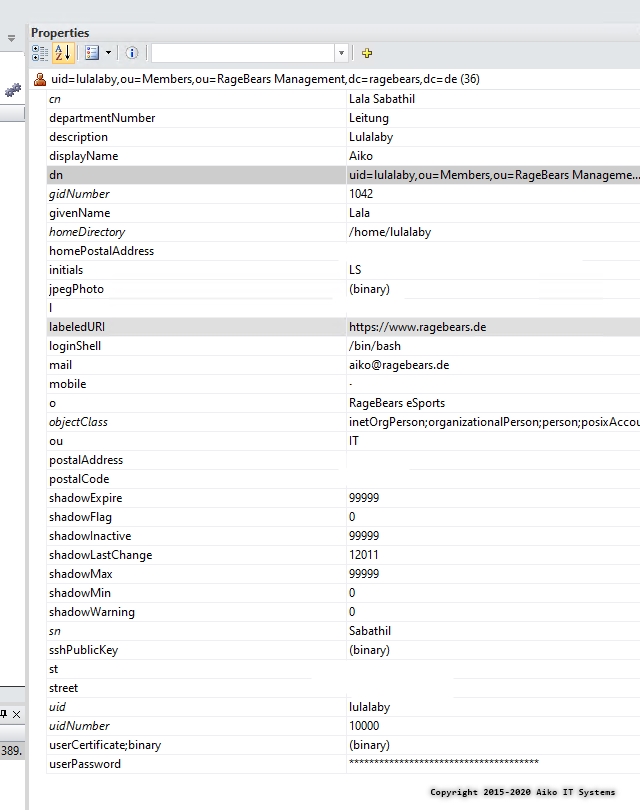
LDAP User Object
Lulalaby
on 30 May 2020
Ok I see a few issues here in your controller:
In the credentials() method, you should return this for OpenLDAP:
Below, I changed the
usernamekey touid.
protected function credentials(Request $request)
{
    return [
        'uid' => $request->get('username'),
        'password' => $request->get('password'),
    ];
}
Also, you shouldn't need any of the additional methods, such as __invoke(), checkVerifyAuth() or doLDAPAuth(). These appear to be performing raw authentication on the LDAP connection itself, but this is done for you in the LdapRecord-Laravel auth driver.
If you perform raw LDAP authentication yourself, it won't setup a Laravel session, or log a user into your application. It will simply attempt to bind to your LDAP server for the duration of the request.
Can you try removing those additional methods that I mentioned (__invoke(), checkVerifyAuth(), doLDAPAuth()) above and try changing the credentials() method as I've shown above?
stevebauman
on 30 May 2020
yeah, i try.
Lulalaby
on 30 May 2020
Great! Also, I see you're customizing the LDAP error messages that are returned here:
if($connection->auth()->attempt($user->getDn(), $request->password, $bindAsUser = true)) {
    return true;
} else {
    $error = $connection->getLdapConnection()->getDiagnosticMessage();

    if (strpos($error, '532') !== false) {
        return "Your password has expired.";
    } elseif (strpos($error, '533') !== false) {
        return "Your account is disabled.";
    } elseif (strpos($error, '701') !== false) {
        return "Your account has expired.";
    } elseif (strpos($error, '775') !== false) {
        return "Your account is locked.";
    }

    return "Username or password is incorrect.";
}
However, these error codes are only returned by Active Directory -- not OpenLDAP (unfortunately). I'm unsure which error codes are returned by OpenLDAP, but if you need to customize these, you can override the method handleLdapBindError that is provided by ListensForLdapBindFailure trait shown here:
https://ldaprecord.com/docs/laravel/auth/setup/#displaying-ldap-error-messages
// app/Http/Controllers/Auth/LoginController.php

class LoginController extends Controller
{
    // ...

    use ListensForLdapBindFailure {
        handleLdapBindError as baseHandleLdapBindError;
    }

    protected function handleLdapBindError($message, $code = null)
    {
        if ($code == '773') {
            // The users password has expired. Redirect them.
            abort(redirect('/password-reset'));
        }

        $this->baseHandleLdapBindError($message, $code);
    }
}
Your config/auth.php, config/ldap.php, and app/User.php look perfect -- no changes need there.
stevebauman
on 30 May 2020
it seems to work with the default auth/login.blade.php

Well, i think, then i have to write another authentication class for my extra verification later.
didn't thought about the problem laying inside raw LDAP auth.
well, as far i see, everything seems to be ok now ❤️
now i know what i have to change to get the rest working.
thank you 💯
Lulalaby
on 31 May 2020
Awesome @Lulalaby! If you need any assistance with that, let me know and hopefully I can point you in the right direction. 👍
stevebauman
on 31 May 2020
yeah, for now i think about sleeping :D
have a great time for now!
Lulalaby
on 31 May 2020
Lol sounds like it's been a long night! :smile: You as well, thank you!
stevebauman
on 31 May 2020
it was a long night! 😆 it's 0:12 here right now.
Lulalaby
on 31 May 2020
Wow yea! Have a good well needed rest 👍
stevebauman
on 31 May 2020
thanks, i had a nice rest.
Now i am working on the integration of user registration.
But it will be complicated, because the useraccount have to:
Register in LDAP
Pepared in Nextcloud (happens through sync)
Admin has to grant access
User has to get an mail in mailcow generated.
And TeamSpeak sync.
Let's see how it goes. The LDAPRecord as far as now helps much.
I am glad that this exsist.
Lulalaby
on 31 May 2020
Related issues
 aanderse
·
3Comments
aanderse
·
3Comments
 AlexH269
·
4Comments
AlexH269
·
4Comments
 abiffe
·
3Comments
abiffe
·
3Comments
 siegherr
·
6Comments
siegherr
·
6Comments
 jagDanJu
·
8Comments
jagDanJu
·
8Comments