Lazysizes: TypeError: Illegal invocation at HTMLDocument.document.createEvent only on iOS Safari mobile
Hi everyone,
I just deployed lazysizes in production for the first time. It is working great, except that my error reporting tool (rollbar dot io), reports a lot of errors only on mobile Safari 10 & 11. Unfortunately I cannot reproduce it on my end.
The stacktrace I get is (I re deployed using the unminified script to know where it comes from) :
TypeError: Illegal invocation
File "(unknown)" line 1 col 35801 in HTMLDocument.document.createEvent
File https://www.fishfriender.com/public/lazysizes/lazysizes.js line 71 col 24 in triggerEvent
File https://www.fishfriender.com/public/lazysizes/lazysizes.js line 526 col 13 in unveilElement
File https://www.fishfriender.com/public/lazysizes/lazysizes.js line 393 col 7 in checkElements
File https://www.fishfriender.com/public/lazysizes/lazysizes.js line 171 col 4 in run
Script is included like this : <script src="/public/lazysizes/lazysizes.js" async=""></script>
Does it speak to anyone ?
 philippeauriach
All 42 comments
Bugsnag reports the same. Haven't looked into it yet as it's rather an uncommon issue, but yes, I'm experiencing it also.
 adriancb
on 26 Jul 2018
adriancb
on 26 Jul 2018
Yes, same here. Clearly, an error tracked by trackjs.com on our production site:
v = function(a, d, e, f, g) {
    var h = b.createEvent("CustomEvent");
    return e || (e = {}), e.instance = c, h.initCustomEvent(d, !f, !g, e), a.dispatchEvent(
      h), h
This can't work as b. is not provided in function(...) call
 terrapop
on 7 Aug 2018
terrapop
on 7 Aug 2018
@adriancb, @philippeauriach and @terrapop
I really need more information.
- url to your website (you can also mailme
- maybe all client side modules you are using
- exact Safari and MacOS versions
@terrapop
This can't work as b. is not provided in function(...) call
If this would be so easy. lazySizes would never work in all browsers. b is defined at a higher scope as document. (see here and here)
The error message would also be a lot clearer. b is not defined. Instead it is Illegal invocation
 aFarkas
on 8 Aug 2018
aFarkas
on 8 Aug 2018
@aFarkas - I've emailed you. :wave: all the way from Australia. :D
adriancb
on 9 Aug 2018
We're also seeing this error in Bugsnag.
We're using ls.bgset and ls.respimg and our bundle also includes a CustomEvent polyfill
It's weird because we can't seem to reproduce it using the same setup.
Url: https://www.lokaleopplevelser.no/moskussafari-dovrefjell
OS: iOS 11.4
Browser: Mobile Safari 11.0.0
User Agent: Mozilla/5.0 (iPhone; CPU iPhone OS 11_4_1 like Mac OS X) AppleWebKit/605.1.15 (KHTML, like Gecko) Version/11.0 Mobile/15E148 Safari/604.1
 alexbech
on 10 Aug 2018
alexbech
on 10 Aug 2018
Also seeing this issue – and, unfortunately, I'm also unable to actually reproduce it myself.


URL: https://verdbegravelse.no
The CustomEvent polyfill that we're using (which we suspect may be relevant to the issue) is https://www.npmjs.com/package/custom-event-polyfill
 mmikkel
on 13 Aug 2018
mmikkel
on 13 Aug 2018
Just sent more details by email ✉️ !
philippeauriach
on 15 Aug 2018
Thank you all for your information. I will look into this this weekend. 'As you know it is hard to fix a bug without being able to reproduce it...
I'll do my best.
aFarkas
on 16 Aug 2018
Hi guys,
It was impossible for me to replicate the bug. It is very strange that this bug is now appearing, because the underlying code wasn't changed since years.
However I did some changes in two branches, so you can checkout wether the error disappears on your site:
- https://github.com/aFarkas/lazysizes/tree/bugfix-test/520-try-1
- https://github.com/aFarkas/lazysizes/tree/bugfix-test/520-try-2
Please check it out. Also to think about: The browser will throw this error message as soon as createEvent is called in the wrong context. At least in trackjs I found the following a little bit suspicious:
this.window=c;this.document=f;
Gave 4.1.4 a whirl and we're still seeing the error in JS. Oddly, we've noticed that all the offending errors originate from Facebook IP's. We're wondering if there's some cut down browser trying to load the pages which explains why it's incredibly difficult to replicate but seemingly so "common" in our Bugsnag report 🤷♂️
 brendo
on 1 Nov 2018
brendo
on 1 Nov 2018
We did the same thing. It seems as if the FB crawlers execute javascript. We've had other libraries reporting errors that weren't really errors. Will do some more investigating.
adriancb
on 1 Nov 2018
I can also confirm that at least on my end, this error is only encountered by clients with Facebook IPs.
 umran
on 5 Feb 2019
umran
on 5 Feb 2019
 alepee
on 4 Apr 2019
alepee
on 4 Apr 2019
Why not use CustomEvent ?
var triggerEvent = function(elem, name, detail, noBubbles, noCancelable) {
    if (typeof window.CustomEvent !== 'function') {
        function CustomEvent(event, params) {
            params = params || {
                bubbles: false,
                cancelable: false,
                detail: null,
            };
            var evt = document.createEvent('CustomEvent');
            evt.initCustomEvent(
                event,
                params.bubbles,
                params.cancelable,
                params.detail
            );
            return evt;
        }
        CustomEvent.prototype = window.Event.prototype;
    }

    if (!detail) {
        detail = {};
    }

    detail.instance = lazysizes;

    var event = new CustomEvent(name, {
        bubbles: !noBubbles,
        cancelable: !noCancelable,
        detail: detail,
    });

    elem.dispatchEvent(event);
    return event;
};
@alepee
Does this fix the bug or do you just want to change the code?
aFarkas
on 4 Apr 2019
Since I can't reproduce it, I can't say, but still it comply with DOM API documentation and get rid of Illegal invocation since it uses CustomEvent constructor. I will run some additional tests tomorrow and will get back to you.
alepee
on 4 Apr 2019
@alepee
Yes, the current API I'm using is an old one, but you can say for sure that it will stay no one will remove it. The web is built upon backwards compatibility. Additionally your code does code branching which results in the situation that some browsers execute the code and others not. This often results in mistakes, harder testing and is a maintainability hazard.
In fact your code demonstrates this very good because - although I haven't run it in a browser - I see some mistakes. (see also: dom4)
aFarkas
on 4 Apr 2019
For us the issue is mostly from iOS users, in almost all such cases the browser is reported as Mobile Safari. Still about 15% of the errors are coming from Chrome, including on Windows.
In all the instances Sentry points at this line of code as the source. Here is the full stack trace:
TypeError: Illegal invocation
  at HTMLDocument.document.createEvent(:519:5)
  at triggerEvent(./node_modules/lazysizes/lazysizes.js:71:1)
  at unveilElement(./node_modules/lazysizes/lazysizes.js:543:1)
  at fn(./node_modules/lazysizes/lazysizes.js:401:1)
  at B(./node_modules/lazysizes/lazysizes.js:176:1)
 dryoma
on 9 Apr 2019
dryoma
on 9 Apr 2019
@dryoma
I still can not reproduce it, which makes fixing quite hard. @alepee has developed a more modern approach to dispatch custom events. You can grab his source code here: https://github.com/aFarkas/lazysizes/pull/627
Please let us know wether your errors go away.
aFarkas
on 9 Apr 2019
Apple Safari documentation 🤦♂️
https://developer.apple.com/documentation/webkitjs/document/1631381-createevent?language=javascript
alepee
on 10 Apr 2019
Ok, I think I can confirm that it's Facebook's doing.
- All the IPs that error events come from are Facebook's
- Every single one of them has the
fbclidget param in the URL.
Whatever it is, it at least seems to run all JS code properly and doesn't omit any script objects like in some other weird cases.
Also the error object has a prop that is basically a copy of the Window object, except all its props are undefined.
I'm also going to take a look at our server logs to clarify if the requests that correspond to these ones have additional attributes that could hint at Facebook. We're also pretty much inclined to block the heck out of it at least in Sentry, but maybe even server-side since lasysizes is by far not the only lib that triggers that.
Yet before that I'm eager to give the changed version a shot to see if it fixes the problem. We have a shit ton of events under this error, so I believe we'll be able to tell right away. Thanks for all your efforts here, will keep you updated.
dryoma
on 12 Apr 2019
- Every single one of them has the
fbclidget param in the URL.
I just rechecked our Bugsnag logs and this is also the case for us.
Yet before that I'm eager to give the changed version a shot to see if it fixes the problem. We have a shit ton of events under this error, so I believe we'll be able to tell right away. Thanks for all your efforts here, will keep you updated.
💯in the same boat. 26% of our errors are from this error... we get a lot of Facebook traffic 😅Happy to test a new release.
I understand the reluctance to fix this because it's extremely difficult to test before shipping, but it would be nice to fix in the library and benefit all the consumers rather than have each consumer have to add a filter/reject on their bug logging system to ignore it.
brendo
on 12 Apr 2019
@alepee
For me the explanation that it is facebook related is currently the best explanation. I thought maybe it is due to some special restrictions inside of the webview of the facebook app. But I had no luck.
This is what I did: I tried to replicate the issue by checking different ios webvies using View Te and later I tested by just posting a link to my wall (only visible for me) and using the ios facebook app to follow the link (you can even post links with your local ip of your dev machine only accessible from your network to do further tests then). In both cases I just tested a slightly modified version of my demo page but could not reproduce. Maybe there has to be some additional site specific thing involved I don't know.
aFarkas
on 13 Apr 2019
I confirm @dryoma observation on our side, fbclid is invlove in every error. Checking for a way to reproduce.
alepee
on 15 Apr 2019
Hi @alepee ,
Sadly, the fix didn't help. Apparently the environment the crawler or whatever it is runs in doesn't have CustomEvent which makes it follow the fallback part and still throw on createEvent() calls.
TypeError: Illegal invocation
  at HTMLDocument.document.createEvent(:519:5)
  at new n(./path-to/js/vendor/lazysizes.js:78:24)
  at triggerEvent(./path-to/js/vendor/lazysizes.js:94:15)
  at unveilElement(./path-to/js/vendor/lazysizes.js:560:13)
  at checkElements(./path-to/js/vendor/lazysizes.js:418:7)
  at _(./path-to/js/vendor/lazysizes.js:632:6)
  at init(./path-to/js/vendor/lazysizes.js:711:11)
  at ? (./path-to/js/vendor/lazysizes.js:300:5)
Hi @dryoma,
I get the exact same results on my side 😞 , did you get some more insights with the fbclid lead ?
alepee
on 16 Apr 2019
Unfortunately, not _yet_. But I did some more debugging on the front end and here is what I've found:
createEvent()fails in any scope, including inside an inline<script>. From what I understood about why and when this error shows up, this indicates they're using modifiedwindowanddocumentobjects in the environment where the errors are generated. So we can't, for example,.bind()the method somewhere in the upper scope.navigator.standaloneisundefinedin that environment. Which means it's either not an iOS browser under the hood at all (I've checked Safari, Chrome, and Firefox on iOS, and all of them had this set at least tofalsewhen in the default mode), or it is, but the environment is removing that prop.- In some cases a User-Agent value indicates a browser different from Mobile Safari. For example, just now we caught it in Edge 18
Mozilla/5.0 (Windows NT 10.0; Win64; x64) AppleWebKit/537.36 (KHTML, like Gecko) Chrome/64.0.3282.140 Safari/537.36 Edge/18.17763
Cases like this are peculiar since
- URLs have GET params other than fbclid:
utm_medium=facebook&utm_source=dlvr.it - there is no stack trace, and my checks for whether
createEvent()runs successfully in other scopes didn't fire at all (no debug tags set), and - the IP is still facebook's, fbclid is still there as well as the huge Window "fingerprint".
- URLs have GET params other than fbclid:
dryoma
on 18 Apr 2019
Hey everyone,
After blocking the "text: illegal invocation + has fbclid param" combination in Sentry the issue events rate dropped significantly. Yet some of them still manage to slip into the tracker - they happen to not have the fbclid param. What's interesting is that many of them report a legit iOS Facebook browser's UA:
Mozilla/5.0 (iPhone; CPU iPhone OS 12_1_2 like Mac OS X) AppleWebKit/605.1.15 (KHTML, like Gecko) Mobile/16C101 [FBAN/FBIOS;FBAV/217.0.0.46.75;FBBV/150461556;FBDV/iPhone11,6;FBMD/iPhone;FBSN/iOS;FBSV/12.1.2;FBSS/3;FBCR/Verizon;FBID/phone;FBLC/en_US;FBOP/5;FBRV/151672081]
Does anyone have an iPhone with Fb installed to try and debug it there? ^_^
dryoma
on 28 Apr 2019
At this moment, I'm sure 99% that Facebook crawlers will come after ~5 mins to crawl the URL every time user share a URL on Facebook (messenger, post, etc). That will cause an error illegal invocation.
I checked on Sentry by sharing some none-existed URLs on Facebook and then check the error on Sentry after 5 mins. For example: https://your-domain.com/this-path-does-not-exist.
 ictgtvt
on 17 Jun 2019
ictgtvt
on 17 Jun 2019
@ictgtvt Do you know if it causes any issues for the facebook share preview or something similar? We're getting the same issue in our setup with lazysizes and bugsnag but I'm having trouble verifying that this is not causing any issues for our users
 axelinternet
on 24 Jun 2019
axelinternet
on 24 Jun 2019
@axelinternet According my understanding, I think this issue doesn't effect to users. We can ignore it. If you already used Sentry, you can follow these steps to verify:
- Share an unknown URL from your domain on Facebook. For example:
https://your-domain.com/this-path-does-not-exist - After ~5 mins, check your Sentry log. You will see an error log on Sentry with the URL
https://your-domain.com/this-path-does-not-exist. That means the error only occurs in Facebook server side, not user.
5 mins is shortest time I have to wait and the longest is around 4-5 hours :)
ictgtvt
on 25 Jun 2019
@ictgtvt nice finding.
I can guess it some Facebook bot to detect frauds\malware and stuff like this, probably they want to know you didnt changed the content too much after sharing it or I dont know what
 boynet
on 25 Jun 2019
boynet
on 25 Jun 2019
This should go somewhere in a global knowledge base for everyone to see.
Thank you for the thread!
 adrianthedev
on 30 Mar 2020
adrianthedev
on 30 Mar 2020
Just wanted to drop in and share my appreciation for all of you guys investing time in trying to solve this issue, and especially @alepee - who opened a PR (to no avail, but still - we now know CustomEvent doesn't fix it).
I have this issue in my sites too, and it bothered me for some time (I also use Sentry, and get many alerts).
Reading this thread convinced me to just let this go, and ignore these errors.
Hopefully with time they'll just stop happening (Maybe Apple fixes them on their side, maybe some refactor in lazysizes somehow make them goes away).
So thanks.
 pinkasey
on 11 Aug 2020
pinkasey
on 11 Aug 2020
I thought I'd add my findings to this. We're getting the same error showing up in Bugsnag. I've tried replicating this issue by hitting up the offending link with a fbclid using BrowserStack (Mobile Safari 13). Unfortunately this does not accurately replicate the error. We use FullStory for analytics, which means I'm able to track down and rewatch sessions where this error has occurred in Bugsnag.
I was concerned this error was causing issues for users, as the session recording drops off straight after page load which is unexpected. I noticed the same behaviour when I reviewed the recordings of my own sessions where I'd tried to replicate this bug. FullStory stops recording the session, however I'm still able to interact with the site and there are no user issues.
My next step would be to log into a Facebook account on a phone using Safari 13, then click on one of the links causing this bug, however BrowserStack is quite locked down with apps and I don't have a suitable device to test this at the moment. Has anyone tried to replicate this bug by clicking a link directly from the Facebook app?
 genevieveloreal
on 1 Sep 2020
genevieveloreal
on 1 Sep 2020
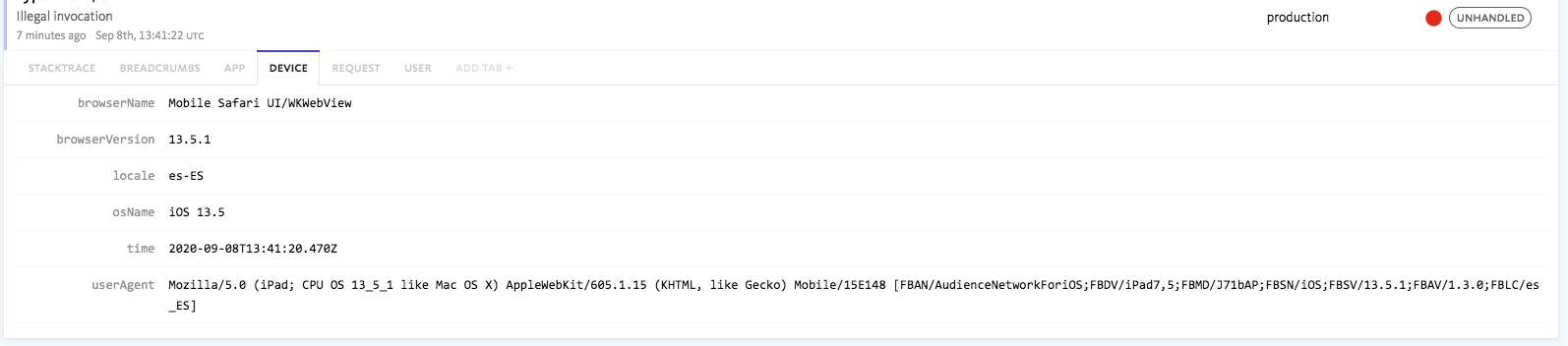
Also experienced this and from Facebook traffic 🤔
Device info:
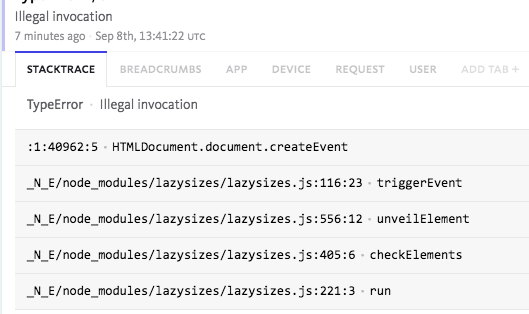
Error stacktrace:
 carloscuesta
on 8 Sep 2020
carloscuesta
on 8 Sep 2020
F#ck ::face:b00c
@if (str_ends_with(request()->getClientIp(), '::face:b00c') === false)
    <script type="text/javascript">
        window.bugsnagClient = bugsnag({
            apiKey: '{{ $key }}',
            releaseStage: '{{ config('app.env') }}'
        });
    </script>
@endif
 joostsolvari
on 16 Sep 2020
joostsolvari
on 16 Sep 2020
Our fb ad account was disabled today and I believe this was the reason as they pointed us to a policy that complains about "Restrict Facebook’s access to an ad's destination page".
We've never had any issues similar to this before. I've started using lazysizes two weeks ago and I've been seeing above-mentioned errors since then.
What would be best way to disable lazysizes for certain visitors (with ip containing ::face:b00c) and show images normally?
 gokce
on 18 Nov 2020
gokce
on 18 Nov 2020
Our fb ad account was disabled today and I believe this was the reason as they pointed us to a policy that complains about "Restrict Facebook’s access to an ad's destination page".
We've never had any issues similar to this before. I've started using lazysizes two weeks ago and I've been seeing above-mentioned errors since then.What would be best way to disable lazysizes for certain visitors (with ip containing ::face:b00c) and show images normally?
https://github.com/aFarkas/lazysizes/issues/520#issuecomment-693353624
alepee
on 19 Nov 2020
That piece of code in #520 (comment) is just disabling Bugsnag for these crawlers. So, fb crawlers would still hit the javascript error but it'll not be sent to bugsnag.
gokce
on 19 Nov 2020
I mean, do not initialize lazysize, in the same way @joostsolvari do not init Bugsnag.
alepee
on 19 Nov 2020
Not sure how much this will help, but from investigating similar issues in the past - I've found that most of the libraries that are being mentioned here, especially tracking users interactions and errors (such as Sentry, BugSnag, trackjs) will shim native methods, which can actually cause problems.
For instance, Bugsnag shims setTimeout, setInterval, document.addEventListener and document.removeEventListener, which can actually break functionality. I would not be surprised either if somewhere along the line Facebook's tracking scripts are doing something similar.
From what I've read previously when the shimming takes place, any events that managed to get registered before the shimming takes place, get dropped, causing problems.
It would be worth testing these instances without the bug tracking software being used on a native device and seeing if the errors still occur via remote / USB debugging.
 braveagencysam
on 9 Dec 2020
braveagencysam
on 9 Dec 2020
Related issues
 Undistraction
·
5Comments
Undistraction
·
5Comments
 muratcorlu
·
5Comments
muratcorlu
·
5Comments
 cobbweb
·
3Comments
cobbweb
·
3Comments
 Freekbron
·
3Comments
Freekbron
·
3Comments
 robertochingon
·
4Comments
robertochingon
·
4Comments
Most helpful comment
We did the same thing. It seems as if the FB crawlers execute javascript. We've had other libraries reporting errors that weren't really errors. Will do some more investigating.