Lazygit: Checkout from remote opens branch in detached head
Describe the bug
If I checkout a remote branch (by pressing space on the branch itself) it opens the branch in a detached head state.
If I want to merge a remote branch into my own branch, I'll have to manually checkout the branch outside lazygit.
I don't know if this behaviour is normal, my goal is to merge so what's the best/easiest way to do this?
To Reproduce
See screenshots.
Expected behavior
I want to merge a remote branch so it would be nice to checkout the remote branch, switch to my branch and merge it. Detached head branches will disappear when you switch to another branch.
Screenshots
Starting point:
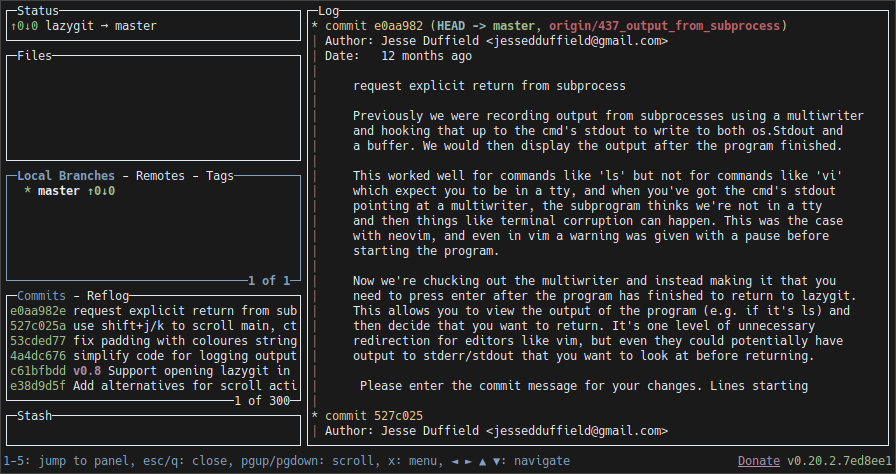
Switch to remotes:
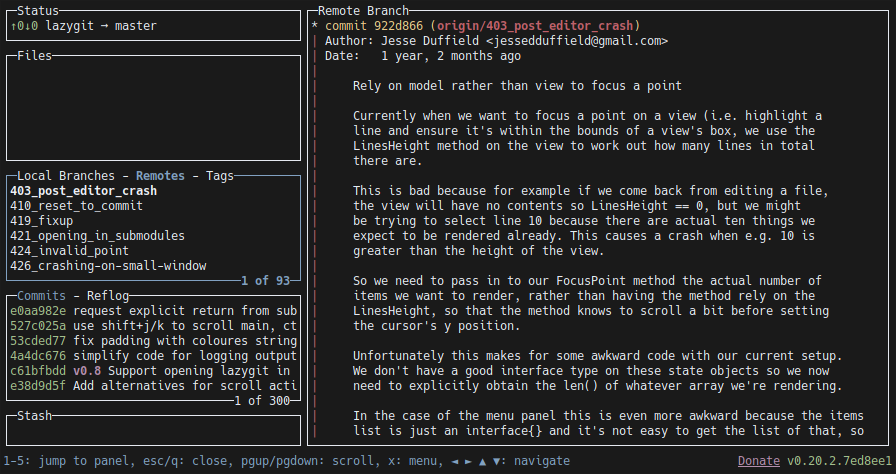
Press space to checkout:

Result:
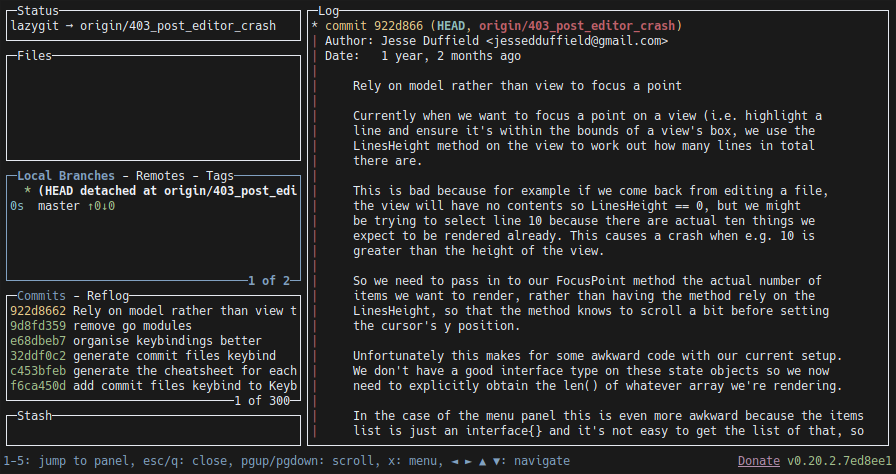
Desktop (please complete the following information):
- OS: Linux
- Lazygit Version v0.20.2 (also had this on other versions)
- The last commit id if you built project from sources: 922d8662ff0962058abd2f66c86f0e79bbba0ba1
- git version 2.26.2
Thanks!
 LanderMoerkerke
All 7 comments
I wish I knew Go to add this to the project. Come on guys, let's pair up and use all the minds! #RemoteFTW
 lordlycastle
on 12 Jun 2020
lordlycastle
on 12 Jun 2020
You can always hit 'n' to create a new branch locally, that has the same name and make git choose the selected remote branch as the upstream. That does exactly what you want. AFAIK all git tools will do the following when checking out remote branches:
- Create a new branch locally (if it doesn't already exist)
- Set the remote branch of interest as the upstream for the local branch
- Checkout the new local branch
Please correct me if I am wrong.
 markonyango
on 26 Jun 2020
markonyango
on 26 Jun 2020
Nope. It doesn’t create new branch and set its upstream. It just checks it out and point detached head to the Latest commit.
We want a single operation to checkout new branches from remotes. Not 3 steps.
lordlycastle
on 28 Jun 2020
@markonyango Hi, I tried your method and 'n' doesn't use the same name, it prepends the name of the remote to the branch name. As a result you can't easily push the branch back to remote since the name doesn't match.
As others have said 'checkout' should mirror what plain 'git' does, i.e. create branch with exactly the same name locally, make it track the remote and pull the latest changes.
 Rizhiy
on 26 Jul 2020
Rizhiy
on 26 Jul 2020
Sorry it took me so long to get around to this issue! A couple things:
1) If your motivation for merging the remote branch is to treat it like an upstream, you can go 'u' on a remote branch to set it as the upstream for the current branch
2) You can merge a remote branch directly into the checked out branch by pressing 'M' on the remote branch
3) I think @Rizhiy is right: lazygit should do whatever git does when it comes to checking out a remote branch. Is there a command we want to specifically mimic? If I do git checkout myremote/mybranch that won't set up any tracking. If I do git checkout -b myremote/mybranch myremote/mybranch that will create the branch with tracking, however if you try again you'll get an error saying the branch already exists. What logic would we like to see from lazygit in that situation?
 jesseduffield
on 23 Aug 2020
jesseduffield
on 23 Aug 2020
Hey I completely forgot that as part of a recent PR you can now create a new branch off of a remote branch. I've put up a PR so that it also prefills the name so that it's easier to keep track of it. Does this resolve the issue?
Also @lordlycastle if you ever want pointers on how you can contribute, I'm never far! Most of these issues aren't too tricky to solve and go is a fairly straightforward language
jesseduffield
on 23 Aug 2020
Hey I completely forgot that as part of a recent PR you can now create a new branch off of a remote branch. I've put up a PR so that it also prefills the name so that it's easier to keep track of it. Does this resolve the issue?
Also @lordlycastle if you ever want pointers on how you can contribute, I'm never far! Most of these issues aren't too tricky to solve and go is a fairly straightforward language
This PR really works out, thanks!
Your comments about using the remote section to set the upstream and also merge are very helpful, didn't knew those features in an app I've been using for over a year :smile:
Will close this issue for the time being.
LanderMoerkerke
on 23 Aug 2020
Related issues
 cbeley
·
6Comments
cbeley
·
6Comments
 stratosgear
·
5Comments
stratosgear
·
5Comments
 spin6lock
·
5Comments
spin6lock
·
5Comments
 kristijanhusak
·
6Comments
kristijanhusak
·
6Comments
 pshirshov
·
3Comments
pshirshov
·
3Comments
Most helpful comment
I wish I knew Go to add this to the project. Come on guys, let's pair up and use all the minds! #RemoteFTW