Lawnchair: Color problem for text in search app
Description
I don't know if the problem described below is linkent Lawnchair or Google search app (personally I think this is related to the launcher) :
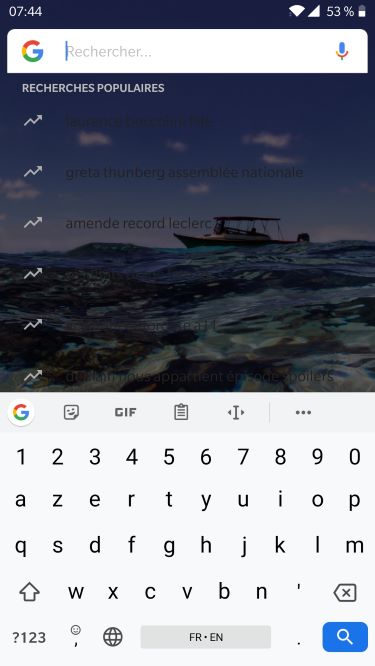
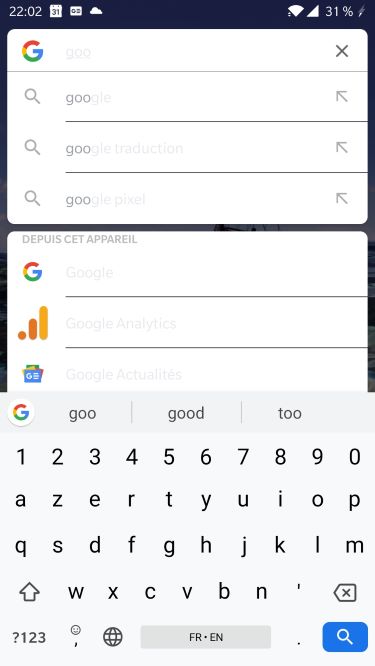
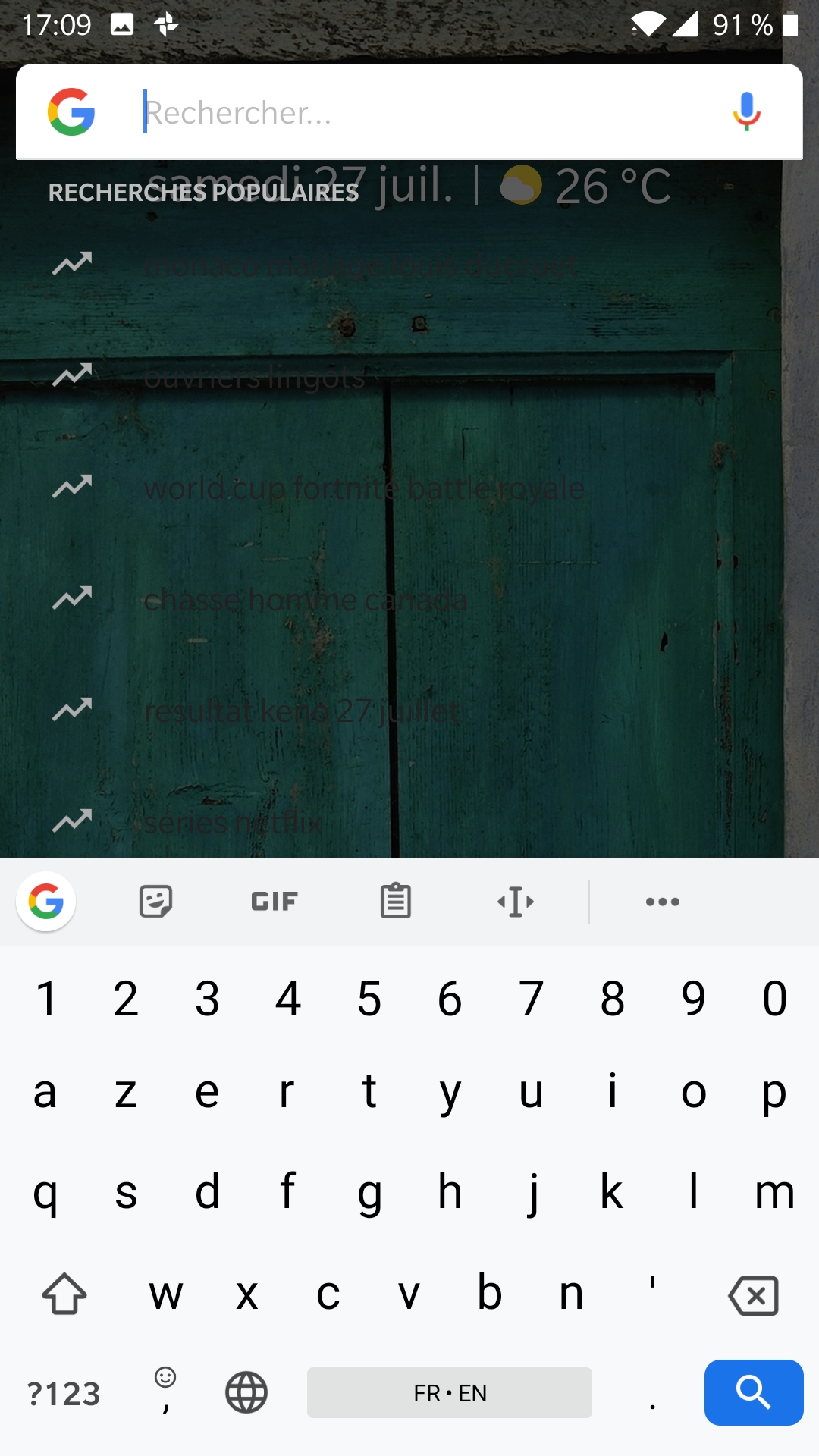
As you can see in the screenshots, during the day the text of the popular searches (below the Google search bar) is dark gray (really too dark) and difficult to read and during night (meaning when night mode is effective) the text in the search bar is light grey (too light) and also difficult to read.
Without night mode :
With night mode :
Expected Behavior
Without night mode : the text of popular searches should be light grey (like the arrow on the left of the text).
With night mode : the text should darker.
Actual Behavior
The text is difficult to read as discribed above.
Steps to Reproduce
Nothing peculiar, just take a look at the screenshots :
Without night mode : https://drive.google.com/open?id=1q-QqRpaW75H1_g5a55YrkCody0wytv5O
With night mode : https://drive.google.com/open?id=1Er4esiuZZ2oZXtaJneK_TMdGYO91s_og
Environment
- Device: Oneplus 5
- Android version: 9
- Launcher version: 2.0-2338-ci-alpha
- Rom: OxygenOS 9.0.6
 Wsebastien-fr
All 21 comments
@Wsebastien-fr Looks more like a system issue, have you tried to report it on OnePlus Forums maybe?
 divadsn
on 23 Jul 2019
divadsn
on 23 Jul 2019
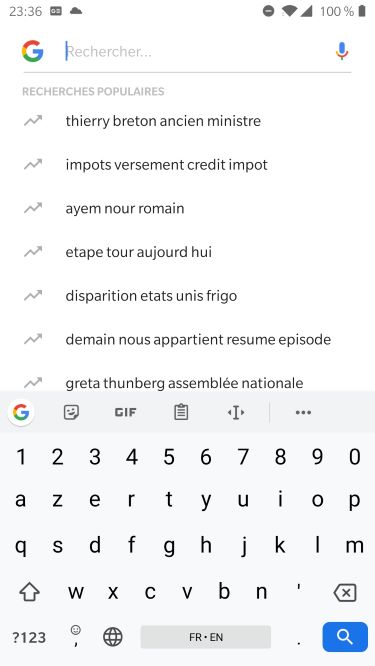
Well, you might be right because some other people have described similar problems on Oneplus forums (they didn't precise which launcher they used). But still with OnePlus default launcher I don't have this problem (screenshot below).
I will look in more detail in the OnePlus forums ...
Wsebastien-fr
on 23 Jul 2019
I have had the same problem for a while now on my 3T. If you find an answer please post it back here.
 cregkly
on 25 Jul 2019
cregkly
on 25 Jul 2019
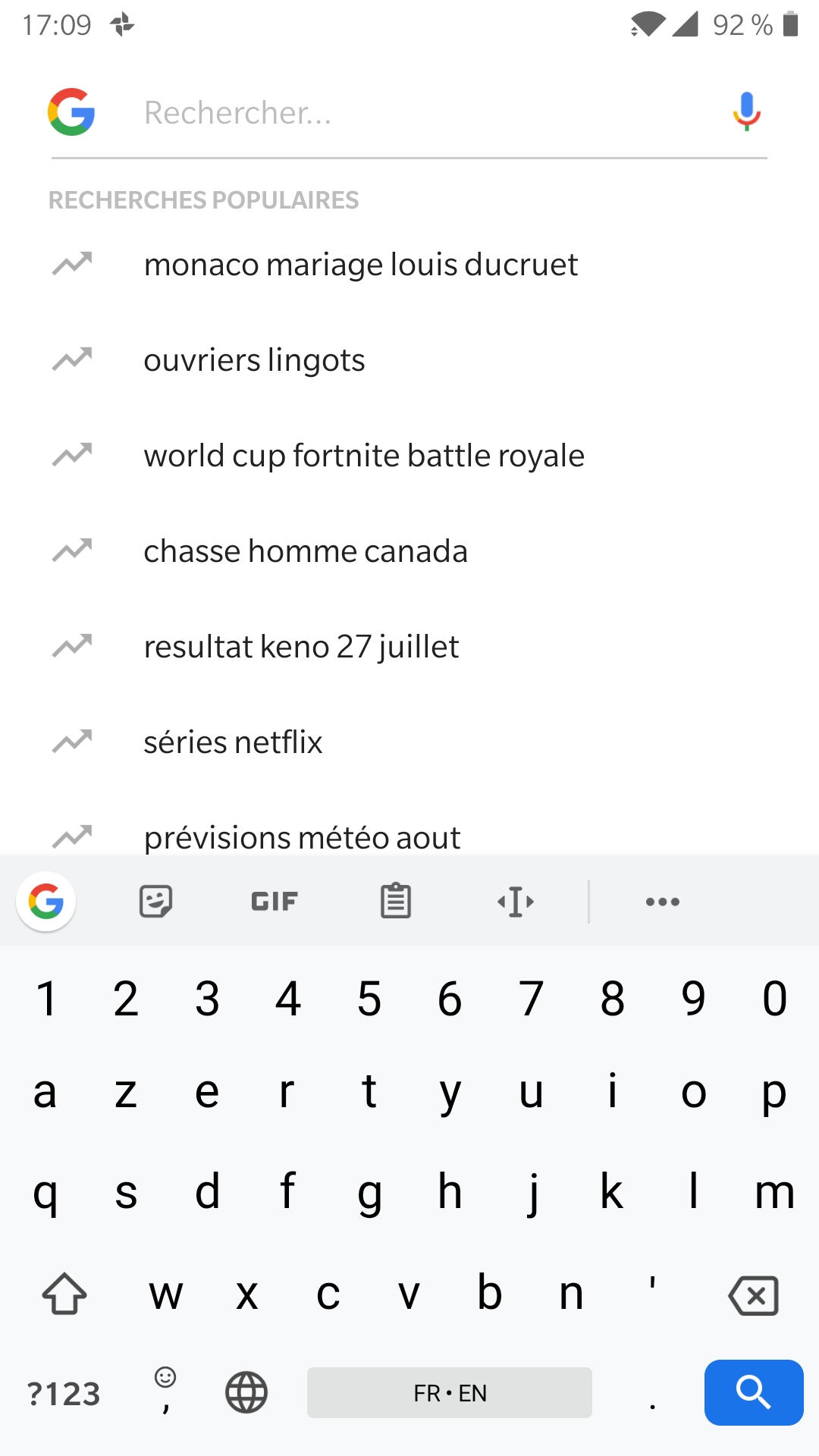
Not finding a solution with Lawnchair. I just tested Nova launcher and found something that could explain Lawnchair's problem:
With Nova, if the search engine is Google App, everything is displayed correctly (first screenshot). If the search engine is Google App Overlay, I encounter the same problems as described above (second screenshot).
Can someone confirm which search engine is used in Lawnchair? Would it be possible to have both of these search modes in Lawnchair's list of search engines?
Wsebastien-fr
on 27 Jul 2019
+1 same problem
 smkamranqadri
on 30 Jul 2019
smkamranqadri
on 30 Jul 2019
+1 can confirm it with a Samsung Galaxy S10e.
Same behavior and especially problematic when the device is set to night mode. Works fine with other Launchers, like Rootless Pixel Launcher.
 Spulface
on 1 Aug 2019
Spulface
on 1 Aug 2019
Most launchers don't use the overlay search (the one that's broken), use amir's Rootless pixel bridge https://github.com/amirzaidi/AIDLBridge/releases/tag/v3 this will make lawnchair use the fullscreen search instead of the broken overlay search (that Google doesn't fix for some reason)
 DanGLES3
on 1 Aug 2019
DanGLES3
on 1 Aug 2019
Awesome, thanks a lot for that hint. I did not know that the bridge will work with Lawnchair and I don't care about the overlay search, so it's a nice workaround.
Spulface
on 2 Aug 2019
Yeah, hopefully Google one day fixes their overlay search
DanGLES3
on 2 Aug 2019
I also confirm this is a good workaround. Thanks for the tip.
Wsebastien-fr
on 2 Aug 2019
+1
 vineetbhatia88
on 16 Sep 2019
vineetbhatia88
on 16 Sep 2019
Quick update, and not sure what has happend (besides the September Patch from Samsung for the S10e), but the issue is back now, even with the Pixelbridge. Any ideas? Updating Lawnchair to the latest version did not help.
Spulface
on 25 Sep 2019
The same here, Galaxy s9 on the night mode. Even the workaround with pixel bridge doesn't work.
Is possible to force to open this search in the "light" mode? Because if I don't use the dark mode this issue doesn't happen.
Thank you.
 augustomerli
on 3 Oct 2019
augustomerli
on 3 Oct 2019
@augustomerli Sadly we have no control over how the google app is themed, if you have dark mode the google app will use a dark theme, we can't change that
DanGLES3
on 3 Oct 2019
@DanGLES3
I understand. Even with this issue, I think that the lawnchair is one of the best launchers for Android. Here I will manage the problem using a Samsung theme called high_contrast_theme_Ii
augustomerli
on 4 Oct 2019
I don't have any problem on this when using other launchers, like OnePlus Launcher and Pixel Launcher. On the other hand, this occurs in both of my Android devices, OnePlus 6T and Mi Pad 4. Don't know what else I can contribute to resolve the issue. Thanks.
 ZtorMyHead
on 4 Oct 2019
ZtorMyHead
on 4 Oct 2019
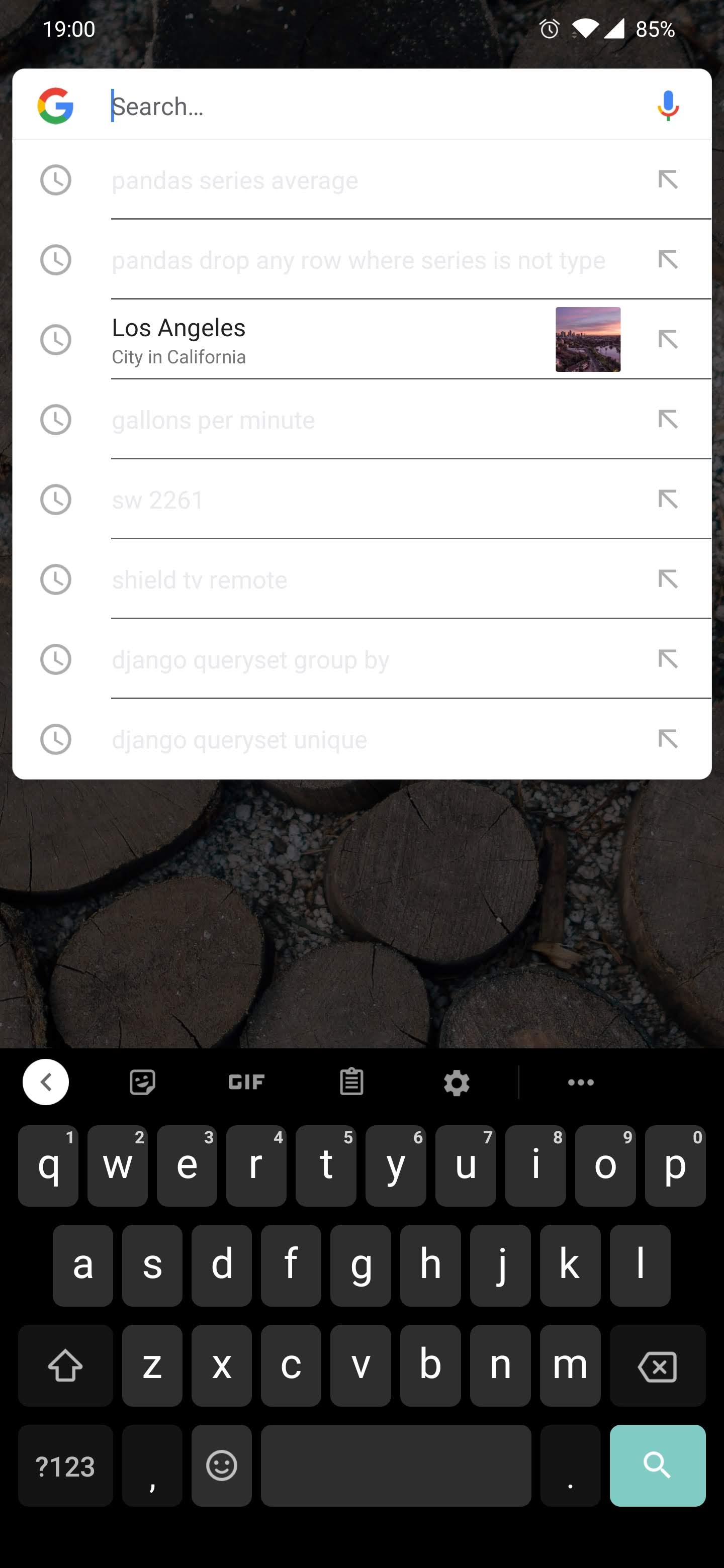
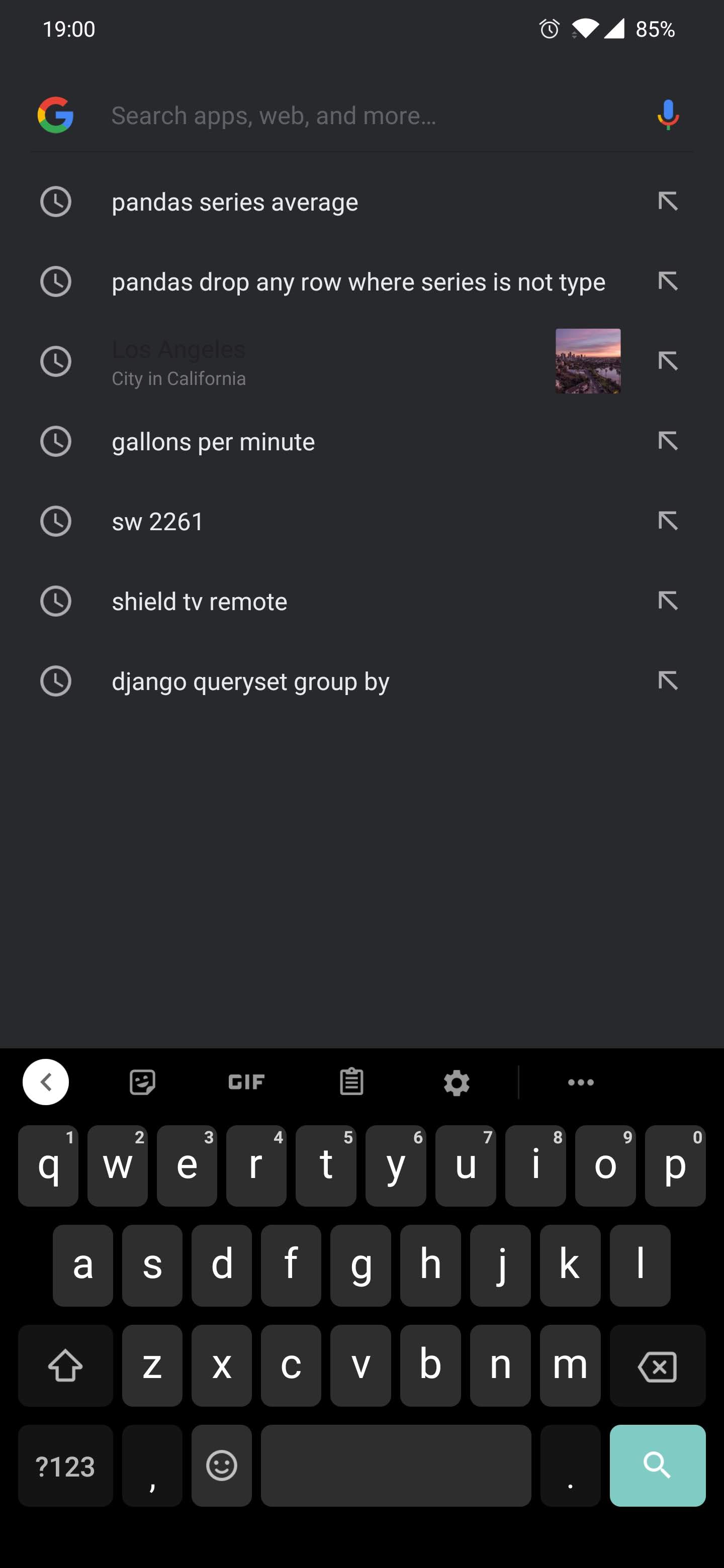
OnePlus 7 Pro user here, encountered the same issue while using the stock Google search. I think I remember something similar back when using Nova.
The odd thing is that it is only broken in the assistant pop-up from the dock search:
While if you use the same search engine from the app drawer it's all good:
 iamjonmiller
on 13 Nov 2019
iamjonmiller
on 13 Nov 2019
I do not have night mode enabled , and I am having this problem on the S9+.
 hubmacfan
on 3 Dec 2019
hubmacfan
on 3 Dec 2019
I'm also having same problem on Oneplus 7 pro running android 10. Any updates on this bug.
 sobirpangode
on 16 Mar 2020
sobirpangode
on 16 Mar 2020
This is not handled by Lawnchair. However, you can use the Pixel Bridge APK to resolve the light text on light background.
 bohrabhijeet
on 16 Mar 2020
bohrabhijeet
on 16 Mar 2020
What I did is... I downloaded Google Go on Google Play.
- Then go to Lawnchair Setting. Search>Search Engine
- Then switch it to Google Go
- But by using Google Go you can't use it in dark theme
maybe they will make an update to use dark theme.
I prefer using Google Go and I don't mind the light theme.
Hopefully this is helpful ☺️
 AAPaiman15
on 14 Sep 2020
AAPaiman15
on 14 Sep 2020
Related issues
 versavius
·
5Comments
versavius
·
5Comments
 ghost
·
5Comments
ghost
·
5Comments
 AxiK101
·
5Comments
AxiK101
·
5Comments
 AubreyKilian
·
5Comments
AubreyKilian
·
5Comments
 tstackhouse
·
6Comments
tstackhouse
·
6Comments
Most helpful comment
Most launchers don't use the overlay search (the one that's broken), use amir's Rootless pixel bridge https://github.com/amirzaidi/AIDLBridge/releases/tag/v3 this will make lawnchair use the fullscreen search instead of the broken overlay search (that Google doesn't fix for some reason)