Lawnchair: Lawnfeed Update notification - EVEN with lawnfeed not installed
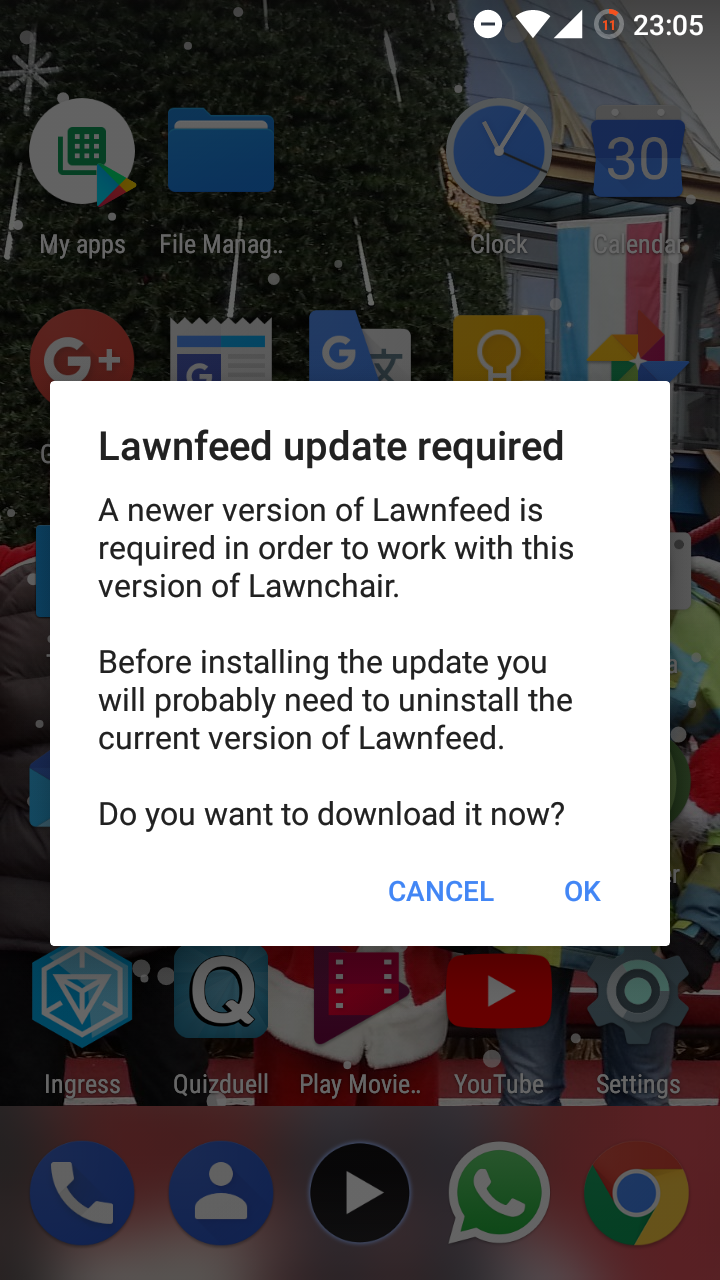
Lawnchair tells me to update my lawnfeed installation, even when I haven't installed it at all.
Description
I use lawnchair as my launcher and everytime when the app is freshly started, e.g. after device boot, when the launcher is killed / not in memory anymore, there pops up a notification to update my lawnfeed installation. I haven't installed any version of lawnfeed, so this shouldn't pop up. It also happens on launcher rotation.
Expected Behavior
There should be no popup, if no version of lawnfeed is installed.
Actual Behavior
The notification pops up regardless of lawnfeed installed or not.
Steps to Reproduce
- Reboot device / kill launcher / rotate launcher
- Popup will appear
Environment
- Device: Samsung Galaxy S3
- Android version: 7.1.2
- Launcher version: 1.1.0.1742
- Rom: lineageOS-20171214
Screenshot
 shaderecker
All 9 comments
@TheHADILP I don't believe you, there is no chance the popup can come up if you haven't Lawnfeed installed, as confirmed by @fonix232 multiple times in other issues.
 divadsn
on 1 Jan 2018
divadsn
on 1 Jan 2018
I can assure you, I don't have lawnfeed installed. Neither now nor have I had it in the past.
shaderecker
on 1 Jan 2018
I have double checked the code responsible for this popup, and there's no way this happens if the Lawnfeed package (or any other package with the same package name) doesn't exist on the device.
The checks are here, first statement disables Lawnfeed integration on CI (non-Play Store) builds, the second one runs a few tests:
- Checks if the Google app is enabled, if not, won't load Lawnfeed
- Checks if the Lawnfeed app (or any other app with the same package name since we don't do signature checks) is installed and enabled
- Checks if the Lawnfeed app's version is higher than 1655
The only time this code runs if the ENABLE_LAWNFEED variable is set (only on Play Store builds), and the package is not a "dev" variant, and if the version is above 1655. There's simply not a possible scenario where this screen is displayed without Lawnfeed, or any other app sitting on the same package name, being installed.
 fonix232
on 1 Jan 2018
fonix232
on 1 Jan 2018
Hmm, idk. I can just tell you that I use the Playstore version and that I don't have lawnfeed installed :)
Furthermore I don't even have the Google app installed.
I will try installing and deleting lawnfeed to check if that has any effect.
shaderecker
on 3 Jan 2018
Hmm, when I install Lawnfeed, the message doesn't pop up, but when I uninstall it, it comes again.
I also set up Lawnchair on a different device (Samsung Galaxy XCover 3, Stock ROM) but there is the same result (the message pops up).
shaderecker
on 7 Jan 2018
I have exactly the seme problem with the latest build from GP.
 dimqua
on 16 Jan 2018
dimqua
on 16 Jan 2018
I had the same problem, too. The bug, if it is one, is from the Google Play builds. If you installed Lawnchair via Google Play you will have this pop-up appearing every time you kill the launcher.
After some googling around I found what the heck was a CI build. If you want this behaviour gone without having to install Lawnchfeed, do the following:
Backup your Lawnchair settings and database so you don't have to set everything up again. The backup should be saved on /Documents/Lawnchair/backup/
Uninstall the Lawnchair you installed from Google Play
Download and install the most recent build from here: https://lawnchairmirror.duckdns.org/
(legit link, got the info from XDA: https://forum.xda-developers.com/showpost.php?s=63ddb3fa56bc0ae947a2269ac122114a&p=73039288&postcount=493)Using your filemanager go to the backup folder and change the name of the xml file from:
ch.deletescape.lawnchair.plah_preferences.xml
to:
ch.deletescape.lawnchair_preferences.xmlStart the new Lawnchair and import your settings and database. You're done!
Hope this helps.
Cheers
p.s.- Sorry but I have to say this. @divadsn "I don't believe you, there's no chance that happened" isn't something you should say to someone who's looking for help. Also, @fonix232, your response obviously wasn't clear enough. If you knew this could happen when installing Lawnchair via Google Play you should start by asking where the user got his build.
 bicodegas
on 17 Jan 2018
bicodegas
on 17 Jan 2018
Thank you @bicodegas this solution worked.
But still: it remains a problem in Playstore builds.
shaderecker
on 17 Jan 2018
Fixed in #1124
divadsn
on 21 Jan 2018
Related issues
 Tony-Stark25
·
3Comments
Tony-Stark25
·
3Comments
 Pau1ey
·
5Comments
Pau1ey
·
5Comments
 AxiK101
·
5Comments
AxiK101
·
5Comments
 ghost
·
5Comments
ghost
·
5Comments
 psyycker
·
3Comments
psyycker
·
3Comments