Latex-workshop: Consider making a new (ActivityBar) icon with sans serif font
Is your feature request related to a problem? Please describe.
As VSCode redesigned its icon set with outline style, the TeX icon looks a little inconsistent.

Describe the solution you'd like
A potential solution is to use a sans serif font
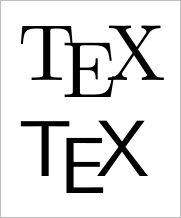
\TeX%

{\sffamily \TeX}
Describe alternatives you've considered
Of course, someone can make a new icon with a different sans serif font, as the \TeX command is not aimed to produce a real icon.
Additional context
Modern icons/logos usually use sans serif fonts as they are "clean" and easy-to-read.
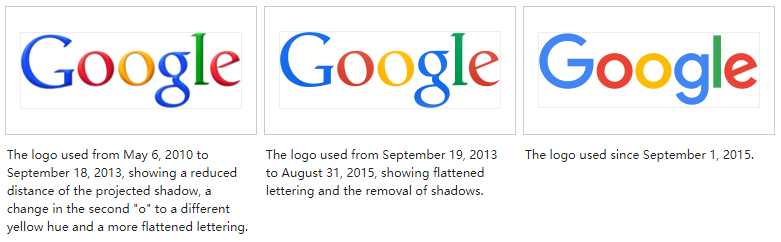
source: wikipedia
 yzhang-gh
All 16 comments
Or maybe like this:

In action:


 trevorgunn
on 5 Sep 2019
trevorgunn
on 5 Sep 2019
Personally, I think a sans-serif logo works best. It's completely unambiguous. However, if we do use a wireframe of the extension icon personally I'd go for something more like this

(svg can be found at https://github.com/tecosaur/LaTeX-Utilities/blob/master/demo-media/icon-wirefrane-minimal.svg)
 tecosaur
on 6 Sep 2019
tecosaur
on 6 Sep 2019
I personally like the one by @tecosaur more. How do others think?
 James-Yu
on 6 Sep 2019
James-Yu
on 6 Sep 2019
Looks good to me. (I am still interested in how the sans serif TeX icon will look like. Have no idea how to convert it to an SVG icon 😅)
yzhang-gh
on 6 Sep 2019
Just keep in mind that the icon will be quite small when displayed. So fine details like the gap between the two tips should be simplified. Also the line needs to be thicker to match the other icons. I believe those icons are about 24 px wide and the lines are about 1.5 px thick.
That looks something like this:

Larger:

trevorgunn
on 6 Sep 2019
@James-Yu I have been thinking for a while that the \TeX icon should be replaced by the nib (pen tip) icon. I also think that this icon should have a minimal number of lines (mostly because it will be displayed very small). I think joining the two tips together is better at that size.
trevorgunn
on 6 Sep 2019
Can I just play the devil's advocate here by asking: _does the pen tip icon associate more than the TeX icon itself with a specialised LaTeX extension such as this one_? It mostly screams "editor", but this is what vs code is for the most part...
 coxackie
on 7 Sep 2019
coxackie
on 7 Sep 2019
I sorta agree with @coxackie about editor vs TeX. Any idea on how to resolve this?
btw, it seems that all other icons have round corners. So the above pen tip icon may also need to have it changed. Tho it should be a small work.
James-Yu
on 12 Sep 2019
Personally I'd still just use a sans serif TeX logo, but if you _really_ want to use the pen I'd be happy to make it curvey.
tecosaur
on 12 Sep 2019
I forgot about the tex symbol. Will include in next release
James-Yu
on 12 Sep 2019
@James-Yu I don't think you did…
tecosaur
on 28 Sep 2019
I am not sure it has been included in 8.3.0. Has it?
 jlelong
on 4 Nov 2019
jlelong
on 4 Nov 2019
It hasn't.
tecosaur
on 4 Nov 2019
Any one can make an icon for me? I tried my inkscape but it won't work.
James-Yu
on 4 Nov 2019
@James-Yu
<?xml version="1.0" encoding="UTF-8"?>
<svg width="38.465pt" height="22.549pt" version="1.1" viewBox="-72 -72 38.465 22.549" xmlns="http://www.w3.org/2000/svg" xmlns:cc="http://creativecommons.org/ns#" xmlns:dc="http://purl.org/dc/elements/1.1/" xmlns:rdf="http://www.w3.org/1999/02/22-rdf-syntax-ns#">
<metadata>
<rdf:RDF>
<cc:Work rdf:about="">
<dc:format>image/svg+xml</dc:format>
<dc:type rdf:resource="http://purl.org/dc/dcmitype/StillImage"/>
<dc:title/>
</cc:Work>
</rdf:RDF>
</metadata>
<style type="text/css"><![CDATA[
text.f0 {font-family:cmss17;font-size:24.787053px}
]]></style>
<g fill="#fff">
<g fill="#fff" aria-label="TEX">
<path d="m-63.994-54.787h-2.2308v-15.74h-5.5275v-1.9582h13.261v1.9582h-5.5027z"/>
<path d="m-47.713-49.451h-9.89v-17.698h9.89v1.9582h-7.6592v5.5275h7.213v1.9334h-7.213v6.3207h7.6592z"/>
<path d="m-34.589-54.787h-2.5283l-4.6848-7.684-4.7591 7.684h-2.3548l5.8745-9.2208-5.5027-8.4772h2.4787l4.3377 6.9404 4.3625-6.9404h2.3548l-5.4779 8.4276z"/>
</g>
</g>
</svg>
I made this in latex using dvisvgm to convert to svg. Then I used inkscape to convert the text to paths (to avoid issues with fonts). Then I used https://www.svgminify.com/ to clean up all the extra stuff.
trevorgunn
on 4 Nov 2019
In v8.3.1!
James-Yu
on 4 Nov 2019
Related issues
 sth4nth
·
3Comments
sth4nth
·
3Comments
 dslemusp
·
4Comments
dslemusp
·
4Comments
 TiemenSch
·
6Comments
TiemenSch
·
6Comments
 jabooth
·
3Comments
jabooth
·
3Comments
 seanmcbreen
·
4Comments
seanmcbreen
·
4Comments
Most helpful comment
Can I just play the devil's advocate here by asking: _does the pen tip icon associate more than the TeX icon itself with a specialised LaTeX extension such as this one_? It mostly screams "editor", but this is what vs code is for the most part...