Latex-workshop: Missing PDF after updating VSCode.
This is happening on two different machines after the most recent VSCode update. It worked perfectly before the update which was applied a few minutes ago.
Dev Tools

Logs

It might be also useful to mention that I am using Remote SSH, but this didn't cause any problems before, the PDF opened and updated perfectly. I am able to see the PDF in the browser without any issues.
Some more interesting errors
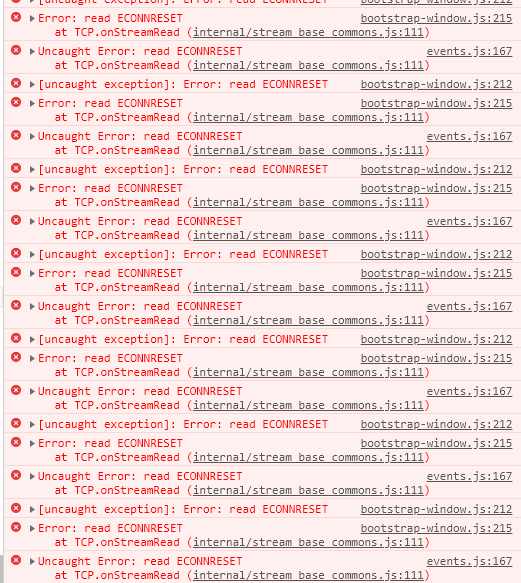
Not sure if these are at all related.
 nakamin
All 14 comments
This is probably related to #1472. Make sure to use LaTeX-Workshop 7.1.0.
 jlelong
on 10 Jul 2019
jlelong
on 10 Jul 2019
I am already using that version. I have also tried reinstalling, didn't help.
nakamin
on 10 Jul 2019
I recommend you to post the whole log messages and others required in the issue template if you want to solve your problem. Understand?
Anyway, even if you have updated the extensions on your local machine, the updating in the remote machine might have failed. Remove ~/.vscode-server in the remote machine and reinstall it. See link.
 tamuratak
on 10 Jul 2019
tamuratak
on 10 Jul 2019
You must shutdown the current vscode remote server if it is running.
tamuratak
on 10 Jul 2019
I have the same issue, but i have noticed it is related to using VS Code trough "Remote-WSL".
 fabianbees
on 11 Jul 2019
fabianbees
on 11 Jul 2019
Please show us log messages. Show us the exact versions of VSCode, LaTeX workshop, and OS. The word latest is NOT helpful. Please disable all the other extensions except for LaTeX Workshop, and check that you still see this issue.

1 Please change the theme of VSCode to the default one, and check that you still see this issue.
2 Please change all the user settings of VSCode to the default ones, and check that you still see this issue.
3 Please disable all the other extensions except for LaTeX Workshop, and check that you still see this issue.
Then please do the followings.
- Open the command palette.
- Enter
Developer: Toggle Developer Toolsand press enter. - Show us messages in the console.


Thank you for your cooperation.
tamuratak
on 11 Jul 2019
I am running to the same bug as well:
Local: MacOS 10.14.4
Remote: Ubuntu 16.04.5 LTS
VS: 1.36.1
Extension: 7.1.0
I disabled all other extensions with only local remote extensions opened, remote latex-workshop turned on. Default settings. Only changed "latex.workshop.tool" as the absolute path to latexpdf tools etc.
[17:39:19] Initializing LaTeX Workshop.
[17:39:19] Creating LaTeX Workshop http and websocket server.
[17:39:19] LaTeX Workshop initialized.
[17:39:20] Server created on 127.0.0.1:41286
[17:39:20] Snippet data loaded.
[17:39:20] LaTeX Workshop version: 7.1.0
[17:39:20] Try root file in root directory: PATH/main.tex
[17:39:20] Found root file in root directory: PATH/main.tex
[17:39:20] Root file changed from: undefined. Find all dependencies.
[17:39:20] Instantiating a new file watcher for PATH/main.tex
[17:39:20] Parsing PATH/main.tex
[17:39:20] Cannot find file PATH/main.fls
[17:40:11] VIEW command invoked.
[17:40:11] Found root file from active editor: PATH/main.tex
[17:40:11] Root file remains unchanged from: PATH/main.tex.
[17:40:11] Serving PDF file at http://localhost:41286/viewer.html?file=/pdf:%252Fpool%252Fceph%252Flisa%252Fyli%252Fresearch%252Ftim_rt%252Ftreecko%252Fdocs%252Fmain.pdf
[17:40:11] Open PDF tab for PATH/main.pdf
[17:40:15] Handle data type: open
Then PDF tab open with

the port is different
Dev Tool shows
[Extension Host] debugger listening on port 4403
[3hg] potential listener LEAK detected, having 262 listeners already. MOST frequent listener (11):
[Embedded Page] Uncaught (in promise) Error: Missing PDF file.
A side note, the pdf seems generated correctly as I can use other extensions to view it remotely.
And it seems working fine under VSCode 1.35.1, so it might be related to some changes from the most recent IDE update
 yihengli
on 12 Jul 2019
yihengli
on 12 Jul 2019
Reported microsoft/vscode/issues/77281
tamuratak
on 12 Jul 2019
@nakamin
I have the Same problem, but I have fond workshop works with 1.36 insider version.Try it.
 bro3cat
on 20 Jul 2019
bro3cat
on 20 Jul 2019
The issue is labeled as Milestone August 2019 now. See microsoft/vscode/issues/77281. So, it will be fixed in the release of the beginning of September.
tamuratak
on 28 Jul 2019
@nakamin
I have the Same problem, but I have fond workshop works with 1.36 insider version.Try it.
In the latest vscode-insider, this bug seems back again
Version: 1.37.0-insider
Commit: 5e08ee01b7daee99cdda2456f19d77e715fb8762
Date: 2019-08-05T21:16:01.319Z
Electron: 4.2.7
Chrome: 69.0.3497.128
Node.js: 10.11.0
V8: 6.9.427.31-electron.0
OS: Darwin x64 18.5.0
I have confirmed that this problem was fixed in VS Code 1.38.0-insider
Commit: 0f73473c08055054f317c1c94502f7f39fdbb164
Date: 2019-08-23T05:36:33.571Z
I still met the same problem in VS Code 1.38.1 and Latex workshop 8.2.0, Windowd 10.
We I first time compiler the tex file. The pdf file is show up correctly on the right sider of editor. But after several times of changing tex file and re-compiler, the pdf file could not open successfully on the right sider.
I see a note that No PDF viewer connected for 'XXX.pdf' in the log. And the pdf file can open successfully on the web viewer.
 huitailangyz
on 28 Sep 2019
huitailangyz
on 28 Sep 2019
@huitailangyz your problem does not seem the same as this issue. Please open a new issue filling out the information required in the issue template.
tamuratak
on 28 Sep 2019
Related issues
 fsonntag
·
4Comments
fsonntag
·
4Comments
 tenhobi
·
4Comments
tenhobi
·
4Comments
 iainmstott
·
5Comments
iainmstott
·
5Comments
 seanmcbreen
·
4Comments
seanmcbreen
·
4Comments
 domenicozambella
·
4Comments
domenicozambella
·
4Comments
Most helpful comment
I have the same issue, but i have noticed it is related to using VS Code trough "Remote-WSL".