Latex-workshop: Activating Extension failed
Hi.
I am sorry but I cannot exactly describe this problem. It occurs frequently in these few days.
The Latex-workshop seems stuck at some process. It is normal a few days ago.
I try to manual click the activate icon ’√‘ at the left status bar of vscode and It shows Activating Extension... and then re-show ’√‘ after a few second.
I try to click the extension icon of the left bar. It shows like this:
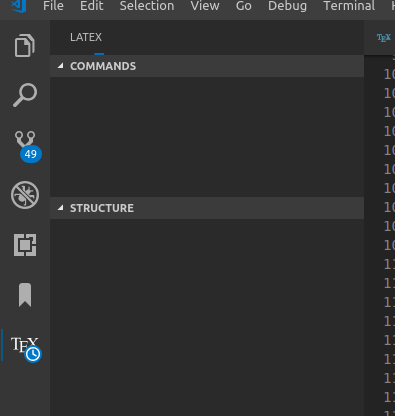
It seems the extension stuck when paring the structure of tex files.
My tex dir tree is as follows:
thesis.tex(root file,\input{Tex/chap1},\input{Tex/chap1}...)
--- Tex
--- --- chap1
--- --- chap2
--- --- chap3...
I try to install and reinstall the extension a few times but the problem can not solved.
If I restart the vscode and the extension works again. But it can not figure out when the problem occurs again.
*
Desktop (please complete the following information):
- OS: ubuntu 16.04
- VS Code version: 1.31.1
- Extension version: 6.0.0
 xiaoyaoE
All 21 comments
Please provide the extension logs available from the Command Palette _Show LaTeX Workshop messages_.
 jlelong
on 27 Feb 2019
jlelong
on 27 Feb 2019
Hi, jlelong.
Thanks for your reply.
The extension has been stuck and the the Command Palette _Show LaTeX Workshop messages_ do not works for me.
I have no idea how to debug these problem now.
I will update this if I could get more info.
xiaoyaoE
on 27 Feb 2019
Without the logs, I cannot help. I think about two things
- Could that be related to the node_modules issue?
- Have you tried completely removing the extension (ie, delete
.vscode/extensions/james-yu.latex-workshop-6.0.0) and installing it again?
I am closing this issue but feel free to ask for reopening if you have new information.
jlelong
on 27 Feb 2019
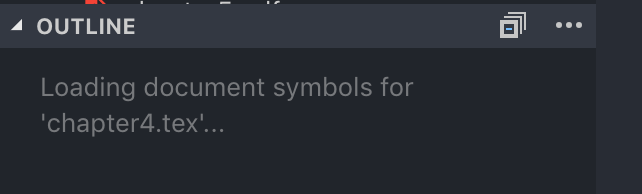
Same problem here. It was working perfect 10m ago
 FrancescoSaverioZuppichini
on 10 Jun 2019
FrancescoSaverioZuppichini
on 10 Jun 2019

FrancescoSaverioZuppichini
on 10 Jun 2019
I reinstalled vs code from scratch and still the same problem
FrancescoSaverioZuppichini
on 10 Jun 2019
We can't do much without logs and a minimal working example to reproduce the issue.
jlelong
on 10 Jun 2019
I cannot get the logs, the command is stuck. I really don't know what to do, the weird thing is that with another project it is working!
FrancescoSaverioZuppichini
on 10 Jun 2019
@jlelong I really would like to provide a working example but I have no idea how to do so. I was working perfectly, then it stops. Maybe it is trying to loading something? One other weird things is that return does not work, by pressing shift + return I get the correct new line.
FrancescoSaverioZuppichini
on 10 Jun 2019
Try to close the outline pane before loading the project. It seems that there is an infinite loop while scanning all the files of your project. Would mind sharing your whole project? This may be related to #1298.
jlelong
on 10 Jun 2019
Sure :) It is my Master Thesis actually
https://github.com/FrancescoSaverioZuppichini/Master-Thesis/tree/master/papers/Thesis
Thank you in advance
FrancescoSaverioZuppichini
on 10 Jun 2019
- Try to close the outline pane before loading the project. Same problem
FrancescoSaverioZuppichini
on 10 Jun 2019
I commented out each chapter and try to compile the latex by uncommented one after the other and I find out that the problem is in chapter 4
but I really don't understand why
EDIT: In a caption, I forgot to close one {. I think the errors messages should be improved and it is really weird that the extension was not working
FrancescoSaverioZuppichini
on 10 Jun 2019
There is a catastrophic backtrack in the regex we use to scan captions. I am on it.
jlelong
on 11 Jun 2019
Well, mystery solved 👍 Thank you
FrancescoSaverioZuppichini
on 11 Jun 2019
I have I believe to be the same issue here.
I am running latext vscode, with latex workshop 7.1.0.
Everything works fine, till the extension suddenly hangs. Then after I restarted vscode, the extension can't load for the same project. Then I tried re-install the extension, doesn't work either.
The project folder doesn't have a .vscode subfolder. I tried rename the project folder. Then the app could run for a while till it hangs.
It's weird that, if I restart vscode, and load another project, the extension does load. But it may fail again suddenly, then the extension remembers that the second project is also sentenced to hang.
The above fix is released in 7.1.0 right?
Edit: I think the issue is file-content specific. I've attached a minimal example here (sorry it's this long, it seems have to be this long. Once you un-comment the last few lines and save the file, the extension immediately hangs (you don't need to do anything like build or sync.).
Then, if you comment out \graphicspath{{../figs/}}, it stops hanging. (But this line doesn't seem to be of anything special; I have another file that even after commenting out this line it still hangs.)
% !Mode:: "TeX:UTF-8"
\documentclass[aps,prl,showkeys,noeprint,superscriptaddress,longbibliography,reprint]{revtex4-1}
\usepackage{graphicx}
\usepackage{braket}
\usepackage{amsmath}
\usepackage{amssymb}
\usepackage[british]{babel}  % for better line-breaking
\usepackage{fontspec}  %  to be used with xeLatex
\usepackage[hidelinks,colorlinks,linkcolor=blue,citecolor=red,urlcolor=blue]{hyperref}  % if enable pdfcomment the
\graphicspath{{../figs/}}

\begin{document}

\title{random}

\author{JD}

\date{\today}
\let\oldDelta\Delta
\renewcommand{\Delta}{\text{\scalebox{0.75}[1.0]{$\oldDelta$}}}

% \begin{abstract}

% \end{abstract}

\maketitle

\section{test1}

From here,
$$
S^{0i} = \frac{i}{4}\left[ \gamma^0, \gamma^i \right] = -\frac{i}{2} \begin{pmatrix}
    \sigma^i  &  0\\
    0  &  \sigma^i
\end{pmatrix}
$$

$$
S^{ij} = \frac{i}{4}\left[ \gamma^i, \gamma^j \right] = \frac{i}{2} \epsilon^{ijk}\begin{pmatrix}
    \sigma^k  &  0\\
    0  &  \sigma^k
\end{pmatrix}
\triangleq
\epsilon^{ijk}\Sigma^k
$$

Then we have $\gamma^5$:
$$
\gamma^5 = \begin{pmatrix}
    -I  &  0\\
    0  &  I
\end{pmatrix}
$$

$$
\gamma^5 = i\gamma^0\gamma^1\gamma^2\gamma^3
$$

$$
(\gamma^5)^\dagger = \gamma^5,\quad
(\gamma^5)^2=1,\quad
\left\{ \gamma^5,\gamma^\mu \right\} = 0
$$

\section{test1}


From here,
$$
S^{0i} = \frac{i}{4}\left[ \gamma^0, \gamma^i \right] = -\frac{i}{2} \begin{pmatrix}
    \sigma^i  &  0\\
    0  &  \sigma^i
\end{pmatrix}
$$

% $$
% S^{ij} = \frac{i}{4}\left[ \gamma^i, \gamma^j \right] = \frac{i}{2} \epsilon^{ijk}\begin{pmatrix}
%     \sigma^k  &  0\\
%     0  &  \sigma^k
% \end{pmatrix}
% \triangleq
% \epsilon^{ijk}\Sigma^k
% $$

\end{document}
 clsmt
on 18 Jul 2019
clsmt
on 18 Jul 2019
I cannot manage to reproduce any issue with your example even after uncommenting the last part.
jlelong
on 19 Jul 2019
I cannot manage to reproduce any issue with your example even after uncommenting the last part.
How about change the folder name to SU(4) Lorentz group, Lie, and make the file longer by duplicating from \section{test1} to the end?
clsmt
on 19 Jul 2019
I have managed to reproduce the issue. This is again a catastrophic backtracking.
I will try to fix tonight.
jlelong
on 19 Jul 2019
Thanks for fixing it. Is there any way for me to test this before it's released?
clsmt
on 19 Jul 2019
@James-Yu I guess we could make a new release.
jlelong
on 19 Jul 2019
Related issues
 sth4nth
·
3Comments
sth4nth
·
3Comments
 s-ilic
·
3Comments
s-ilic
·
3Comments
 domenicozambella
·
4Comments
domenicozambella
·
4Comments
 tillahoffmann
·
6Comments
tillahoffmann
·
6Comments
 sidmishraw
·
3Comments
sidmishraw
·
3Comments
Most helpful comment
I have managed to reproduce the issue. This is again a catastrophic backtracking.
I will try to fix tonight.