Latex-workshop: PDFs not generated from latex do not render
Describe the bug
When I try to open a PDF not in a latex folder or generated from latex workshop, it does not render.
To Reproduce
Download a random PDF from wherever. Try to open.
Expected behavior
I expect the PDF browser to open.
Logs
[2018-12-08 12:39:41.495] [renderer1] [error] Illegal argument: Error: Illegal argument
at Object.t.illegalArgument (file:///Applications/Visual Studio Code.app/Contents/Resources/app/out/vs/workbench/workbench.main.js:174:917)
at file:///Applications/Visual Studio Code.app/Contents/Resources/app/out/vs/workbench/workbench.main.js:1634:281
at file:///Applications/Visual Studio Code.app/Contents/Resources/app/out/vs/workbench/workbench.main.js:1582:790
at t.e.invokeFunction (file:///Applications/Visual Studio Code.app/Contents/Resources/app/out/vs/workbench/workbench.main.js:1422:693)
at t._tryExecuteCommand (file:///Applications/Visual Studio Code.app/Contents/Resources/app/out/vs/workbench/workbench.main.js:3041:736)
at file:///Applications/Visual Studio Code.app/Contents/Resources/app/out/vs/workbench/workbench.main.js:3041:458
at n.Class.define.cancel.then (file:///Applications/Visual Studio Code.app/Contents/Resources/app/out/vs/workbench/workbench.main.js:169:517)
at t.executeCommand (file:///Applications/Visual Studio Code.app/Contents/Resources/app/out/vs/workbench/workbench.main.js:3041:432)
at e.$executeCommand (file:///Applications/Visual Studio Code.app/Contents/Resources/app/out/vs/workbench/workbench.main.js:3204:528)
at t._doInvokeHandler (file:///Applications/Visual Studio Code.app/Contents/Resources/app/out/vs/workbench/workbench.main.js:3278:1009)
at t._invokeHandler (file:///Applications/Visual Studio Code.app/Contents/Resources/app/out/vs/workbench/workbench.main.js:3278:675)
at t._receiveRequest (file:///Applications/Visual Studio Code.app/Contents/Resources/app/out/vs/workbench/workbench.main.js:3277:262)
at t._receiveOneMessage (file:///Applications/Visual Studio Code.app/Contents/Resources/app/out/vs/workbench/workbench.main.js:3276:126)
at file:///Applications/Visual Studio Code.app/Contents/Resources/app/out/vs/workbench/workbench.main.js:3273:997
at e.fire (file:///Applications/Visual Studio Code.app/Contents/Resources/app/out/vs/workbench/workbench.main.js:183:466)
at a (file:///Applications/Visual Studio Code.app/Contents/Resources/app/out/vs/workbench/workbench.main.js:337:918)
at Socket.n._socketDataListener (file:///Applications/Visual Studio Code.app/Contents/Resources/app/out/vs/workbench/workbench.main.js:338:137)
at emitOne (events.js:116:13)
at Socket.emit (events.js:211:7)
at addChunk (_stream_readable.js:263:12)
at readableAddChunk (_stream_readable.js:250:11)
at Socket.Readable.push (_stream_readable.js:208:10)
at Pipe.onread (net.js:594:20)
LaTeX Workshop Output
[12:39:41] No PDF viewer connected for /Users/jerlich/annex/Conferences/COSYNE19/reviews/8_jaz.pdf
[12:39:41] Serving PDF file at http://127.0.0.1:54993/viewer.html?file=/pdf:%25252FUsers%25252Fjerlich%25252Fannex%25252FConferences%25252FCOSYNE19%25252Freviews%25252F8_jaz.pdf
[12:39:41] Open PDF tab for /Users/jerlich/annex/Conferences/COSYNE19/reviews/8_jaz.pdf
[12:39:42] Preview PDF file: /Users/jerlich/annex/Conferences/COSYNE19/reviews/8_jaz.pdf
Developer Tools Console
[Embedded Page] Uncaught (in promise) SecurityError: Failed to read the 'localStorage' property from 'Window': Access is denied for this document.
workbench.main.js:sourcemap:3693 [Embedded Page] PDF 9c7e6b4dace9bd6056979b01acd228ae [1.3 Mac OS X 10.12.6 Quartz PDFContext / Word] (PDF.js: 2.0.943)
Screenshots
If applicable, add screenshots to help explain your problem.
Desktop (please complete the following information):
- OS: Mac OS 10.13.6
- VS Code version: 1.29.1
- Extension version: 5.17.3
Additional context
Add any other context about the problem here.
 jerlich
All 13 comments
I cannot reproduce the problem. Any other reports?
 James-Yu
on 10 Dec 2018
James-Yu
on 10 Dec 2018
I confirm that I cannot open a pdf by just clicking it in the _Explorer_ view. Either I end up with a blank page or with the the binary content of the file.
Tested with all extensions disabled except LW on OS X Mojave with vscode 1.29.1
 jlelong
on 10 Dec 2018
jlelong
on 10 Dec 2018
It seems to be a mac-specific bug. My windows PCs can get the behavior correctly. Anything suspicious in the log messages?
James-Yu
on 10 Dec 2018
Opening a pdf file does not produce any specific log messages
jlelong
on 10 Dec 2018
Having the same issue on macOS
 Brookke
on 10 Dec 2018
Brookke
on 10 Dec 2018
Mac 10.13.6
VS Code 1.29.1
When I click a pdf icon in the side bar focusing the pdf viewer, a pdf viewer is opened. When I click a pdf icon in the side bar focusing the editor, a blank viewer is opened.
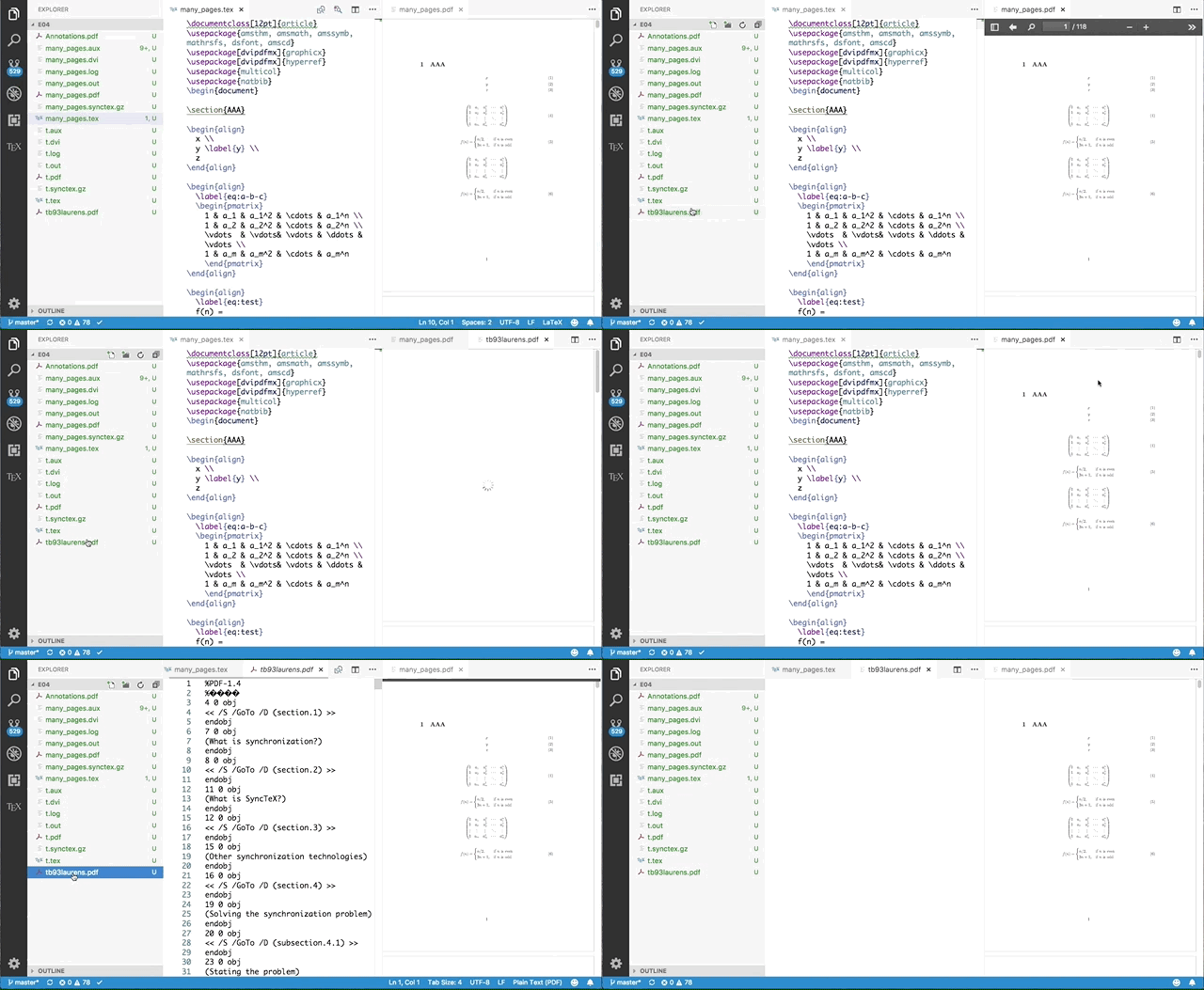
The following is the log message when the blank viewer is opened.
[23:26:45] Initializing LaTeX Workshop.
[23:26:45] Creating LaTeX Workshop http and websocket server.
[23:26:45] LaTeX Workshop initialized.
[23:26:45] Found root file from active editor: /Users/tamura/src/github/mytypescript/latex/e04/many_pages.tex
[23:26:46] Root file changed from: undefined. Find all dependencies.
[23:26:46] Instatiating new file watcher for /Users/tamura/src/github/mytypescript/latex/e04/many_pages.tex
[23:26:46] Parsing /Users/tamura/src/github/mytypescript/latex/e04/many_pages.tex
[23:26:46] Server created on 127.0.0.1:49447
[23:26:46] Snippet data loaded.
[23:26:46] LaTeX Workshop version: 5.18.0
[23:26:49] PDF command invoked.
[23:26:49] No PDF viewer connected for /Users/tamura/src/github/mytypescript/latex/e04/tb93laurens.pdf
[23:26:49] Serving PDF file at http://127.0.0.1:49447/viewer.html?file=/pdf:%25252FUsers%25252Ftamura%25252Fsrc%25252Fgithub%25252Fmytypescript%25252Flatex%25252Fe04%25252Ftb93laurens.pdf
[23:26:49] Open PDF tab for /Users/tamura/src/github/mytypescript/latex/e04/tb93laurens.pdf
[23:26:50] Preview PDF file: /Users/tamura/src/github/mytypescript/latex/e04/tb93laurens.pdf
[23:27:02] LOG command invoked.
 tamuratak
on 10 Dec 2018
tamuratak
on 10 Dec 2018
hmm... I still cannot reproduce the problem on Windows. This might be a platform-specific issue, and I suspect it an upstream vscode one.
James-Yu
on 11 Dec 2018
For what its worth, the vscode-pdf extension works.
jerlich
on 11 Dec 2018
tbh, I really wanted to remove the pdf viewing feature and wait for vscode to provide API, so that the extension does not need to use quite in-elegant tricks to recognize pdf file @jlelong do you think we need a standalone-pdf viewing overhaul?
James-Yu
on 11 Dec 2018
@James-Yu I only view pdf files produced from LaTeX within the extension. I have never felt like using vscode to view other pdf files. I think it is a little beyond the scope of the extension to provide a standalone pdf viewing feature.
jlelong
on 11 Dec 2018
@jlelong the use case (of opening PDFs in vscode) for me is if I am reviewing a PDF document and writing notes in vscode. Or if I am writing code to generate PDF figures in vscode and the PDF is the output of that build process. This extension says that it replaces all the functionality of the vscode-pdf extension. If you remove that claim then you can close this issue. If the two extensions do not play nicely together, you can recommend that people disable one of the extensions in a workspace.
jerlich
on 11 Dec 2018
In case anyone is looking through this or #1091 , I found that the following worked:
- uninstall latex-workshop
- locate folder in which VS code extensions are stored (see official docs)
- delete folder containing latex-workshop
- open VS code and reinstall
Don't know enough about how this extension is built to really suggest why this is happening, but my old log messages were showing that there was no PDF viewer defined, and once I did this that stopped happening. Perhaps when I upgraded to a newer version of latex-workshop a path definition wasn't deleted when it should have been? Hope this may be helpful.
 jdossgollin
on 2 Jan 2019
jdossgollin
on 2 Jan 2019
I have reported this issue in Microsoft/vscode/issues/65881.
tamuratak
on 3 Jan 2019
Related issues
 jabooth
·
3Comments
jabooth
·
3Comments
 s-ilic
·
3Comments
s-ilic
·
3Comments
 dslemusp
·
4Comments
dslemusp
·
4Comments
 iainmstott
·
5Comments
iainmstott
·
5Comments
 mdrozdo
·
4Comments
mdrozdo
·
4Comments