Laravelshoppingcart: How to add an image
Hello, thank you for the package, I added the id, name, price and qty but how to add a string data caled 'image'?
 akuma605
All 16 comments
Hello @akuma605. I just started learning php and laravel but I got that one working :) As the documentations says here - https://github.com/Crinsane/LaravelShoppingcart, you can pass a $key => $value pair like so:
@param Array $options Array of additional options, such as 'size' or 'color' / or whatever option you want to pass. Good luck! (:
array('id' => '4832k', 'name' => 'Product 2', 'qty' => 1, 'price' => 10.00, 'options' => array('size' => 'large')).
 reppair
on 2 Aug 2015
reppair
on 2 Aug 2015
Hello, thank you for the reply, I added like that:
Cart::add(array(
'id' => $product->id,
'name' => $product->titre,
'qty' => 1,
'price' => $product->prix,
'options' => array('image' => $product->image),
));
but in my view I put {{$product->image}}, and nothing appear.
{{$product->id}}{{$product->name}}{{$product->qty}}{{$product->price}} work fine
akuma605
on 2 Aug 2015
Because it is in options Collections you have to call options first and then the option you need.
Something like {{ $product->options->size }}
 bebnev
on 2 Aug 2015
bebnev
on 2 Aug 2015
Are you storing the path to the location of the image directly on the products_table in some field as a 'string'? I have done this by setting a field in the product's $table in my create_products_migration like so: $table->string('image')->nullable(); Then I am able to say $product->image and it spits out the path to where my image is stored in. Try to dump() / dd() the value of this field. Or open 'php artisan tinker' and try $product = appProduct::first(), then $product->image..
reppair
on 2 Aug 2015
If you get something like "/path/to/image" string then maybe you can assign this value to a $variable and then put it in the cart's options.
reppair
on 2 Aug 2015
I store a path to my image and when I dd($product->image), it show me "jr.jpg" which is good, but the problem is to get this "jr.jpg" on my view, I put this like in the docu:
options->has('image') ? $product->options->image :'');?>
not working
akuma605
on 2 Aug 2015
{{ $product->options->size }} not working to
sorry for disturbing you guys:)
akuma605
on 2 Aug 2015
Could you please provide us with more of your code. How should we reproduce your error?
 Crinsane
on 2 Aug 2015
Crinsane
on 2 Aug 2015
can I add the key 'image' or do I have obligatory to put it on the 'options' key'?
akuma605
on 2 Aug 2015
well i loud say you can't rend your image be cause you have the wrong path, when you save the path in the table it should also be resolvable as well :) I had this issue not long ago. I echo it like so: img class="feat-img" src="{{ $product->image }}" alt="Oops!" but if i dd() $product->image I get the following string - "/images/products/2015-07-28 02:49:02-product.jpg" which is resolvable and the img gets rendered on the screen :) and here is a little trick I do:
private function syncImg(Product $product, $request)
{
if ( $request->hasFile('image') )
{
$img = $request->file('image');
$name = Carbon::now() . '-' . $img->getClientOriginalName();
$img->move(public_path() . '/images/products/', $name);
$imgPath = "/images/products/" . $name;
$product->update(['image' => $imgPath]);
}
That way when I call this method when adding new product or updating it I am able to save the right path/to/my/image. And here is a g8 video from master Jeffrey to teach you exactly how this works :) https://laracasts.com/lessons/file-uploads-101
reppair
on 2 Aug 2015
// Route
Route::get('/', function () {
    Cart::add('1239ad0', 'Product 2', 2, 5.95, ['size' => 'large', 'image' => 'test.jpg']);

    $cart = Cart::content();

    return view('welcome', compact('cart'));
});
// View
<table border="1">
    <thead>
        <tr>
            <th>Image</th>
            <th>Product</th>
            <th>Qty</th>
            <th>Item Price</th>
            <th>Subtotal</th>
        </tr>
    </thead>

    <tbody>

    <?php foreach($cart as $row) :?>

        <tr>
            <td>
                <p><?php echo ($row->options->has('image') ? $row->options->image : '');?></p>
            </td>
            <td>
                <p><strong><?php echo $row->name;?></strong></p>
                <p><?php echo ($row->options->has('size') ? $row->options->size : '');?></p>
            </td>
            <td><input type="text" value="<?php echo $row->qty;?>"></td>
            <td>$<?php echo $row->price;?></td>
            <td>$<?php echo $row->subtotal;?></td>
       </tr>

    <?php endforeach;?>

    </tbody>
</table>
_Result_

Looks fine to me...
Crinsane
on 2 Aug 2015
it work finally, thank you guys
akuma605
on 2 Aug 2015
thank you vr much, it work fine
 cuongmillioner
on 18 Aug 2018
cuongmillioner
on 18 Aug 2018
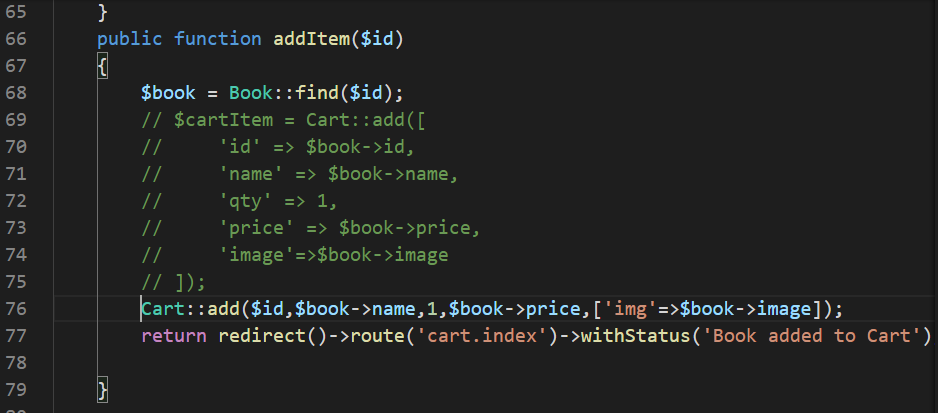
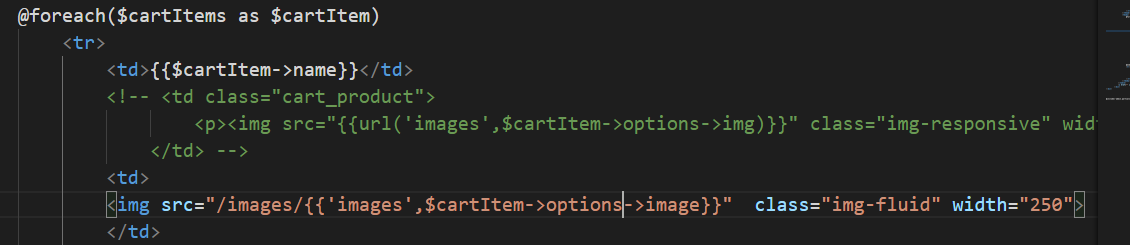
I am having problem with displaying image in the cart using Crinsane/LaravelShoppingcart package.
my code for cartController is here:
my code for cart.index.blade.php is here:

 Chihaya1
on 30 Jun 2020
Chihaya1
on 30 Jun 2020
@Chihaya1 An easy way for you to solve this is to do dd ($ cartItem) in the view () and observe how the data is retrieved.
I added an item to Cart the way you did. And when I made the call that I suggested, the answer was this:
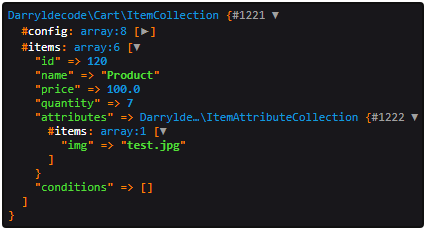
So if I take {{$ item-> attributes-> img}} I get the name of the image.
Another way to correct this would be for you to assign the image to the product, not to the cart item (session registration). In other words, if you have the product id, just use it to retrieve the registration at the bank and thus get the name of the image or the path, whatever.
_Note: Note: I am using the darryldecode package_
 webfelipemaia
on 5 Jul 2020
webfelipemaia
on 5 Jul 2020
In addition i can advice to install and use xDebug so you can always view your data as you are running trought the code line by line inside your editor.
 bumbummen99
on 5 Jul 2020
bumbummen99
on 5 Jul 2020
Related issues
 pelachile
·
8Comments
pelachile
·
8Comments
 sobhanattar
·
4Comments
sobhanattar
·
4Comments
 mbijker
·
4Comments
mbijker
·
4Comments
 ellgibug
·
5Comments
ellgibug
·
5Comments
 matbeard
·
7Comments
matbeard
·
7Comments
Most helpful comment
_Result_

Looks fine to me...