Laravel-permission: Can't give roles properly
I've got a create user form, I'm trying to assign the user created to a role.
I'm doing it like that :
$user->assignRole(Role::where('id', $request->input('roles', [])['id'])->get('name')->first());
where Role::where('id', $request->input('roles', [])['id'])->get('name')->first() returns 'Publisher', and I want it to assign it to a guard named also 'publisher', how can I assign the role to a guard that is not the default ? At the moment I'm getting this error :
Argument 1 passed to Spatie\Permission\Exceptions\GuardDoesNotMatch::create() must be of the type string, null given
My guards :
    'guards' => [
        'admin' => [
            'driver' => 'session',
            'provider' => 'users',
        ],
        'publisher' => [
            'driver' => 'session',
            'provider' => 'users',
        ],
        'member' => [
            'driver' => 'session',
            'provider' => 'users',
        ],

        'web' => [
            'driver' => 'session',
            'provider' => 'users',
        ],

        'api' => [
            'driver' => 'token',
            'provider' => 'users',
            'hash' => false,
        ],
    ],
In that same idea, how to fill the model_has_permissions table by giving a role ? We can't pass to $user->assignRole function a guard name so he's trying to use the default gurad, which is false in my case, I can't set multiple default guards, as all guards are coming out of the User model.
Here's my roles table :
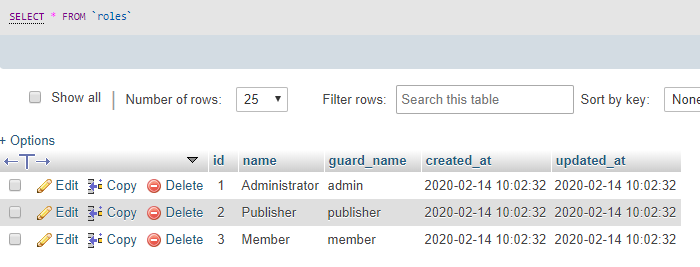
In my edit user form, the edit is working and is assigning the correct role to my model_has_roles table but is not filling the model_has_permissions with the correct roles contained inside the role_has_permissions table :(
Help ?
 elshobokshy
All 12 comments
Two things:
When you assign a role to a User, only the model_has_roles table will be used. It does not also add all that role's permissions to the User, because those permissions are granted by association with the role. (eg: when you assign permissions to a Role (not a User), that Role's permissions pass through to the user when the user logs in.)
When you are using the
assignRole()method, the code you posted shows that you're doing a lookup of the role (Role::where(id)->..pluck('name')) based on itsname. This causes the package to guess at the correct guard.
However, if you change it to just retrieve the Rolemodel(skip the pluck(name)) then you'll be passing the actual Role as a model. Therefore it will know which guard that Role is associated with, and should not throw the guard-is-null exception you mentioned.
 drbyte
on 14 Feb 2020
drbyte
on 14 Feb 2020
Thank you @drbyte ! Now I've got another problem, any idea where might be the problem coming from ?
Using my guards above, \Auth::user()->roles()->pluck('name') returns
Illuminate\Support\Collection {#651 ▼
  #items: array:1 [▼
    0 => "Publisher"
  ]
}
And \Auth::user()->getAllPermissions()->toArray() returns :
array:54 [▼
  ....
  26 => array:6 [▼
    "id" => 81
    "name" => "admin.admin-user.index"
    "guard_name" => "publisher"
    "created_at" => "2020-02-15 12:56:36"
    "updated_at" => "2020-02-15 12:56:36"
    "pivot" => array:2 [▶]
  ]
  ....
]
BUT ! \Auth::user()->can('admin.admin-user.index') returns false. I have no idea why.
I tried a lot of things, but none seems to work. The only thing that works is changing my guards order from
    'guards' => [
        'admin' => [
            'driver' => 'session',
            'provider' => 'admin_users',
        ],
        'publisher' => [
            'driver' => 'session',
            'provider' => 'admin_users',
        ],
        'member' => [
            'driver' => 'session',
            'provider' => 'admin_users',
        ],
        ....
    ],
to
    'guards' => [
        'publisher' => [
            'driver' => 'session',
            'provider' => 'admin_users',
        ],
        'admin' => [
            'driver' => 'session',
            'provider' => 'admin_users',
        ],
        'member' => [
            'driver' => 'session',
            'provider' => 'admin_users',
        ],
        ....
    ],
But then it doesn't work for the admin and member guards? Why woud the order change anything in there? It's supposed to be looking inside the user's guards and the order doesn't matter. For info, I have all guards using the same model type Admin\Models\User
    'providers' => [
        'users' => [
            'driver' => 'eloquent',
            'model' => Admin\Models\User::class,
        ],
    ],
Help please ? :)
elshobokshy
on 15 Feb 2020
Does this work?
-\Auth::user()->can('admin.admin-user.index')
+\Auth::user()->can('admin.admin-user.index', 'publisher')
Question: Does your app NEED different roles/permissions "per guard"? ie: do you have DIFFERENT actions based on which guard and which role/permission?
ie: does admin.admin-user.index get different rights when using the publisher guard vs the member guard?
I'm guessing your role/permission names themselves apply universally regardless of which guard, right? If so, see https://github.com/spatie/laravel-permission/issues/1156
drbyte
on 15 Feb 2020
@drbyte no, adding the guard name as the second parameter doesn't fix it.
I'll check the link, thanks!
elshobokshy
on 15 Feb 2020
@drbyte I'm extrelemy sorry to bother you again, but I'm really trying to understand why this isn't working.
So the Auth::user()->can('admin.admin-user.index', 'publisher') isn't working, but this is :
        try {
            return \Auth::user()->hasPermissionTo('admin.admin-user.index', strtolower(\Auth::user()->roles->first()->name));
        } catch (\Exception $e) {
            return false;
        }
So I need to pass manually the role of the user for it to work, as auth()->guard() is returning admin instead of publisher. I don't know from where should I search this fact...
elshobokshy
on 16 Feb 2020
Apologies. I was wrong in suggesting to pass the guard name as the 2nd parameter to ->can(), as that is normally used for policies where it expects details for the affected model/object. (I was asking a question, more than making a suggestion, but I can see where my post was too generic and didn't convey that intent clearly.)
This package does not _currently*_ directly link the current user's authenticated guard to the can() lookup. When you have highly specific combinations of permissions per-guard you must be explicit in your code by using the methods offered by this package's API which allow you to specify a guard name, such as hasPermissionTo and others.
_(* a tested PR to fix this, or remove the heavily-engineered guard features which lookup guard defaults in a way that's deemed by many to be too inflexible, is welcome.)_
However, if your app doesn't actually require any of your named roles/permissions to be treated differently for different guards, you can use the wildcarding approach mentioned in #1156 and be less specific about which guard to use when you are checking authorization.
Granted, I still don't understand your hierarchy of role and permission names and how they intersect with your guards, and what specifically is different about each of your guards, particularly since they're all using the same Model, so same driver and provider too. I'm sure I'm missing contextual information about your app, else it feels overengineered.
drbyte
on 16 Feb 2020
@drbyte thank you for your answer, so I suppose doing my \Auth::user()->hasPermissionTo('permission', 'guard') is not just a workaround but is indeed a solution?
Let me explain my hierarchy for reference sake in the issue. (the image I posted of my roles table in my first post explains it a little bit)
I have 3 guards. Roles have the same name as guards, role Admin has a guard named admin.
Thus, role Admin has permission A, B, C and D. Publisher has permission B, C and D. Member has permission D.
So I created 3 guards, and each gave different roles. You think I should have my default guard as Member and then extend the other permissions from it as per the issue you attached? As I have my default as an Admin, so it's making it a bit more complicated to extend detached roles, if you see what I mean.
Thank you for your contribution to the community, it's extremely appreciated!
elshobokshy
on 17 Feb 2020
Thus, role Admin has permission A, B, C and D. Publisher has permission B, C and D. Member has permission D.
Fair. That makes total sense.
Those can be used very effectively in middleware, views, policies, controllers, etc.
I created 3 guards, and each gave different roles.
Why separate guards? I don't see the purpose.
If your app grants access based on being part of a certain role or permission, then why do you need more guards? Wouldn't one guard (default is web) be enough?
What benefit does "more guards" add to your application? It seems to me that it just adds unneeded complexity (and in the case of this package it requires you to be way more verbose in order to use the features you're forcing it into).
drbyte
on 17 Feb 2020
@drbyte oh, you're saying I should have the same guard and just play with roles rather than with both roles and guards? Mhmm... That seems like a totally logic answer. Why hadn't I thought of that? I'll try it out! Could you give me a use case where having an additional guard is useful?
Thanks once more!
elshobokshy
on 17 Feb 2020
Could you give me a use case where having an additional guard is useful?
The classic reason to use another guard is if you need to perform logins differently (ie: web uses php sessions/cookies, whereas api might use jwt tokens or some other approach).
But login is authentication; whereas roles/permissions are authorization.
While they do "compliment" each other, they're not the same thing. Often people mix them together long before their application really requires it.
I've seen very few ie:rare cases where an application needs to give completely different meaning to a permission based on whether a certain guard is used.
But in the vast majority of cases, a create-post or view-other-users or purge-data permission means the same everywhere in the application, whether the person authenticates via web or via api ... whether that's sessions, tokens, whatever.
drbyte
on 17 Feb 2020
@drbyte I see, so I'll just go ahead and use the one guard approach now that I really understood what I'm doing and how it works haha ^^ Keep up the amazing work and thanks again.
elshobokshy
on 17 Feb 2020
👍
drbyte
on 17 Feb 2020
Related issues
 devingray
·
3Comments
devingray
·
3Comments
 Dreambox13
·
3Comments
Dreambox13
·
3Comments
 ghost
·
3Comments
ghost
·
3Comments
 feliperoan
·
3Comments
feliperoan
·
3Comments
 bhulsman
·
3Comments
bhulsman
·
3Comments