Laravel-mongodb: Text Search in Mongo
How can I do text search in mongo using this library?
 dhananjaygoel
All 17 comments
You just have to use the whereRaw method. It can be better if you encapsulate this in a query scope.
class User extends Moloquent {
public function scopeWhereFullText($query, $search)
{
return $query->whereRaw(array('$text' => array('$search' => $search)));
}
}
User::whereFullText('jaygoel')->get();
 alexandre-butynski
on 3 Feb 2015
alexandre-butynski
on 3 Feb 2015
This should be in the readme! :-) +1
 amahrt
on 29 Oct 2015
amahrt
on 29 Oct 2015
And how ordered that by score like in js query?
db.products.find({$text:{$search:"SomeText"}},{score:{$meta:'textScore'}}).sort({score:{$meta:'textScore'}})
 orangeShadow
on 13 May 2016
orangeShadow
on 13 May 2016
I think that you can only do this by using PHP Driver base methods. It can be something like that :
User::raw(function ($collection) use ($search) {
return $collection->find(
[
'$text' => ['$search' => $search]
],
[
'score' => ['$meta' => 'textScore']
]
)->sort(
[
'score' => ['$meta' => 'textScore']
]
)->limit(6);
});
I write that code
public function scopeWhereFullText($query, $search)
{
$query->getQuery()->projections = ['score'=>['$meta'=>'textScore']];
return $query->whereRaw(['$text' => ['$search' => $search]]);
}
and in result
$products = Product::whereFullText($request->get('q',''))
->orderBy('score',['$meta'=>'textScore'])->get();
$max = $products->max('score');
$min = $products->min('score');
$products = $products->filter(function($item) use($max,$min){
return $item->score > ($max+$min)/2;
});
But this method broke pagination :(
orangeShadow
on 14 May 2016
Sometimes some ORM methods are broken when you use low level methods. I didn't experience your use case but you can try to make a custom paginator like that :
protected function customPaginator($query, $countParam, $perPage)
{
$paginator = $query->getQuery()->getConnection()->getPaginator();
$total = $query->count($countParam);
$page = $paginator->getCurrentPage($total);
$items = $query->forPage($page, $perPage)->get()->all();
return $paginator->make($items, $total, $perPage);
}
Or to do something else custom and more low level than the standard paginator method. Can't be more helpful today, sorry !
alexandre-butynski
on 17 May 2016
An alternative for custom pagination using textScore:
//App\Models\User

public function scopeWhereFullText($query, $search, $page = 1, $limit = 10)
    {
        $query->getQuery()->projections = ['score'=>['$meta'=>'textScore']];

        $query->orderBy('score',['$meta'=>'textScore']);

        $query->skip(($page - 1)*$limit);

        $query->take($limit);

        return $query->whereRaw(['$text' => ['$search' => $search]]);
    }
Usage:
User::whereFullText('searchable',1,10)->get();
 mateusvtt
on 13 Nov 2017
mateusvtt
on 13 Nov 2017
hello @mateusvtt i am using your function for mongodb it works but when i use another orberby after $query->orderBy('score',['$meta'=>'textScore']) the second orberby not been used or been neglected for ordering the data your help will greatly appreciated
 balap777
on 14 Aug 2018
balap777
on 14 Aug 2018
Hi @balap777 I've tried to reproduce your issue adding a extra field to sort.
$query->orderBy('score',['$meta'=>'textScore'])->orderBy('_id', 'asc');
It works here, but keep in mind that the second orderBy acts as a tie-breaking criterion. I.e. the documents with the highest score will continue at the top, only those with similar scores will be resorted.
mateusvtt
on 18 Aug 2018
Hi good day I am getting _MongoDBDriverExceptionCommandException: text index required for $text query in file_
--model
`
namespace App;
use JenssegersMongodbEloquentModel;
use JenssegersMongodbEloquentSoftDeletes;
class Listing extends Model
{
public function scopeWhereFullText($query, $search, $page = 1, $limit = 10)
{

    $query->getQuery()->projections = ['score'=>['$meta'=>'textScore']];

    $query->orderBy('score',['$meta'=>'textScore']);

    $query->skip(($page - 1)*$limit);

    $query->take($limit);

    return $query->whereRaw(array('$text' => array('$search' => $search)));
}`
--controller
public function search(){
return Listing::whereFullText('searchable',1,10)->get();
}
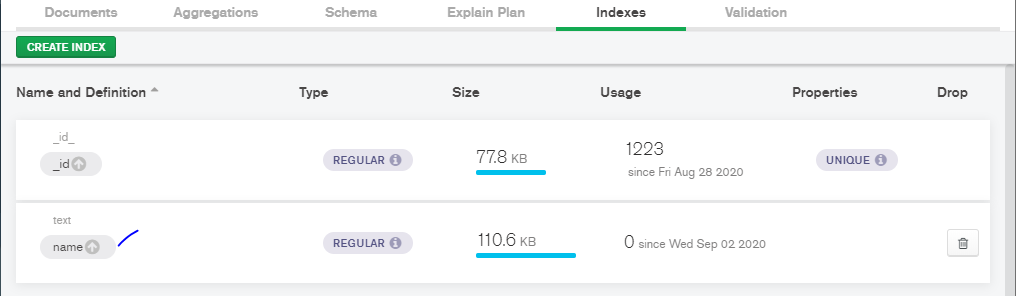
I already created an index
 ederson-cinnamon
on 2 Sep 2020
ederson-cinnamon
on 2 Sep 2020
@ederson-cinnamon i don't see field name in search query
 Smolevich
on 2 Sep 2020
Smolevich
on 2 Sep 2020
@Smolevich Hi what do you mean? I'm not sure how to properly declare it. can you give example?
ederson-cinnamon
on 2 Sep 2020
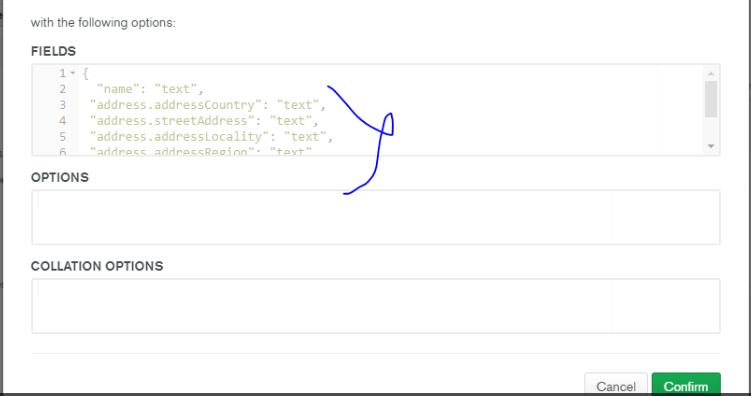
got it, adding index something like this solve my issue.

I inserted it using cloud.mongodb.com.
ederson-cinnamon
on 2 Sep 2020
wut is $text and $search variable?
i get
text index required for $text query",
 Sahandi81
on 8 Nov 2021
Sahandi81
on 8 Nov 2021
@Sahandi81
Those operators require an indexed field. Check Mongo doc here:
https://docs.mongodb.com/manual/reference/operator/query/text/
 jcaillot
on 8 Nov 2021
jcaillot
on 8 Nov 2021
@jcaillot
Thanks, you Right.
but how i can add this to db fields? i dont find any way to do that ...
for insert new record i use
Product::create([
     'title' => "randomString"
])
Sahandi81
on 8 Nov 2021
One can create a text index during migration using:
use Illuminate\Database\Migrations\Migration;
//use Illuminate\Database\Schema\Blueprint; <<-- note the replacement
use Illuminate\Support\Facades\Schema;
use Jenssegers\Mongodb\Schema\Blueprint;


class IndexedTexts extends Migration
{
    /**
     * Run the migrations.
     *
     * @return void
     */
    public function up()
    {
        Schema::create('indexed_texts', function (Blueprint $collection) {
            $collection->id();
            $collection->string('any_text');

            $collection->index(
                ['any_text' => 'text'], // <-- this does the trick
                null,
                null,
                [
                    // text indexes only support simple binary comparison and do not support collation.
                    'collation' => ['locale' => "simple"],
                ]
            );
        });
    }
Related issues
 YSimple
·
3Comments
YSimple
·
3Comments
 yupangestu
·
3Comments
yupangestu
·
3Comments
 Idnan
·
3Comments
Idnan
·
3Comments
 geofflancaster
·
3Comments
geofflancaster
·
3Comments
 viacheslavpleshkov
·
3Comments
viacheslavpleshkov
·
3Comments
Most helpful comment
An alternative for custom pagination using textScore:
Usage:
User::whereFullText('searchable',1,10)->get();