Laravel-mongodb: Issue in installation on mongo3.6 php7
Environment : PHP7.1.9 MongoDB : 3.6
PHP Mongo Extension 1.4.1

I am getting error
Your requirements could not be resolved to an installable set of packages.
Problem 1
- jenssegers/mongodb v3.3.0 requires mongodb/mongodb ^1.0.0 -> satisfiable b
y mongodb/mongodb[1.0.0, 1.0.0-alpha1, 1.0.0-beta1, 1.0.0-beta2, 1.0.1, 1.0.2, 1
.0.3, 1.0.4, 1.0.5, 1.1.0, 1.1.0-alpha1, 1.1.1, 1.1.2, 1.2.0, 1.2.0-alpha1, 1.3.
0, 1.3.x-dev, v1.0.x-dev, v1.1.x-dev, v1.2.x-dev].
- jenssegers/mongodb v3.3.0-alpha requires mongodb/mongodb ^1.0.0 -> satisfi
able by mongodb/mongodb[1.0.0, 1.0.0-alpha1, 1.0.0-beta1, 1.0.0-beta2, 1.0.1, 1.
0.2, 1.0.3, 1.0.4, 1.0.5, 1.1.0, 1.1.0-alpha1, 1.1.1, 1.1.2, 1.2.0, 1.2.0-alpha1
, 1.3.0, 1.3.x-dev, v1.0.x-dev, v1.1.x-dev, v1.2.x-dev].
- jenssegers/mongodb v3.3.1 requires mongodb/mongodb ^1.0.0 -> satisfiable b
y mongodb/mongodb[1.0.0, 1.0.0-alpha1, 1.0.0-beta1, 1.0.0-beta2, 1.0.1, 1.0.2, 1
.0.3, 1.0.4, 1.0.5, 1.1.0, 1.1.0-alpha1, 1.1.1, 1.1.2, 1.2.0, 1.2.0-alpha1, 1.3.
0, 1.3.x-dev, v1.0.x-dev, v1.1.x-dev, v1.2.x-dev].
- mongodb/mongodb v1.2.x-dev requires ext-mongodb ^1.3.0 -> the requested PH
P extension mongodb is missing from your system.
- mongodb/mongodb v1.1.x-dev requires ext-mongodb ^1.2.0 -> the requested PH
P extension mongodb is missing from your system.
- mongodb/mongodb v1.0.x-dev requires ext-mongodb ^1.1.0 -> the requested PH
P extension mongodb is missing from your system.
- mongodb/mongodb 1.3.x-dev requires ext-mongodb ^1.4.0 -> the requested PHP
extension mongodb is missing from your system.
- mongodb/mongodb 1.3.0 requires ext-mongodb ^1.4.0 -> the requested PHP ext
ension mongodb is missing from your system.
- mongodb/mongodb 1.2.0-alpha1 requires ext-mongodb ^1.2.0 -> the requested
PHP extension mongodb is missing from your system.
- mongodb/mongodb 1.2.0 requires ext-mongodb ^1.3.0 -> the requested PHP ext
ension mongodb is missing from your system.
- mongodb/mongodb 1.1.2 requires ext-mongodb ^1.2.0 -> the requested PHP ext
ension mongodb is missing from your system.
- mongodb/mongodb 1.1.1 requires ext-mongodb ^1.2.0 -> the requested PHP ext
ension mongodb is missing from your system.
- mongodb/mongodb 1.1.0-alpha1 requires ext-mongodb ^1.1.0 -> the requested
PHP extension mongodb is missing from your system.
- mongodb/mongodb 1.1.0 requires ext-mongodb ^1.2.0 -> the requested PHP ext
ension mongodb is missing from your system.
- mongodb/mongodb 1.0.5 requires ext-mongodb ^1.1.0 -> the requested PHP ext
ension mongodb is missing from your system.
- mongodb/mongodb 1.0.4 requires ext-mongodb ^1.1.0 -> the requested PHP ext
ension mongodb is missing from your system.
- mongodb/mongodb 1.0.3 requires ext-mongodb ^1.1.0 -> the requested PHP ext
ension mongodb is missing from your system.
- mongodb/mongodb 1.0.2 requires ext-mongodb ^1.1.0 -> the requested PHP ext
ension mongodb is missing from your system.
- mongodb/mongodb 1.0.1 requires ext-mongodb ^1.1.0 -> the requested PHP ext
ension mongodb is missing from your system.
- mongodb/mongodb 1.0.0-beta2 requires ext-mongodb ^1.1.1 -> the requested P
HP extension mongodb is missing from your system.
- mongodb/mongodb 1.0.0-beta1 requires ext-mongodb ^1.0.0 -> the requested P
HP extension mongodb is missing from your system.
- mongodb/mongodb 1.0.0-alpha1 requires ext-mongodb ^1.0.0 -> the requested
PHP extension mongodb is missing from your system.
- mongodb/mongodb 1.0.0 requires ext-mongodb ^1.1.0 -> the requested PHP ext
ension mongodb is missing from your system.
- Installation request for jenssegers/mongodb ^3.3 -> satisfiable by jensseg
ers/mongodb[v3.3.0, v3.3.0-alpha, v3.3.1].
To enable extensions, verify that they are enabled in your .ini files:
- G:\wamp64\bin\php\php7.1.9\php.ini
You can also run php --ini inside terminal to see which files are used by PH
P in CLI mode.
Installation failed, reverting ./composer.json to its original content.
 maneeshms
All 5 comments
You need to install the mongodb driver
sudo apt-get install php7.x-dev
Install Libs you are probably missing
sudo apt-get install libcurl4-openssl-dev pkg-config libssl-dev libsslcommon2-dev
Install PECL
sudo apt-get install php-pear
Install MongoDB driver
sudo pecl install mongodb
Finally, add the following line to your php.ini file for php-fpm and cli:
extension=mongodb.so
restart the service php7.x fpm
 mattdalmau
on 23 Feb 2018
mattdalmau
on 23 Feb 2018
Hi Thank you for your response.... I am using windows machine...
maneeshms
on 24 Feb 2018
You still need the PHP driver.
Follow those steps:
http://php.net/manual/en/mongodb.installation.windows.php
mattdalmau
on 24 Feb 2018
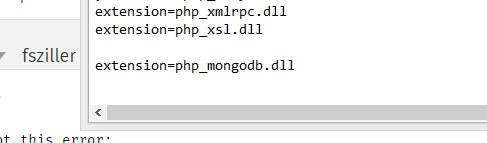
I followed the same.....

maneeshms
on 25 Feb 2018
follow the step in the link below, It works for me.
https://stackoverflow.com/questions/48421836/how-to-install-mongodb-driver-in-php
 sambatlim
on 14 Jul 2018
sambatlim
on 14 Jul 2018
Related issues
 ricardofontanelli
·
3Comments
ricardofontanelli
·
3Comments
 yupangestu
·
3Comments
yupangestu
·
3Comments
 sebastiaanluca
·
3Comments
sebastiaanluca
·
3Comments
 viacheslavpleshkov
·
3Comments
viacheslavpleshkov
·
3Comments
 Vasiliy-Bondarenko
·
3Comments
Vasiliy-Bondarenko
·
3Comments
Most helpful comment
You need to install the mongodb driver
sudo apt-get install php7.x-devInstall Libs you are probably missing
sudo apt-get install libcurl4-openssl-dev pkg-config libssl-dev libsslcommon2-devInstall PECL
sudo apt-get install php-pearInstall MongoDB driver
sudo pecl install mongodbFinally, add the following line to your php.ini file for php-fpm and cli:
extension=mongodb.sorestart the service php7.x fpm