Laravel-mix: Mix 5.0.5: Causing UnhandledPromiseRejectionWarning error
- Laravel Mix Version: 5.0.5 (
npm list --depth=0) - Node Version (
node -v): v12.12.0 - NPM Version (
npm -v): 6.11.3 - OS: MacOS
Description:
Running npm run dev no longer works once Laravel mix is upgraded to 5.0.5. It's throwing an UnhandledPromiseRejectionWarning about file/directory not existing, but the files in question exist. This error prevents mix from, well, mixing.
The issue is that these files exist. And if I roll back to Mix 5.0.4, everything works swimmingly.
Full error output:
(node:26595) UnhandledPromiseRejectionWarning: Error: ENOENT: no such file or directory, open '/usr/local/var/www/exedra/resources/assets/js/*.js'
(node:26595) UnhandledPromiseRejectionWarning: Unhandled promise rejection. This error originated either by throwing inside of an async function without a catch block, or by rejecting a promise which was not handled with .catch(). (rejection id: 1)
Steps To Reproduce:
package.json file:
{
    "private": true,
    "scripts": {
        "dev": "npm run development",
        "development": "cross-env NODE_ENV=development node_modules/webpack/bin/webpack.js --progress --hide-modules --config=node_modules/laravel-mix/setup/webpack.config.js",
        "watch": "cross-env NODE_ENV=development node_modules/webpack/bin/webpack.js --watch --progress --hide-modules --config=node_modules/laravel-mix/setup/webpack.config.js",
        "watch-poll": "npm run watch -- --watch-poll",
        "hot": "cross-env NODE_ENV=development node_modules/webpack-dev-server/bin/webpack-dev-server.js --inline --hot --config=node_modules/laravel-mix/setup/webpack.config.js",
        "prod": "npm run production",
        "production": "cross-env NODE_ENV=production node_modules/webpack/bin/webpack.js --progress --hide-modules --config=node_modules/laravel-mix/setup/webpack.config.js"
    },
    "devDependencies": {
        "cross-env": "^7.0.2",
        "laravel-mix": "^5.0.5",
        "resolve-url-loader": "^3.1.1",
        "sass": "^1.26.10",
        "sass-loader": "^7.1.0"
    }
}
webpack.mix.js file:
let mix = require('laravel-mix');

mix.disableNotifications();

// establish known paths for sanity
let vendorPath     = 'node_modules/',
    assetPath      = 'resources/assets/',
    libPath        = assetPath + 'lib/',
    sassPath       = assetPath + 'sass/',
    sassVarPath    = sassPath + 'variables/',
    cssPath        = assetPath + 'css/',
    jsPath         = assetPath + 'js/',
    cvmPath        = 'modules/CompositeViews/',
    cvmAssetPath   = cvmPath + 'Resources/assets/',
    cvmSassPath    = cvmAssetPath + 'sass/',
    cvmSassVarPath = cvmSassPath + 'variables/',
    bvmPath        = 'modules/BinViews/',
    bvmAssetPath   = bvmPath + 'Resources/assets/',
    bvmSassPath    = bvmAssetPath + 'sass/',
    bvmSassVarPath = bvmSassPath + 'variables/';

// compile all SASS styles from modules and primary resources
mix.sass(bvmSassPath + 'module.scss', 'assets/css/compiled-bvm.css').setPublicPath('resources');
mix.sass(cvmSassPath + 'module.scss', 'assets/css/compiled-cvm.css').setPublicPath('resources');
mix.sass(sassPath + 'app.scss', 'assets/css/compiled-sass.css').setPublicPath('resources');

// combine javascript files
mix.scripts([
    assetPath + 'descriptor.js',
    jsPath + '*.js'
], 'public/js/app.js');

// combine app styles into one CSS file
mix.styles([
    cssPath + '*.css',
], 'public/css/app.css');
With Laravel Mix 5.0.5 installed, run the following command:
npm run dev
Downgrade to Laravel Mix 5.0.4 and run the same command and no error appears. The mix completes without issue.
 blackdrago
All 27 comments
I'm getting the same issue. I can probably share logs if needed.
 RobertoGongora
on 1 Sep 2020
RobertoGongora
on 1 Sep 2020
Instead of using an asterisk for all files under specified folder (*.js, *.css etc), use the full file path.
For example:
mix.scripts([
    'resources/js/utility/add_me_to_scripts.js',
    'resources/js/filters/you_dont_wanna_forget_me.js'
], 'public/js/app.js');
 fatihgune
on 1 Sep 2020
fatihgune
on 1 Sep 2020
I appreciate the workaround as an option, but, as far as I know, the wildcard is a valid option from Laravel Mix for both CSS and JS files. Unless that's slated to change? (I hope not.)
Using the full file path of every single file isn't a great solution when you have many, many files... not to mention that you'd have to update the mix file every time you add/remove a file.
blackdrago
on 1 Sep 2020
This issue comes up here too, defining each path itself is not really an option, unless I want to blow up the webpack.mix.js and add massive maintenance burden.
Workaround is nice to have but a solution would be appreciated, the error is not very verbose and I don't know enough about webpack/mix inner working to start digging here.
This seems like a bug since AFAIK this has always worked, at least for me 👍
    .combine([
        'resources/assets/css/**/*.css',
    ], 'public/build/assets.min.css')
 stayallive
on 3 Sep 2020
stayallive
on 3 Sep 2020
I am also experiencing this issue.
(node:5334) UnhandledPromiseRejectionWarning: Error: ENOENT: no such file or directory, open '/application/resources/assets/js/pages/*.js'
Been using this for ages:
mix.scripts('resources/assets/js/pages/*.js', 'public/js/pages.js');
Now have to list each separatly:
mix.scripts([
    'resources/assets/js/pages/_global.js',
...
    'resources/assets/js/pages/guide.js'
    ]
    , 'public/js/pages.js');
 emericklaw
on 5 Sep 2020
emericklaw
on 5 Sep 2020
I am having the same issue as described above by OP, and the workaround is a bit of a maintenance nightmare.
Is it possible the dependency upgrade of yargs is causing the issue?
https://github.com/yargs/yargs/compare/v12.0.5...v15.4.1
 reidkornman
on 10 Sep 2020
reidkornman
on 10 Sep 2020
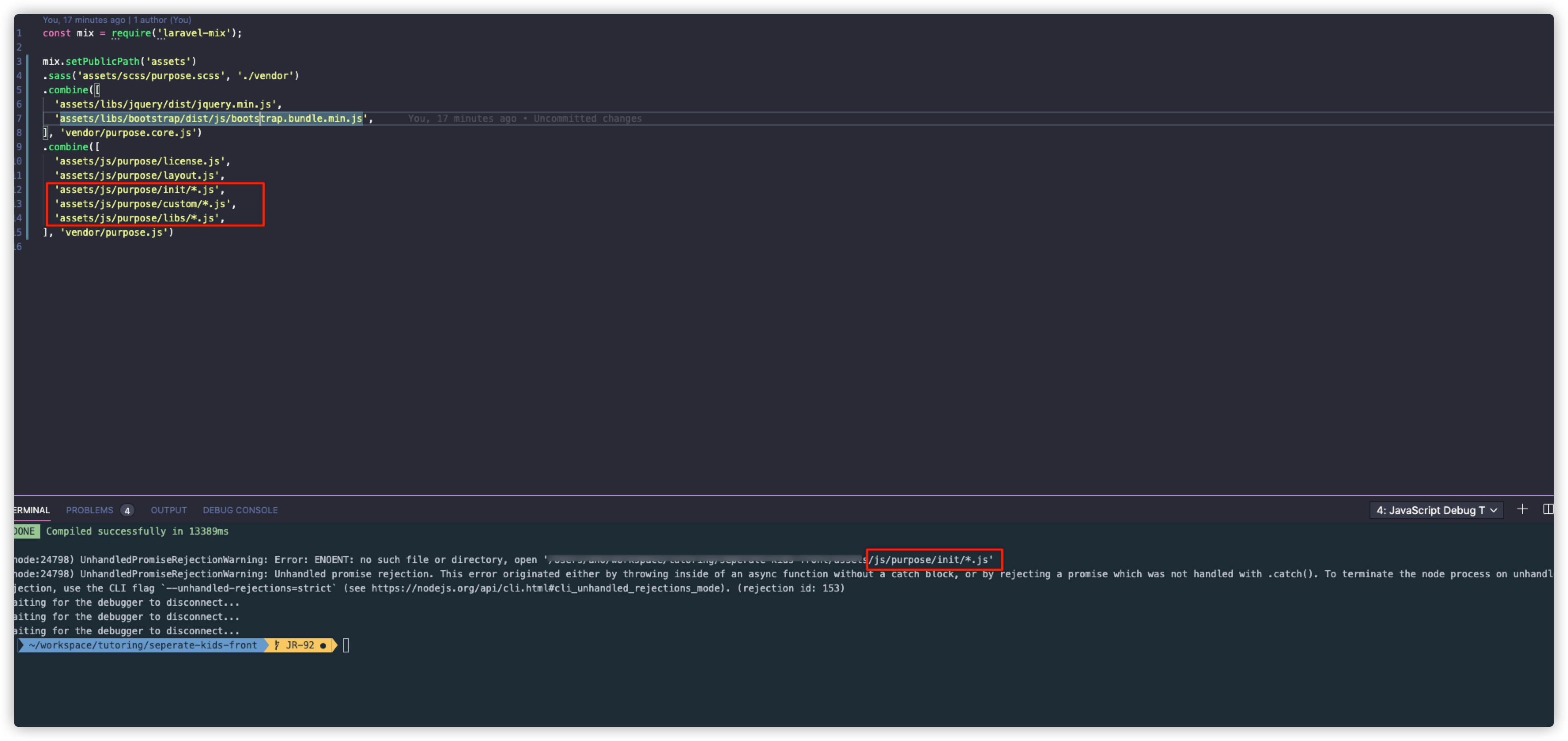
i am having the same issue as described above,
 P-iknow
on 14 Sep 2020
P-iknow
on 14 Sep 2020
same issue here, any temp fix ? maybe previous version ?
 neoteknic
on 15 Sep 2020
neoteknic
on 15 Sep 2020
@neoteknic
I changed to previous version5.0.4 and issue was resolved.
P-iknow
on 15 Sep 2020
Ok simple temp fix :
"laravel-mix": "5.0.4", in package json and npm install
neoteknic
on 15 Sep 2020
Got the same issue on the following code running [email protected], reverting to 5.0.4 fixes the warning. Not using an asterisk but the spritemap.js is an unlinked file.
{
    apply: (compiler) => {
        compiler.hooks.done.tap('SpritemapFileRemover', (compilation) => {
            // After the compiler is done remove the spritemap.js file created by SVGSpritemapPlugin.
            // This workaround is needed due to the versioning plugin requiring all created files to be present
            //  for versioning.
            const fs = require('fs');
            const spritemapPath = mix.config.publicPath + '/spritemap.js';
            if (fs.existsSync(spritemapPath)) {
                fs.unlinkSync(spritemapPath);
            }
        });
    },
}
 tsharms
on 17 Sep 2020
tsharms
on 17 Sep 2020
any 5.0.6 to fix ?
neoteknic
on 17 Sep 2020
The temp fix mentioned by neoteknic seems to be the only solution for now, but I wanted to bump this as "npm audit fix" seems to want to push version 5.0.5 every single time and it's quite cumbersome to always have to restore an old version.
reidkornman
on 6 Oct 2020
Can someone give me a basic example to reproduce this?
 JeffreyWay
on 8 Oct 2020
JeffreyWay
on 8 Oct 2020
Something as simple as this seems to break on my solution under ("webpack.mix.js")
mix.scripts([
    'resources/js/vendor/*.js',
    'resources/js/security/*.js'
], 'public/js/security.js');
Thank you. Fixed.
JeffreyWay
on 8 Oct 2020
Just curious because I'm new to this ... will this end up in a 5.0.6 release or what's the process? Thank you.
reidkornman
on 9 Oct 2020
(node:92562) UnhandledPromiseRejectionWarning: Error: ENOENT: no such file or directory, open 'resources/assets/css/vendor/*.css'
same package.json file with laravel-mix version 5.0.5 have this error and not render my files .
please help me solve this problem .
 jafarchoupan
on 19 Oct 2020
jafarchoupan
on 19 Oct 2020
~@jafarchoupan updating to version 5.0.7 should fix this issue.~
tsharms
on 19 Oct 2020
@tsharms
steps :
rm -rf node_modules
rm package-lock.json
npm cache clean --force
Both version check 5.0.6 and 5.0.7 , I still have the problem .
jafarchoupan
on 19 Oct 2020
Hmm I'm sorry, I saw that the version was bumped to 5.0.7 and was expecting that it features the fix for this problem. The only temporary solution for now is locking Laravel Mix add version 5.0.4 :(
"laravel-mix": "5.0.4"
tsharms
on 19 Oct 2020
@tsharms
i used version 5.0.4 by the way and get this Error .
any body don't know this problem ?
jafarchoupan
on 19 Oct 2020
This is still pending being merged into a release. @JeffreyWay mentioned it may be back ported once v6 is finalized, hopefully. Version 5.0.4 should work though.
reidkornman
on 19 Oct 2020
@reidkornman
So should I run until then? which one version must be run my project ?
jafarchoupan
on 19 Oct 2020
@reidkornman
So should I run until then? which one version must be run my project ?
I'm running 5.0.4 without an issue currently. That's what I would advise.
reidkornman
on 20 Oct 2020
5.0.9, not fixed yet.
 Adizbek
on 13 Dec 2020
Adizbek
on 13 Dec 2020
It looks like the focus is on 6.0 being released. Any plans to fix this in the 5.x branch @JeffreyWay ? It looks like 5.0.9 is out but not marked as "latest" (5.0.5 is currently marked as latest). I haven't seen anything on this since Jeff's comment 2 months ago.
reidkornman
on 17 Dec 2020
Related issues
 Bomavi
·
3Comments
Bomavi
·
3Comments
 rderimay
·
3Comments
rderimay
·
3Comments
 rlewkowicz
·
3Comments
rlewkowicz
·
3Comments
 wendt88
·
3Comments
wendt88
·
3Comments
 pixieaka
·
3Comments
pixieaka
·
3Comments
Most helpful comment
Thank you. Fixed.