Laravel-mix: Extracted files path issue when using extract() and chunkFilename..
- Laravel Mix Version (
npm list --depth=0): 4.0.12 - Node Version (
node -v): 10.14.2 - NPM Version (
npm -v): 6.4.1 - OS: Windows 10
Description:
When I use extract() while specifying an output path for chunkFilename in webpackConfig.. ( vendor.js - app.js ) files goes inside the specified chunks path.. not in the same folder as manifest.js..

Steps To Reproduce:
using this in your webpack.mix.js
mix.js("resources/js/front/app.js", "public/js/front")
    .sass("resources/sass/front/app.scss", "public/css/front")
    .extract();

mix.webpackConfig({
    output: {
        chunkFilename: mix.inProduction() ? "js/front/chunks/[name].[chunkhash].js" : "js/front/chunks/[name].js",
    }
})
 ghost
ghost
All 44 comments
I think this could have the save root problem as this #1914
 rderimay
on 4 Jan 2019
rderimay
on 4 Jan 2019
Having similar issue here with 4.0.13
 dolbex
on 6 Jan 2019
dolbex
on 6 Jan 2019
Yep, have similar issue on 4.0.13 as well.
 zoranlorkovic
on 12 Jan 2019
zoranlorkovic
on 12 Jan 2019
have similar issue on 4.0.7 as well.
 sirRen
on 17 Jan 2019
sirRen
on 17 Jan 2019
Have similar issue on 4.0.14.
Did anyone find a solution for it?
 tcdsantos
on 21 Jan 2019
tcdsantos
on 21 Jan 2019
@tcdsantos
You could use magic-comments, but I think you cant add a hash for the chunk's file name using this. as I tried to do that.
something like this:
Vue.component('my-component', () => import(/* webpackChunkName: "path/to/js/my-component" */ './components/MyComponent'));
But,for now I am sticking with mix v3.0.
ghost
on 21 Jan 2019
@tcdsantos
You could use magic-comments, but I think you cant add a hash for the chunk's file name using this. as I tried to do that.
something like this:
Vue.component('my-component', () => import(/* webpackChunkName: "path/to/js/my-component" */ './components/MyComponent'));But,for now I am sticking with mix v3.0.
Thank you @Rux77 !
I also opt to downgrade and, at least for now, i will be working with mix 3.0 and webpack 3.11.
Maybe in the future, with webpack 5, this issue can be fixed... lets see.
tcdsantos
on 22 Jan 2019
I'm having this issue too.
Asset Size Chunks Chunk Names
/assets/js/manifest.js 8.73 KiB /assets/js/manifest [emitted] /assets/js/manifest
assets/css/app.css 0 bytes /assets/js/app, /assets/js/manifest, /assets/js/vendor [emitted] /assets/js/app, /assets/js/manifest, /assets/js/vendor
180 KiB /assets/js/app [emitted] /assets/js/app
assets/js//assets/js/vendor.js 3.67 MiB /assets/js/vendor [emitted] /assets/js/vendor
assets/js/0.js 45.5 KiB 0 [emitted]
assets/js/1.js 18.3 KiB 1 [emitted]
assets/js/2.js 16.2 KiB 2 [emitted]
assets/js/3.js 15.1 KiB 3 [emitted]
assets/js/4.js 7.52 KiB 4 [emitted]
assets/js/5.js 8.13 KiB 5 [emitted]
assets/js/6.js 16.5 KiB 6 [emitted]
assets/js/7.js 10.9 KiB 7 [emitted]
assets/js/8.js 14.2 KiB 8 [emitted]
assets/js/9.js 14.8 KiB 9 [emitted]
The app.js and vendor.js are using /assets/js/ 2 times when I config my .
// ...
mix
.js('resources/js/app.js', 'assets/js/')
.sass('resources/sass/app.scss', 'assets/css')
mix.extract()
mix.webpackConfig({
output: {
chunkFilename: 'assets/js/[name].js' + (mix.inProduction() ? '?id=[chunkhash]' : '')
}
})
And without mix.extract():
Asset Size Chunks Chunk Names
/assets/js/app.js 3.85 MiB /assets/js/app [emitted] /assets/js/app
assets/css/app.css 173 KiB /assets/js/app [emitted] /assets/js/app
assets/js/0.js 45.5 KiB 0 [emitted]
assets/js/1.js 18.3 KiB 1 [emitted]
assets/js/2.js 16.2 KiB 2 [emitted]
assets/js/3.js 15.1 KiB 3 [emitted]
assets/js/4.js 7.52 KiB 4 [emitted]
assets/js/5.js 8.13 KiB 5 [emitted]
assets/js/6.js 16.5 KiB 6 [emitted]
assets/js/7.js 10.9 KiB 7 [emitted]
assets/js/8.js 14.2 KiB 8 [emitted]
assets/js/9.js 14.8 KiB 9 [emitted]
But my app works with laravel-mix 4 if I just don't' use that mix.extract().
 nelson6e65
on 7 Feb 2019
nelson6e65
on 7 Feb 2019
@nelson6e65 : exactly the same as i was experiencing... i had to downgrade to webpack 3/laravel-mix 3 due to this issue.
If you find a way to resolve it, please let me know.
tcdsantos
on 7 Feb 2019
Same issue here: this is really annoying
 Genora51
on 7 Feb 2019
Genora51
on 7 Feb 2019
@tcdsantos For now, I just don't use extract() until this is solved. Because there is also an issue with CSS dynamically imported #1914
nelson6e65
on 8 Feb 2019
@tcdsantos For now, I just don't use
extract()until this is solved. Because there is also an issue with CSS dynamically imported #1914
Thank you!
However, in this way, you don't extract the vendor files to a separated file... in my case, i really need it for caching reasons...
tcdsantos
on 8 Feb 2019
However, in this way, you don't extract the vendor files to a separated file... in my case, i really need it for caching reasons...
Vendor extraction still works fine. You just cant do chunking.
 pdbreen
on 8 Feb 2019
pdbreen
on 8 Feb 2019
Same problem here.
Asset Size Chunks
/css/main.css 0 bytes /js/manifest, /js/main, /js/vendor [emitted]
Am downgrading laravel-mix till the issue is fixed
 njoguamos
on 17 Feb 2019
njoguamos
on 17 Feb 2019
I have two problems similar to this topic.
My package.json:
{
"private": true,
"scripts": {
"dev": "npm run development",
"development": "cross-env NODE_ENV=development node_modules/webpack/bin/webpack.js --progress --hide-modules --config=node_modules/laravel-mix/setup/webpack.config.js",
"watch": "npm run development -- --watch",
"watch-poll": "npm run watch -- --watch-poll",
"hot": "cross-env NODE_ENV=development node_modules/webpack-dev-server/bin/webpack-dev-server.js --inline --hot --config=node_modules/laravel-mix/setup/webpack.config.js",
"prod": "npm run production",
"production": "cross-env NODE_ENV=production node_modules/webpack/bin/webpack.js --no-progress --hide-modules --config=node_modules/laravel-mix/setup/webpack.config.js"
},
"devDependencies": {
"babel-plugin-dynamic-import-webpack": "^1.1.0",
"babel-plugin-syntax-dynamic-import": "^6.18.0",
"clean-webpack-plugin": "^1.0.1",
"compression-webpack-plugin": "^2.0.0",
"cross-env": "^5.2.0",
"laravel-mix": "^4.0.14",
"resolve-url-loader": "^3.0.0",
"sass": "^1.17.0",
"sass-loader": "^7.1.0",
"vue-template-compiler": "^2.6.6"
},
"dependencies": {
"axios": "^0.18.0",
"bootstrap": "^4.2.1",
"bootstrap-vue": "^2.0.0-rc.11",
"vee-validate": "^2.1.7",
"vue": "^2.6.6",
"vue-select": "^2.5.1",
"vue-toastr": "^2.0.16",
"vuejs-datepicker": "^1.5.4",
"vuex": "^3.1.0",
"vuex-map-fields": "^1.3.1"
}
}
My webpack.mix.js
const mix = require('laravel-mix');
const CleanWebpackPlugin = require('clean-webpack-plugin');
const CompressionPlugin = require('compression-webpack-plugin');
let configWebPack = {
resolve: {
extensions: ['.js', '.vue', '.json'],
alias: {
'@': __dirname + '/resources'
},
},
}
mix.options({
hmrOptions: {
host: '0.0.0.0',
port: 5003
},
})
if(mix.inProduction()) {
configWebPack.output = {
chunkFilename: `[name].[chunkhash].js`,
publicPath: '/',
}
configWebPack.plugins = [
new CleanWebpackPlugin([
'public/css',
'public/js',
]),
new CompressionPlugin({
filename: "[path].gz[query]",
algorithm: "gzip",
test: /\.js$|\.css$|\.html$|\.svg$/,
threshold: 10240,
minRatio: 0.8
})
]
mix.version();
}
mix.webpackConfig(configWebPack)
mix.js('resources/js/app.js', 'public/js')
.extract([
'vue','bootstrap-vue','vuex','axios',
'vuejs-datepicker','vuex-map-fields',
'vee-validate','vue-toastr', 'vue-select'
])
.copyDirectory('resources/assets/images', 'public/images');
mix.sass('resources/sass/vendor.scss', 'public/css/vendor.css')
.sass('resources/sass/app.scss', 'public/css/app.css')
.sass('resources/sass/front.scss', 'public/css/front.css')
.sass('resources/sass/sidebar.scss', 'public/css/sidebar.css');
running npm run prod
Two cases are seen: The CSS generates it empty. and the JS app, vendor and manifest files are renamed by the [chunkhash]. I have the obligation to add this option of "chunkFilename:[name]. [Chunkhash] .js "to avoid the browser cache. The other problem that I have in my blade file:
<script src="{{ mix('js/manifest.js') }}"></script>
<script src="{{ mix('js/vendor.js') }}"></script>
<script src="{{ mix('js/app.js') }}"></script>
This means that the files can not find them. He let me understand? Can somebody help me? Thank you.
 renattonl
on 21 Feb 2019
renattonl
on 21 Feb 2019
Chunking / chunkhash is not working and may not be supported until next version of webpack, which would likely be a major version upgrade for mix as well.
But, since you are using mix.version(), chunkhash is not required for cache busting. The generated manifest and urls include a file checksum that will bust caches. See https://laravel-mix.com/docs/4.0/versioning
pdbreen
on 21 Feb 2019
@pdbreen The reason I use that configuration is because I am using dynamic components with the help of "babel-plugin-dynamic-import-webpack" and "babel-plugin-syntax-dynamic-import". This generates me several chunks and I do not put [chunkhash] ... I will have a problem with the browser cache. since loading the JS chuck, it does not load like [name].js?version-id
renattonl
on 21 Feb 2019
@renattonl you'll need to drop back to prior version for the dynamic importing to work.
pdbreen
on 21 Feb 2019
@pdbreen Understood, that's what I was thinking too. Thank you.
renattonl
on 21 Feb 2019
Confirming that removing the .extract() call fixes the directory issue for me too. Using v4.0.14.
 JSn1nj4
on 27 Feb 2019
JSn1nj4
on 27 Feb 2019
Also running into this problem, any fixed?
 bolechen
on 3 Mar 2019
bolechen
on 3 Mar 2019
Getting this issue too.
 pinodex
on 12 Mar 2019
pinodex
on 12 Mar 2019
same issue here
 j574144
on 6 May 2019
j574144
on 6 May 2019
same issue too
 NikitaIT
on 15 May 2019
NikitaIT
on 15 May 2019
I am having the same issue too..
While trying to solve this..
I tried this, which solved the issue for me, and I don't even know how and why is this working!
So what I did is:
- I moved
chunkhashto be as a query string inchunkFilename - I removed
/fromjs/injs[name]for filename and chunkFilename
mix.js('resources/js/front.js', 'front.js')
.extract()
.webpackConfig({
output: {
filename: 'front/js[name].js',
chunkFilename: 'front/js[name].js?id=[chunkhash]'
}
});
Now every file is in the place I wanted it to be.
My mix-manifest.json:
{
"/front/js/front.js": "/front/js/front.js?id=f48b0f53caa325bec94f",
"/front/js/manifest.js": "/front/js/manifest.js",
"/front/js/vendor.js": "/front/js/vendor.js?id=e8496d4b85289d3d835c"
}
Still waiting for a better solution for this..
 rakk7
on 24 May 2019
rakk7
on 24 May 2019
@rakk7 so in your output, you're using filename and chunkFilename? Thanks, I'll give that a shot.
Up until this point, I've been using just publicPath and chunkFilename. Haven't been using filename; I figured Mix was handling that already for each .js() call.
JSn1nj4
on 1 Jun 2019
I have found a better solution for this.
Using this webpack plugin https://github.com/MhMadHamster/webpack-chunk-rename-plugin, solved my issue.
rakk7
on 18 Jun 2019
I have found a better solution for this.
Using this webpack plugin https://github.com/MhMadHamster/webpack-chunk-rename-plugin, solved my issue.
@rakk7, could you please share your webpack.mix.js file where you are using the webpack-chunk-rename-plugin?
I tryed to use this same plugin but i am having problems because i don't know what to put in the entry { } option...
This is my webpack config:
{
output: {
filename: "[name].js",
//chunkFilename: "[name].[chunkhash].js", // production
chunkFilename: "[name].js", // development
},
entry: {
mySpecialChunk: "/js/chunks",
},
plugins: [
new ChunkRenamePlugin({
initialChunksWithEntry: true,
mySpecialChunk: "specialName.[name].js",
}),
]
}
With this configuration i am getting an error telling that the 'js/chunks' path can't be resolved in my project folder (and i have the folder myproject/public/js/chunks created).
I would like to have app.js, vendor.js and manifest.js files into myproject/public/js/ folder and all chunks into myproject/public/js/chunks/...
I am new to webpack and i am struggling with it...
tcdsantos
on 19 Jun 2019
@tcdsantos
- You can see what are your chunks names after successfully compiling your assets in the console.
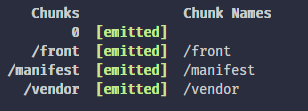
Here is my webpack.mix
mix.js('resources/js/front.js', 'front.js')
  .extract()
  .webpackConfig({
    output: {
      filename: (chunkData) => {
        return chunkData.chunk.name === '/manifest' ? 'front/js/manifest.js' : 'front/js/[name].js';
      },
      chunkFilename: 'front/js/chunks/[name].[chunkhash].js'
    },
    plugins: [
      new ChunkRenamePlugin({
        initialChunksWithEntry: true,
        '/front': 'front/js/front.js',
        '/vendor': 'front/js/vendor.js',
      }),
    ],
  });
I have found a better solution for this.
Using this webpack plugin https://github.com/MhMadHamster/webpack-chunk-rename-plugin, solved my issue.
Using this plugin also solved it for me.
I added the following into the webpackConfig (in webpack.mix.js):
plugins: [
    new ChunkRenamePlugin({
      initialChunksWithEntry: true,
      '/js/app': 'js/app.js',
      '/js/vendor': 'js/vendor.js',
    }),
]
NB: Don't forget to add following line to the top of webpack.mix.js.
const ChunkRenamePlugin = require("webpack-chunk-rename-plugin");
 SocyList
on 20 Jun 2019
SocyList
on 20 Jun 2019
@rakk7 and @mobyface Thank you!
This plugin solved it for me too!
tcdsantos
on 20 Jun 2019
@rakk7 I lost css complie after add webpack-chunk-rename-plugin and .extract. Here is my webpack.mix.js file
mix.js('resources/js/app.js', 'front.js')
    .extract()
    .webpackConfig({
        resolve: {
            alias: {
                '@': path.resolve(__dirname, 'resources/js/src'),
                '@assets': path.resolve(__dirname, 'resources/assets'),
                '@sass': path.resolve(__dirname, 'resources/sass')
            }
        },
        output: {
            filename: (chunkData) => {
                return chunkData.chunk.name === '/manifest' ? 'front/js/manifest.js' : 'front/js/[name].js';
              },
            chunkFilename: 'front/js/chunks/[name].[chunkhash].js',
        },
        plugins: [
            new ChunkRenamePlugin({
              initialChunksWithEntry: true,
              '/front': 'front/js/front.js',
              '/vendor': 'front/js/vendor.js',
            }),
        ],
    })
    .sass('resources/sass/app.scss', 'public/css').options({
        postCss:[require('autoprefixer')]
    })
    .postCss('resources/assets/css/main.css', 'public/css', [
        tailwindcss('tailwind.js'),
    ])
    .copy('node_modules/vuesax/dist/vuesax.css', 'public/css/vuesax.css') // Vuesax framework css
    .copy('resources/assets/css/iconfont.css', 'public/css/iconfont.css') // Feather Icon Font css
    .copyDirectory('resources/assets/fonts', 'public/fonts') // Feather Icon fonts
    .copyDirectory('node_modules/material-icons/iconfont', 'public/css/material-icons') // Material Icon fonts
    .copyDirectory('node_modules/material-icons/iconfont/material-icons.css', 'public/css/material-icons/material-icons.css') // Material Icon fonts css
    .copy('node_modules/prismjs/themes/prism-tomorrow.css', 'public/css/prism-tomorrow.css'); // Prism Tomorrow theme css

if (mix.inProduction()) {
    mix
    // .version() // Use `laravel-mix-versionhash` for the generating correct Laravel Mix manifest file.
        .versionHash()
} else {
    mix.sourceMaps()
}
 vanthao03596
on 23 Jun 2019
vanthao03596
on 23 Jun 2019
@vanthao03596 If you mean you have an empty css file, then see my comment to solve this
https://github.com/JeffreyWay/laravel-mix/issues/2070#issuecomment-503410615
rakk7
on 23 Jun 2019
Any news on this issue? I simply went with the "add the js/ folder prefix in the webpackChunkName" solution. Kinda an ugly hack.
Another option would be to do something like this:
mix.webpackConfig({
       output: {
              chunkFilename: "js/[name].[hash].js",
       },
})
 techouse
on 29 Jul 2019
techouse
on 29 Jul 2019
Hello,
i have the same issue :
js/chunks//js/vendor.js 764 KiB /js/vendor [emitted] /js/vendor
the path is broken
the ChunkRenamePlugin trick did work, thanks !
 lk77
on 24 Oct 2019
lk77
on 24 Oct 2019
whatsup ?
when it will be resolved ?
any dates ?
 h-zone
on 12 Dec 2019
h-zone
on 12 Dec 2019
I think this will be solved by Webpack 5.
nelson6e65
on 13 Dec 2019
I think this will be solved by Webpack 5.
Why do you think so? This is not a Webpack issue. It works just fine in Webpack 4. In fact this was one of the reasons why I moved away from using Laravel Mix and started using plain Webpack 4.
techouse
on 13 Dec 2019
Why do you think so? This is not a Webpack issue. It works just fine in Webpack 4. In fact this was one of the reasons why I moved away from using Laravel Mix and started using plain Webpack 4.
Because of extract-text-webpack-plugin used for this extraction, @techouse (https://github.com/JeffreyWay/laravel-mix/issues/1914#issuecomment-461236908).
nelson6e65
on 16 Dec 2019
Why do you think so? This is not a Webpack issue. It works just fine in Webpack 4. In fact this was one of the reasons why I moved away from using Laravel Mix and started using plain Webpack 4.
Because of
extract-text-webpack-pluginused for this extraction, @techouse (#1914 (comment)).
Which is a plugin for Webpack 3, and you fix it in Webpack 4 by using mini-css-extract-plugin in your webpack.config.js instead.
techouse
on 16 Dec 2019
Is this project dead?
 frodeknutsen
on 16 Feb 2020
frodeknutsen
on 16 Feb 2020
It does not seems dead to me.
lk77
on 17 Feb 2020
Is this project dead?
I'm pretty sure the laravel-mix project is waiting for the stable Webpack 5.0 to be released which will fix most of these issues and bring new good features.
 roitto
on 6 Mar 2020
roitto
on 6 Mar 2020
Yes. Mix 6 and webpack 5 fix this issue.
I’m well aware that extract-text-webpack-plugin was deprecated. But we had to continue using it, due to breaking changes if we had switched.
 JeffreyWay
on 10 Oct 2020
JeffreyWay
on 10 Oct 2020
Related issues
 RomainGoncalves
·
3Comments
RomainGoncalves
·
3Comments
 mementoneli
·
3Comments
mementoneli
·
3Comments
 wendt88
·
3Comments
wendt88
·
3Comments
 kpilard
·
3Comments
kpilard
·
3Comments
 mstralka
·
3Comments
mstralka
·
3Comments
Most helpful comment
@tcdsantos
Here is my webpack.mix