Laravel-mix: IE 11 -- Invalid Character -- Bootstrap Vue -- Popover
- Laravel Mix Version: 2.1.11
- Node Version: 8.10.0
- NPM Version: 3.5.2
- OS: laravel homestead running off ubuntu 18.04
Hello.
We are having a very difficult time getting past a particular IE 11 specific error.
.babelrc
{
  "plugins": [
    "transform-es2015-template-literals"
  ],
  "presets": [
    ["env", {
      "modules": false,
      "targets": {
        "browsers": ["> 2%"],
        "uglify": true
      }
    }]
  ]
}
webpack.ix.js
let mix = require('laravel-mix');

mix.js('resources/assets/js/app.js', 'public/js')
    .extract(['vue'])
    .sass('resources/assets/sass/app.scss', 'public/css')
    .sourceMaps();
app.js entry has the following at the top:
import "babel-polyfill";

window.bootstrap = require('bootstrap')
window.axios = require('axios')
window.moment = require('moment')
...
package.json
{
  "private": true,
  "scripts": {
    "dev": "npm run development",
    "development": "cross-env NODE_ENV=development node_modules/webpack/bin/webpack.js --progress --hide-modules --config=node_modules/laravel-mix/setup/webpack.config.js",
    "watch": "cross-env NODE_ENV=development node_modules/webpack/bin/webpack.js  --watch --watch-poll --progress --hide-modules --config=node_modules/laravel-mix/setup/webpack.config.js",
    "watch-poll": "npm run watch -- --watch-poll",
    "hot": "cross-env NODE_ENV=development node_modules/webpack-dev-server/bin/webpack-dev-server.js --inline --hot --watch --watch-poll --config=node_modules/laravel-mix/setup/webpack.config.js",
    "prod": "npm run production",
    "production": "cross-env NODE_ENV=production node_modules/webpack/bin/webpack.js --no-progress --hide-modules --config=node_modules/laravel-mix/setup/webpack.config.js"
  },
  "devDependencies": {
    "axios": "^0.17",
    "bootstrap": "^4.0.0",
    "bootstrap-vue": "^2.0.0-rc.1",
    "cross-env": "^5.1",
    "es6-promise": "^4.2.4",
    "font-awesome": "^4.7.0",
    "jquery": "^3.2",
    "laravel-mix": "^2.1",
    "lodash": "^4.17.4",
    "popper.js": "^1.12",
    "vue": "^2.5.7"
  },
  "dependencies": {
    "babel-polyfill": "^6.26.0",
    "babel-plugin-transform-es2015-template-literals": "^6.22.0",
    "moment": "^2.22.1",
    "typeahead.js": "^0.11.1"
  }
}
The following lines in a js file loaded by app.js is causing issues, and if commented out, IE11 compilation works OK
import Popover from '../directives/popover';
Vue.directive('popover', Popover);
With those Popover enabled, the following error:
SCRIPT1014: Invalid character
app.js (5235,1)
 jhchnc
All 18 comments
My gut says that something related to template literals is causing an issue, however with babel-polyfill and the specific transform-literals plugin, I don't see what is causing the issue.
Any help would be greatly appreciated!
jhchnc
on 10 Jul 2018
Laravel mix already tranforms your template literals, i never installed transform-es2015-template-literals plugin.
I dont know why you are using babel-polyfill
 ankurk91
on 11 Jul 2018
ankurk91
on 11 Jul 2018
@ankurk91 thanks for your comment. i'm trying to figure out the invalid character issue I'm seeing. It might simply be isolated to popper.js. thanks again.
jhchnc
on 11 Jul 2018
@ankurk91 -- Also, using babel-polyfill per the Bootstrap Vue documentation for IE 11 support.
jhchnc
on 11 Jul 2018
Where do you see the error?
Terminal or dev tools console?
ankurk91
on 11 Jul 2018
The IE 11 dev tools console. MS Edge is working fine.
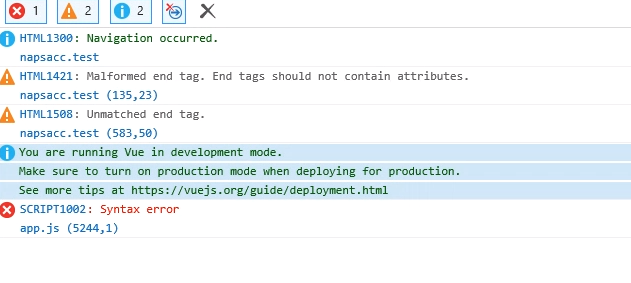
Additionally, a search for the back-tick in the console output yields the following, but I am unsure if the error is related:

jhchnc
on 11 Jul 2018
I suspect some js code is not being transpiled by Babel.
Try to reduce the imported modules one by one to figure out which module is causing this issue.
It would be best if you can share a minimal re production.
This issue is not related to laravel mix I guess.
ankurk91
on 11 Jul 2018
I was curious if the Vue extraction could cause Vue-related modules to be transpiled incorrectly or not at all.
Thanks very much for your feedback
jhchnc
on 11 Jul 2018
No, I don't think so.
Just to let you know, if you import an ES6 (Non transpiled) module from node_modules folder then babel-loader will ignore and won't convert it to ES5.
ankurk91
on 11 Jul 2018
That would mean that code could be quite suspect, correct?
import popover from '../../../../node_modules/bootstrap-vue/src/directives/popover/popover'
import Popper from 'popper.js'
import PopOver from '../../../../node_modules/bootstrap-vue/src/utils/popover.class'
import { assign, keys } from '../../../../node_modules/bootstrap-vue/src/utils/object'
import warn from '../../../../node_modules/bootstrap-vue/src/utils/warn'
What would be the correct procedure for adding in such things?
(What I'm showing you is in a component, itself imported in the app.js)
jhchnc
on 11 Jul 2018
You should never import from src folder.
If you ever do then whitelist that module in Babel loader.
This is mentioned in bootstrap Vue docs already.
https://bootstrap-vue.js.org/docs
rules: [
            {
                test: /\.js$/,
                include: [ // use `include` vs `exclude` to white-list vs black-list
                    path.resolve(__dirname, "src"), // white-list your app source files
                    require.resolve("bootstrap-vue"), // white-list bootstrap-vue
                ],
                loader: "babel-loader"
            }
        ]
Thanks.
Is https://npmjs.com/package/babel-node-modules something worth exploring, in your opinion?
I'll try your solution.
jhchnc
on 11 Jul 2018
You can override webpack configuration via mix.
See how
https://github.com/JeffreyWay/laravel-mix/blob/master/docs/quick-webpack-configuration.md
ankurk91
on 11 Jul 2018
Here is similar question asked
https://github.com/babel/babel-loader/issues/171
ankurk91
on 11 Jul 2018
@ankurk91 thanks so much for your help.
based on what you wrote, i figured out i can do this:
import popover from '../../../../node_modules/bootstrap-vue/es/directives/popover/popover'
import Popper from 'popper.js'
import PopOver from '../../../../node_modules/bootstrap-vue/es/utils/popover.class'
import { assign, keys } from '../../../../node_modules/bootstrap-vue/es/utils/object'
import warn from '../../../../node_modules/bootstrap-vue/es/utils/warn'
bootstrap-vue provides es compiled src. seems to be working for now
jhchnc
on 11 Jul 2018
Good to know.
Good lesson: always read documentation :smile:
ankurk91
on 11 Jul 2018
Definitely!
Many thanks, again.
jhchnc
on 11 Jul 2018
This issue has been automatically marked as stale because it has not had recent activity. It will be closed if no further activity occurs. Thank you for your contributions.
![stale[bot] picture](https://avatars.githubusercontent.com/in/1724?v=4&s=40) stale[bot]
on 4 Dec 2018
stale[bot]
on 4 Dec 2018
Related issues
 pixieaka
·
3Comments
pixieaka
·
3Comments
 kpilard
·
3Comments
kpilard
·
3Comments
 amin101
·
3Comments
amin101
·
3Comments
 stefensuhat
·
3Comments
stefensuhat
·
3Comments
 jpmurray
·
3Comments
jpmurray
·
3Comments