Laravel-mix: __webpack_require__(...) is not a function
Laravel Mix Version: 1.4.2
Node Version : 8.0.0
NPM Version : 5.3.0
OS: Windows 10
Description:
I use code below when watch code:
mix.options({ extractVueStyles: true })
That error:
TypeError: __webpack_require__(...) is not a function
But when i run npm run dev, there is no error.
 maxcareer
All 15 comments
We need more information. Too difficult to debug otherwise. If you remove that mix.options() section, does it compile?
 JeffreyWay
on 11 Aug 2017
JeffreyWay
on 11 Aug 2017
@JeffreyWay
This my .vue file:
````
```
When i remove mix.options(), it can compile, and when i remove , it kan compile too.
maxcareer
on 11 Aug 2017
What does your webpack.mix.js look like?
JeffreyWay
on 11 Aug 2017
@JeffreyWay, this webpack.mix.js

maxcareer
on 11 Aug 2017
I'm getting the same (or a similar) issue suddenly:

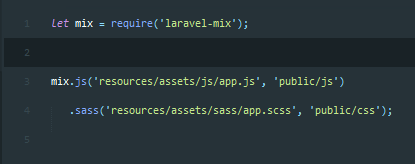
I don't tamper with any webpack files, and I haven't encountered this problem before.
 typicalcoda
on 18 Aug 2017
typicalcoda
on 18 Aug 2017
I have the same problem, this error doesn't occur in version 0.12.1
 PimW
on 19 Aug 2017
PimW
on 19 Aug 2017
@JeffreyWay I'm a coworker of PimW and we attempted to debug this issue today. After we upgraded a project from Mix 0.12.1 to 1.4.2 this issue started to happen; npm run dev (or the first time you run npm run watch) works, but subsequent runs of npm run watch when you change a file always cause this error when you load your application.
Strange thing is that the error occurs in a Vue file which is shared with another project; that other project also uses Mix 1.4.2 and there it works just fine. We tried re-installing all node_modules, removing a whole bunch of CSS, using scoped in the style tag in the Vue file in case there is some CSS conflict, and nothing worked. The only thing that solved it was simply going back to version 0.12.1 :(
Something that may be of interest: the project that has the problem uses Pug in some templates (not in the file where the errors occurs though), and the project where the very same file does not cause any problems at all doesn't use Pug, maybe that is related, but I'm unsure. It's the only major "architectural" difference between the two projects I can think of.
Also, if you're interested in our webpack.mix.js files: they're exactly the same for both projects.
mix.options({
  extractVueStyles: true
});
mix.sourceMaps();
mix.js('resources/assets/js/app.js', 'public/js');
mix.sass('resources/assets/sass/app.scss', 'public/css');

if (mix.inProduction()) {
  mix.version();
}
If we can do more to debug the issue, please let us know :)
 ThomHurks
on 20 Aug 2017
ThomHurks
on 20 Aug 2017
@ThomHurks Today, I edit my bootstrap.js file:
window.axios = require('axios')
to
window.axios = require('axios/dist/axios.js')
Now work well!
maxcareer
on 20 Aug 2017
@maxonly That worked for me, too - however, not sure if it's the best option.
Note - When this happens, if you switch to another .vue or .js file that doesn't cause this problem, and just hit "save" so that the processor re-processes everything, the problem disappears for me.
typicalcoda
on 20 Aug 2017
I have the same error, I thought that it was a problem with my code but I started a fresh project and this continues happening, I hope this will be fixed soon.
 DannyFeliz
on 29 Aug 2017
DannyFeliz
on 29 Aug 2017
It's related to https://github.com/webpack/webpack/issues/5399 , workaround is to downgrade extract-text-webpack-plugin from 3.0.0 to 2.1.2.
 aguingand
on 2 Sep 2017
aguingand
on 2 Sep 2017
same problem here , Mac Os dev environment , and @max-boy , your way is only working for the first time , if i change something no matter in app.scss or app.js , it happens again .
btw , how to downgrade the extract-text-webpack-plugin @aguingand ?
 maverickchangithub
on 10 Sep 2017
maverickchangithub
on 10 Sep 2017
@aguingand How can we downgrade the extract-text-webpack-plugin?
 bjora857
on 25 Oct 2017
bjora857
on 25 Oct 2017
you can write
npm i --save [email protected]
or
yarn add [email protected]
 woolfi182
on 26 Nov 2017
woolfi182
on 26 Nov 2017
This issue has been automatically marked as stale because it has not had recent activity. It will be closed if no further activity occurs. Thank you for your contributions.
![stale[bot] picture](https://avatars.githubusercontent.com/in/1724?v=4&s=40) stale[bot]
on 4 Dec 2018
stale[bot]
on 4 Dec 2018
Related issues
 stefensuhat
·
3Comments
stefensuhat
·
3Comments
 wendt88
·
3Comments
wendt88
·
3Comments
 dtheb
·
3Comments
dtheb
·
3Comments
 nezaboravi
·
3Comments
nezaboravi
·
3Comments
 Cheddam
·
3Comments
Cheddam
·
3Comments
Most helpful comment
It's related to https://github.com/webpack/webpack/issues/5399 , workaround is to downgrade
extract-text-webpack-pluginfrom3.0.0to2.1.2.