Laravel-mix: Uncaught TypeError: utils.isStandardBrowserEnv is not a function
Just running "npm run watch" and I'm getting the error every 4-5 re-compilations.
Uncaught TypeError: utils.isStandardBrowserEnv is not a function
    at Object.chars (app.js:64325)
    at __webpack_require__ (app.js:20)
    at Object.<anonymous> (app.js:26040)
    at __webpack_require__ (app.js:20)
    at getDefaultAdapter (app.js:10529)
    at Object.<anonymous> (app.js:10538)
    at Object.<anonymous> (app.js:10603)
    at __webpack_require__ (app.js:20)
    at Object.module.exports (app.js:63840)
    at __webpack_require__ (app.js:20)
__Everything is at the newest version__
 davidhoeck
All 28 comments
What does your webpack.mix.js file look like?
 JeffreyWay
on 2 Aug 2017
JeffreyWay
on 2 Aug 2017
@JeffreyWay
// app sass files
mix.sass('resources/assets/sass/framework.scss', 'public/css');
mix.sass('resources/assets/sass/app.scss', 'public/css');

// app js files
mix.js('resources/assets/js/app.js', 'public/js');

// copy font files
mix.copy('resources/assets/fonts', 'public/fonts');

// copy image files
mix.copy('resources/assets/images', 'public/images');


mix.browserSync({
    proxy: 'dev.beer-tasting.shop'
});
I'm getting the same error @davidhoeck - just started recently. Seems to be working fine with watching JS files - but any updates I make to less files require me to stop and run a fresh watch.
 bryandease
on 4 Aug 2017
bryandease
on 4 Aug 2017
Got the same error after any update in sass files.
 nxmad
on 5 Aug 2017
nxmad
on 5 Aug 2017
I've gotten this too. I started getting it after I commented out everything in my app.scss files and used a CSS CDN. If I restore everything (uncomment the sass file, take out the CDN) I still get 'Uncaught TypeError: utils.isStandardBrowserEnv is not a function'.
This is my laravel mix file
let mix = require('laravel-mix');
mix.js('resources/assets/js/app.js', 'public/js')
.sass('resources/assets/sass/app.scss', 'public/css');
 chagoy
on 5 Aug 2017
chagoy
on 5 Aug 2017
Getting the same error every time I update my sass file...
 stebrl
on 7 Aug 2017
stebrl
on 7 Aug 2017
@JeffreyWay I think it is coming from the axios library...
davidhoeck
on 7 Aug 2017
Here the same problem when running npm run watch
I had to stop and run again to make it work when making any sass change.
 franc014
on 7 Aug 2017
franc014
on 7 Aug 2017
+1, only happens on npm run watch. This started recently.
 suhogrozdje
on 7 Aug 2017
suhogrozdje
on 7 Aug 2017
Same here...
 JhumanJ
on 9 Aug 2017
JhumanJ
on 9 Aug 2017
@davidhoeck is right that this has something to do with the axios library and it's utils file, but I'm guessing the bug is still somewhere within mix's own watch config.
Here is a temporary fix: require/import the full axios dist file. All of it's own internal dependencies will be included and webpack/mix won't need to load them. The following works for me and solves this very annoying issue.
window.axios = require('axios/dist/axios.js');
 jeffturcotte
on 9 Aug 2017
jeffturcotte
on 9 Aug 2017
Mix doesn't have a custom watcher in this case. It's all webpack behind the scenes.
I'm having trouble reproducing this. Can someone give me exact steps in a fresh Laravel app to see this error?
JeffreyWay
on 9 Aug 2017
I've narrowed down the problem, and this isn't a problem with laravel-mix per se, but webpack and specifically the watcher - is setting something in a global variable and it is getting overwritten by something else.
I was able to reproduce the problem by bringing in axios and ExtractTextPlugin and set up
First time you run watch, everything is working fine,
second time around, the watcher will recompile and axios will attempt to bring in utils
// from /node_modules/axios/lib/helpers/isURLSameOrigin.js
'use strict';

var utils = require('./../utils');

module.exports = (
  utils.isStandardBrowserEnv() ?
// etc
however it is overwritten by /node_modules/css-loader/lib/css-base.js

From Chrome devtools dumping the utils obj to console:
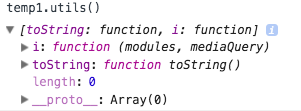
// in /node_modules/css-loader/lib/css-base.js
// import a list of modules into the list
list.i = function(modules, mediaQuery) {
    if(typeof modules === "string")
    modules = [[null,
// etc
I managed to fix it with this ugliness inside the vue-loader :
test   : /\.vue$/,
        loader : 'vue-loader',
        options: {
          extractCSS: true,
          loaders   : {
                scss: is_prod ? ExtractTextPlugin.extract({use:'css-loader!sass-loader',fallback:'vue-style-loader'}) : 'vue-style-loader!css-loader!sass-loader',
                sass: is_prod ? ExtractTextPlugin.extract({use:'css-loader!sass-loader?indentedSyntax',fallback:'vue-style-loader'}) : 'vue-style-loader!sass-loader?indentedSyntax',
                css : is_prod ? ExtractTextPlugin.extract({use:'css-loader',fallback:'vue-style-loader'}) : 'vue-style-loader!css-loader',
          },
Searching around, it seems to be linked to this : https://github.com/webpack/webpack/issues/5399
 wafs
on 10 Aug 2017
wafs
on 10 Aug 2017
@wafs Could you be a bit more explicit about your fix (which file..etc.)? Thanks!
JhumanJ
on 10 Aug 2017
Yeah this doesn't seem to be a Mix-specific issue. It's either directly webpack or the extract plugin.
Giving this a close, since there's nothing I can directly do here to fix it.
JeffreyWay
on 11 Aug 2017
I have same error when i update my vue file,how to fix ? Thanks!
extract-text-webpack-plugin/issues/579
 maxcareer
on 18 Aug 2017
maxcareer
on 18 Aug 2017
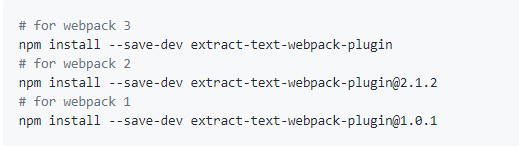
I can confirm that downgrading to [email protected] solves the issue for me.
bryandease
on 18 Aug 2017
@bryandease But my webpack version is 3.5, it not match [email protected]
maxcareer
on 19 Aug 2017
I'm also experiencing this problem. @bryandease can you elaborate regarding how you downgraded extract-text-webpack-plugin to resolve it? I'm not quite sure how to override the mess of JS requirements. For instance I installed [email protected] in my project's root package.json file but that didn't fix it. Is there another way to override the version of extract-text-webpack-plugin being used down the tree? Thank you!
 wjgilmore
on 31 Aug 2017
wjgilmore
on 31 Aug 2017
I am using Laravel 5.5 with Bulma CSS (sass) & Vuejs 2.
I am also experiencing the same problem. but after I run artisan command to clear compile and then run composer dump-autoload and my issues got solved.
thank you.
 wadday
on 3 Sep 2017
wadday
on 3 Sep 2017
Having the same issue at the moment.
It's only started happening recently. If I'm using 'npm run watch" and change something in my global scss file and watch as mix recompiles everything, I'll get the above error as soon as I refresh my webpage on my app.
IF I happen to open say, one of my vue components and immediately save it (forcing npm watch to do a recompile) everything is fixed again.
It's a little annoying but that's what I'm doing at the moment to work around it.
 jonnywilliamson
on 4 Sep 2017
jonnywilliamson
on 4 Sep 2017
I managed to recreate it..kinda.
Initial conditions:
- .scss & .vue files that need to get compiled.
- package.json dependencies:
- "axios": "^0.16.2",
- "cross-env": "^5.0.1",
- "laravel-mix": "^1.0",
- "lodash": "^4.17.4",
- "moment": "^2.18.1",
- "vue": "^2.1.10",
- "vue-i18n": "^7.2.0",
- "vuejs-datepicker": "^0.9.11"
Steps:
- While having
npm run watchon, make some changes to a .scss and save. - Empty cache and hard reload(refresh) the browser and see
Uncaught TypeError: utils.isStandardBrowserEnv is not a functionin the browser console. - Make some changes to a .vue file and save.
- Empty cache and hard reload(refresh) the browser and see
Uncaught SyntaxError: Invalid or unexpected token. - Wait a lil bit and try Empty cache and hard reload(refresh) again. Finally it will work ok.
- You might need to repeat steps 1-5 multiple times.
Note:
- Laravel Mix seems very buggy in this new release. You'll get a js error (Unexpected end of input) if you refresh the browser right after the files are compiled. You have to wait a few seconds.
 daniesy
on 5 Sep 2017
daniesy
on 5 Sep 2017
Same issue...I cant use npm watch whilst editing a sass file.
As per previous posts, it does appear to be coming from axios. I removed axios from my app and now I can edit sass and watch changes with npm run watch
 ottz0
on 6 Sep 2017
ottz0
on 6 Sep 2017
Adding mix.version() seemed to fix the issue for me
 anthonyholmes
on 14 Sep 2017
anthonyholmes
on 14 Sep 2017
I have the same issue.
Unfortunately, adding mix.version() triggers another error.
It's working fine with npm run dev and npm run hot.
 tesis
on 15 Sep 2017
tesis
on 15 Sep 2017
Same here!
 ItsLhoudini
on 16 Oct 2017
ItsLhoudini
on 16 Oct 2017
To me it happens only if I save .scss files. To fix it i'd just ctrl+s on a .js file.
 xxRockOnxx
on 17 Oct 2017
xxRockOnxx
on 17 Oct 2017
I also experienced this while changing my .scss styles !
 vyzaldysanchez
on 17 Nov 2017
vyzaldysanchez
on 17 Nov 2017
Related issues
 jpmurray
·
3Comments
jpmurray
·
3Comments
 rlewkowicz
·
3Comments
rlewkowicz
·
3Comments
 Bomavi
·
3Comments
Bomavi
·
3Comments
 rderimay
·
3Comments
rderimay
·
3Comments
 sdebacker
·
3Comments
sdebacker
·
3Comments
Most helpful comment
@davidhoeck is right that this has something to do with the axios library and it's utils file, but I'm guessing the bug is still somewhere within mix's own
watchconfig.Here is a temporary fix: require/import the full axios dist file. All of it's own internal dependencies will be included and webpack/mix won't need to load them. The following works for me and solves this very annoying issue.
window.axios = require('axios/dist/axios.js');