Laravel-mix: Help Test the 1.0 Release
Hey, everyone -
I've been working on Mix quite a bit in the last week, as we prep the official 1.0 release. Countless bugs have been fixed, and, for the non-webpack tasks, like concatenation, copying, and versioning, I've refactored the codebase to a more sequential task-based setup.
Because many sections of the codebase have been rewritten, I'd love some help testing the beta before we make it official.
Install
laravel new test-project
Currently, Laravel installs the 0.* version of Mix. Open package.json and delete that line entirely. We'll pull in the beta instead. Now return to the terminal and install Laravel's Node dependencies, as well as the beta of Laravel Mix.
npm install
npm install laravel-mix@beta
Okay, you're all set. Try out the API, see if you find any issues. I'm sure there are some, so we'll get those squared away pretty quickly and then officially release 1.0 soon.
What to Test
- Windows users, please test out file watching (
npm run watch). This can sometimes get a little tricky. - Sourcemaps work like you expect?
- All
mix.options()settings good? - Production builds working well?
- ...Anything you can think of would help.
Notes
- The API should be exactly the same. This isn't a breaking release.
- File versioning (
mix.version()) in Mix has changed. Rather than forcing a hash into the output file name, we instead store it as a querystring within yourmix-manifest.jsonfile. This not only simplifies the Mix codebase, but it should also make deployment and general compilation cleaner. - Better terminal output for your compilation. This will now include even your non-webpack tasks.
- If you create a .babelrc file in your project root, it'll now be intelligently merged with Mix's own Babel config file, rather than overwriting it completely. This was the source of many issues in the past.
- Much of Mix's internal structure has been simplified and refactored to a plugin-based system.
mix.combine/scripts/styles/minify()andmix.copy()are now triggered sequentially, after webpack finishes its main compilation. This means, you can sequentially do thinks like:- Compile my JS
- Then copy the generated output file to this other location
- And then concatenate that new file, with all these other files I have.
- And finally version all relevant files
mix.js('resources/assets/js/app.js', 'public/js')
   .copy('public/js/app.js', 'public/somewhere')
   .combine([
       'public/js/vendor/jquery.js',
       'public/somewhere/app.js'
   ], 'public/all.js')
   .version();
 JeffreyWay
All 29 comments
Awesome 🔥
 decadence
on 6 Jun 2017
decadence
on 6 Jun 2017
It worked fine based on the code block below.
mix.js('resources/assets/js/app.js', 'public/js')
.copy('public/js/app.js', 'public/somewhere')
.combine([
'public/js/vendor/jquery.js',
'public/somewhere/app.js'
], 'public/all.js')
.version();
 ruchern-chong
on 6 Jun 2017
ruchern-chong
on 6 Jun 2017
Slight issue : (updated)
npm run dev produces :
95% emitting
ERROR Failed to compile with 3 errors 3:43:47 PM
error in ./~/vuejs-calendar/src/components/Calendar.vue
Module parse failed: /Users/LukePOLO/PhpstormProjects/nucleus/forcemed/playbook-module/node_modules/vuejs-calendar/src/components/Calendar.vue Unexpected token (1:0)
You may need an appropriate loader to handle this file type.
| <template>
| <div class="c-wrap">
| <div class="c-header">
@ multi vue vuex axios jquery lodash select2 nprogress pusher-js flatpickr vue-router fullcalendar laravel-echo vuedraggable vuejs-calendar moment-timezone lodash-inflection vue-froala-wysiwyg
error in ./resources/assets/sass/app.scss
Config :
const { mix } = require('laravel-mix');
mix
.js('./resources/assets/js/app.js', 'public/js')
.sass('resources/assets/sass/app.scss', 'public/css')
.extract([
'vue',
'vuex',
'axios',
'jquery',
'lodash',
'select2',
'nprogress',
'pusher-js',
'flatpickr',
'vue-router',
'fullcalendar',
'laravel-echo',
'vuedraggable',
'vuejs-calendar',
'moment-timezone',
'lodash-inflection',
'vue-froala-wysiwyg',
])
.autoload({
vue : 'Vue',
lodash : '_',
store : 'browser',
select2 : 'select2',
'pusher-js' : 'Pusher',
jquery: ['$', 'jQuery'],
clipboard : 'Clipboard',
flatpickr : 'flatpickr',
})
.sourceMaps()
if (mix.inProduction) {
mix.version()
} else {
mix.browserSync({
open: 'external',
host : 'nucleus.dev',
proxy : 'nucleus.dev'
})
}
 lukepolo
on 6 Jun 2017
lukepolo
on 6 Jun 2017
@lukepolo Thanks! Fixed here: https://github.com/JeffreyWay/laravel-mix/commit/30718379489ec652a175421ee3a3bd1f11637f05
JeffreyWay
on 6 Jun 2017
I ran into some problems when using mix.setPublicPath with a path outside of the project root.
OS: Windows 10
Folder structure:
- laravel
- public
test-project/laravel/webpack.mix.js:
let mix = require('laravel-mix');
mix.setPublicPath('../public');
mix.js('resources/assets/js/app.js', '../public/assets/js')
.sass('resources/assets/sass/app.scss', '../public/assets/css')
.options({
processCssUrls: false
});
When I run npm run development it gets stuck at 95% emitting and outputs this to the mix-manifest.json.
test-project/public/mix-manifest.json:
{
"/E:/projects/test-project/public/E:/projects/test-project/public/assets/js/app.js": "/E:/projects/test-project/public/E:/projects/test-project/public/assets/js/app.js",
"/E:/projects/test-project/public/assets/css/app.css": "/E:/projects/test-project/public/assets/css/app.css"
}
I did some tests and found out that in here it tries to remove the Mix.paths.root() from the absolute path of the file but since the public directory is outside the project root it fails to do that.
I was able to find a way to make it kinda of work by using the function path.relative, I changed the return from:
return this.path().replace(Mix.paths.root() + path.sep, '');
to:
return path.relative(Mix.paths.root(), this.path());
But I had to change mix.setPublicPath from '../public' to '..\\public' and on the output path of mix.js and mix.sass I had to either do the same change or remove the ../public.
Updated webpack.mix.js:
let mix = require('laravel-mix');
mix.setPublicPath('..\\public');
mix.js('resources/assets/js/app.js', '..\\public/assets/js') // Or 'assets/js'
.sass('resources/assets/sass/app.scss', '..\\public/assets/css') // Or 'assets/css'
.options({
processCssUrls: false
});
After doing this it seems to work fine.
Sorry if my English is not very good.
 TopFuel
on 7 Jun 2017
TopFuel
on 7 Jun 2017
Windows 10 - 64bit
NodeJs - v7.10.0
NPM - 5.0.3
My assets are generated "fine" but compilation end with 2 errors:
Module build failed: ModuleBuildError: Module build failed: TypeError: Cannot read property 'postcss' of null
C:\xampp\htdocs\Moje\WEBSITES\CactusKvetiny\node_modules\extract-text-webpack-plugin\loader.js??ref--7-0!C:\xampp\htdocs\Moje\WEBSITES\CactusKvetiny\node_modules\css-loader\index.js??ref--7-1!C:\xampp\htdocs\Moje\WEBSITES\CactusKvetiny\node_modules\postcss-loader\lib\index.js??ref--7-2!C:\xampp\htdocs\Moje\WEBSITES\CactusKvetiny\node_modules\resolve-url-loader\index.js??ref--7-3!C:\xampp\htdocs\Moje\WEBSITES\CactusKvetiny\node_modules\sass-loader\lib\loader.js??ref--7-4!C:\xampp\htdocs\Moje\WEBSITES\CactusKvetiny\resources\css\admin\app.scss doesn't export content
My admin/app.scss content:
@import './bulma/bulma.sass';
@import './bootstrap.scss';
@import './alertify.scss';
@import './dropify.scss';
@import './highlighter.scss';
@import './typeahead.scss';
@import './chosen.css';
@import './flatpickr.css';
@import './lity.css';
 natocTo
on 7 Jun 2017
natocTo
on 7 Jun 2017
@TopFuel Thanks! I'm on it.
JeffreyWay
on 7 Jun 2017
Has the process for using Mix outside of Laravel projects changed with the new beta? It would appear so. Keen to test this but I am not sure how to proceed given the changes in setup/webpack.config.js.
 greatislander
on 7 Jun 2017
greatislander
on 7 Jun 2017
My compilation working fine now when I remove '.css' extension;
Before: (error 3 comments above)
@import './bulma/bulma.sass';
@import './bootstrap.scss';
@import './alertify.scss';
@import './dropify.scss';
@import './highlighter.scss';
@import './typeahead.scss';
@import './chosen.css';
@import './flatpickr.css';
@import './lity.css';
After: (working)
@import './bulma/bulma.sass';
@import './bootstrap.scss';
@import './alertify.scss';
@import './dropify.scss';
@import './highlighter.scss';
@import './typeahead.scss';
@import './chosen';
@import './flatpickr';
@import './lity';
@natocTo Yeah, I've run into the same problem before, it seems to be a "problem" of the SASS compiler:
https://stackoverflow.com/questions/7111610/import-regular-css-file-in-scss-file/30279590#30279590
TopFuel
on 8 Jun 2017
On win10-x64. Just replaced the laravel-mix version using this npm install laravel-mix@beta and ran npm run watch
Was working before, now no more.
Thanks.
npm WARN [email protected] requires a peer of uglify-js@^2.8.0 but none was installed.
undefined:1
{ presets:['react','es2015','stage-0'] }
^
SyntaxError: Unexpected token p in JSON at position 2
Got this error on React Compilation.
webpack.mix.js
.js('resources/assets/js/app.js', 'public/js/compiled')
.less('resources/assets/less/custom_bootstrap.less','public/css/style.css').version()
.react('resources/react_modules/course_editor/course_editor.jsx','public/js/compiled').version();
all of dependencies and devDependencies in package.json
"devDependencies": {
"axios": "^0.16.1",
"babel-core": "^6.24.1",
"babel-loader": "^7.0.0",
"babel-preset-es2015": "^6.24.1",
"babel-preset-react": "^6.24.1",
"babel-preset-stage-0": "^6.24.1",
"bootstrap-sass": "^3.3.7",
"cross-env": "^5.0.0",
"html-webpack-plugin": "^2.28.0",
"jquery": "^3.2.1",
"laravel-mix": "^0.12.1",
"less": "^2.7.2",
"less-loader": "^4.0.4",
"lodash": "^4.17.4",
"vue": "^2.3.3"
},
"dependencies": {
"ag-grid": "^10.0.1",
"ag-grid-react": "^10.0.0",
"create-react-class": "^15.5.3",
"laravel-mix": "^1.0.0-beta.1",
"mjml": "^3.3.2",
"prop-types": "^15.5.10",
"react": "^15.5.4",
"react-addons-create-fragment": "^15.5.4",
"react-addons-update": "^15.5.2",
"react-dom": "^15.5.4",
"react-select": "^1.0.0-rc.5"
},
 joy014
on 9 Jun 2017
joy014
on 9 Jun 2017
On our pure Vue project we are using a check to HMR to copy some files, but now there's not mix.config anymore:
if (!mix.config.options.hmr) {
mix.copyDirectory('src/assets', 'dist/src/assets')
}
This causes this error now:
if (!mix.config.options.hmr) {
^
TypeError: Cannot read property 'options' of undefined
at Object.<anonymous> (project/webpack.mix.js:34:17)
at Module._compile (module.js:569:30)
at Object.Module._extensions..js (module.js:580:10)
at Module.load (module.js:503:32)
at tryModuleLoad (module.js:466:12)
at Function.Module._load (module.js:458:3)
at Module.require (module.js:513:17)
at require (internal/module.js:11:18)
at Object.<anonymous> (project/node_modules/laravel-mix/setup/webpack.config.js:9:1)
at Module._compile (module.js:569:30)
at Object.Module._extensions..js (module.js:580:10)
at Module.load (module.js:503:32)
at tryModuleLoad (module.js:466:12)
at Function.Module._load (module.js:458:3)
at Module.require (module.js:513:17)
at require (internal/module.js:11:18)
This is the script:
"dev": "cross-env NODE_ENV=development webpack --progress --hide-modules --config=node_modules/laravel-mix/setup/webpack.config.js"
 gabrielboliveira
on 9 Jun 2017
gabrielboliveira
on 9 Jun 2017
@gabrielboliveira Try this way:
if (!Config.hmr) {
mix.copyDirectory('src/assets', 'dist/src/assets')
}
I do not know if it's the right way, mix.config is not working for me too, and if you want to check if it's running in the production environment you either have to use Config.production or Mix.inProduction() (with capital C and M).
Looking at the code in here it seems like mix.config should work, so maybe it's a bug.
TopFuel
on 10 Jun 2017
cross-env was removed, however it is still used in the scripts section causing errors.
https://github.com/JeffreyWay/laravel-mix/blob/master/package.json#L7
 steveheinsch
on 10 Jun 2017
steveheinsch
on 10 Jun 2017
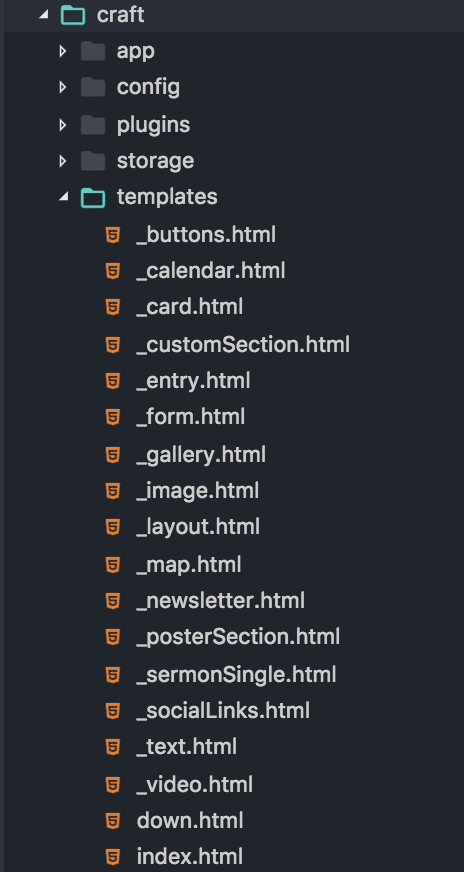
I'm seeing an issue where:
.copyDirectory(
"@source/templates",
"craft/templates"
)
is copying all files to the root level of the destination, without the accompanying directory structure.
Source:
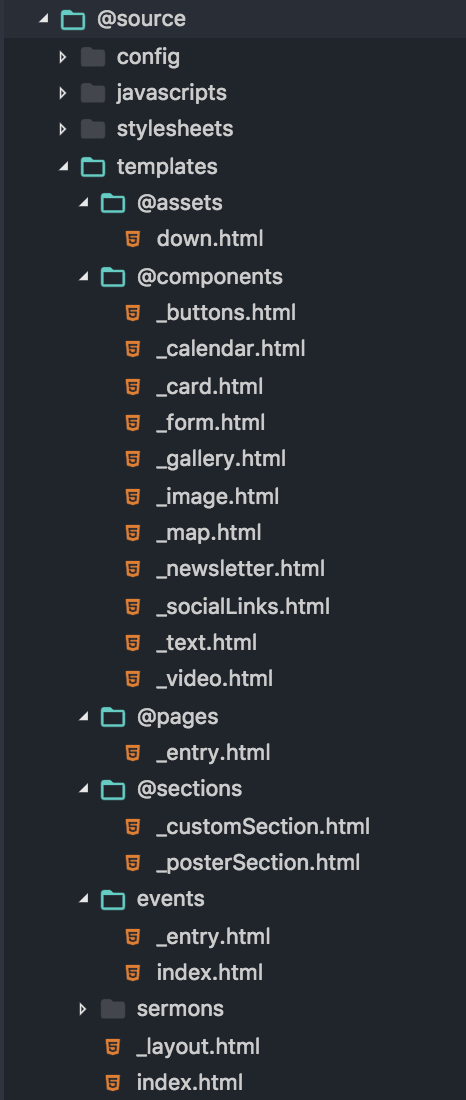
Destination:
 edolyne
on 12 Jun 2017
edolyne
on 12 Jun 2017
Windows 10, Node 6.9.5, NPM 3.10.10, Yarn 0.21.3
yarn run dev produces quite unreadable output, not really sure what's going on. NPM
Log: npm-debug.log.txt
yarn run watch and yarn run production produce a similar error to what saw in one of the first comments:
yarn run v0.21.3
$ cross-env NODE_ENV=production node_modules/webpack/bin/webpack.js --progress --hide-modules --config=node_modules/laravel-mix/setup/webpack.config.js
95% emitting
ERROR Failed to compile with 1 errors 19:57:10
error in ./~/vue-bulma-datepicker/src/index.vue
Module parse failed: C:\server\projects\popc\node_modules\vue-bulma-datepicker\src\index.vue Unexpected token (1:0)
You may need an appropriate loader to handle this file type.
| <template>
| <component :value="date" :placeholder="placeholder"
| :inputClass="inputClass" :alignment="alignment"
@ ./resources/assets/js/app.js 23:26-57
@ multi ./resources/assets/js/app.js ./resources/assets/sass/web.scss ./resources/assets/sass/pdf.scss
package.json.txt
webpack.mix.js.txt
Sorry for the txt files, GitHub doesn't allow .js, .json nor .log.
 KKSzymanowski
on 12 Jun 2017
KKSzymanowski
on 12 Jun 2017
@edolyne Try mix.copyDirectory(<source>, <destination>, false) Related #695
ruchern-chong
on 13 Jun 2017
@JeffreyWay is there a way to test if we can version only specific files in this version? I read in a couple of issues here that you'd add that functionality to 1.0.
My current test versions all files.
What I tried was add .version() to one call, like so:
mix.js('resources/assets/js/app.js', 'public/js');
mix.sass('resources/assets/sass/app.scss', 'public/css').version();
 iamgoodbytes
on 13 Jun 2017
iamgoodbytes
on 13 Jun 2017
@ruchern Thanks for the suggestion. I added the false variable, but I am still seeing a flattened directory structure.
edolyne
on 13 Jun 2017
@edolyne Then I left with nothing for this problem. Guess wait for v1.0 release.
ruchern-chong
on 13 Jun 2017
@edolyne @ruchern It seems like the Api doesn't use/take the third param anymore.
copyDirectory(from, to) and copy(from, to)
 tibiacentral
on 15 Jun 2017
tibiacentral
on 15 Jun 2017
I'm trying with an existing project and also from scratch.
- Macos Sierra 10.12.5
node -v - v8.1.1npm -v 5.0.3
When from scratch (using the instructions at the beginning of this issue)
I'm getting the following error when trying to run and of the npm commands
npm run dev [22:38:10]
> @ dev /Users/maxcarvalho/Code/test-project
> npm run development
> @ development /Users/maxcarvalho/Code/test-project
> cross-env NODE_ENV=development node_modules/webpack/bin/webpack.js --progress --hide-modules --config=node_modules/laravel-mix/setup/webpack.config.js
events.js:182
throw er; // Unhandled 'error' event
^
Error: spawn node_modules/webpack/bin/webpack.js ENOENT
at exports._errnoException (util.js:1016:11)
at Process.ChildProcess._handle.onexit (internal/child_process.js:189:19)
at onErrorNT (internal/child_process.js:366:16)
at _combinedTickCallback (internal/process/next_tick.js:102:11)
at process._tickCallback (internal/process/next_tick.js:161:9)
at Function.Module.runMain (module.js:607:11)
at startup (bootstrap_node.js:158:16)
at bootstrap_node.js:575:3
npm ERR! code ELIFECYCLE
npm ERR! errno 1
npm ERR! @ development: `cross-env NODE_ENV=development node_modules/webpack/bin/webpack.js --progress --hide-modules --config=node_modules/laravel-mix/setup/webpack.config.js`
npm ERR! Exit status 1
npm ERR!
npm ERR! Failed at the @ development script.
npm ERR! This is probably not a problem with npm. There is likely additional logging output above.
npm ERR! A complete log of this run can be found in:
npm ERR! /Users/maxcarvalho/.npm/_logs/2017-06-15T21_38_17_040Z-debug.log
npm ERR! code ELIFECYCLE
npm ERR! errno 1
npm ERR! @ dev: `npm run development`
npm ERR! Exit status 1
npm ERR!
npm ERR! Failed at the @ dev script.
npm ERR! This is probably not a problem with npm. There is likely additional logging output above.
npm ERR! A complete log of this run can be found in:
npm ERR! /Users/maxcarvalho/.npm/_logs/2017-06-15T21_38_17_066Z-debug.log
When I'm using with an existing project (non-laravel) I'm being able to run npm run dev and npm run watch, but every time that I try to run npm run prod I'm getting an error:
npm run prod ✖ ➜ ✹ ✚ ✭ [22:18:15]
> @ prod /Users/maxcarvalho/Code/smoke
> npm run production
> @ production /Users/maxcarvalho/Code/smoke
> cross-env NODE_ENV=production node_modules/webpack/bin/webpack.js --progress --hide-modules --config=node_modules/laravel-mix/setup/webpack.config.js
95% emitting
DONE Compiled successfully in 10842ms 22:19:34
Whoops! We had trouble minifying "/skin/frontend/rwd/smoke/js/smoke.js". Perhaps you need to use mix.babel() instead?
/Users/maxcarvalho/Code/smoke/node_modules/laravel-mix/src/plugins/CustomTasksPlugin.js:67
throw e;
^
Error: ENOENT: no such file or directory, open '/skin/frontend/rwd/smoke/js/smoke.js'
at Object.fs.openSync (fs.js:651:18)
at Object.fs.readFileSync (fs.js:553:33)
at addFile (/Users/maxcarvalho/Code/smoke/node_modules/uglify-js/tools/node.js:85:22)
at /Users/maxcarvalho/Code/smoke/node_modules/uglify-js/tools/node.js:104:17
at Array.forEach (native)
at Object.UglifyJS.minify (/Users/maxcarvalho/Code/smoke/node_modules/uglify-js/tools/node.js:102:26)
at File.minify (/Users/maxcarvalho/Code/smoke/node_modules/laravel-mix/src/File.js:221:31)
at manifest.forEach.asset (/Users/maxcarvalho/Code/smoke/node_modules/laravel-mix/src/plugins/CustomTasksPlugin.js:60:23)
at Array.forEach (native)
at CustomTasksPlugin.minifyAssets (/Users/maxcarvalho/Code/smoke/node_modules/laravel-mix/src/plugins/CustomTasksPlugin.js:56:18)
at Compiler.compiler.plugin.stats (/Users/maxcarvalho/Code/smoke/node_modules/laravel-mix/src/plugins/CustomTasksPlugin.js:16:22)
at Compiler.applyPlugins (/Users/maxcarvalho/Code/smoke/node_modules/tapable/lib/Tapable.js:61:14)
at /Users/maxcarvalho/Code/smoke/node_modules/webpack/lib/Compiler.js:271:13
at Compiler.emitRecords (/Users/maxcarvalho/Code/smoke/node_modules/webpack/lib/Compiler.js:367:37)
at /Users/maxcarvalho/Code/smoke/node_modules/webpack/lib/Compiler.js:265:12
at /Users/maxcarvalho/Code/smoke/node_modules/webpack/lib/Compiler.js:360:11
at next (/Users/maxcarvalho/Code/smoke/node_modules/tapable/lib/Tapable.js:154:11)
at Compiler.compiler.plugin (/Users/maxcarvalho/Code/smoke/node_modules/webpack/lib/performance/SizeLimitsPlugin.js:99:4)
at Compiler.applyPluginsAsyncSeries1 (/Users/maxcarvalho/Code/smoke/node_modules/tapable/lib/Tapable.js:158:13)
at Compiler.afterEmit (/Users/maxcarvalho/Code/smoke/node_modules/webpack/lib/Compiler.js:357:8)
at Compiler.<anonymous> (/Users/maxcarvalho/Code/smoke/node_modules/webpack/lib/Compiler.js:352:14)
at /Users/maxcarvalho/Code/smoke/node_modules/async/dist/async.js:421:16
at iteratorCallback (/Users/maxcarvalho/Code/smoke/node_modules/async/dist/async.js:998:13)
at /Users/maxcarvalho/Code/smoke/node_modules/async/dist/async.js:906:16
at /Users/maxcarvalho/Code/smoke/node_modules/graceful-fs/graceful-fs.js:43:10
at FSReqWrap.oncomplete (fs.js:135:15)
npm ERR! code ELIFECYCLE
npm ERR! errno 1
npm ERR! @ production: `cross-env NODE_ENV=production node_modules/webpack/bin/webpack.js --progress --hide-modules --config=node_modules/laravel-mix/setup/webpack.config.js`
npm ERR! Exit status 1
npm ERR!
npm ERR! Failed at the @ production script.
npm ERR! This is probably not a problem with npm. There is likely additional logging output above.
npm ERR! A complete log of this run can be found in:
npm ERR! /Users/maxcarvalho/.npm/_logs/2017-06-15T21_19_34_951Z-debug.log
npm ERR! code ELIFECYCLE
npm ERR! errno 1
npm ERR! @ prod: `npm run production`
npm ERR! Exit status 1
npm ERR!
npm ERR! Failed at the @ prod script.
npm ERR! This is probably not a problem with npm. There is likely additional logging output above.
npm ERR! A complete log of this run can be found in:
npm ERR! /Users/maxcarvalho/.npm/_logs/2017-06-15T21_19_34_976Z-debug.log
 maaxxicarvalho
on 15 Jun 2017
maaxxicarvalho
on 15 Jun 2017
Error with vue-video-player library @ ./~/vue-video-player/index.js 11:22-45 Try using css-load, style-loader, but it doesnt work
````
Module parse failed: /Users/ralee/Public/projects/LTA/node_modules/vue-video-player/player.vue Unexpected token (1:0)
You may need an appropriate loader to handle this file type.
|
|
|
@ ./~/babel-loader/lib?{"cacheDirectory":true,"presets":[["env",{"modules":false,"targets":{"browsers":["> 2%"],"uglify":true}}]],"plugins":["transform-object-rest-spread"]}!./~/vue-loader/lib/selector.js?type=script&index=0!./resources/assets/js/components/backend/video-player.vue
@ ./resources/assets/js/components/backend/video-player.vue
@ ./~/babel-loader/lib?{"cacheDirectory":true,"presets":[["env",{"modules":false,"targets":{"browsers":["> 2%"],"uglify":true}}]],"plugins":["transform-object-rest-spread"]}!./~/vue-loader/lib/selector.js?type=script&index=0!./resources/assets/js/components/backend/vehicle-segment-video.vue
@ ./resources/assets/js/components/backend/vehicle-segment-video.vue
@ ./~/babel-loader/lib?{"cacheDirectory":true,"presets":[["env",{"modules":false,"targets":{"browsers":["> 2%"],"uglify":true}}]],"plugins":["transform-object-rest-spread"]}!./~/vue-loader/lib/selector.js?type=script&index=0!./resources/assets/js/components/backend/vehicle-form.vue
@ ./resources/assets/js/components/backend/vehicle-form.vue
@ ./resources/assets/js/backend/router.js
@ ./resources/assets/js/backend.js
@ multi ./resources/assets/js/backend.js
````
mix.webpackConfig({
plugins: [
new CleanWebpackPlugin(['./public/js', './public/css'])
],
module: {
rules: [{
test: /\.css$/,
loaders: ['style-loader', 'css-loader']
}]
}
})

@iamgoodbytes - Yes, you can version specific files. Just pass a string or array of files to version (on top of what Webpack will automatically version), and you're all set.
mix.version('public/some/file.js');
The updated code base feels a lot like fabpots approach with Encore. Everything seems to work together better. One project I'm working on has a lot of js... legacy modules, jquery plugins, scripts, etc. I struggled with mix for several days before trying Encore. I had it working in less than an hour. For me, the api just matched the way I think a little better. Now I'm anxious to pull mix back in and keep my frontend in the laravel family. Thanks for the untold hours of work you've put into this @jeffreyway
 devcircus
on 20 Jun 2017
devcircus
on 20 Jun 2017
@JeffreyWay The problem I described above is still happening on the 1.0 release.
Should I create a new issue for it?
TopFuel
on 22 Jun 2017
@TopFuel I think it's best to create a new issue indeed, as this one's already closed... 🙂
 MichaelDeBoey
on 22 Jun 2017
MichaelDeBoey
on 22 Jun 2017
@TopFuel You saved my day! My issue was just because Windows treats slashes differently comparing to Linux/Mac OS. See my following working code:
let mix = require('laravel-mix');
let path = require('path');

mix.setPublicPath(`..${path.sep}public_html`);
mix.js('resources/assets/js/app.js', 'js')
   .sass('resources/assets/sass/app.scss', 'css');
I'm using the 'path' module because node.js will pass either "/" or "\" depending on which platform you're running the application.
 sayhicoelho
on 10 Sep 2017
sayhicoelho
on 10 Sep 2017
@renandiett I'm using this fix at the moment.
But I think your fix does the same thing :)
TopFuel
on 10 Sep 2017
Related issues
 Micaso
·
3Comments
Micaso
·
3Comments
 kpilard
·
3Comments
kpilard
·
3Comments
 jpriceonline
·
3Comments
jpriceonline
·
3Comments
 pixieaka
·
3Comments
pixieaka
·
3Comments
 jpmurray
·
3Comments
jpmurray
·
3Comments
Most helpful comment
@TopFuel You saved my day! My issue was just because Windows treats slashes differently comparing to Linux/Mac OS. See my following working code: