Laravel-mix: CSS url() Rewriting with subfolder
- Laravel Mix Version: 0.12.1
- Node Version 8.0.0
- NPM Version 5.0.0
- OS: Win10 / Homestead-7
Description:
URL Processing is not working with subfolder.
Steps To Reproduce:
style.scss
body{
  background: url("../images/bg/bg1.png");
}
webpack.mix.js
mix.sass('resources/assets/painel/sass/style.scss', 'public/css');
resources folder


public folder

Result:
style.css
body {
  background: url(/images/bg1.png?810b1859b0d5c6f6273fb7818a633b03);
}
 garbinmarcelo
All 10 comments
I have same problem...
- Laravel Mix Version: 0.12.1
- Node Version 6.3.0
- NPM Version 4.6.1
- OS: Mac 10.12.5 / Homestead
Is it a laravel-mix bug or something wrong with our settings?
 Romchik
on 13 Jun 2017
Romchik
on 13 Jun 2017
@marcelogarbin
Fixed in 1.0.3.
Path to image schould be started with "/images...":
    body {
        background: url("/images/bg/bg1.png");
    }
Romchik
on 21 Jun 2017
@Romchik How to upgrade to new version?
garbinmarcelo
on 21 Jun 2017
Open package.json file and edit laravel-mix depency:
"laravel-mix": "^1.0.*",
Then run npm update laravel-mix.
Romchik
on 21 Jun 2017
@Romchik Thank you very much!
garbinmarcelo
on 21 Jun 2017
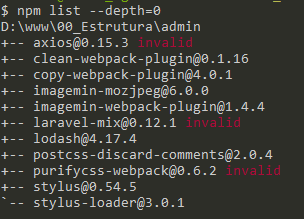
@Romchik Not wanting to bother, but can you help me? I did the procedure, removed the node_modules folder and ran npm_install again, but it is giving an error.
package.json
{
  "private": true,
  "scripts": {
    "dev": "node node_modules/cross-env/dist/bin/cross-env.js NODE_ENV=development node_modules/webpack/bin/webpack.js --progress --hide-modules --config=node_modules/laravel-mix/setup/webpack.config.js",
    "watch": "node node_modules/cross-env/dist/bin/cross-env.js NODE_ENV=development node_modules/webpack/bin/webpack.js --watch --progress --hide-modules --config=node_modules/laravel-mix/setup/webpack.config.js",
    "watch-poll": "node node_modules/cross-env/dist/bin/cross-env.js NODE_ENV=development node_modules/webpack/bin/webpack.js --watch --watch-poll --progress --hide-modules --config=node_modules/laravel-mix/setup/webpack.config.js",
    "hot": "node node_modules/cross-env/dist/bin/cross-env.js NODE_ENV=development node_modules/webpack-dev-server/bin/webpack-dev-server.js --inline --hot --config=node_modules/laravel-mix/setup/webpack.config.js",
    "prod": "node node_modules/cross-env/dist/bin/cross-env.js NODE_ENV=production node_modules/webpack/bin/webpack.js --progress --hide-modules --config=node_modules/laravel-mix/setup/webpack.config.js"
  },
  "devDependencies": {
    "axios": "^0.16.2",
    "clean-webpack-plugin": "^0.1.16",
    "copy-webpack-plugin": "^4.0.1",
    "cross-env": "^5.0.1",
    "imagemin-mozjpeg": "^6.0.0",
    "imagemin-webpack-plugin": "^1.4.4",
    "laravel-mix": "^1.0.*",
    "lodash": "^4.17.4",
    "purifycss-webpack": "^0.7.0",
    "stylus": "^0.54.5",
    "stylus-loader": "^3.0.1",
    "postcss-discard-comments": "^2.0.4"
  }
}
garbinmarcelo
on 21 Jun 2017
Sorry, I have no idea...
Maybe you can try to update npm to the last version.
Tnen remove the 'node_modules' folder.
Run npm cache clean.
Run npm install.
Romchik
on 21 Jun 2017
I removed the package-lock.json file and ran the npm install again. It worked. Only condition if(mix.config.inProduction){} stopped working, before updating it worked normally.


garbinmarcelo
on 21 Jun 2017
@marcelogarbin Yeah, that was changed with 1.0. It's in the release notes. Change it to mix.inProduction(). :)
 JeffreyWay
on 21 Jun 2017
JeffreyWay
on 21 Jun 2017
Question related: Laravel-mix appears to move files from my assets/img folder to public/images however when using the asset() helper function it looks for /img is there a way to set them to the same folder so their are not two folders in public with images? aka img and images ?
Thanks in advance :)
 audetcameron
on 26 Sep 2018
audetcameron
on 26 Sep 2018
Related issues
 amin101
·
3Comments
amin101
·
3Comments
 sdebacker
·
3Comments
sdebacker
·
3Comments
 wendt88
·
3Comments
wendt88
·
3Comments
 jpriceonline
·
3Comments
jpriceonline
·
3Comments
 stefensuhat
·
3Comments
stefensuhat
·
3Comments
Most helpful comment
Sorry, I have no idea...
Maybe you can try to update npm to the last version.
Tnen remove the 'node_modules' folder.
Run
npm cache clean.Run
npm install.