Laravel-medialibrary: When generating images, "laravel-medialibrary" cuts off part of the characters of the file name to the first "-" in the Russian file name
I use "spatie/laravel-medialibrary": "^7.0.0"
When generating (Save new OR Regenerating) images, "laravel-medialibrary" cuts off part of the characters of the file name to the first "-" in the Russian file name:
951
│   ├── conversions
│   │   ├── -min-big.jpg
│   │   ├── -min-list.jpg
│   │   ├── -min-preset.jpg
│   │   ├── -min-preview.jpg
│   │   ├── -min-prev_seen.jpg
│   │   ├── -min-table.jpg
│   │   └── -min-thumb.jpg
│   └── кровать-min.jpg
└── 954
    ├── conversions
    │   ├── life_кровать-шкаф-min-big.jpg
    │   ├── life_кровать-шкаф-min-list.jpg
    │   ├── life_кровать-шкаф-min-preset.jpg
    │   ├── life_кровать-шкаф-min-preview.jpg
    │   ├── life_кровать-шкаф-min-prev_seen.jpg
    │   ├── life_кровать-шкаф-min-table.jpg
    │   └── life_кровать-шкаф-min-thumb.jpg
    └── life_кровать-шкаф-min.jpg
https://i.imgur.com/aKQFP4G.jpg
If the file name without the "-" - cuts off completely Russian file name:
│   ├── conversions
│   │   ├── -big.jpg
│   │   ├── -list.jpg
│   │   ├── -preset.jpg
│   │   ├── -preview.jpg
│   │   ├── -prev_seen.jpg
│   │   ├── -table.jpg
│   │   └── -thumb.jpg
│   └── Зеркало.jpg
https://i.imgur.com/CPWoZu8.jpg
In ny model (App/Models/Product):
public function registerMediaConversions(Media $media = null)
    {
        $this->addMediaConversion('preview')
            ->crop('crop-center', 30, 30);

        $this->addMediaConversion('thumb')
            ->crop('crop-center', 50, 50);

        $this->addMediaConversion('prev_seen')
            ->fit('crop', 146, 122);

        $this->addMediaConversion('list')
            ->fit('crop', 528, 528);

        $this->addMediaConversion('table')
            ->fit('crop', 354, 354);

        $this->addMediaConversion('preset')
            ->fit('crop', 146, 146);

        $big = $this->addMediaConversion('big')
            ->fit('fill', 1248, 1248);
    }
Php version on server:
php -v
PHP 7.2.6 (cli) (built: Jun  5 2018 00:52:18) ( NTS )
Why is it not possible to apply, for example "str_slug ()" (only without deleting the dot "."), For file names (with extension), while saving them?
For example: "Это мой файл - тест.jpg" -> "eto-moy-fayl-test.jpg"
 fomvasss
All 10 comments
I accept a PR that fixes this.
 freekmurze
on 3 Jan 2019
freekmurze
on 3 Jan 2019
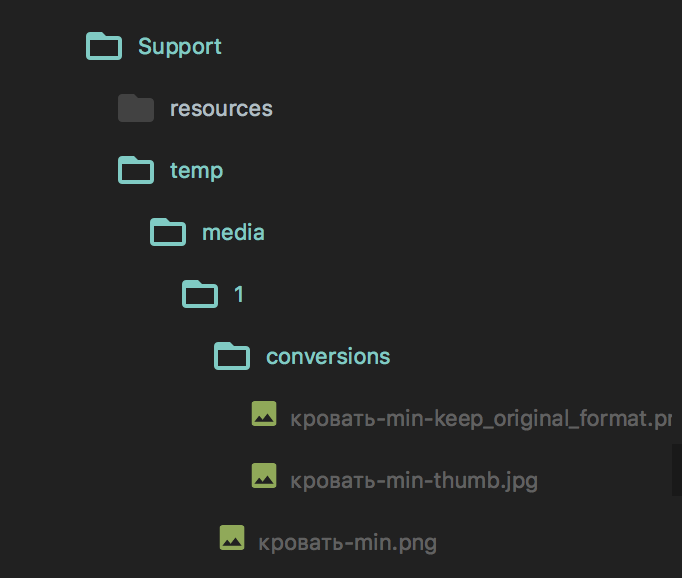
I've tried to reproduce on php 7.2.5, latest version of laravel-medialibrary, cannot reproduce. When adding media to testModelWithConversion, named кровать-min.png, it preserves the conversion's filename properly:
 Joucke
on 4 Jan 2019
Joucke
on 4 Jan 2019
@Joucke same, can't reproduce
 vincentkosciuszko
on 4 Jan 2019
vincentkosciuszko
on 4 Jan 2019
@Joucke @VincentKos thanks for your attempts to reproduce this, highly appreciated 👍
Going to close this now because it can't be reproduced. If somebody can reproduce this please PR a failing test for me to fix.
freekmurze
on 4 Jan 2019
@freekmurze I confirm it happens. But! File with cyrillic name uploads to folder correctly with correct filename; url stores in db with cut filename so 404 errors occurs. Conversions however partially work with -thumb.jpg url.
spatie/laravel-medialibrary: 7.5.5
laravel: 5.7
php: 7.2
db: pgsql and mysql/maria
To display I use getUrl() . relativeUrl() not helping.
My quickfix is to use usingFileName() with Laravel's helper str_slug() on submission.
        $contest
                ->addMediaFromRequest('video')
                ->usingFileName('video.'.$request->video->getClientOriginalExtension())
                ->toMediaCollection('contest-videos');
 NormanEdance
on 11 Jan 2019
NormanEdance
on 11 Jan 2019
I fixed it in the following way:
Added next string in file bootstrap/app.php:
setlocale(LC_ALL,'en_US.UTF-8');
after code:
$app = new Illuminate\Foundation\Application(
    realpath(__DIR__.'/../')
);
After it medialibrary working good! :)
But i think it is not perfect way(
fomvasss
on 11 Jan 2019
I am also having troubles storing an uploaded file with greek characters in its filename
In particular, when I try to to upload a file with filename cosmos - κοσμος.pdf, the name field of the media table stores the right name (i.e. cosmos - κοσμος.pdf) but when I try to upload a file named κοσμος - cosmos.pdf the name field of the media table gets the wrong value i.e. - cosmos.pdf
Moreover, when I try to upload a file with only greek haracters in its filename, the name filed the media table gets an empty value
 iraklisg
on 5 Feb 2019
iraklisg
on 5 Feb 2019
I also reproduced this bug.
And found exactly why this is happening.
So in "FileAdder" there is the usage of "pathinfo()" function that doesn't work correctly with encoding without set_locale to UTF.

But if we add "setlocale(LC_ALL,'C.UTF-8')" before pathinfo() it will works:
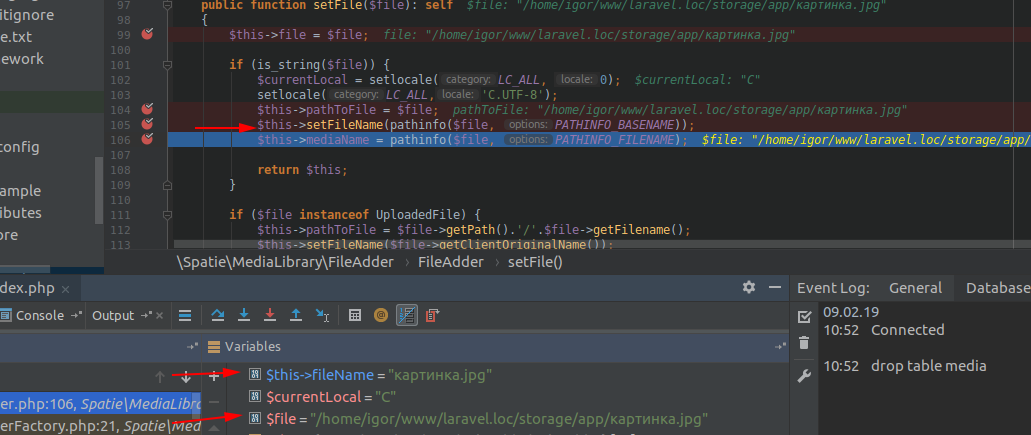
So question is what we should do about it?
- Make some kind of wrapper to change locale to C.UTF-8 and revert it after.
- Make programmers set this locale by their own.
- Try to understand why Laravel don't set this locale by default.
 igorrebega
on 9 Feb 2019
igorrebega
on 9 Feb 2019
Do we have an update on this issue? The problem still exists :disappointed:
@igorrebega may I ask you please what strategy are you using currently to overcome this problem?
Thank you
EDIT:
I tried @fomvasss workaround and it worked with greek filenames
iraklisg
on 21 May 2019
Use fix proposed by @fomvasss for now.
freekmurze
on 23 Jul 2019
Related issues
 snapey
·
3Comments
snapey
·
3Comments
 Krato
·
4Comments
Krato
·
4Comments
 jam1e
·
3Comments
jam1e
·
3Comments
 brendt
·
4Comments
brendt
·
4Comments
 intrepidws
·
3Comments
intrepidws
·
3Comments